A scope is a selection of communities and domains that you can use in an assignment of an asset type to apply specific rules to the assets belonging to that asset type and scope.
Default and custom scopes
A community or domain (resource) can belong to only one scope at a time. By default, every resource belongs to the Default scope. Assets within these resources follow the global assignment.
You can also create a custom scope. When you apply a custom scope to a resource, the resource is moved out of the Default scope. Conversely, when you remove a custom scope from a resource or delete the custom scope itself, the resource is moved back to the Default scope.
When you apply a scope to a parent community, all its subcommunities and domains inherit that same scope.
How assignments work with scopes
An asset type can have both global and scoped assignments. The assignment that a specific asset follows depends on the scope applied to its community or domain (resource).
If the asset is located in a resource that belongs to the Default scope, the asset follows the global assignment, whereas if the asset is located in a resource that belongs to a custom scope, it follows the scoped assignment. If the scoped assignment doesn't exist, it continues to follow the global assignment.
Minimizing the number of scoped assignments you create makes your operating model easier to manage.Scopes page
The Scopes page in the Operating Model settings provides an overview of all scopes and their associated communities and domains.
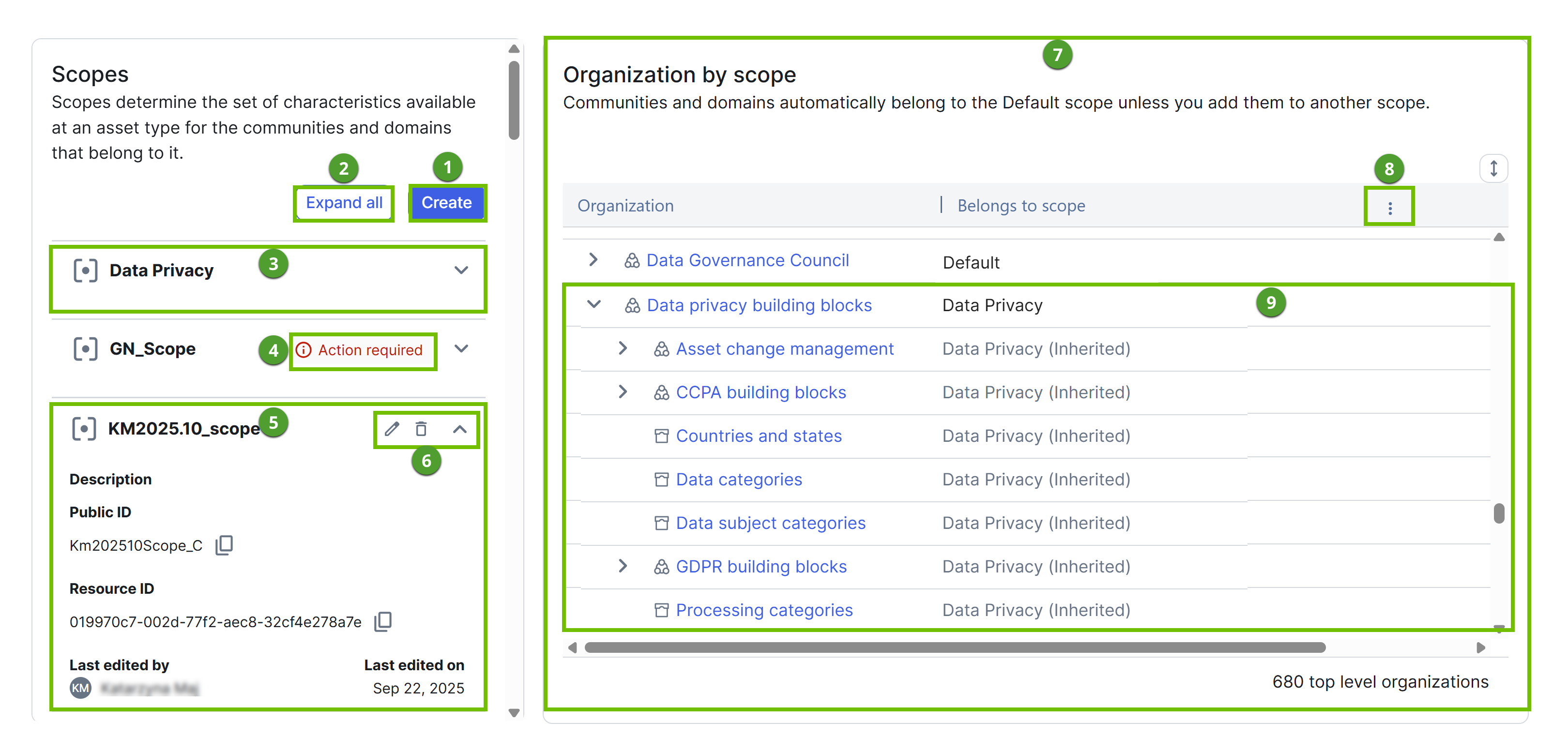
| Number | Element | Description |
|---|---|---|
 | Create | Button to create a new scope. |
 | Expand all | Button to expand all scopes. This shows metadata for each scope, including its description, public and resource IDs, audit trail (last edited by or on), and the asset types using the scope. |
 | Collapsed scope | Scope that is collapsed. |
 | Action required | Warning indicating that the scope isn't applied to any communities or domains. |
 | Expanded scope | Scope that is expanded to show its metadata. |
 | Scope actions | Buttons to edit, delete, and collapse the scope. |
 | Organization by scope | Nested overview of communities and domains, showing which scope each resource belongs to. Tip The table in the Organization by scope section also includes the Overlap column, which shows a warning icon if a resource belongs to more than one scope. This could occur only with older data, as the current user interface prevents such overlaps. |
 | Search | Option to search the Organization or Belongs to scope columns. This appears when you hover over the column heading. |
 | Expanded community | Community that belongs to a custom scope. Its subcommunities and domains inherit the same scope. |