Collibra Model Context Protocol (MCP)
About MCP and Collibra MCP
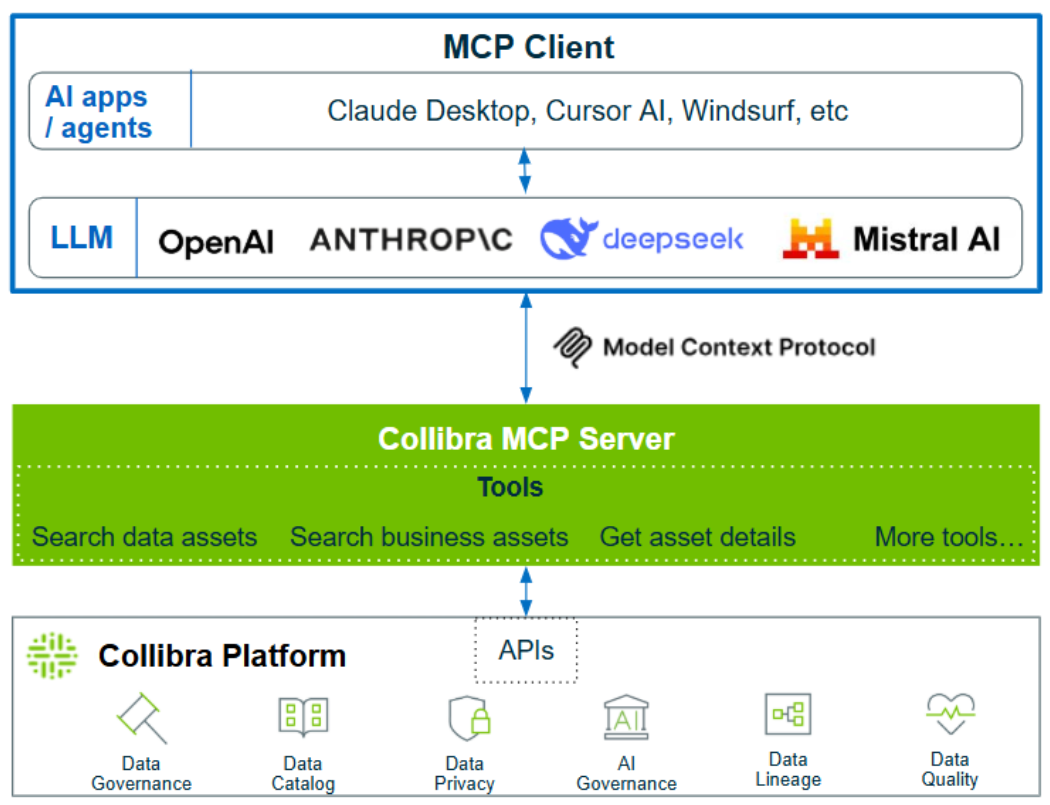
Model Context Protocol (MCP) is an open standard that enables AI agents to connect with and access enterprise systems in real time. Think of it as a universal translator that allows AI to communicate with your business tools, databases, and applications. Essentially, MCP serves as an API for AI applications, enabling seamless communication between AI agents and external systems. Instead of copying data or using complex custom integrations, MCP enables AI to request specific information when needed.
With Collibra MCP, AI models and agents can access governed metadata and business context information in Collibra. This enables you to solve problems using real-time context from Collibra.
Collibra MCP servers and tools
The Collibra MCP servers act as a bridge between the Collibra Platform and AI tools. They offer a set of tools that deliver real-time context to AI environments, simplifying the interaction between AI agents and metadata and enabling efficient workflows.
Collibra offers two flavors, one that is specific to Databricks and one which is a generic, open source server. Both are available as offerings on Collibra Marketplace.
-
Generic Collibra MCP server
The generic MCP server is open source. It is available as a community offering for all Collibra customers.Tip You can contribute to the Generic Collibra MCP by proposing changes. Any change request is then verified and approved by the repository admin. Instructions for contributors are available in the CONTRIBUTING.md file in the GIT repository.
-
Databricks - Collibra MCP server
The Databricks-Collibra MCP server is designed specifically for Databricks and has unique installation requirements, functionality, and tools. It is available as a commercial offering. This MCP server is not available for Collibra Platform for Government or Collibra Self Hosted customers.
For extra Databricks information, go to Databricks Marketplace.
The Collibra MCP servers provide access to various tools, such as Data asset discovery, List Data Classes, and Basic Search. To get the full list of available tools, check the information in Marketplace or the README.md file in the GitHub repository.