Integrating with Collibra's MCP server
Collibra offers two ways to connect: the Collibra MCP server and a local MCP server. They suit different needs and have different setup.
| Collibra MCP server | Local MCP server | |
|---|---|---|
| Description | Hosted connection used by the featured integrations | Open-source server you run yourself |
| Best for | Connecting an AI platform such as Databricks | Development, or a client not covered by a featured integration |
| Transport | Streamable HTTP | Local (stdio) |
| Authentication | OAuth 2.0 | Configured locally |
| Support | Collibra | Community (GitHub) |
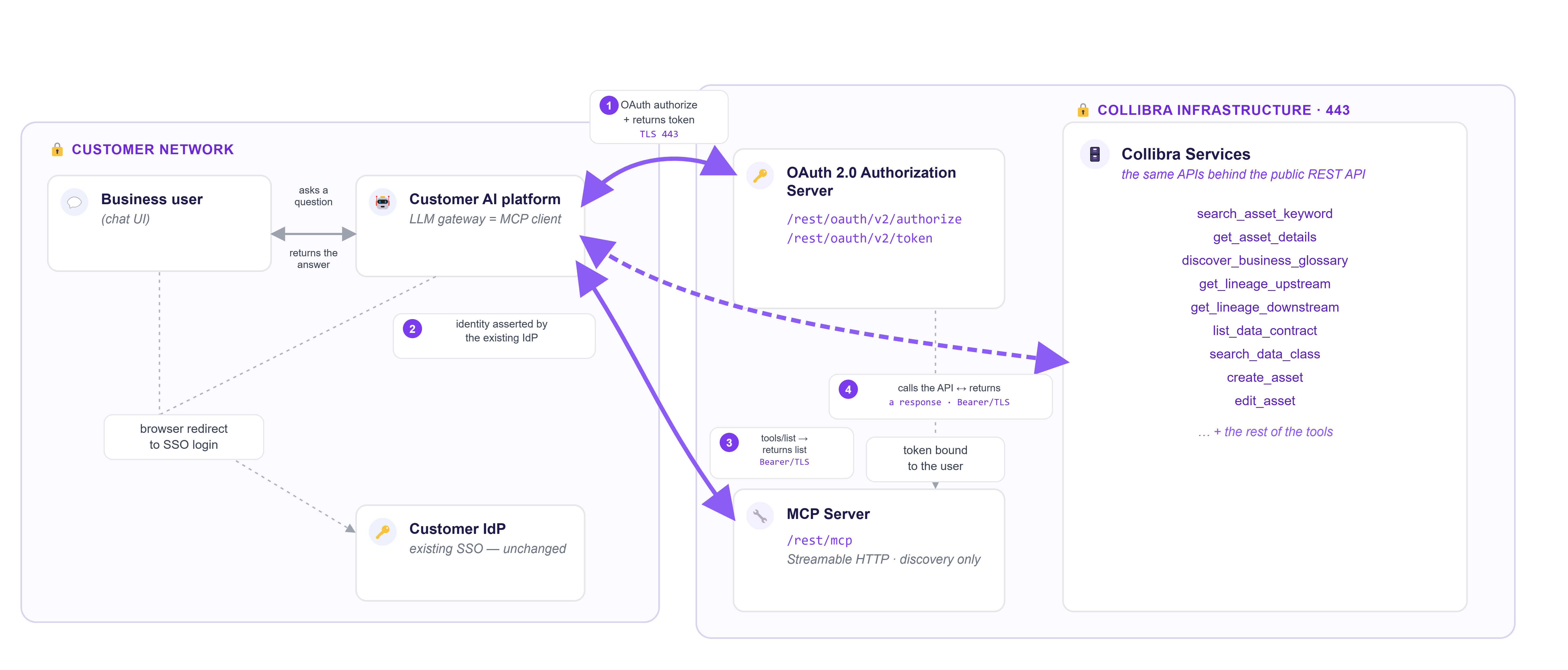
The following diagram shows the full request path, from your AI platform through OAuth authorization and into Collibra's governed services.
- Your AI platform requests authorization and a token from the OAuth 2.0 Authorization Server over TLS.
- The Authorization Server asserts identity through your existing identity provider. Your single sign-on setup does not change.
- Your AI platform calls
tools/liston the MCP server, using a bearer token over TLS, to discover the available tools. The MCP server returns the list. - Your AI platform then calls the corresponding governed service API directly, using the same bearer token, and receives a response. The MCP server only handles discovery only, it does not sit in the path of the request itself.
Collibra MCP server
The Collibra MCP server is the hosted connection used by the featured integrations. Your AI platform connects to it over the internet. Use it when you connect through a featured integration such as Databricks, Microsoft, Snowflake Cortex, or AWS SageMaker.
Connection requirements
- Transport: Streamable HTTP
- Authentication: OAuth 2.0
- Network access: Remote AI platforms connect to the Collibra MCP server over the public internet. If your organization uses IP allowlisting, you may need to allow your AI platform's IP ranges.
Local MCP server (generic Collibra MCP server)
The local MCP server, also called the generic Collibra MCP server, is an open-source, community offering that you run yourself. Use it for development, or to connect a client that is not covered by a featured integration.
Because it runs locally, the setup differs from the remote server:
- You install and run the server in your own environment.
- You configure your MCP client to launch it, usually with a command and arguments in the client's MCP configuration.
- Transport is local (stdio) rather than Streamable HTTP.
- Authentication is configured locally rather than through the OAuth flow above.
Get it from Collibra Marketplace or the GitHub repository. It is community-supported, and you can propose changes throughout the repository.
Authentication
How you authenticate depends on which offering you use. The Collibra MCP server uses OAuth, where each user signs in with their own Collibra identity. The local MCP server uses basic Collibra credentials set in the local configuration. In both cases, the server connects to Collibra using the identity you provide and respects that account's permissions.
Collibra MCP server: OAuth
Register an application in Collibra to get a Client ID and Client Secret. Your AI platform then signs each user in through the OAuth authorization code flow, so everyone connects with their own Collibra identity. For automated or machine-to-machine connections (background services, CI/CD pipelines, scheduled jobs), use the OAuth client credentials flow instead. Your platform authenticates directly without a browser redirect.
For how to register an application and the full reference, see the OAuth Applications settings page.
Collibra OAuth endpoints follow this form where, <instance> is your Collibra instance name:
- Authorization endpoint: https://<instance>.collibra.com/rest/oauth/v2/authorize
- Token endpoint: https://<instance>.collibra.com/rest/oauth/v2/token
Local MCP server: basic Collibra credentials
Set your Collibra username and password in the client's local configuration. The server connects to Collibra on your behalf and does not use the OAuth flow above.
For authentication instructions, see the README.md in the GitHub repository.