Understanding the communication paths that Edge uses helps you ensure your network environment meets security requirements and allows for successful data exchange.
Edge communicates with Collibra and third-party servers using an outbound-only model. Edge uses the following communication paths to exchange data:
- When communicating with Collibra, Edge retrieves tasks as work commands through long polling sessions.
Example When communicating with Collibra, Edge starts a session and requests a task from Collibra. If no tasks are available, the session ends, and Edge immediately starts a new session. If a task is available, Edge retrieves the task from Collibra, completes it, and sends the results back to Collibra.
- When communicating with third-party services, Edge pushes and pulls data as needed.
Edge encrypts all data transmitted from your Edge site. It uses certificates from a Certificate Authority (CA) that Collibra chooses. The encryption uses TLS 1.3 and either basic authentication or OAuth.
- If you installed your Edge site before 2025.08 your Collibra server uses username and password authentication. You can change the password of this user account by following the steps outlined in Update Edge service account credentials.
- If you installed your Edge site with 2025.08 or newer, your Collibra server uses OAuth authentication.
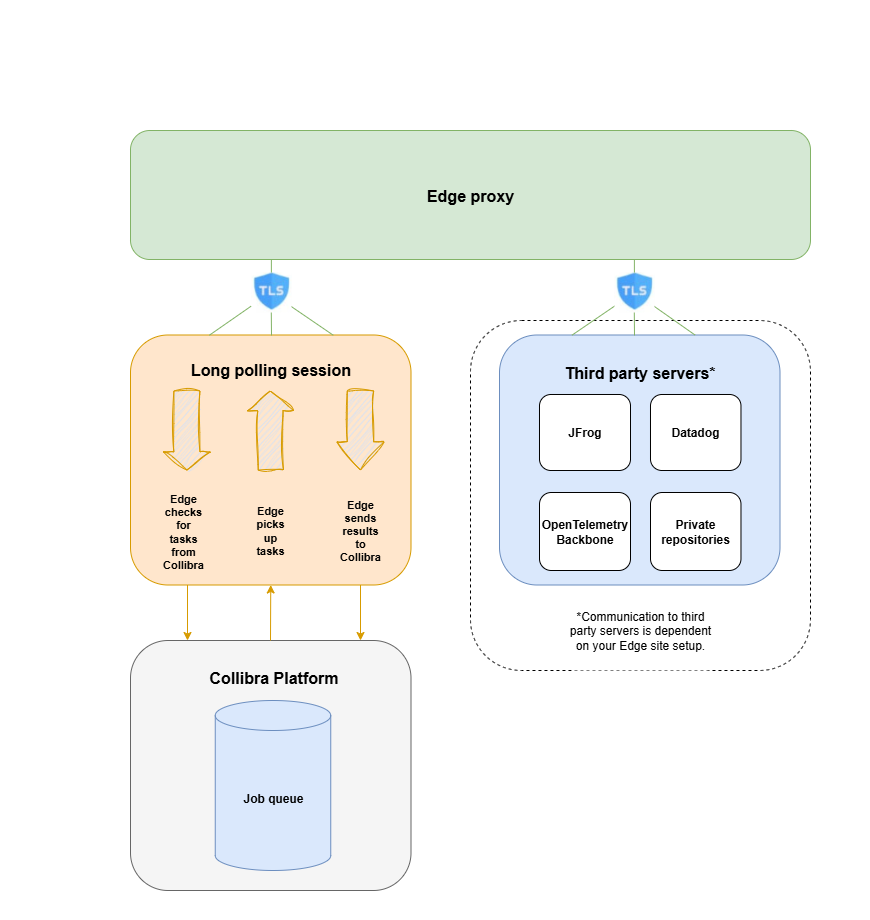
Edge communication to Collibra
- Edge sites always use REST API endpoints to establish connections.
- Edge requires access to a Collibra server to:
- Read a request queue, which is a queue with jobs that need to be run on Edge.
- Return the metadata results of Edge jobs.
- Edge manages Collibra Platform and data source credentials. This has the following consequences:
- Credentials are not accessible outside of Edge.
- Credentials used on an Edge site are encrypted with a key that is secured in Collibra.
- Credentials of data sources and Collibra can be updated if necessary.
- All configuration parameters, files, or strings marked as secret are stored on the Edge site. They are encrypted using a public key that resides in Collibra. The private part of that key is encrypted with a public key from the Edge site. As a result, Edge can only decrypt secrets with both key pairs, one residing on the Edge site and the other on Collibra.
- If you are using a forward proxy with your Edge site, you must use the proxy server's CA.
- OpenTelemetry Backbone: Edge communicates with OpenTelemetry Backbone using HTTPS to upload various Edge related metrics.
Edge communication to third-party servers
Depending on your Edge site setup, Edge may need to communicate with other servers, such as JFrog, for maintenance purposes.
- JFrog: Edge communicates with JFrog using API Key Pair over HTTPS in order to download Helm Charts and Docker Images that are running on Edge.
- Private repositories: If you are using a private repository for your Edge site, Edge communicates using HTTPS to send information from your Edge site to Collibra Platform. For more information, go to About private registries with Edge.
If you have any questions about data privacy and what information is sent using third party components, such as Datadog, reach out to your Collibra representative.
- Create an Edge site.
- Install an Edge site.
- Create a connection.
- Add a capability to a connection.