This page gives an overview of the integrated assets from Snowflake via the Catalog JDBC ingestion synchronization, including, the naming conventions, ingested metadata per asset, and the code to create a hierarchy in Collibra.
Naming conventions for created assets
The assets receive a unique full name (fully qualifying name) based on the following naming convention: [asset parent full name]>[asset name]
| Asset type | Naming convention | Example |
|---|---|---|
| Database | edgeConnectionName>jdbccatalog where jdbccatalog is the name retrieved from the JDBC "catalog" property. |
Snowflake-Connection > GLOBAL_SALES_PROD |
| Schema | edgeConnectionName>jdbccatalog>schemaName | Snowflake-Connection > GLOBAL_SALES_PROD > REVENUE_MART |
| Table | edgeConnectionName>jdbccatalog>schemaName>tableName | Snowflake-Connection > GLOBAL_SALES_PROD > REVENUE_MART > QUARTERLY_REVENUE |
| Database view | edgeConnectionName>jdbccatalog>schemaName>viewName | Snowflake-Connection > GLOBAL_SALES_PROD > REVENUE_MART > V_KPI_DASHBOARD |
| Semantic View | edgeConnectionName>jdbccatalog>schemaName>semanticviewName | Snowflake-Connection > GLOBAL_SALES_PROD > REVENUE_MART > CRM_SEMANTIC_VIEW |
| Column | edgeConnectionName>jdbccatalog>schemaName>tableName>columnName(column) edgeConnectionName>jdbccatalog>schemaName>viewName>columnName(column) |
Snowflake-Connection > GLOBAL_SALES_PROD > REVENUE_MART > QUARTERLY_REVENUE > NET_PROFIT_USD(column)
Snowflake-Connection > GLOBAL_SALES_PROD > REVENUE_MART > V_KPI_DASHBOARD > YOY_GROWTH_PCT(column) |
| Foreign key |
For commercial customers: edgeConnectionName>jdbccatalog>schemaName>tableName>foreignKeyName(foreign key) |
Snowflake-Connection > GLOBAL_SALES_PROD > REVENUE_MART > QUARTERLY_REVENUE > FK_REGION_ID(foreign key) |
|
For other customers: edgeConnectionName>jdbccatalog>schemaName>foreignKeyName(foreign key) |
Snowflake-Connection > GLOBAL_SALES_PROD > REVENUE_MART > QUARTERLY_REVENUE > FK_REGION_ID(foreign key) |
You can view the full name of an asset by editing the asset.
Warning Avoid editing the full name of an asset, because the full name is used to synchronize and refresh data sources. Changing the full name may cause unexpected results and break the synchronization or refresh process.
Snowflake source of synchronized metadata
For Table and Columns assets, the Snowflake source depends on the value defined for the engine-strategy property.
- Tables:
- If the
engine-strategyvalue isSNOWFLAKE_INFORMATION_SCHEMA, the source is INFORMATION_SCHEMA.TABLES. - If the
engine-strategyvalue isSNOWFLAKE_ACCOUNT_USAGE, the source is SNOWFLAKE.ACCOUNT_USAGE.TABLES. - If the
engine-strategyvalue isJAVA_API, the tables are retrieved via command SHOW TABLES IN SCHEMA.
- If the
- Columns:
- If the
engine-strategyvalue isSNOWFLAKE_INFORMATION_SCHEMA, the source is INFORMATION_SCHEMA.COLUMNS. - If the
engine-strategyvalue isSNOWFLAKE_ACCOUNT_USAGE, the source is SNOWFLAKE.ACCOUNT_USAGE.COLUMNS. - If the
engine-strategyvalue isJAVA_API, the columns are retrieved via command SHOW COLUMNS.
- If the
For Source tags, the Snowflake source depends on the value defined for tags-strategy property.
- If the
tags-strategyvalue is SINGLE_CALL, the source is ACCOUNT_USAGE.tag_references table. - If the
tags-strategyvalue is CALL_PER_TABLE, the sources are INFORMATION_SCHEMA.tag_references_all_columns and INFORMATION_SCHEMA.tag_references tables. - If the
tags-strategyvalue is SKIP, no values are retrieved.
Also other requirements need to be in place to retrieve source tags. For more information, go to Preflight checks for Snowflake metadata integration (Edge).
Characteristics mapping
| Asset | Attribute | Public ID or description | Snowflake column |
|---|---|---|---|
| Schema | Data source type | The type of the registered data source. |
DatabaseMetaData.getDatabaseProductName() |
| Description From Source System | DescriptionFromSourceSystem | COMMENT | |
| Source Tags | The tags assigned to the asset in the source system. |
SNOWFLAKE.ACCOUNT_USAGE.tags |
|
|
Table |
Name | TABLE_NAME | |
|
Table Type Supported table types include:
|
TableType | TABLE_TYPE | |
| Description From Source System | DescriptionFromSourceSystem | COMMENT | |
|
Source Tags |
SourceTags | <source_tag_name>=<source_tag_value> | |
| Semantic View | Name | TABLE_NAME | |
| Table Type |
TABLETYPE The value is SEMANTIC_VIEW |
TABLE_TYPE
|
|
| Description From Source System | DescriptionFromSourceSystem | ||
|
Source Tags |
SourceTags |
Source tags <source_tag_name>=<source_tag_value> |
|
| Column | Name |
COLUMN_NAME or For Columns in Semantic View assets: TABLE_NAME.field_NAME |
|
|
Technical Data Type |
TechnicalDataType |
DATA_TYPE
|
|
| Default value | DefaultValue | COLUMN_DEFAULT | |
|
Column Position |
ColumnPosition | ORDINAL_POSITION | |
|
Is Nullable |
IsNullable | IS_NULLABLE | |
| Description from source system | DescriptionFromSourceSystem | COMMENT | |
| Is Auto Incremented | IsAutoIncremented | IS_IDENTITY | |
| Is Generated | IsGenerated | IDENTITY_GENERATION | |
| Number Of Fractional Digits | NumberOfFractionalDigits |
Calculated
|
|
| Char octet Length | CharOctetLength | CHARACTER_OCTET_LENGTH | |
| Size | Size |
Calculated
|
|
| Is Primary Key | IsPrimaryKey | calculated | |
| Primary Key Name | PrimaryKeyName | calculated | |
| Popularity Score | PopularityScore | calculated | |
|
Field Type Completed only for Columns in Semantic View assets. |
FieldType Defines the category and behavior of the data, indicating whether it is used to organize information or to perform calculations. Possible values are Dimension, Metric, and Fact. |
||
|
Field expression Completed only for Columns in Semantic View assets. |
FieldExpression The exact calculation logic that constructs the data field. |
expression |
For generic information, go to Synchronized metadata.
Hierarchy and diagram view in Collibra
By default, the resulting assets are shown in a plain list, but you can enable a multi-path hierarchy to show it in a tree structure. Use the following relations to create the hierarchy.
- Technology asset has Schema
- Schema contains Table
Because Database View and Semantic View are both child asset types of Table, they are included automatically in this hierarchy. - Tables contains Column
You can also create a diagram view that shows the hierarchy.
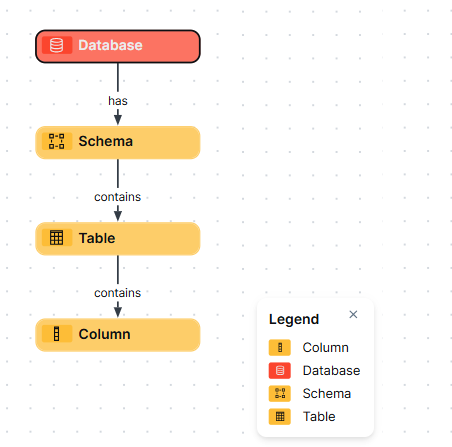
{
  "nodes": [
    {
      "id": "Database",
      "type": {
        "id": "00000000-0000-0000-0000-000000031006"
      }
    },
    {
      "id": "Schema",
      "type": {
        "id": "00000000-0000-0000-0001-000400000002"
      }
    },
    {
      "id": "Table",
      "type": {
        "id": "00000000-0000-0000-0000-000000031007"
      }
    },
    {
      "id": "Column",
      "type": {
        "id": "00000000-0000-0000-0000-000000031008"
      }
    }
  ],
  "edges": [
    {
      "from": "Database",
      "to": "Schema",
      "label": "",
      "style": "arrow",
      "type": {
        "id": "00000000-0000-0000-0000-000000007024"
      },
      "roleDirection": true
    },
    {
      "from": "Schema",
      "to": "Table",
      "label": "",
      "style": "arrow",
      "type": {
        "id": "00000000-0000-0000-0000-000000007043"
      },
      "roleDirection": true
    },
    {
      "from": "Table",
      "to": "Column",
      "label": "",
      "style": "arrow",
      "type": {
        "id": "00000000-0000-0000-0000-000000007042"
      },
      "roleDirection": false
    }
  ],
  "showOverview": false,
  "enableFilters": true,
  "showLabels": false,
  "showFields": true,
  "showLegend": true,
  "showPreview": true,
  "visitStrategy": "completeGraph",
  "layout": "HierarchyTopBottom",
  "maxNodeLabelLength": 50,
  "maxEdgeLabelLength": 30,
  "layoutOptions": {
    "compactGroups": false,
    "componentArrangementPolicy": "topmost",
    "edgeBends": true,
    "edgeBundling": true,
    "edgeToEdgeDistance": 5,
    "minimumLayerDistance": "auto",
    "nodeToEdgeDistance": 5,
    "orthogonalRouting": true,
    "preciseNodeHeightCalculation": true,
    "recursiveGroupLayering": true,
    "separateLayers": true,
    "webWorkers": true,
    "nodePlacer": {
      "barycenterMode": true,
      "breakLongSegments": true,
      "groupCompactionStrategy": "none",
      "nodeCompaction": false,
      "straightenEdges": true
    }
  }
}
For more information on diagram views, go to About JSON syntax for diagram views.
About Semantic View assets
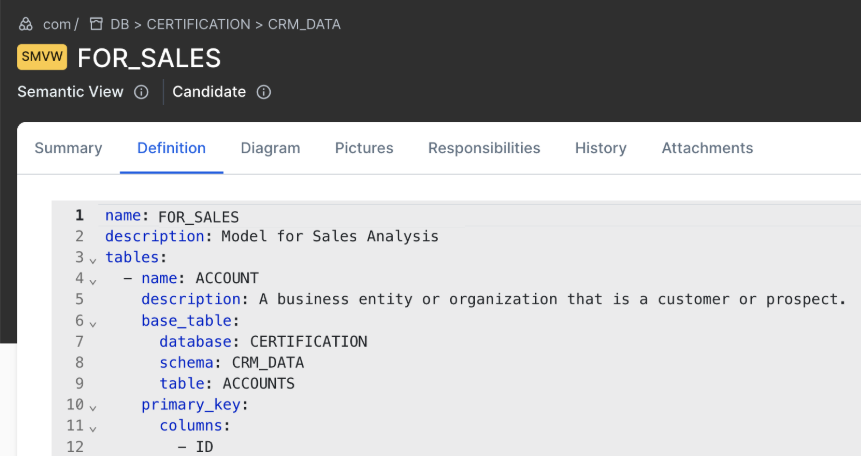
The Semantic View asset type is a child of the Table asset type that represents a Snowflake Semantic View. The fields in the Snowflake Semantic View are ingested as Column assets linked to the Semantic View asset.
A Semantic View asset page includes a Definition tab, which shows the full YAML representation of the Semantic View as ingested from Snowflake. For information, go to the Snowflake Semantic View YAML documentation.
Known limitations
If a Snowflake Semantic View contains dimensions, facts, or metrics with the same name, only the first one defined is ingested as an asset in Collibra. This limitation occurs because items with the same name resolve to the same unique identifier during ingestion.