The SAP S/4HANA integration for metadata uses a specific subset of asset types. These are available out of the box. For more information on asset attributes or metadata synchronized per asset type, go to Integrated SAP S/4HANA data.
| Asset type | Description |
|---|---|
|
Technology Asset System |
Executable software that you can buy commercially off the shelf (COTS) or build internally to automate one or more business functions that help run a business smoothly and efficiently. Examples: CRM, ERP, EDW |
|
Technology Asset Database |
A collection of data that is systematically organized or structured to make it easy to create, update, and query the information. Examples: Ora_DGC_V45, SalesDB2020 |
|
Data Asset Schema Data Structure |
An asset that contains the location of specific data. It provides all the details that are required for setting up a connection to a database or server. |
|
Data Asset
Table Data Structure |
An implementation of data entities in columns and rows, in a given database system. It is the basic structure of a relational database. Examples: Account_tbl, CUST_ADDR |
|
Data Asset
Database View Data Structure |
A Database View is a virtual table based on the result-set of an SQL statement. |
|
Data Asset Column Data Element |
An atomic unit of data that can be stored in a database table. Examples: FST_NM, EMPID |
SAP S/4HANA diagram view
For information on the data that is integrated from SAP S/4HANA, go to Integrated SAP S/4HANA data.
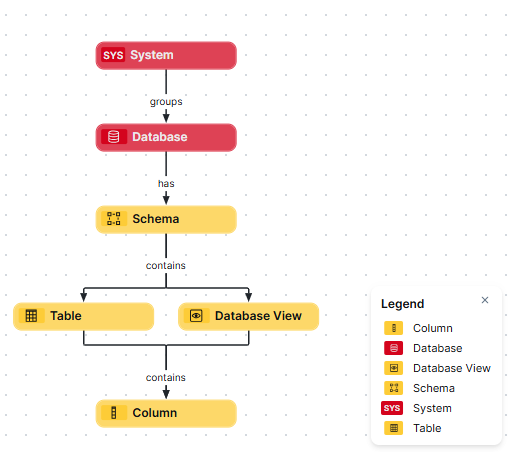
Steps
- Open the asset page.
- Click the
Diagram tab.
The diagram is shown in the default diagram view. - Click
 to add a new view.
- Select the Text option below the diagram view name.
The diagram view text editor is shown. - Copy the code from the Show JSON code section below and paste it in the diagram view text editor.
- Click Save.
- Edit the name and description of the diagram view as needed.
{
  "nodes": [
    {
      "id": "System",
      "type": {
        "id": "00000000-0000-0000-0000-000000031302"
      }
    },
    {
      "id": "Database",
      "type": {
        "id": "00000000-0000-0000-0000-000000031006"
      },
      "fields": []
    },
    {
      "id": "Schema",
      "type": {
        "id": "00000000-0000-0000-0001-000400000002"
      },
      "fields": []
    },
    {
      "id": "Table",
      "type": {
        "id": "00000000-0000-0000-0000-000000031007"
      }
    },
    {
      "id": "Database View",
      "type": {
        "id": "00000000-0000-0000-0001-000400000009"
      },
      "fields": []
    },
    {
      "id": "Column",
      "type": {
        "id": "00000000-0000-0000-0000-000000031008"
      }
    }
  ],
  "edges": [
    {
      "from": "System",
      "to": "Database",
      "label": "",
      "style": "arrow",
      "type": {
        "id": "00000000-0000-0000-0000-000000007054"
      },
      "roleDirection": true
    },
    {
      "from": "Database",
      "to": "Schema",
      "label": "",
      "style": "arrow",
      "type": {
        "id": "00000000-0000-0000-0000-000000007024"
      },
      "roleDirection": true
    },
    {
      "from": "Schema",
      "to": "Table",
      "label": "",
      "style": "arrow",
      "type": {
        "id": "00000000-0000-0000-0000-000000007043"
      },
      "roleDirection": true
    },
    {
      "from": "Schema",
      "to": "Database View",
      "label": "",
      "style": "arrow",
      "type": {
        "id": "00000000-0000-0000-0000-000000007043"
      },
      "roleDirection": true
    },
    {
      "from": "Table",
      "to": "Column",
      "label": "",
      "style": "arrow",
      "type": {
        "id": "00000000-0000-0000-0000-000000007042"
      },
      "roleDirection": false
    },
    {
      "from": "Database View",
      "to": "Column",
      "label": "",
      "style": "arrow",
      "type": {
        "id": "00000000-0000-0000-0000-000000007042"
      },
      "roleDirection": false
    }
  ],
  "showOverview": false,
  "enableFilters": true,
  "showLabels": true,
  "showFields": true,
  "showLegend": true,
  "showPreview": true,
  "visitStrategy": "directed",
  "layout": "HierarchyTopBottom",
  "maxNodeLabelLength": 50,
  "maxEdgeLabelLength": 30,
  "layoutOptions": {
    "compactGroups": false,
    "componentArrangementPolicy": "topmost",
    "edgeBends": true,
    "edgeBundling": true,
    "edgeToEdgeDistance": 5,
    "minimumLayerDistance": "auto",
    "nodeToEdgeDistance": 5,
    "orthogonalRouting": true,
    "preciseNodeHeightCalculation": true,
    "recursiveGroupLayering": true,
    "separateLayers": true,
    "webWorkers": true,
    "nodePlacer": {
      "barycenterMode": true,
      "breakLongSegments": true,
      "groupCompactionStrategy": "none",
      "nodeCompaction": false,
      "straightenEdges": true
    }
  }
}