Data usage statistics and popularity scores help data consumers understand how frequently data in a data source is used. This information can indicate that the data is valuable and trustworthy.
- The JDBC registration process can synchronize the data usage statistics and calculate a popularity score only for Snowflake and Databricks (OSS).
- This feature is available only in the latest UI for Commercial Cloud customers and when the scalable ingestion flow is enabled.
- The popularity score of an asset is recalculated twice a day and takes the data usage statistics of the last 30 days of the last gathered information into account.
Retrieve data usage statistics and popularity score
As a data steward, to synchronize the usage statistics of data in a Snowflake or Databricks (OSS) data source and calculate a popularity score, your data source connection must have the required permissions and you must select the Include Data Usage Statistics option when defining the synchronization rules for a schema.
After the synchronization, the following data usage information becomes available for Table, View, and Column assets:
- Number of distinct users: The number of people who used the asset in a query on the source system within a specific time frame. During the synchronization, this information is gathered from the data source for the past 30 days.
- Number of queries: The number of times the asset has been part of a query on the source system within a specific time frame. During the synchronization, this information is gathered from the data source for the past 30 days.
- Popularity score: This score is calculated by Collibra and indicates how often an asset is used in queries on the source system compared to all other assets for which the data usage statistics have been ingested in Data Catalog. Scores for Table and Column assets are calculated separately.
The possible popularity score values are: Very high, High, Medium, Low, and None. The value is available in the Popularity Score attribute of an asset. A No score value means that the Popularity Score attribute doesn't contain a value.
For more information, go to Popularity score calculation.
Tip When you start synchronizing usage statistics, the scores are not loaded for past data. It may take a couple of days before you start seeing results.
View data usage statistics and popularity score
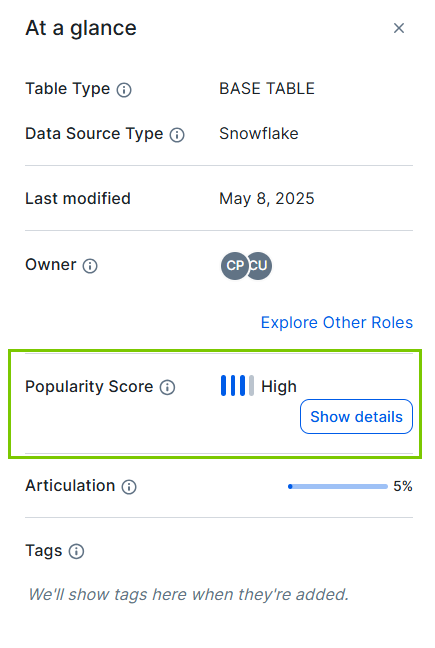
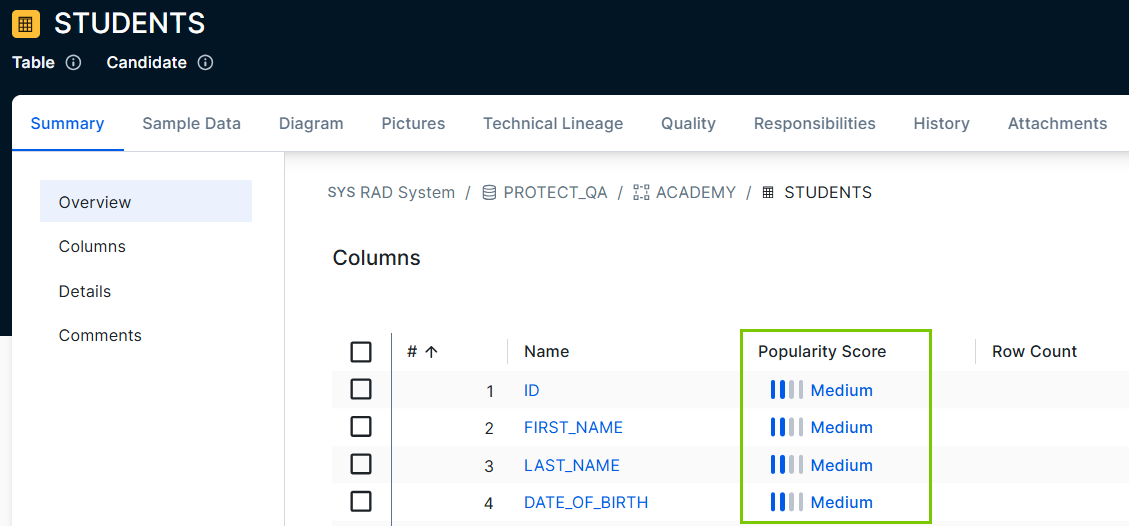
As a data consumer, you can check the popularity score to understand how frequently data in the data source is used. The Popularity Score field is shown in the At a glance sidebar for Table, View, and Column assets. You can also add this attribute to table asset views and asset pages.
|
|
When you click Show details for a popularity score in the At a glance sidebar or click the Popularity Score value in a view, a dialog box opens with the following sections.
-
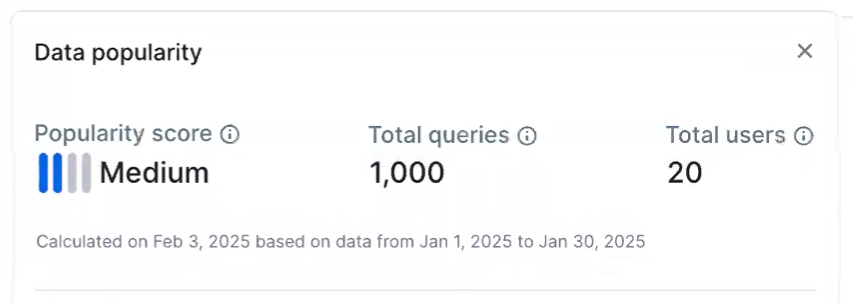
Data popularity: Shows the popularity score, the number of queries, and the number of distinct users of the data.
- Popularity score: The latest calculated score for the asset. The score is based on the usage statistics of the last 30 days of the last gathered information, so it can be high even if the query history for the selected date range shows no queries. For details, go to Popularity score calculation.
- Total queries: The total number of queries from the last time the 30-day data was gathered.
- Total users: The total number of distinct users of the data from the last time the 30-day data was gathered.
-
Query History: Shows the number of queries within a specific date range. You can change the date range. When you do, the current date is always the last day in the date range. The possible values are:
- Last week: Shows the last 7 days, from the first date in the date range until the last. The data point shows the number of queries for that day.
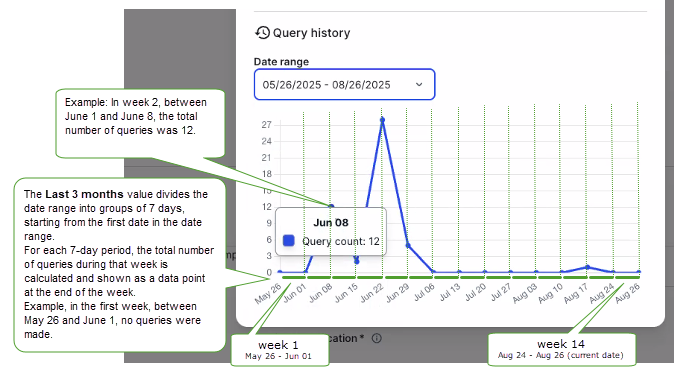
- Last month, Last 3 months, and Last 6 months: Divides the date range into groups of 7 days, starting from the first date in the date range. For each 7-day period, the total number of queries during that week is calculated and shown as a data point at the end of the week.
Popularity Score values with the value None can't be clicked to get the details.
Example of the query history chart for date range Last 3 months
For the following query history chart, created on August 26, 2025, the date range Last 3 months is selected. As a result, the date range is set to May 26 - August 26, 2025, and is divided into 7-day periods in the chart.
- The data point for May 26 is 0. This means that on May 26, no queries were made on the data.
- The data point for Jun 01 is 0. This means that between May 26 and June 1, no queries were made on the data.
- The data point on June 8 is 12. This means that between June 1 and June 8, the data was queried 12 times.
Popularity score calculation
The popularity score is calculated as follows:
- For the ingested assets, Collibra calculates a numeric score based on the number of queries and distinct users. It uses identifiers to protect user privacy while still showing if interactions are from the same or different users. To do this:
- Only read operations are included. Any query that made a change to data or structure is excluded.
- All identities, such as users, service accounts, and automated processes, are counted.
- User data is anonymized by hashing before processing.
- The assets are ordered by the calculated numeric score and split into 5 groups.
- Based on the assigned group, the Popularity Score value of an asset is set.
The possible values are:- If an asset has not been queried, the Popularity Score value is None.
Note The None value is also used when an asset previously had a popularity score but hasn't been resynchronized for more than 30 days.
- If the asset is in the lowest 25% of assets, <=P25, the Popularity Score value is Low.
- If the asset is in the second group, >P25 and <=P50, the Popularity Score value is Medium.
- If the asset is in the third group, >P50 and <=P75, the Popularity Score value is High.
- If the asset is in the highest 25% of assets, >P75, the Popularity Score value is Very High.
A No Score value means that the Data Usage statistics for the asset are collected, but the popularity score hasn't been calculated yet. The value is updated during the next recalculation. The No Score value doesn't appear in the Popularity Score column in a view.
- If an asset has not been queried, the Popularity Score value is None.
Related topics
Create a Databricks (OSS) JDBC connection
Create a Snowflake JDBC connection
Helpful resources
Popularity scores training on Collibra University