The Gemini Enterprise Agent Platform (formerly Vertex AI) integration of Collibra Platform uses the following asset types. The asset types comes out of the box with your software.
| Gemini Enterprise Agent Platform object | Asset type | Description |
|---|---|---|
| Vendor base model (Gemini and similar); your own model in the Model Registry | AI Base Model | Represents foundational business concepts that define the model’s purpose and governing principles in your Gemini Enterprise Agent Platform workspace. |
| Vendor model version; your own model version | Vertex AI Model Version |
A subtype of AI Model Version that represents AI model versions in Gemini Enterprise Agent Platform. |
| Deployed model within an endpoint | AI Model Deployment | The operational instance where a model version is assigned computational resources to execute and generate real-time outputs. |
| Endpoint; a runnable agent with a package, source-code, or container spec gets its own query endpoint, connected to its agent version through the AI Agent Deployment complex relation | AI Endpoint | The access point for external systems that provides a consistent interface while allowing for the seamless exchange of underlying deployments. |
| Model monitoring job (drift monitor; skipped if none of its monitored deployments were ingested); each ingested agent also gets a synthetic pass/fail monitor to hold daily pass and fail metrics | AI Monitor |
The configuration of automated tracking parameters and alerting thresholds used to observe a deployment’s real-world performance and detect deviations from expected behavior. For AI agents, a pass/fail monitor is also created to attach daily pass and fail metrics. |
| Reasoning Engine; one synthetic "Vertex AI Knowledge Retrieval" agent per project, grouping data stores and RAG corpora that no agent claims | AI Agent | An autonomous system that perceives its environment, makes decisions based on predefined rules or learned patterns, and takes actions to achieve specific goals. |
Agent runtime revision; synthetic "Knowledge Retrieval" version for each agent that claims a RAG corpus (rag_corpus label) and for the synthetic Knowledge Retrieval agent
|
AI Agent Version |
A specific, immutable implementation of the model logic and parameters that serves as the audited "raw" model version before it is activated. |
| Discovery Engine (Vertex AI Search) data store; RAG Engine corpus | AI Agent Tool |
A service accessible to an AI agent that automates tasks, generates content, or delivers intelligent insights. For example, a Vertex AI RAG Engine knowledge corpus or Discovery Engine data store. For RAG Engine, each tool connects an AI agent version to the corpus it reads. |
| Data store documents (only for CONTENT_REQUIRED stores with gs:// URIs); RAG Engine corpus; training data GCS files | Storage Container |
Represents the folder containing the dataset files used to fine-tune your AI base models, or a Vertex AI RAG Engine knowledge corpus. Fine-tuning dataset folders are optional, to ingest them, select the Do you want to ingest input and output assets? option. RAG Engine corpora are ingested automatically, independent of this option. |
| Data store documents (only for CONTENT_REQUIRED stores with gs:// URIs); RAG Engine corpus; training data GCS files | File |
Represents the dataset files used to fine-tune your AI base models, the individual files in a Vertex AI RAG Engine knowledge corpus, or the documents indexed by a Discovery Engine data store. Fine-tuning dataset files are optional, to ingest them, select the Do you want to ingest input and output assets? option. RAG corpus files and data store documents are ingested automatically, independent of this option. |
| BigQuery prediction-log table | Database | A collection of data that is systematically organized or structured to make it easy to create, update, and query the information. This asset is optional, you can ingest this data during the integration by selecting the Do you want to ingest input and output assets? option. |
| BigQuery prediction-log table | Schema |
An asset that contains the location of specific data. It provides all the details that are required for setting up a connection to a database or server. This asset is optional, you can ingest this data during the integration by selecting the Do you want to ingest input and output assets? option. |
| BigQuery prediction-log table | Table |
An implementation of data entities in columns and rows, in a given database system. It is the basic structure of a relational database. This asset is optional, you can ingest this data during the integration by selecting the Do you want to ingest input and output assets? option. |
| BigQuery prediction-log table | Column |
An atomic unit of data that can be stored in a database table. This asset is optional, you can ingest this data during the integration by selecting the Do you want to ingest input and output assets? option. |
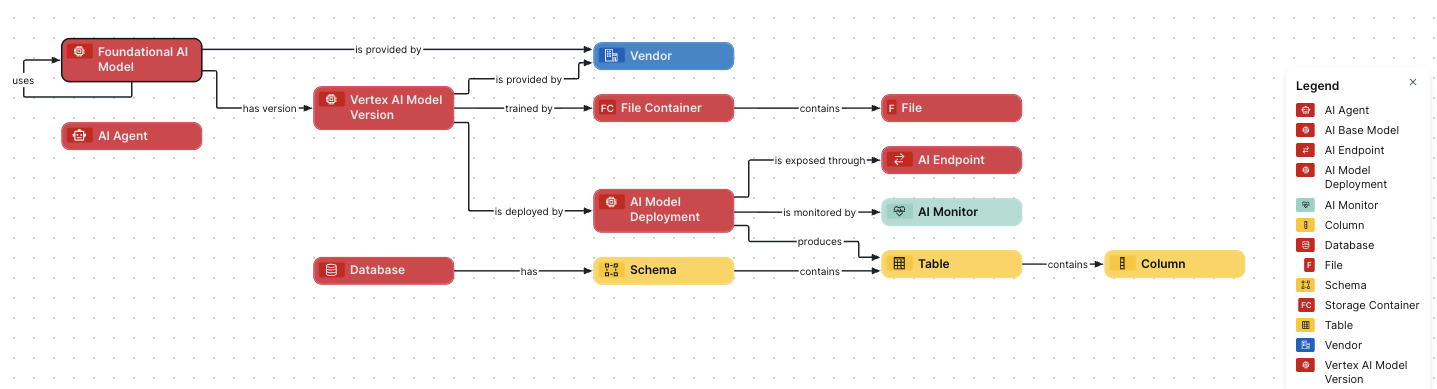
Gemini Enterprise Agent Platform diagram view
For information on the data that is integrated from Gemini Enterprise Agent Platform, go to Integrated Gemini Enterprise Agent Platform data.
Steps
- Open the asset page.
- Click the
Diagram tab.
The diagram is shown in the default diagram view. - Click
 to add a new view.
- Select the Text option below the diagram view name.
The diagram view text editor is shown. - Copy the code from the Show JSON code section below and paste it in the diagram view text editor.
- Click Save.
- Edit the name and description of the diagram view as needed.
{
  "nodes": [
    {
      "id": "Foundational AI Model",
      "type": {
        "id": "00000000-0000-0000-0000-000000031422"
      }
    },
    {
      "id": "Vertex AI Model Version",
      "type": {
        "id": "00000000-0000-0000-0000-000000031404"
      }
    },
    {
      "id": "AI Model Deployment",
      "type": {
        "id": "00000000-0000-0000-0000-000000031500"
      }
    },
    {
      "id": "AI Endpoint",
      "type": {
        "id": "00000000-0000-0000-0000-000000031501"
      }
    },
    {
      "id": "AI Monitor",
      "type": {
        "id": "00000000-0000-0000-0000-000000031502"
      }
    },
    {
      "id": "AI Agent",
      "type": {
        "id": "00000000-0000-0000-0000-000000031450"
      }
    },
    {
      "id": "AI Agent Version",
      "type": {
        "id": "00000000-0000-0000-0000-000000031452"
      }
    },
    {
      "id": "AI Agent Tool",
      "type": {
        "id": "00000000-0000-0000-0000-000000031453"
      }
    },
    {
      "id": "Vendor",
      "type": {
        "id": "00000000-0000-0000-0000-000000031403"
      }
    },
    {
      "id": "File Container",
      "type": {
        "id": "00000000-0000-0000-0001-002900000002"
      }
    },
    {
      "id": "File",
      "type": {
        "id": "00000000-0000-0000-0000-000000031304"
      }
    },
    {
      "id": "Database",
      "type": {
        "id": "00000000-0000-0000-0000-000000031006"
      }
    },
    {
      "id": "Schema",
      "type": {
        "id": "00000000-0000-0000-0001-000400000002"
      }
    },
    {
      "id": "Table",
      "type": {
        "id": "00000000-0000-0000-0000-000000031007"
      }
    },
    {
      "id": "Column",
      "type": {
        "id": "00000000-0000-0000-0000-000000031008"
      }
    }
  ],
  "edges": [
    {
      "from": "Foundational AI Model",
      "to": "Foundational AI Model",
      "label": "",
      "style": "arrow",
      "type": {
        "id": "00000000-0000-0000-0000-000000007116"
      },
      "roleDirection": true
    },
    {
      "from": "Foundational AI Model",
      "to": "Vertex AI Model Version",
      "label": "",
      "style": "arrow",
      "type": {
        "id": "00000000-0000-0000-0000-000000077000"
      },
      "roleDirection": true
    },
    {
      "from": "Foundational AI Model",
      "to": "Vendor",
      "label": "",
      "style": "arrow",
      "type": {
        "id": "00000000-0000-0000-0000-000000077005"
      },
      "roleDirection": true
    },
    {
      "from": "Vertex AI Model Version",
      "to": "Vendor",
      "label": "",
      "style": "arrow",
      "type": {
        "id": "00000000-0000-0000-0000-000000007105"
      },
      "roleDirection": true
    },
    {
      "from": "Vertex AI Model Version",
      "to": "AI Model Deployment",
      "label": "",
      "style": "arrow",
      "type": {
        "id": "00000000-0000-0000-0000-000000077001"
      },
      "roleDirection": true
    },
    {
      "from": "Vertex AI Model Version",
      "to": "File Container",
      "label": "",
      "style": "arrow",
      "type": {
        "id": "00000000-0000-0000-0000-000000007102"
      },
      "roleDirection": true
    },
    {
      "from": "AI Model Deployment",
      "to": "AI Endpoint",
      "label": "",
      "style": "arrow",
      "type": {
        "id": "00000000-0000-0000-0000-000000077006"
      },
      "roleDirection": true
    },
    {
      "from": "AI Model Deployment",
      "to": "AI Monitor",
      "label": "",
      "style": "arrow",
      "type": {
        "id": "00000000-0000-0000-0000-000000077007"
      },
      "roleDirection": true
    },
    {
      "from": "AI Model Deployment",
      "to": "Table",
      "label": "",
      "style": "arrow",
      "type": {
        "id": "00000000-0000-0000-0000-000000077004"
      },
      "roleDirection": true
    },
    {
      "from": "File Container",
      "to": "File",
      "label": "",
      "style": "arrow",
      "type": {
        "id": "00000000-0000-0000-0000-000000007060"
      },
      "roleDirection": true
    },
    {
      "from": "Database",
      "to": "Schema",
      "label": "",
      "style": "arrow",
      "type": {
        "id": "00000000-0000-0000-0000-000000007024"
      },
      "roleDirection": true
    },
    {
      "from": "Schema",
      "to": "Table",
      "label": "",
      "style": "arrow",
      "type": {
        "id": "00000000-0000-0000-0000-000000007043"
      },
      "roleDirection": true
    },
    {
      "from": "Table",
      "to": "Column",
      "label": "",
      "style": "arrow",
      "type": {
        "id": "00000000-0000-0000-0000-000000007042"
      },
      "roleDirection": false
    },
    {
      "from": "AI Agent",
      "to": "AI Agent Version",
      "label": "",
      "style": "arrow",
      "type": {
        "id": "00000000-0000-0000-0000-000000007206"
      },
      "roleDirection": true
    },
    {
      "from": "AI Agent Version",
      "to": "AI Agent Tool",
      "label": "",
      "style": "arrow",
      "type": {
        "id": "00000000-0000-0000-0000-000000007207"
      },
      "roleDirection": true
    },
    {
      "from": "AI Agent Tool",
      "to": "File Container",
      "label": "",
      "style": "arrow",
      "type": {
        "id": "00000000-0000-0000-0000-000000007211"
      },
      "roleDirection": true
    },
    {
      "from": "AI Agent",
      "to": "Vertex AI Model Version",
      "label": "",
      "style": "arrow",
      "type": {
        "id": "00000000-0000-0000-0000-000000007108"
      },
      "roleDirection": true
    }
  ],
  "showOverview": false,
  "enableFilters": true,
  "showLabels": true,
  "showFields": true,
  "showLegend": true,
  "showPreview": true,
  "visitStrategy": "directed",
  "layout": "HierarchyLeftRight",
  "maxNodeLabelLength": 50,
  "maxEdgeLabelLength": 30,
  "layoutOptions": {
    "compactGroups": false,
    "componentArrangementPolicy": "topmost",
    "edgeBends": true,
    "edgeBundling": true,
    "edgeToEdgeDistance": 5,
    "minimumLayerDistance": "auto",
    "nodeToEdgeDistance": 5,
    "orthogonalRouting": true,
    "preciseNodeHeightCalculation": true,
    "recursiveGroupLayering": true,
    "separateLayers": true,
    "webWorkers": true,
    "nodePlacer": {
      "barycenterMode": true,
      "breakLongSegments": true,
      "groupCompactionStrategy": "none",
      "nodeCompaction": false,
      "straightenEdges": true
    }
  }
}