The AWS Bedrock AI integration of Collibra Platform uses the following asset types. The asset types come out of the box with your software.
You can configure Edge connections and capabilities without an active AI Governance license. However, AI Governance must be enabled to harvest AI model and agent metadata, ingest corresponding AI assets in Data Catalog, and access the dashboards and features necessary to visualize and govern your AI landscape.
| Bedrock object | Asset type | Description |
|---|---|---|
| Provider of a foundation model that is ingested as a base model (one per provider) | Vendor | Represents pre-trained models provided natively by AI providers, such as AI Providers like Anthropic, Meta, and Amazon. These are only ingested on-demand when another asset references them. |
| Foundation model used directly by an agent or as the base of a custom model (base); custom (fine-tuned) model (synthetic base, linked to its parent base model); imported model (synthetic base); end-of-life base model still referenced by a custom model or agent (tombstone; its description states lifecycle status LEGACY) | AI Base Model | Represents foundational business concepts that define the model’s purpose and governing principles in your Amazon Bedrock workspace. |
| Foundation model used directly by an agent (version); custom (fine-tuned) model (version); imported model (version); end-of-life model still used by an agent (version under the tombstone) | AWS Bedrock AI Model Version |
A subtype of AI Model Version that represents AI model versions in Amazon Bedrock. |
| Imported model (synthetic deployment); custom model deployment | AI Model Deployment | The operational instance where a model version is assigned computational resources to execute and generate real-time outputs. |
| Agent | AI Agent | An autonomous system that perceives its environment, makes decisions based on predefined rules or learned patterns, and takes actions to achieve specific goals. |
| Agent DRAFT version; each published agent version | AI Agent Version |
A specific, immutable implementation of the model logic and parameters that serves as the audited "raw" model version before it is activated. For AWS Bedrock AI, this is always the |
| Enabled action group; enabled knowledge base, which resolves to a single shared tool if the same knowledge base is used by more than one agent | AI Agent Tool |
A service accessible to an AI agent that automates tasks, generates content, or delivers intelligent insights. |
Imported model (synthetic endpoint); custom model deployment (synthetic endpoint); agent alias (except the test alias TSTALIASID and aliases with no routed versions)
|
AI Endpoint | The access point for external systems that provides a consistent interface while allowing for the seamless exchange of underlying deployments. |
| Agent alias (CloudWatch monitor) | AI Monitor | The configuration of automated tracking parameters and alerting thresholds used to observe a deployment’s real-world performance and detect deviations from expected behavior. |
| Training data S3 bucket of a custom model; model-invocation-logging S3 destination (one per region) | Storage Container | Represents the S3 endpoint output paths Amazon Bedrock workspace. You can ingest this data during the integration by selecting Do you want to ingest input and output assets? checkbox. |
| Training data S3 object of a custom model | File | Represents the S3 endpoint output paths Amazon Bedrock workspace. You can ingest this data during the integration by selecting Do you want to ingest input and output assets? checkbox. |
AWS Bedrock AI diagram view
For information on the data that is integrated from AWS Bedrock AI, go to Integrated AWS Bedrock AI data.
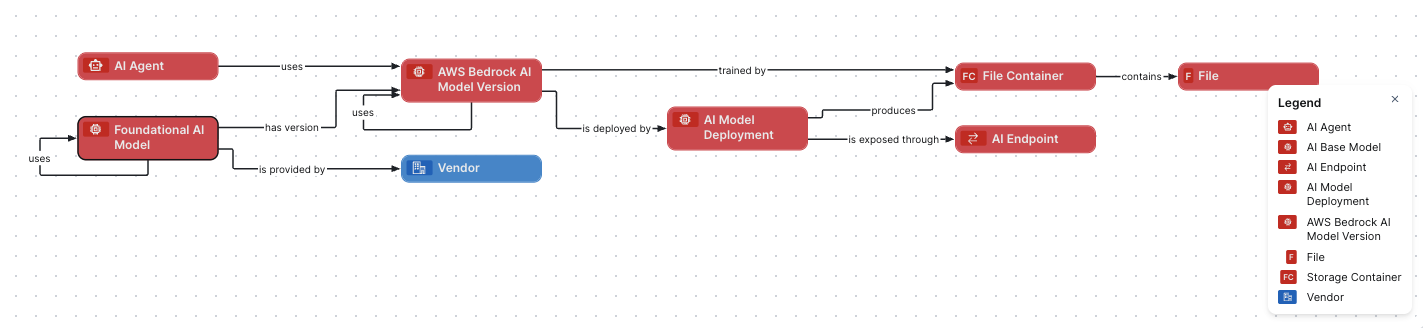
Steps
- Open the asset page.
- Click the
Diagram tab.
The diagram is shown in the default diagram view. - Click
 to add a new view.
 - Select the Text option below the diagram view name.
The diagram view text editor is shown. - Copy the code from the Show JSON code section below and paste it in the diagram view text editor.
- Click Save.
- Edit the name and description of the diagram view as needed.
{
  "nodes": [
      {
        "id": "Foundational AI Model",
        "type": {
          "id": "00000000-0000-0000-0000-000000031422"
        }
      },
      {
        "id": "AWS Bedrock AI Model Version",
        "type": {
          "id": "00000000-0000-0000-0000-000000031408"
        }
      },
      {
        "id": "AI Model Deployment",
        "type": {
          "id": "00000000-0000-0000-0000-000000031500"
        }
      },
      {
        "id": "AI Endpoint",
        "type": {
          "id": "00000000-0000-0000-0000-000000031501"
        }
      },
      {
        "id": "AI Agent",
        "type": {
          "id": "00000000-0000-0000-0000-000000031450"
        }
      },
      {
        "id": "Vendor",
        "type": {
          "id": "00000000-0000-0000-0000-000000031403"
        }
      },
      {
        "id": "File Container",
        "type": {
          "id": "00000000-0000-0000-0001-002900000002"
        }
      },
      {
        "id": "File",
        "type": {
          "id": "00000000-0000-0000-0000-000000031304"
        }
      }
    ],
    "edges": [
      {
        "from": "Foundational AI Model",
        "to": "Foundational AI Model",
        "label": "",
        "style": "arrow",
        "type": {
          "id": "00000000-0000-0000-0000-000000007116"
        },
        "roleDirection": true
      },
      {
        "from": "Foundational AI Model",
        "to": "AWS Bedrock AI Model Version",
        "label": "",
        "style": "arrow",
        "type": {
          "id": "00000000-0000-0000-0000-000000077000"
        },
        "roleDirection": true
      },
      {
        "from": "Foundational AI Model",
        "to": "Vendor",
        "label": "",
        "style": "arrow",
        "type": {
          "id": "00000000-0000-0000-0000-000000077005"
        },
        "roleDirection": true
      },
      {
        "from": "AWS Bedrock AI Model Version",
        "to": "AWS Bedrock AI Model Version",
        "label": "",
        "style": "arrow",
        "type": {
          "id": "00000000-0000-0000-0000-000000007106"
        },
        "roleDirection": true
      },
      {
        "from": "AWS Bedrock AI Model Version",
        "to": "AI Model Deployment",
        "label": "",
        "style": "arrow",
        "type": {
          "id": "00000000-0000-0000-0000-000000077001"
        },
        "roleDirection": true
      },
      {
        "from": "AWS Bedrock AI Model Version",
        "to": "File Container",
        "label": "",
        "style": "arrow",
        "type": {
          "id": "00000000-0000-0000-0000-000000007102"
        },
        "roleDirection": true
      },
      {
        "from": "AI Model Deployment",
        "to": "AI Endpoint",
        "label": "",
        "style": "arrow",
        "type": {
          "id": "00000000-0000-0000-0000-000000077006"
        },
        "roleDirection": true
      },
      {
        "from": "AI Model Deployment",
        "to": "File Container",
        "label": "",
        "style": "arrow",
        "type": {
          "id": "00000000-0000-0000-0000-000000077004"
        },
        "roleDirection": true
      },
      {
        "from": "AI Agent",
        "to": "AWS Bedrock AI Model Version",
        "label": "",
        "style": "arrow",
        "type": {
          "id": "00000000-0000-0000-0000-000000007108"
        },
        "roleDirection": true
      },
      {
        "from": "File Container",
        "to": "File",
        "label": "",
        "style": "arrow",
        "type": {
          "id": "00000000-0000-0000-0000-000000007060"
        },
        "roleDirection": true
      }
    ],
    "showOverview": false,
    "enableFilters": true,
    "showLabels": true,
    "showFields": true,
    "showLegend": true,
    "showPreview": true,
    "visitStrategy": "directed",
    "layout": "HierarchyLeftRight",
    "maxNodeLabelLength": 50,
    "maxEdgeLabelLength": 30,
    "layoutOptions": {
      "compactGroups": false,
      "componentArrangementPolicy": "topmost",
      "edgeBends": true,
      "edgeBundling": true,
      "edgeToEdgeDistance": 5,
      "minimumLayerDistance": "auto",
      "nodeToEdgeDistance": 5,
      "orthogonalRouting": true,
      "preciseNodeHeightCalculation": true,
      "recursiveGroupLayering": true,
      "separateLayers": true,
      "webWorkers": true,
      "nodePlacer": {
        "barycenterMode": true,
        "breakLongSegments": true,
        "groupCompactionStrategy": "none",
        "nodeCompaction": false,
        "straightenEdges": true
      }
    }
}