The Azure Data Lake Storage (ADLS) file system integration allows you to register ADLS as a data source in Collibra and synchronize metadata. ADLS is a cloud storage service built on Azure Blob Storage. Once you have completed the ADLS integration, the files and directories of the ADLS file system are represented in Collibra by specific asset types, retaining their original names.
- The ADLS integration supports Azure Data Lake Storage (Gen2) only.
Azure Data Lake Storage Gen1 is not supported. To verify the Azure version that you are using, check the Account Kind in the Overview section of your Azure storage account details. StorageV2 indicates that you are using Gen2.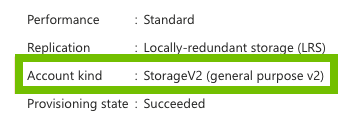
- You can integrate an ADLS file system only via Edge.
For detailed information on Microsoft Azure Data Lake Storage (Gen2), go to the Azure documentation.
About the ADLS integration with Microsoft Purview
The ADLS integration supports Microsoft Purview, a service for schema discovery. With Microsoft Purview, you can integrate tables and columns from files. For information on the asset types, go to the ADLS operating model.
The ADLS integration supports three synchronization sources:
- ADLS only: Multiple File assets become available, one per file discovered in ADLS.
- ADLS with Purview: A File asset can represent multiple files that follow a specific naming pattern. These files are shown in a single File asset with a schema (Table and Column assets). To use the ADLS integration with Microsoft Purview, select ADLS with Purview in the Synchronization Source field when you configure the ADLS synchronization.
- Purview resource sets (in preview): The integration only ingests resource-set entities from Microsoft Purview. Files that share a date- or time-based naming pattern are collapsed into a single File asset that represents the resource-set pattern. Use this synchronization source if you have a large number of partitioned or time-stamped files in ADLS and want to avoid ingesting one asset per physical file. To use this option, select Purview resource sets (in preview) in the Synchronization Source field when you configure the ADLS synchronization.
Important considerations to keep in mind if you integrate ADLS with Microsoft Purview:
- Even if you use Microsoft Purview to integrate tables and columns, we don't currently support profiling and sampling.
- Currently, the ADLS integration can ingest up to 100,000 assets from Microsoft Purview.
For detailed information on Microsoft Purview, go to the Microsoft Purview documentation.
Helpful resources
To learn more about the ADLS integration, follow our University course.