This topic provides an overview of the necessary steps to create a technical lineage via Edge.
You can also use the Collibra Catalog Cloud Ingestions API to create or update a technical lineage capability and start or schedule a synchronization to create a technical lineage. For more information about using APIs, go to Collibra Developer Portal.
To view the steps to create technical lineage for your data source, select the data source and connection type, if applicable. For a listed of supported data sources and their corresponding connection types, go to Supported data sources for technical lineage.
|
Select a data source and the connection type if needed to see the related information. Currently, the information is shown for: |

Amazon Redshift

Azure Data Factory
Azure SQL Data Warehouse
Azure SQL Server

Azure Synapse Analytics

DB2

dbt Cloud (Beta) 
Google BigQuery

Greenplum

HiveQL

IBM InfoSphere DataStage
Informatica Intelligent Cloud Services
Informatica PowerCenter

Matillion

MicroStrategy

Oracle

PostgreSQL

Power BI

MySQL

Netezza

SAP Hana

Snowflake

Spark SQL

SQL Server
SQL Server Integration Services

Sybase

Tableau

Teradata

Custom technical lineage
|
Which connection type do you use?
For best technical lineage results, use the JDBC connection to ingest JDBC sources when possible, instead of using the Shared Storage connection with SQL files. |
Before you begin
- Use Collibra Data Intelligence Cloud 2023.03 or later.
- Create an Edge site in Collibra Data Intelligence Cloud.
- Install an Edge site.
-
Enable technical lineage via Edge.
To use technical lineage via Edge, you must enable the technical lineage for different data sources. You can also define some specific technical lineage settings on Edge. The technical lineage settings are general configurations that apply to all technical lineage features on Edge.
Prerequisites and permissions
The services configuration in the Collibra settings is the same as the DGC service settings that require the ADMIN role in Collibra Console. By default, you do not see this section.
Steps
Depending on your environment, follow this procedure either in the Services Configuration section of the Collibra settings or in Collibra Console:
-
Open the Services Configuration page.
-
On the main menu, click
 , and then click
 Settings.
The Collibra settings page opens. - In the tab pane, click Services Configuration.
- Click Edit configuration.
Open the DGC service settings for editing:- Open Collibra Console.
Collibra Console opens with the Infrastructure page. - In the tab pane, expand an environment to show its services.
- In the tab pane, click the Data Governance Center service of that environment.
- Click Configuration.
- Click Edit configuration.
-
On the main menu, click
- In the Lineage on Edge section, select the value of
 True for the technical lineage features that you want to enable.
Setting
Description
Power BI and Tableau synchronization enabled
Enable Data Catalog ingestion and technical lineage for Power BI and Tableau via Edge.
- Enable this feature.
True False
False- Disable this feature.
Technical lineage via JDBC connection enabled
Enable the function of creating technical lineage for data sources that are connected by using JDBC connections on Edge. For a list of data sources that use the JDBC connection type, go to Supported data sources for technical lineage.
- True
- Enable this feature.
- False
- Disable this feature.
Technical lineage for SQL via folder, ETL tools, and custom lineage on Edge enabled
Enable the function of creating technical lineage for data sources that are connected by using Shared Storage connections and APIs. With this function enabled, you can create custom technical lineage and technical lineage for ETL tools and JDBC data sources that are connected by using Shared Storage connections. For a list of data sources and connection types, go to Supported data sources for technical lineage.
- True
- Enable this feature.
- False
- Disable this feature.
- In the same Lineage on Edge section, enter the following information:
Setting
Description
DGC user name The user name to be used to ingest metadata in Data Catalog via Collibra Data Lineage service. DGC user password The password for the user to be used to ingest metadata. Collibra system name Indicates whether you want to use the system or server name of a data source to match to the System asset that you create in Data Catalog. Only set the value to
True when you have multiple databases with the same name. - False
- The technical lineage via Edge ignores all system or server names that you specify for the Collibra system name settings when you add technical lineage capabilities. This is the default value.
- True
- The technical lineage via Edge uses the system or server names that you specify for the Collibra system name settings when you add technical lineage capabilities.
Important If you use technical lineage via Edge and the lineage harvester to generate the technical lineage, the following values must be the same:- The value for this setting.
- The value of the
useCollibraSystemNameproperty in the lineage harvester configuration file.
If the values are different, the technical lineage synchronization ends with an error.
- Click Save all.
-
-
Enable technical lineage via Edge.
To use technical lineage via Edge, you can define some specific technical lineage settings on Edge. The technical lineage settings are general configurations that apply to all technical lineage features on Edge.
Prerequisites and permissions
The services configuration in the Collibra settings is the same as the DGC service settings that require the ADMIN role in Collibra Console. By default, you do not see this section.
Steps
Depending on your environment, follow this procedure either in the Services Configuration section of the Collibra settings or in Collibra Console:
-
Open the Services Configuration page.
-
On the main menu, click , and then click
Settings.
The Collibra settings page opens. - In the tab pane, click Services Configuration.
- Click Edit configuration.
Open the DGC service settings for editing:- Open Collibra Console.
Collibra Console opens with the Infrastructure page. - In the tab pane, expand an environment to show its services.
- In the tab pane, click the Data Governance Center service of that environment.
- Click Configuration.
- Click Edit configuration.
-
On the main menu, click
- In the same Lineage on Edge section, enter the following information:
Setting
Description
DGC user name The user name to be used to ingest metadata in Data Catalog via Collibra Data Lineage service. DGC user password The password for the user to be used to ingest metadata. Collibra system name Indicates whether you want to use the system or server name of a data source to match to the System asset that you create in Data Catalog. Only set the value to
True when you have multiple databases with the same name. - False
- The technical lineage via Edge ignores all system or server names that you specify for the Collibra system name settings when you add technical lineage capabilities. This is the default value.
- True
- The technical lineage via Edge uses the system or server names that you specify for the Collibra system name settings when you add technical lineage capabilities.
Important If you use technical lineage via Edge and the lineage harvester to generate the technical lineage, the following values must be the same:- The value for this setting.
- The value of the
useCollibraSystemNameproperty in the lineage harvester configuration file.
If the values are different, the technical lineage synchronization ends with an error.
- Click Save all.
-
-
Ensure that you meet the minimum network requirements.
-
Firewall rules so that the lineage harvester can connect to:
- The host names of all data sources in your lineage harvester configuration file.
- All Collibra Data Lineage service instances in your geographic location:
- 15.222.200.199 (techlin-aws-ca.collibra.com)
- 18.198.89.106 (techlin-aws-eu.collibra.com)
- 13.228.38.245 (techlin-aws-sg.collibra.com)
- 54.242.194.190 (techlin-aws-us.collibra.com)
- 51.105.241.132 (techlin-azure-eu.collibra.com)
- 20.102.44.39 (techlin-azure-us.collibra.com)
- 35.197.182.41 (techlin-gcp-au.collibra.com)
- 34.152.20.240 (techlin-gcp-ca.collibra.com)
- 35.205.146.124 (techlin-gcp-eu.collibra.com)
- 34.87.122.60 (techlin-gcp-sg.collibra.com)
- 35.234.130.150 (techlin-gcp-uk.collibra.com)
- 34.73.33.120 (techlin-gcp-us.collibra.com)
Note Edge connects to different Collibra Data Lineage service instances based on your geographic location and cloud provider. If your location or cloud provider changes, Edge rescans all your data sources. You have to allow all Collibra Data Lineage service instances in your geographic location. In addition, we highly recommend that you always allow the techlin-aws-us instance as a backup, in case Edge cannot connect to other Collibra Data Lineage service instances.
-
Connect to a proxy server, if needed.
Collibra Data Lineage supports proxy server connection and authentication. Specifically, Collibra Data Lineage automatically applies all proxy settings that are configured on Edge.
Warning You cannot use a man-in-the-middle (MITM) proxy. MITM proxies are not supported by the technical lineage via Edge capabilities.
For Collibra Data Lineage to connect to a data source that requires a proxy, you can configure a forward proxy on Edge when you install your Edge site. For detailed steps, go to configure a forward proxy on Edge.
When you add and synchronize the technical lineage capability on Edge, Collibra Data Lineage uses these proxy settings to establish connections to your data source to collect the metadata and create the technical lineage.
Important Proxy server support is added to each technical lineage capability. If you encounter a connection error while synchronizing a technical lineage capability for a data source with a forward proxy configured, contact Collibra Support. - Create a JDBC connection.
- Register the data source via Edge. Before you register the data source, ensure that you add the Catalog JDBC ingestion capability, so that Collibra Data Lineage can stitch the data objects in your technical lineage to the assets in Data Catalog.
-
Register Azure Data Factory in the Azure Portal and assign the necessary permissions and access.
Collibra Data Lineage uses Azure APIs to get the information necessary to build technical lineage from Azure Data Factory. Use this information to register Azure Data Factory in the Azure Portal and assign the necessary permissions and access.
Warning Because the tasks covered in this topic are performed outside of Collibra, it is possible that the content changes without us knowing. We strongly recommend that you carefully read the source documentation.
Topics in this section
- Required values for your Azure Data Factory configuration file
- Register your Azure Data Factory instance in the Azure Portal
- Assign the API permissions
- Create an authentication secre
- Create an Azure Active Directory group and add your Azure Data Factory instance
- Add your Azure Data Factory instance to a resource group
- Retrieve the subscription ID of the resource group
- Assign read-only permissions to the resource group
Required values for your Azure Data Factory configuration file
The tasks in this topic help you to identify the values you will need when you are preparing the lineage harvester configuration file for Azure Data Factory. You need the correct values for the properties shown in the following table.
Important If you want to create a technical lineage for more than one Azure Data Factory instance, you need this information for each instance.
Properties Description tenantDomain The directory ID of your Azure Data Factory instance. applicationId The application ID of your Azure Data Factory instance. Specifically, this is the associated service principal for Azure Data Factory, not the enterprise application ID.
resourceGroupName The name of a resource group with the Reader role for the Azure Data Factory instance. subscriptionId The subscription ID of the resource group. password The secret value for the application ID. Register your Azure Data Factory instance in the Azure Portal
Follow the Microsoft Azure instructions on how to register an application and refer to the following table for help with the various settings:
Setting Description Name The name of your Azure Data Factory instance. Supported account types The type of tenant. This indicates who can access the Azure Data Factory instance.
Select Single tenant.
Redirect URI The location to which a user's client is redirected and where security tokens are sent after successful authorization. In this case, the redirect URI must be of the type Web.
Leave this field empty. You don't have to specify a web location.
The Azure Portal creates:
- The Application ID
- The Directory ID
Note When your Azure Data Factory instance is registered, you can find these two IDs in the Overview pane on the Azure Portal or in the upper-right menu.Tip These IDs are the values you will use for the
applicationIdandtenantDomainproperties, respectively, in your Azure Data Factory configuration file.Assign the API permissions
-
In the Azure Portal, click the Authentication pane, and then:
- Click the Advanced settings section.
- For the Allow public client flows option, click Yes.
- Click the API permissions pane, and then:
- For the permission type, click Delegated permissions.
- Assign the Azure Data Factory instance in Microsoft Azure the Microsoft Graph User.Read permission.
The user now has the following permissions:
- Microsoft Graph
- User.Read
Create an authentication secret
- In the sidebar navigation, in the Manage section, click Certificates and secrets.
-
Ciick New client secret. Note that certificates are not supported.
- Enter a description.
- Use the date picker to specify an expiration date for the authentication secret.
- Click Add.
An authentication secret is shown.Important Make note of the authentication secret. For security purposes, It will not be available later. If you lose the authentication secret, you will need to create a new one.
Tip The authentication secret is the value you will use when prompted for the password to connect to Azure Data Factory.
Create an Azure Active Directory group and add your Azure Data Factory instance
- Go to the Group Management page for your Azure Data Factory instance.
-
Follow the Microsoft Azure instructions on how to Create and manage an Azure Active Directory (AD) Group, and refer to the following table for help with the various settings:
Setting Description Group Name The name of the new Azure AD group that you are creating.
Group Type The type of the Azure AD group.
Select Security.
Service Principal The identity an application uses to access Azure resources and APIs.
Enter the Application ID that was generated when you registered Azure Data Factory in the Azure Portal.
Add your Azure Data Factory instance to a resource group
Your Azure Data Factory instance should already be part of a resource group. If it is, you can skip this step. If it's not, you need to create a resource group and add your Azure Data Factory instance to it.
The group name is the value you will use for the
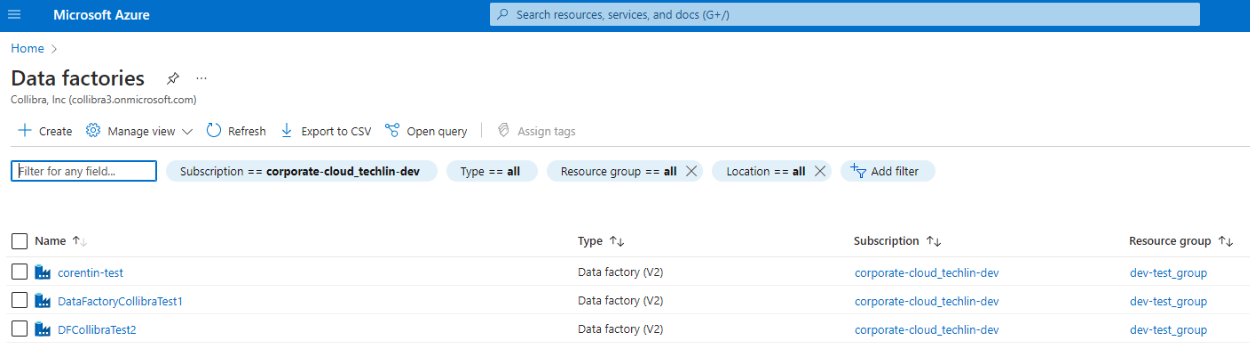
resourceGroupNameproperty in your Azure Data Factory configuration file.Tip The Data factories page shows all of your Azure Data Factory instances, including their subscriptions and resource groups. Check here to know if your instance is part of a resource group.
Retrieve the subscription ID of the resource group
On the Data factories page, click the resource group for the Azure Data Factory instance for which you want to create a technical lineage, and make note of the subscription ID.
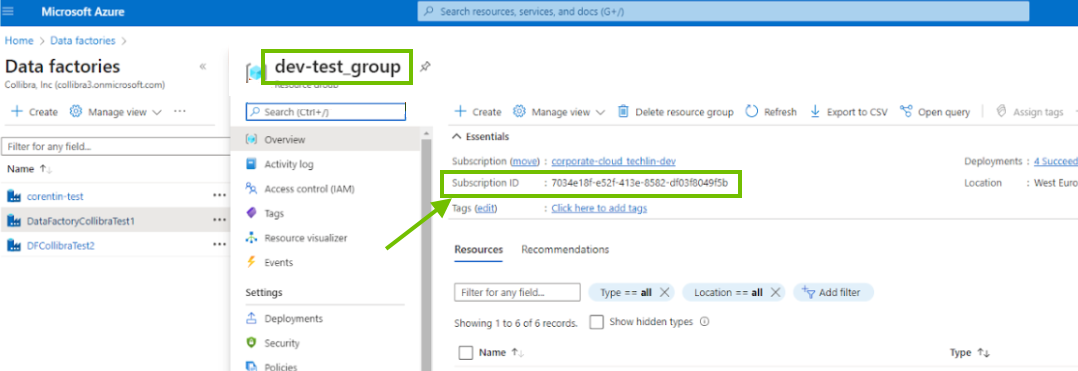
Tip The subscription ID is the value you will use for the
subscriptionIdproperty, in your Azure Data Factory configuration file.Assign read-only permissions to the resource group
To gather the information needed for technical lineage, the resource group needs permission to read the APIs.
-
Check to see which permissions the resource group has.
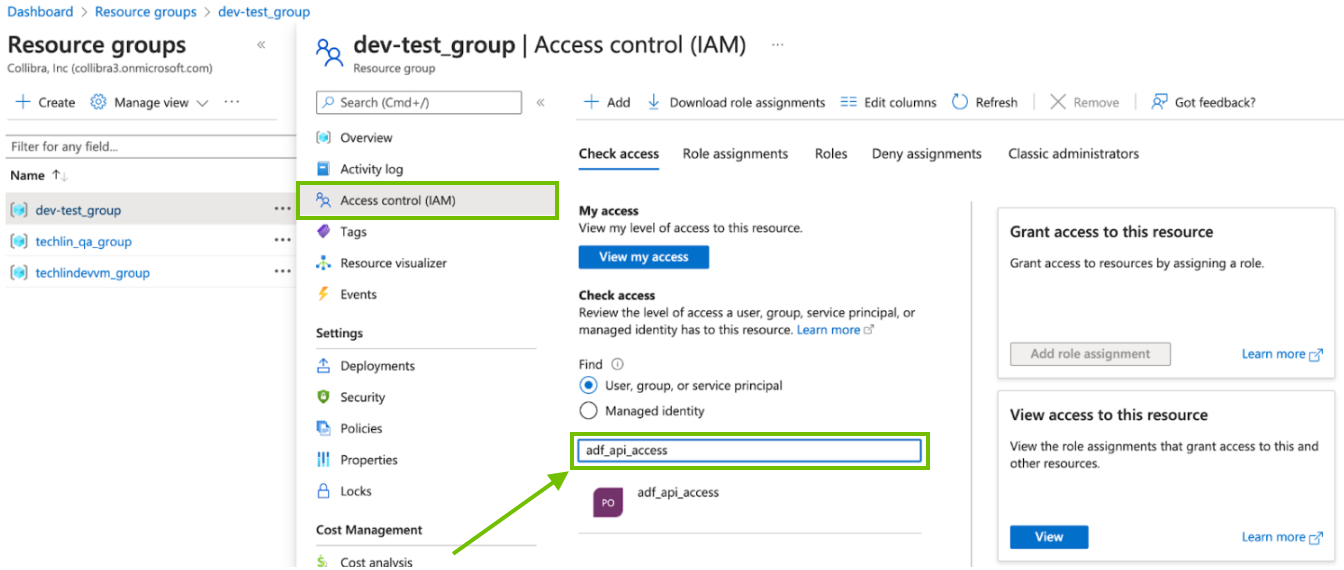
- On the Resource groups page, click Access control (IAM).
-
In the Check access search box, type the name of the AD group.
- In the search results, click on the AD group to see the access assignments.
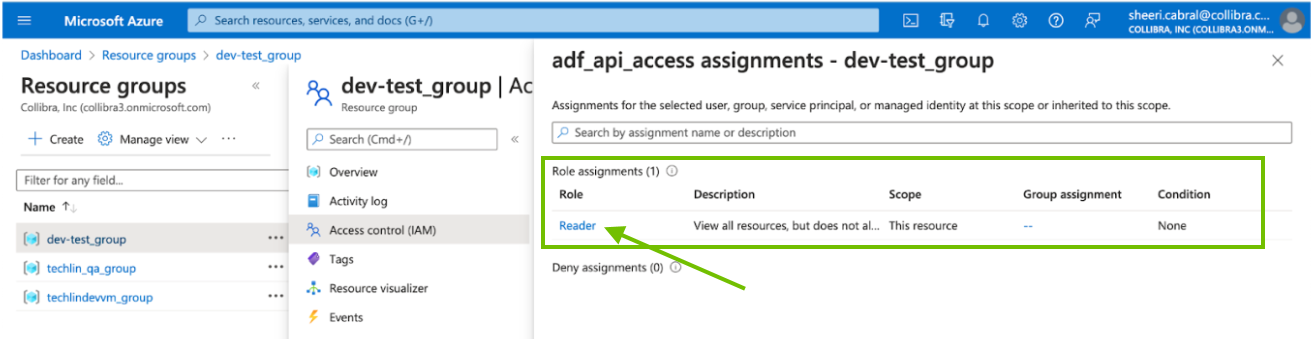
- If your resource group does not have the Reader role, click X in the upper-right corner, to close the Access assignments page.
The Access control (IAM) page again appears. - Click the Role assignments tab.

- Click Add > Add role assignment and follow the Microsoft Azure instructions on how to add a role assignment. Refer to the following table for help with the various settings:
Setting Description Roles The role assignment for the resource group.
Select Reader.
The lineage harvester only needs read access.
Members Ensure that the User, group, or service principal radio button is selected.
Search for and select the AD group.
Conditions No conditions are necessary. Click Next. Review + assign Click Review +assign, to assign the Reader role to the resource group. After a few moments, the read-only permission is assigned to the resource group.
If your resource group already has the Reader role, as shown in the previous image, this task is complete.
Requirements and permissions
The following requirements and permissions are needed for the technical lineage process. Additional, Edge-related roles and resources, are mentioned in each of the specific steps.
- Collibra Data Intelligence Cloud 2023.08 or later
- A global role with the following global permissions:
- Data Stewardship Manager
- Manage all resources
- System administration
- Technical lineage
- A resource role with the following resource permission on the community level in which you created the BI Data Catalog domain:
- Asset: add
- Attribute: add
- Domain: add
- Attachment: add
- Necessary permissions to all database objects that technical lineage via Edge accesses.
- bigquery.jobs.create
- bigquery.readsessions.create
- bigquery.tables.getData
- bigquery.readsessions.getData
- GRANT SELECT, at table level. Grant this to every table for which you want to create a technical lineage.
-
The role of the user that you specify in the
usernameproperty in lineage harvester configuration file must be the owner of the views in PostgreSQL. - Ensure that the Snowflake user has the appropriate allowed host list. For details, go to Allowing Hostnames in Snowflake documentation.
- You need a role that can access the Snowflake shared read-only database. To access the shared database, the account administrator must grant the IMPORTED PRIVILEGES privilege on the shared database to the user. The username of the user must be specified in the JDBC connection that you use to access Snowflake.
- If the default role in Snowflake does not have the IMPORTED PRIVILEGES privilege, you can click the Add property button to add a custom parameter with the following values specified:
Field Value Name customConnectionPropertiesType TextEncryption Select one of the following encryption methods:
Not encrypted (plain text)Encrypted with public keyTo be encrypted by Edge management server
Value role=METADATA - all_tab_cols
- all_col_comments
- all_objects
- ALL_DB_LINKS
- all_mviews
- all_source
- all_synonyms
- all_views
- Your user role must have privileges to export assets.
- You must have read permission on all assets that you want to export.
- You have at least a Matillion Enterprise license.
- You have generated the Matillion certificate. For more information, go to Recreating self-signed SSL certificates on a Matillion ETL instance.
- You have added the Matillion certificate to a Java truststore. For more information about adding a certificate to a Java truststore, go to Add a Certificate to a Truststore Using Keytool.
-
You need Admin API permissions.
The first call we make to MicroStrategy is to authenticate. We connect to <MSTR URL>:<Port>/MicroStrategyLibrary/api-docs/ and use POST api/auth/login. You have to ensure that this API call can be made successfully. - You need permissions to access the library server.
- The lineage harvester uses port 443. If the port is not open, you also need permissions to access the repository.
- If you have a MicroStrategy on-premises environment, you need the permissions for all of the database objects that the lineage harvester accesses.
- You have to configure the MicroStrategy Modeling Service. For complete information, see the MicroStrategy documentation.
- Necessary permissions to all database objects that the lineage harvester accesses.Show me the data source-specific permissions
Data source
Required permissions
Amazon Redshift
You need read access on information_schema. Only views that you own are processed.Azure Data Factory
Ensure that you meet the Azure Data Factory-specific permissions described in Set up Azure Data Factory.Azure SQL server
You need read access on the SYS schema.Azure Synapse Analytics
SELECT, at table level. Grant this to every table for which you want to create a technical lineage.Google BigQuery
You need read access on information_schema:- bigquery.datasets.get
- bigquery.tables.get
- bigquery.tables.list
- bigquery.jobs.create
- bigquery.routines.get
- bigquery.routines.list
Greenplum
A role with the LOGIN option.HiveQL
SELECT WITH GRANT OPTION, at Table level.IBM DB2
CONNECT ON DATABASEInformatica Intelligent Cloud Services
- Your user role must have privileges to export assets.
- You must have read permission on all assets that you want to export.
Matillion
- You have at least a Matillion Enterprise license.
- You have generated the Matillion certificate. For more information, go to Recreating self-signed SSL certificates on a Matillion ETL instance.
- You have added the Matillion certificate to a Java truststore. For more information about adding a certificate to a Java truststore, go to Add a Certificate to a Truststore Using Keytool.
Microsoft SQL Server
You need read access on the SYS schema and the View Definition Permission in your SQL Server.MySQL
SELECT, at table level. Grant this to every table for which you want to create a technical lineage.Netezza
You need read access on definition_schema.Oracle You need read access to the following dictionary views:- all_tab_cols
- all_col_comments
- all_objects
- ALL_DB_LINKS
- all_mviews
- all_source
- all_synonyms
- all_views
PostgreSQL
- GRANT SELECT, at table level. Grant this to every table for which you want to create a technical lineage.
-
The role of the user that you specify in the
usernameproperty in lineage harvester configuration file must be the owner of the views in PostgreSQL.
Snowflake The following permissions are required, regardless of the ingestion mode:SQLorSQL-API.You need a role that can access the Snowflake shared read-only database. To access the shared database, the account administrator must grant the IMPORTED PRIVILEGES privilege on the shared database to the user that runs the lineage harvester.If the default role in Snowflake does not have the IMPORTED PRIVILEGES privilege, you can use thecustomConnectionPropertiesproperty in the lineage harvester configuration file to assign the appropriate role to the user. For example:"customConnectionProperties": "role=METADATA"Teradata
You need read access on the DBC.
SQL or SQL-API.The following permissions apply only to MicroStrategy on-premises customers.
Steps
- Set up Tableau.
- Set up Power BI.
- Set up MicroStrategy.
-
Create an Azure Data Factory connection.
For Collibra Data Lineage to connect to and retrieve metadata from Azure Data Factory, create an Azure connection.
Before you begin
Create an Edge site on K3S.
Prerequisites
- You have a global role that has the System administration global permission.
- You have a global role that has the Manage Edge sites global permission.
- You have a global role that has the Manage connections and capabilities global permission.
Steps
- Open an Edge site.
-
On the main menu, click , and then click
Settings.
The Collibra settings page opens. -
Click Edge.
The Edge sites overview opens. - Click the name of an Edge site in the Edge site overview.
The Edge site page opens.
-
On the main menu, click
- Click Create Connection.
The Connection settings page appears. -
Enter the connection information.
Field Description Required Connection settings
This section contains the general settings of your connection.
NameThe name of the Edge connection for Azure Data Factory.
 YesDescription
The description of the connection.
 No
Connection provider
No
Connection providerThe connection provider, which determines the available connection parameters.
Select the Azure connection.
Yes
Connection parameters
This section contains the settings to connect to your data source. Service Principal IDThe Application account ID to connect to the Azure.
For information on the Azure Service Principal user and the Application ID, go to the Azure documentation. Yes
Service Principal SecretIf you want to use the Service Principal authentication type, enter the application secret for the Service Principal.
For information on the application secret value, go to the Azure documentation.If you want to use the Resource Owner Password Credentials authentication type, enter the password.
Ensure that you select the corresponding authentication type when you add the Technical Lineage for ADF capability.
Yes
Encryption optionsSelect the type of encryption used to store the Secret Access Key.
The default is To be encrypted by Edge management server.
Yes
Tenant IDThe Tenant ID of your Azure Active Directory.
For information on the Directory (tenant) ID, go to the Azure documentation. Yes
- Click Create.
-
Create a dbt connection.
For CollibraData Lineage to connect to and retrieve metadata from dbt Cloud (Beta), create a dbt connection.
Before you begin
Create an Edge site on K3S.
Prerequisites
- You have a global role that has the System administration global permission.
- You have a global role that has the Manage Edge sites global permission.
Steps
- Open an Edge site.
-
On the main menu, click , and then click
Settings.
The Collibra settings page opens. -
Click Edge.
The Edge sites overview opens. - Click the name of an Edge site in the Edge site overview.
The Edge site page opens.
-
On the main menu, click
- Click Create Connection.
The Connection settings page appears. -
Enter the connection information.
Field Description Required Connection settings This section contains the settings to connect to your data source. NameThe name of the connection. Yes
DescriptionThe description of the connection. This field is also visible when you register content. No
Connection providerThe connection provider, which determines the available connection parameters.
Select dbt connection.
Yes
Connection parameters This section contains general settings to connect to your data source. Admin URLThe dbt Cloud Administrative API that Collibra Data Lineage uses to download job artifacts. The default value is
https://cloud.getdbt.com/api/v2. No
Metadata URLThe dbt Cloud Discovery API. The default value is
https://metadata.cloud.getdbt.com/graphql.For details, go to Query the Discovery API in dbt documentation.
No
Token NameThe name of the service token. It can be any unique meaningful name.
How to get a service token and token value.- Generate a Service token and ensure that you set the Read-Only permissions for CollibraData Lineage to work properly.
- Copy the token value when you save the service token.
For details, go to Generating service account tokens in dbt documentation.
Yes
Token ValueEnter the service token.
Tip You can select To be encrypted by Edge management server or Encrypted with public key to indicate the encryption method.
Yes
- Click Create.
-
Create an Informatica Intelligent Cloud Services connection.
For CollibraData Lineage to connect to and retrieve metadata from Informatica Intelligent Cloud Services, create an Informatica Intelligent Cloud Services (IICS) connection.
Before you begin
- To create and use Informatica Intelligent Cloud Services (IICS) connection, use Collibra Data Intelligence Cloud 2023.03 or later.
- Create an Edge site on K3S.
Prerequisites
- You have a global role that has the System administration global permission.
- You have a global role that has the Manage Edge sites global permission.
- You have a global role that has the Manage connections and capabilities global permission.
Steps
- Open an Edge site.
-
On the main menu, click , and then click
Settings.
The Collibra settings page opens. -
Click Edge.
The Edge sites overview opens. - Click the name of an Edge site in the Edge site overview.
The Edge site page opens.
-
On the main menu, click
- Click Create Connection.
The Connection settings page appears. -
Enter the connection information.
Field Description Required Connection settings This section contains the settings to connect to your data source. NameThe name of the connection. Yes
DescriptionThe description of the connection. This field is also visible when you register content. No
Connection providerThe connection provider, which determines the available connection parameters.
Select Informatica Intelligent Cloud Services (IICS) connection.
Yes
Connection parameters This section contains general settings to connect to your data source. IICS URLThe URL of the Informatica Intelligent Cloud Services environment sign-in page. For example:
https://dm-us.informaticaintelligentcloud.com. Yes
UsernameThe username that you use to sign in to Informatica Intelligent Cloud Services. Yes
PasswordThe password that you use to sign in to Informatica Intelligent Cloud Services.
Tip You can select To be encrypted by Edge management server or Encrypted with public key to indicate the encryption method.
Yes
- Click Create.
-
Create a Tableau connection.
To retrieve data from Tableau, you have to connect to Tableau via the Edge site.
Prerequisites
- You have a global role that has the System administration global permission.
- You have a global role that has the Manage Edge sites global permission.
- You have a global role that has the Manage connections and capabilities global permission.
- You have a resource role with the Configure external system resource permission, for example, Owner.
- If you connect to Tableau Online, you have a Tableau user with at least Viewer rights.
- If you connect to Tableau Server, you have a Tableau user with access to at least one site.
- You have the necessary Tableau permissions.
Steps
- Open an Edge site.
-
In the main menu, click Settings.
The System tab page appears. -
In the tab pane, click Edge.
The Edge sites overview appears. -
In the Edge site overview, click the name of an Edge site.
The Edge site page appears.
-
In the main menu, click Settings.
-
In the Connections section, click Create Connection.
The Connection settings page appears. - Enter the required information.
Field Description Required Connection settings This section contains general information about the connection. Name The name of the connection. The name can be anything, as long as it is unique.
Tip The name that you provide here is the name you have to select in the Tableau connection field, when adding the Technical Lineage for Tableau capability to the Edge site.
Yes
Description The description of the connection. No
Connection provider The type of connection.
Select Tableau connection.
Yes
Connection parameters This section contains connection authentication information. URL The URL of your Tableau server. Yes
Authentication type The authentication type for your connection to the Tableau server.
Yes
Username/Token name - If you selected authentication type username, enter the username of the Tableau user.
- If you selected authentication type token, enter the personal access token name of the Tableau user.
Yes
Password/Token secret - If you selected authentication type username, enter the password of the Tableau user.
- If you selected authentication type token, enter the personal access token secret of the Tableau user.
Yes
Custom certificate Optional field for uploading a custom server certificate, to connect to
Click Upload and search for your custom server certificate.
You don't need to add the certificate to the Java Truststore. Edge stores the certification as it does any other input parameter, and automatically uses it when connecting to
No - Click Create.
What's next?
Add the Technical Lineage for Tableau capability to the Edge site.
-
Create a Power BI connection.
To retrieve data from Power BI, you have to connect to Power BI via the Edge site.
Prerequisites
- You have a global role that has the System administration global permission.
- You have a global role that has the Manage Edge sites global permission.
- You have a global role that has the Manage connections and capabilities global permission.
- You have a resource role with the Configure external system resource permission, for example, Owner.
- You have the necessary Power BI permissions.
Steps
- Open an Edge site.
-
In the main menu, click Settings.
The System tab page appears. -
In the tab pane, click Edge.
The Edge sites overview appears. -
In the Edge site overview, click the name of an Edge site.
The Edge site page appears.
-
In the main menu, click Settings.
-
In the Connections section, click Create Connection.
The Connection settings page appears. - Enter the required information.
Field Description Required Connection settings This section contains general information about the connection. Name The name of the connection. The name can be anything, as long as it is unique.
Tip The name that you provide here is the name you have to select in the Power BI connection field, when adding the Technical Lineage for Power BI capability to the Edge site.
Yes
Description The description of the connection. No
Connection provider The type of connection.
Select Power BI connection.
Yes
Connection parameters This section contains connection authentication information. Tenant Domain The domain associated with the Microsoft Azure tenant. This domain is either a default domain or a custom domain. For example, collibrapowerbi.onmicrosoft.com.
Note Usually, you can find a list of Power BI tenant or server domains in your Azure Active Directory or in the top right menu.
Yes
Authentication type The authentication type for your connection to Power BI. Enter one of the following:
- Service Principal
- Resource Owner Password Credentials
Yes
Application ID The unique ID of the Microsoft Azure Application (client) ID. Yes
Username The email address of your Azure Active Directory user.
This field only applies if you entered Resource Owner Password Credentials in the Authentication type field.
No
Password/Secret key Your password (if you entered Resource Owner Password Credentials in the Authentication type field) or your secret key (if you entered Service Principal in the Authentication type field), for your Azure Active Directory user.
Yes
Custom certificate Optional field for uploading a custom server certificate, to connect to
Click Upload and search for your custom server certificate.
You don't need to add the certificate to the Java Truststore. Edge stores the certification as it does any other input parameter, and automatically uses it when connecting to
No - Click Create.
What's next?
Add the Technical Lineage for Power BI capability to the Edge site.
-
Create a MicroStrategy connection.
To retrieve data from MicroStrategy, you have to connect to MicroStrategy via the Edge site.
Prerequisites
- You have a global role that has the System administration global permission.
- You have a global role that has the Manage Edge sites global permission.
- You have a global role that has the Manage connections and capabilities global permission.
- You have a resource role with the Configure external system resource permission, for example, Owner.
- You have the necessary MicroStrategy permissions.
Steps
- Open an Edge site.
-
In the main menu, click Settings.
The System tab page appears. -
In the tab pane, click Edge.
The Edge sites overview appears. -
In the Edge site overview, click the name of an Edge site.
The Edge site page appears.
-
In the main menu, click Settings.
-
In the Connections section, click Create Connection.
The Connection settings page appears. - Enter the required information.
Field Description Required Connection settings This section contains general information about the connection. Name The name of the connection. The name can be anything, as long as it is unique.
Tip The name that you provide here is the name you have to select in the MicroStrategy connection field, when adding the Technical Lineage for MicroStrategy capability to the Edge site.
Yes
Description The description of the connection. No
Connection provider The type of connection.
Select MicroStrategy connection.
Yes
Connection parameters This section contains connection authentication information. URL The URL of your MicroStrategy Intelligence Server.
Yes
Authentication type The authentication type for your connection to MicroStrategy.
Yes
Username The email address of your Azure Active Directory user.
This field only applies if you entered Resource Owner Password Credentials in the Authentication type field.
No
Password/Secret key Your password (if you entered Resource Owner Password Credentials in the Authentication type field) or your secret key (if you entered Service Principal in the Authentication type field), for your Azure Active Directory user.
Yes
- Click Create.
What's next?
Add the Technical Lineage for MicroStrategy capability to the Edge site.
-
Create a Matillion connection.
For Collibra Data Lineage to connect to and retrieve metadata from Matillion, create a Matillion connection.
Before you begin
- To create and use Matillion connection, use Collibra Data Intelligence Cloud 2023.03 or later.
- Create an Edge site on K3S.
Prerequisites
- You have a global role that has the System administration global permission.
- You have a global role that has the Manage Edge sites global permission.
- You have a global role that has the Manage connections and capabilities global permission.
Steps
- Open an Edge site.
-
On the main menu, click , and then click
Settings.
The Collibra settings page opens. -
Click Edge.
The Edge sites overview opens. - Click the name of an Edge site in the Edge site overview.
The Edge site page opens.
-
On the main menu, click
- Click Create Connection.
The Connection settings page appears. -
Enter the connection information.
Field Description Required Connection settings This section contains the settings to connect to your data source. NameThe name of the connection. Yes
DescriptionThe description of the connection. This field is also visible when you register content. No
Connection providerThe connection provider, which determines the available connection parameters.
Select Matillion connection.
Yes
Connection parameters This section contains general settings to connect to your data source. Matillion URLThe URL of your Matillion environment. For example, https://<domain name>orhttps://<IP address>. Yes
Authentication TypeThe authentication details for signing in to Matillion. You can select one of the following values:
Credentials- Use the username and password authentication type.
Token- Use the token-based authentication type.
Yes
UsernameThe username that you use to sign in to Matillion.
This field is required if you set the Authentication type field to Credentials.PasswordThe password that you use to sign in to Matillion.
Tip You can select To be encrypted by Edge management server or Encrypted with public key to indicate the encryption method.
Yes
- Click Create.
-
Create a Shared Storage connection.
A Shared Storage connection allows you to grant your capabilities access to files from a shared folder. This connection is especially useful for capabilities with large files, as you do not need to manually upload these files directly to Edge, but rather define the file path when creating the new connection.
Before you begin
Note This connection type is not available for Edge sites created on EKS.
Prerequisites
- You have a global role that has the System administration global permission.
- You have a global role that has the Manage Edge sites global permission.
- You have a global role that has the Manage connections and capabilities global permission.
Steps
- Create a folder on the server where your Edge site is installed, relative to
--storage-path.When you create the Shared Storage connection, the location of this file appears next to the Folder field. For example, the location is indicated as Folder relative to /var/lib/edge/storage. - Open an Edge site.
-
On the main menu, click , and then click
Settings.
The Collibra settings page opens. -
Click Edge.
The Edge sites overview opens. - Click the name of an Edge site in the Edge site overview.
The Edge site page opens.
-
On the main menu, click
- Click Create Connection.
The Connection settings page appears. -
Enter the connection information.
Field Description Required Name The name of the connection. Yes
Description The description of the connection. No
Connection provider Select Shared Storage Connection. Yes
Folder Enter the name of your folder created in step 1.
Note Edge lists the location of this file to the right of this field. Yes
- Click Create.
-
Create a Shared Storage connection.
A Shared Storage connection allows you to grant your capabilities access to files from a shared folder. This connection is especially useful for capabilities with large files, as you do not need to manually upload these files directly to Edge, but rather define the file path when creating the new connection.
Before you begin
Note This connection type is not available for Edge sites created on EKS.
Prerequisites
- You have a global role that has the System administration global permission.
- You have a global role that has the Manage Edge sites global permission.
- You have a global role that has the Manage connections and capabilities global permission.
Steps
- Create a folder on the server where your Edge site is installed, relative to
--storage-path.When you create the Shared Storage connection, the location of this file appears next to the Folder field. For example, the location is indicated as Folder relative to /var/lib/edge/storage. - Open an Edge site.
-
On the main menu, click , and then click
Settings.
The Collibra settings page opens. -
Click Edge.
The Edge sites overview opens. - Click the name of an Edge site in the Edge site overview.
The Edge site page opens.
-
On the main menu, click
- Click Create Connection.
The Connection settings page appears. -
Enter the connection information.
Field Description Required Name The name of the connection. Yes
Description The description of the connection. No
Connection provider Select Shared Storage Connection. Yes
Folder Enter the name of your folder created in step 1.
Note Edge lists the location of this file to the right of this field. Yes
- Click Create.
-
Prepare the SQL directory.
To create technical lineage for JDBC data sources by using the Shared Storage Connection, you must provide SQL files that include your SQL queries. Collibra Data Lineage processes the metadata based on your queries to create the technical lineage.
For more information about the connection types for different data sources, go to Supported data sources for technical lineage.
Steps
-
Create your SQL files. Ensure that the following requirements are met for the SQL files:
- The SQL files must be UTF-8 encoded.
- For better ingestion, include one SQL statement in one SQL file.
- Collibra Data Lineage processes the SQL files in alphabetical order. The SQL files that include the Data Definition Language (DDL) statements must be processed before the SQL files that include the Data Manipulation Language (DML) statements. To ensure this order, name the SQL files such that those containing DDL statements come before those containing DML statements alphabetically.
- The database and schema names in the SQL statements in your SQL files take precedence over the values that you provide for the Database and Schema fields in the technical lineage for SqlDirectory capability. If your SQL statements contain database and schema names, Collibra Data Lineage uses them for stitching. If your SQL statements do not contain database and schema names, Collibra Data Lineage uses the values of the Database and Schema fields in the capability for stitching. For more information, go to Add a technical lineage capability to your Edge site and Automatic stitching for technical lineage.
For more information, go to Supported SQL syntax.
- Store the SQL files in the folder that you created when you created the Shared Storage connection.
Example 1 SQL statements do not include schema and database names
This example shows the SQL files that include the queries on the
PersonsandJobInformationtables and theJobTitleViewview.- The ddl-persons.sql file
CREATE TABLE Persons ( PersonID int, LastName varchar(255), FirstName varchar(255), Address varchar(255), City varchar(255) ); - The ddl-jobinformation.sql file
CREATE TABLE JobInformation ( PersonID int, Department varchar(255), Title varchar(255) ); - The view-jobtitle.sql file
CREATE VIEW JobTitleView AS
SELECT
    Persons.PersonID,
    Persons.FirstName,
    Persons.LastName,
    JobInformation.Title
from
    Persons
    INNER JOIN JobInformation ON Persons.PersonID = JobInformation.PersonId
Example 2 SQL statements include schema and database names
This example shows SQL files that include the queries on the
PersonsandJobInformationtables and theJobTitleViewview. The SQL statements contain the database and schema names for each table and view, and Collibra Data Lineage uses them for stitching. The SQL files are named in a way that ensures the DDL statements are processed before the DML statement.- The ddl-db1-schemaA-persons.sql file
CREATE TABLE DB1.SchemaA.Persons ( PersonID int, LastName varchar(255), FirstName varchar(255), Address varchar(255), City varchar(255) ); - The ddl-db2-schemaB-jobinformation.sql file
CREATE TABLE DB2.SchemaB.JobInformation ( PersonID int, Department varchar(255), Title varchar(255) ); - The view-db2-schemaC-jobtitleview.sql file
CREATE VIEW DB2.SchemaC.JobTitleView AS
SELECT
    Persons.PersonID,
    Persons.FirstName,
    Persons.LastName,
    JobInformation.Title
from
   DB1.SchemaA.Persons
   INNER JOIN DB2.SchemaB.JobInformation ON Persons.PersonID = JobInformation.PersonId
-
-
Prepare the data source files.
Prepare the data source files and store the data source files in the folder that you created when you created the Shared Storage connection in the previous step.
Prerequisites
You have IBM InfoSphere Information Server version 11.5 or newer.
Steps
-
Export the DataStage project files (DSX) for which you want to create a technical lineage.
-
Store the DataStage files in your Shared Storage connection folder.
-
Optionally, if your DataStage project uses environment variables, manually export the environment files (ENV).
-
Give the environment files the same name as the DataStage project files. For example, if your project file is named datastage-project-1.dmx, name your environment file datastage-project-1.env.
-
Store the environment files in the same Shared Storage connection folder.
Important- Collibra Data Lineage only supports DSX and ENV files.
- You can have one DSX file per DataStage project.
- You can have more than one DSX file in the Shared Storage connection folder.
- You can have one or none ENV file per DSX file.
- The name of the DSX file and the ENV file has to be the same.
-
-
Prepare the data source files.Prepare the data source files and store the data source files in the folder that you created when you created the Shared Storage connection in the previous step.
Prerequisites
You have Informatica PowerCenter version 9.6 or newer.Steps
- Export the Informatica objects or repository for which you want to create a technical lineage to the Shared Storage connection folder.
Make sure to export all objects, parameter files, mappings and sessions at the same time.Manually exporting Informatica objects in Informatica PowerCenter 10.0.0.
- Open Informatica PowerCenter Repository Manager.
- Connect to your Informatica repository.
- In the navigation panel, navigate to the workflow that contains the Informatica objects that you want to export.
- Right-click on the workflow and click Dependencies.
- In the Dependencies dialog box, do the following:
- Select Primary/Foreign Key dependencies.
- Select Global Shortcut dependencies.
- In the Object Types selector, select all object types except User-Defined.
- Click OK.
The Dependencies dialog box closes.
A dialog box with all Informatica objects appears. - Select all objects.
- In the toolbar, click
 (Export to XML).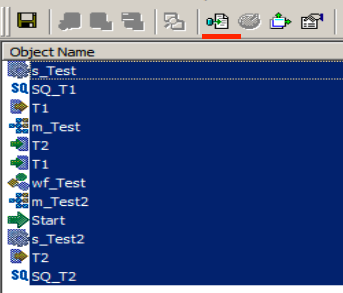
- Save the resulting XML files in your local folder.
Exporting Informatica repository objects in Informatica PowerCenter via command line.- In the Informatica PowerCenter Client or PowerCenter Services bin directories, open pmrep.
- Export Informatica PowerCenter repository objects.
Note Make sure that you export the same Informatica PowerCenter repository objects as during a manual export.
- Save the resulting XML files in your local folder.
Note- If your folder contains previous versions of the parameter files, objects might be duplicated across different file versions. The duplicated objects cause CollibraData Lineage to ignore some transformations, resulting in missing lineage and error messages. For example, if a parameter file is exported after a column was added to a table, duplicated objects exist if the previous version of the parameter file remains in the folder. To avoid missing lineage, export all objects and parameter files at the same time.
- All XML and parameter files, for example PAR, TXT or PRM files in this folder and its subfolders are taken into account when you create a technical lineage, but Collibra Data Lineage only shows a technical lineage for workflows that have mappings with sources, transformations and targets. Collibra supports the most common Informatica PowerCenter transformations. For more information, see the Informatica PowerCenter documentation.
- When you export a workflow, ensure that all dependencies are included in the same export file. This applies whether you export the XML file manually or by using the command line. If any dependencies are missing for a workflow, the lineage information for the workflow will be missing in the technical lineage.
- A technical lineage is created when the following tags are present in your XML file:
- <REPOSITORY>
- <FOLDER>
- <SOURCE> / <TARGET>
- <SESSION>
- <MAPPING>
- <TRANSFORMATION> (within a <MAPPING> tag)
- If parameters are missing from the parameter files, the UNRESOLVED PARAMETERS analyze error will be displayed in the analysis results in the Sources tab page. For details, go to Analyze errors and possible solutions in Technical lineage Sources tab page.
In the Shared Storage connection folder, create a folder named techlin-param and put the parameter files in the techlin-param folder.
- Export the Informatica objects or repository for which you want to create a technical lineage to the Shared Storage connection folder.
Make sure to export all objects, parameter files, mappings and sessions at the same time.
-
Prepare the data source files.
Prepare the data source files and store the data source files in the folder that you created when you created the Shared Storage connection in the previous step.
Prerequisites
- You have SQL Server Integration Services 2012 or newer with package format version 6 or newer.
- You have Microsoft Visual Studio version 2012 or newer.
Steps
-
Export the SSIS files for which you want to create a technical lineage.
Tip You can export them directly from the SQL Server Integration Services repository or via Microsoft Visual Studio. For more information, see the SQL Server Integration Services documentation. -
Store the SSIS files to
- SSIS package files (DTSX), containing the SQL Server Integration Services source code.
- Connection manager files (CONMGR), containing environment and connection information.
- Parameter files (PARAMS), if applicable.
Note- All files in this folder and subfolders are taken into account when you create a technical lineage.
- Not all SSIS files are processed and shown in the technical lineage.
-
Which custom lineage definition option are you using?
- Single-file definition
You have to define the technical lineage in a single JSON file. Use the following format and code examples to create the JSON file, and then store the file in the folder that you created when you created the Shared Storage connection, earlier in this procedure.
JSON file formatting for the single-file definition optionIf you opt for the single-file definition option, you use a lineage.json file to define the lineage between two or more data objects, and optionally include transformations details to create the custom technical lineage.
The following sections in the JSON file define different parts in the resulting Collibra technical lineage graph:
tree, which defines the data object hierarchy. The data objects are shown as nodes in the technical lineage graph.lineages, which defines the lineage relation. The lineage relations are shown as edges in the technical lineage graph. The edges represent the data flow from a source to a target.codebase_files, which points to the source code files that include transformation details.
To create a simple custom technical lineage, you need to include
assetsandlineagessections in your JSON file. You can add the transformation code in thelineagessection.To create an advanced custom technical lineage, you need to include
assets,lineagesandcodebase_filessections in your JSON file. You add references to the transformation code in source code files in thecodebase_filessection.Transformation code in both simple and advanced custom technical lineages is shown in the source code pane at the bottom part of the technical lineage graph.
Requirements and restrictions
The source code files must be in the same directory as the lineage.json file. Otherwise, an error occurs indicating that the lineage harvester cannot find the source code files.
Sections
Sections
Description version
The version of the JSON architecture. Specify the value of
1.0, which is the only supported version.This section contains tree definitions of data objects between which lineages can be defined. The data objects are systems, databases, schemas, tables, views, columns, dashboards and reports.
Each node of a tree contains the name, type and optionally children or leaves properties which form a hierarchy of data objects. You must define a node only once in this section. With the nested tree format, you can reuse the properties of one node for multiple children. For example, you can define a database once and use the
childrenarray to define multiple tables in the database.Tip Usually, the structure you map is the following: system > database > schema > table > column. The system is optional, unless the
useCollibraSystemNameproperty is set totruein your lineage harvester configuration file. Collibra Data Lineage can stitch these data objects to assets in Data Catalog. However, you can also map custom objects, for example dashboards and reports. Custom objects cannot be stitched to assets in Data Catalog.Important If the
useCollibraSystemNameproperty is set tofalsein your lineage harvester configuration file, do not specify the system data object in this section, or else stitching will fail.lineages This section contains the path from a source to a target and defines the transformation code or transformation references to be processed by the Collibra Data Lineage service.
Important If the
useCollibraSystemNameproperty is set tofalsein your lineage harvester configuration file, do not specify the system data object in this section, or else stitching will fail.codebase_files
This optional section defines the reference to source code files. Store the source code files that contain the transformation code in the same directory as the lineage.json file.
Include this section only when you create an advanced custom technical lineage.
tree section properties
Properties
Description nameThe name of your data object. Specify this property with the system name, database name, schema name, table name, view name or column name.
The following rules apply when you specify this property:
- The names are case sensitive.
- The names of children and leaves can be identical if the children and leaves with the same names are in different parent nodes.
typeThe type of your data object. You can specify one of the following options:
system,database,schema,table,view,column,dashboardorreport.If theuseCollibraSystemNameproperty in your lineage harvester configuration file is set totrue, the system data object is used to stitch to the System asset in Data Catalog. If theuseCollibraSystemNameproperty is set tofalsein your lineage harvester configuration file, do not specify the system data object in this section, or else stitching will fail.childrenThe sub-objects that have a hierarchical relation to the defined data object.
Each child can contain
childrenproperties, except for the penultimate child. The penultimatechildrenproperty must contain theleavesproperty. Theleavesproperty cannot contain achildrenproperty.For example, you can use the
childrenproperty to define a table and use theleavesproperties to define columns that have a relation to the table node.Each child and leave have the
nameandtypeproperties and the optionalcatalog_fullname,catalog_domain_id,catalog_asset_type_nameandcatalog_asset_type_uuidproperties.leavesThe sub-objects of an object that is defined in a
childrenproperty, but cannot have sub-objects of their own.A technical lineage is defined as relations between leaf nodes of the tree.
The value of the
typeproperty of theleavesproperty must becolumnorreport. Indirect and table-level technical lineages are not supported. For the workarounds to create a table level or indirect technical lineage, see Programming considerations.lineage section properties
Properties
Required Description src_pathYes The hierarchical path to the source data object. This data object is defined as a leaf in the
treesection.This property represents where the data comes from for a transformation.
trg_pathYes The hierarchical path to the target data object. This data object is defined as a leaf in the
treesection.This property represents where the data flows to.
<data objects>Yes An ordered array of data object names. This array is required to define the sub-objects of the
src_pathandtrg_pathproperties.Specify the array with the data object names that start from the top of the
treesection and finish at a leaf node.This example shows data objects that can be stitched: system > database > schema > table > column.
This example shows data objects that cannot be stitched: dashboard > report > column.
If theuseCollibraSystemNameproperty in your lineage harvester configuration file is set totrue, the system data object is used to stitch to the System asset in Data Catalog. If theuseCollibraSystemNameproperty is set tofalsein your lineage harvester configuration file, do not specify the system data object in this section, or else stitching will fail.mappingYes
Simple custom technical lineage only
The mapping name. This property specifies a name for the transformation code.
source_codeYes
Simple custom technical lineage only
The transformation code, which determines how the technical lineage is constructed.
The transformation code can be a descriptive string or a SQL statement that manipulates data.
mapping_refNo
Advanced custom technical lineage only
This property contains the name of the mapping reference to the transformation code in source code files. This property also contains the position and length of the transformation code to be highlighted in the technical lineage graph.
source_codeNo
Advanced custom technical lineage only
The name of the source code file that contains the transformation code. The transformation code can be a SQL statement, code that manipulates data or a descriptive string.
mappingNo
Advanced custom technical lineage only
The unique descriptor of a part of transformation code in a source code file that is in the same directory as the lineage.json file.
A source code file can contain different parts of transformation code that represent different data flows. This property indicates the referenced data flow.
The value of this property is the same as the value of the
mapping_refsproperty in thecodebase_filessection.codebase_posNo
Advanced custom technical lineage only
The positions indicate a string of the transformation code in a source code file to be highlighted in the bottom part of the Collibra technical lineage graph. The whole lines that include the transformation code are highlighted.
The string must be a subset of the string of the transformation code that is defined by the
pos_startandpos_lenproperties of themapping_refsproperty in thecodebase_filessection.pos_startNo
Advanced custom technical lineage only
The start position of the string of the transformation code to be highlighted. The start position is in characters, not bytes.
The value must be equal to or greater than the value of the
pos_startproperty of themapping_refsproperty in thecodebase_filessection.pos_lenNo
Advanced custom technical lineage only
The length of the string of the transformation code to be highlighted. The length is in characters, not bytes.
Specify a value in the following range:
- Equal to or greater than 1.
- Less than or equal to the length of the string that is defined by the
pos_lenproperty of themapping_refsproperty in the thecodebase_filessection.
For example, if you specify
"pos_start": 10and"pos_len": 160in thecodebase_filessection, specify a value for this property in the range of 0 - 149.codebase_files section properties
Properties
Description <source code path>The file path to source code files that contain the transformation code. The transformation code can be a SQL statement or code that manipulates data.
The mapping of the transformation code and the position of the transformation code that is shown in the bottom part of the technical lineage graph.
This property defines a string of the transformation code in the source code file to be shown in the technical lineage graph. The string must include the string that is defined by the
pos_startandpos_lenproperties of themappingproperty in thelineagesection.<mapping>The unique descriptor of a part of transformation code in a source code file that is in the same directory as the lineage.json file.
A source code file can contain different parts of transformation code that represent different data flows. This property indicates the referenced data flow.
The value must match the value of the
mappingproperty in thelineagesection.pos_startThe start position of the string of the transformation code. The start position is in characters, not bytes.
Specify a value in the following range:
- Equal to or greater than 0.
- Less than or equal to the value of the
pos_startproperty in themappingproperty in thelineagesection.
pos_lenThe length of the string of the transformation code. The length is in characters, not bytes.
Specify a value in the following range:
- Greater than or equal to 1.
- Less than or equal to the length of the source code file minus the start position.
For example, if you specify
"pos_start": 10and the file length is 160 characters, specify a value for this property in the range of 1 - 150.Programming considerations
Currently, there is no native support for indirect and table-level lineages. As a workaround, you can specify
"type": "column"and"name": "*"for theleavesproperty to create a table level or indirect technical lineage. With this specification, the indirect technical lineage is shown as a solid line instead of a dashed line in the Collibra technical lineage graph, and is always shown, regardless of whether or not the Show indirect dependencies option is enable or disabled.Example
For some example JSON files, go to Custom technical lineage JSON file examples.
Single file-definition JSON file examplesThis section shows some example lineage.json files for simple custom technical lineage and advanced custom technical lineage.
Each example can be used to generate technical lineage graphs in Collibra to represent the IOT_JSON and IOT_DEVICES_PER_COUNTRY tables with the following columns:
IOT_JSON
IOT_DEVICES_PER_COUNTRY CCA3
COUNTRY
DEVICE_ID
NUMBER_DEVICES
Example JSON file for a simple custom technical lineage
In the following example, the
treesection defines the IOT_JSON and IOT_DEVICES_PER_COUNTRY tables and columns. The tables are in a schema named COLLIBRA. The COLLIBRA schema is in a database named COLLIBRA and a system named Databricks.Important If you define the System asset in your lineage.json file, the
useCollibraSystemNameproperty in your lineage harvester configuration file must be set totrue; otherwise, relations will not be created between the relevant assets in Collibra and stitching will fail.To show the transformation code at the bottom of the technical lineage graph, specify the
mappingandsource_codeproperties in thelineagessection.{ "version": "1.0", "tree": [ { "name": "Databricks", "type": "system", "children": [ { "name": "COLLIBRA", "type": "database", "children": [ { "name": "COLLIBRA", "type": "schema", "children": [ { "name": "IOT_JSON", "type": "table", "leaves": [ { "name": "CCA3", "type": "column" }, { "name": "DEVICE_ID", "type": "column" } ] }, { "name": "IOT_DEVICES_PER_COUNTRY", "type": "table", "leaves": [ { "name": "COUNTRY", "type": "column" }, { "name": "NUMBER_DEVICES", "type": "column" } ] } ] } ] } ] } ], "lineages": [ { "src_path": [ { "system": "Databricks" }, { "database": "COLLIBRA" }, { "schema": "COLLIBRA" }, { "table": "IOT_JSON" }, { "column": "CCA3" } ], "trg_path": [ { "system": "Databricks" }, { "database": "COLLIBRA" }, { "schema": "COLLIBRA" }, { "table": "IOT_DEVICES_PER_COUNTRY" }, { "column": "COUNTRY" } ], "mapping": "dev_no_bat_per_country_view", "source_code": "INSERT INTO ... SELECT CCA3 AS COUNTRY...FROM IOT_JSON" } ] }Example JSON file for an advanced custom technical lineage
In the following example, the
treesection defines the IOT_JSON and IOT_DEVICES_PER_COUNTRY tables and columns. The tables are in a schema named COLLIBRA. The COLLIBRA schema is in a database named COLLIBRA and a system named Databricks.If you define the System asset in your lineage.json file, theuseCollibraSystemNameproperty in your lineage harvester configuration file must be set totrue; otherwise, relations will not be created between the relevant assets in Collibra and stitching will fail.{ "version": "1.0", "tree": [ { "name": "Databricks", "type": "system", "children": [ { "name": "COLLIBRA", "type": "database", "children": [ { "name": "COLLIBRA", "type": "schema", "children": [ { "name": "IOT_JSON", "type": "table", "leaves": [ { "name": "CCA3", "type": "column" }, { "name": "DEVICE_ID", "type": "column" } ] }, { "name": "IOT_DEVICES_PER_COUNTRY", "type": "table", "leaves": [ { "name": "COUNTRY", "type": "column" }, { "name": "NUMBER_DEVICES", "type": "column" } ] } ] } ] } ] } ], "lineages": [ { "src_path": [ { "system": "Databricks" }, { "database": "COLLIBRA" }, { "schema": "COLLIBRA" }, { "table": "IOT_JSON" }, { "column": "CCA3" } ], "trg_path": [ { "system": "Databricks" }, { "database": "COLLIBRA" }, { "schema": "COLLIBRA" }, { "table": "IOT_DEVICES_PER_COUNTRY" }, { "column": "COUNTRY" } ], "mapping_ref": { "source_code": "transforms.sql", "mapping": "dev_no_bat_per_country_view", "codebase_pos": [ { "pos_start": 71, "pos_len": 69 } ] } } ], "codebase_files": { "transforms.sql": { "mapping_refs": { "dev_no_bat_per_country_view": { "pos_start": 0, "pos_len": 246 } } } } }Example technical lineage graphs
Both example lineage.json files generate the following technical lineage graph, which contains 2 nodes and 1 edge.
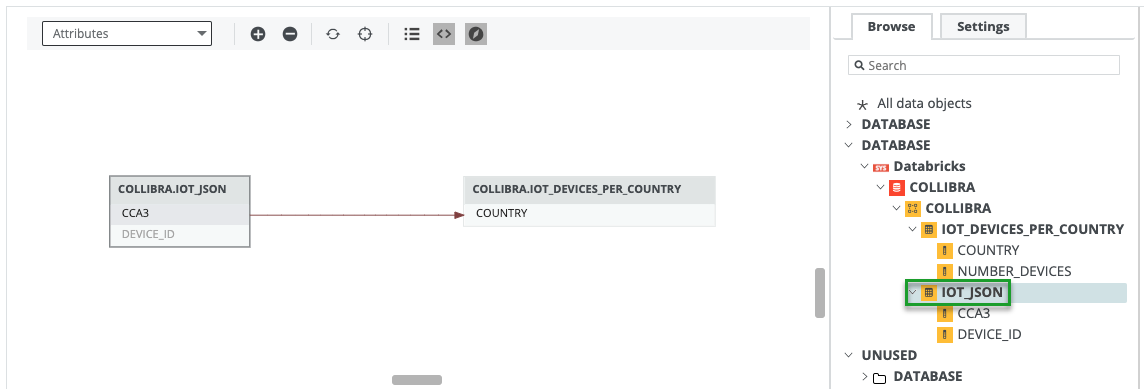
The following technical lineage graph is generated by using the example lineage.json file for an advanced custom technical lineage. The bottom part shows the transformation code that generated the data flow.
In the
lineagessection, thepos_startproperty is specified with 71 and thepos_lenproperty is specified with 69. The specifications indicate that the transformation code that starts at position 71 and the following 69 characters are highlighted in blue. Line 2 in the technical lineage graph contains the highlighted transformation code.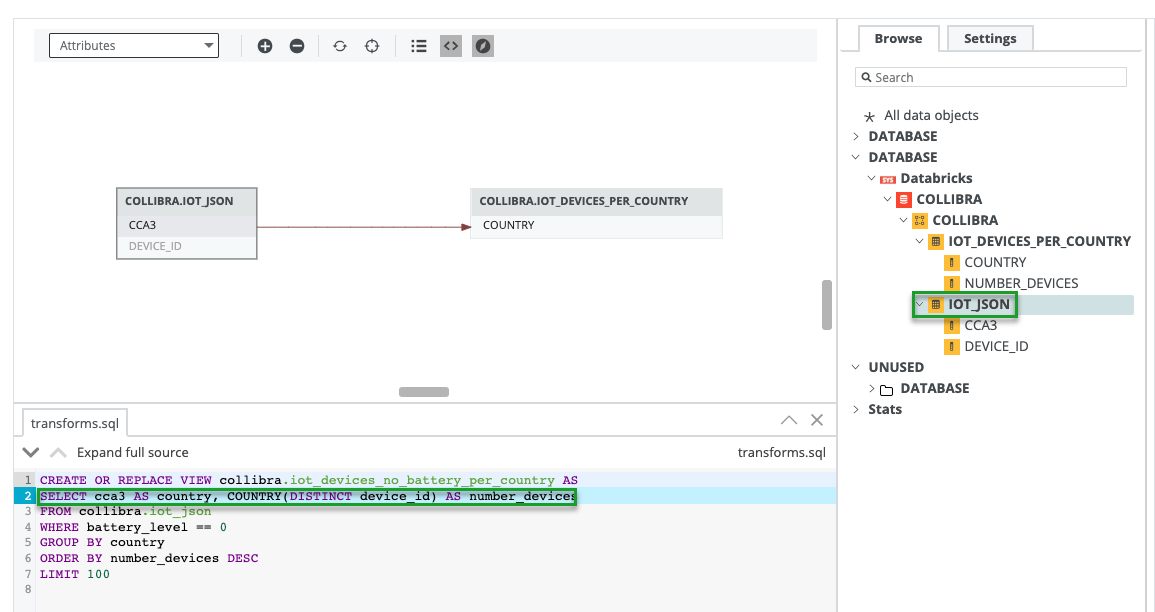
- Batch definition
You can define the custom technical lineage in any number of JSON files. Use the following format and code examples to create the JSON files, and then store the files in the folder that you created when you created the Shared Storage connection, earlier in this procedure.
JSON file formatting for the batch-definition optionIf you opt for the batch definition option, you need to create a folder with all of your JSON files and specify the folder in your lineage harvester configuration file. The harvester then accesses the folder, zips the content and ingests it for processing.
Which files do you need in your batch folder?
Let's say that you create a folder and name it custom-lineage. In this folder, you need the following:
- Exactly one metadata file, to provide the JSON architecture version, the data source type, and asset type UUIDs of the assets you want to include in the technical lineage.
- Optionally, one or more asset files, to provide a list of data objects you want to view in the technical lineage and define the data object hierarchy to achieve stitching.
- One or more lineage files, to define the lineage relation between two or more data objects.
- Optionally, a subfolder of source code files that contain the transformation code.
Example__custom-lineage__ ├── assets-domain1.json ├── assets1.json ├── lineage.json ├── lineage-extra.json ├── metadata.json └── source_codes ├── sc1.sql └── sc2.pyMetadata file
Your metadata file has to be named metadata.json. Format the file as shown in the following image:
Example{ "version": 3, "application_name": "databricks", "asset_types":{ "Column":{"uuid": "00000000-0000-0000-0000-000000031008"}, "Table":{"uuid": "00000000-0000-0000-0000-000000031007"}, "Database":{"uuid": "00000000-0000-0000-0000-000000031006"}, "Schema":{"uuid": "00000000-0000-0000-0001-000400000002"} } }Section Description version
The version of the JSON architecture. For batch-file instruction, the value must be
3.application_name
The type of data source for which you are creating a technical lineage.
This helps us to better understand your needs and make more informed decisions concerning future integrations.
asset_types
The asset types and UUIDs of the asset types you want to include in the technical lineage.
Important If you choose to include asset files in your batch definition, the values (meaning the asset types) that you specify in this property must match the values that you specify in the
typeproperties in your asset files. Likewise, the values that you specify in this property must match the asset types that you mention in your lineage files.Assets files
Optionally, you can include one or more assets files. You use asset files to provide the list of data objects you want to view in the technical lineage and define the data object hierarchy. The
propsproperty allows you to specify the full names and domain IDs of the assets.Tip- You don't need to use asset files for the traditional (System) > Database > Schema > Table > Column asset types and hierarchy. In that case, the full name is automatically, correctly constructed. You only need to use asset files to specify assets that are not part of that traditional asset hierarchy.
- You don't need to use asset files if you use
propsin your lineage files to define the assets specified there.
The names of your assets files have to follow the format assets<something-unique>.json.
Asset files can consist of
nodes,parent, andleafkinds of assets. In the following example code, we used thenodesproperty to specify the highest levels of the data object hierarchy that we want to view in the technical lineage: Database and Schema. We then used theparentandleafproperties to build out the lower levels of the data object hierarchy: Table and Column, respectively.Tip
parentassets represent what we traditionally refer to as the table-level lineage.leafassets represents what we traditionally refer to as the column-level lineage.Keep in mind that the property names
nodes,parent, andleafare designed to be non-restrictive, so you can define a hierarchy to reflect the hierarchy of any asset types (similar to the database > schema > table > column hierarchy), including your custom asset types.Tip For examples of how to configure the
propsproperty, as shown in the following code examples, see Using the props property.Property
Description nodes
A JSON element in which you specify the highest levels of the hierarchy. In the example code, the nodes specify the hierarchy of GCS File System > GCS Bucket.
Example{ "nodes": [ { "name": "GCS1", "type": "GCS File System" }, { "name": "GCS-B1", "type": "GCS Bucket" } ], "props": { "fullname": "<full name of the GCS Bucket asset>", "domain_id": "<domain of the GCS Bucket asset>" } }nameThe name of the node data object. The value is case-sensitive.
Case-sensitivity exceptionThe value of the
nameproperty is not case-sensitive for Database, Schema, Table and Column assets. For those assets, any capitalization discrepancies are rectified during processing, and the names always appear in uppercase in the technical lineage. However, assets files are not needed or recommended for these asset types.typeThe type of data object of the specified node, for example:
System,Database,View,Dashboard, orReport. The value is case-sensitive.Important The values (meaning the asset types) that you specify for this property must match the values that you specify in the
asset_typesproperty in your metadata file.parent
A lower-level data object in a hierarchy for which the highest levels are specified in the
nodessection. Theparentproperty represents what we traditionally refer to as the table-level lineage.When specifying parent data objects, you also have to include the nodes information, as shown in the following example code.
Example{ "nodes": [ { "name": "GCS1", "type": "GCS File System" }, { "name": "GCS-B1", "type": "GCS Bucket" } ], "parent": { "name": "DIR1", "type": "Directory" }, "props": { "fullname": "<full name of the Directory asset>", "domain_id": "<domain of the Directory asset>" } }Tip Each parent object can contain
leafdata objects. For example, you can use theparentproperty to specify a table, and use theleafproperties to specify the columns in the table.nameThe name of the parent data object. The value is case-sensitive.
Case-sensitivity exceptionThe value of the
nameproperty is not case-sensitive for Database, Schema, Table and Column assets. For those assets, any capitalization discrepancies are rectified during processing, and the names always appear in uppercase in the technical lineage. However, assets files are not needed or recommended for these asset types.typeThe asset type of the parent data object, for example:
Table,View,Directory,Dashboard, orReport. The value is case-sensitive.Important The values (meaning the asset types) that you specify for this property must match the values that you specify in the
asset_typesproperty in your metadata file.leaf
The lowest level data object in your hierarchy. The
leafproperty represents what we traditionally refer to as the column-level lineage.When specifying leaf data objects, you also have to include the nodes and parent information, as shown in the following example code.
The names of parents and leaf data objects can be identical if the data objects with the same names are sub-objects of different
nodesdata objects.Example{ "nodes": [ { "name": "GCS1", "type": "GCS File System" }, { "name": "GCS-B1", "type": "GCS Bucket" } ], "parent": { "name": "DIR1", "type": "Directory" }, "leaf": { "name": "data.xls", "type": "File" }, "props": { "fullname": "<full name of the File asset>", "domain_id": "<domain of the File asset>" } }nameThe name of the leaf data object. The value is case-sensitive.
Case-sensitivity exceptionThe value of the
nameproperty is not case-sensitive for Database, Schema, Table and Column assets. For those assets, any capitalization discrepancies are rectified during processing, and the names always appear in uppercase in the technical lineage. However, assets files are not needed or recommended for these asset types.typeThe asset type of the leaf data object, for example:
View,Column,Dashboard, orReport. The value is case-sensitive.Important The values (meaning the asset types) that you specify for this property must match the values that you specify in the
asset_typesproperty in your metadata file.props This property allows you to specify the full name and domain ID of an asset for the purpose of stitching, regardless of asset type hierarchy.
When you add the props property to define the full name of an asset, it applies to the last asset in the array.
Tip For examples of how to configure the
propsproperty and how to use it for a custom hierarchy, see Using the props property.Important considerations
- You don't need to use this property for the traditional (System) > Database > Schema > Table > Column asset types and hierarchy. In fact, assets files are not needed or recommended for those asset types, as the full name is automatically, correctly constructed for that hierarchy. Instead, use this property to specify the full names of assets that are not part of that traditional asset hierarchy.
- You must specify in your metadata file the asset types and UUIDs of all the assets types used.
- If the
useCollibraSystemNameproperty in your lineage harvester configuration file is set totrue, the system data object is used to stitch to the System asset in Data Catalog. If theuseCollibraSystemNameproperty is set tofalsein your lineage harvester configuration file, do not specify the system data object in this section, or else stitching will fail.
A word about file processing order and inadvertently specifying the same asset more than once
Assets files and lineage files are processed in the following order: first, all assets files in alphabetical order, followed by all lineage files in alphabetical order. If you choose to specify
propsfor an asset, we recommend that you do so in either an assets file or a lineage file; not both. For any asset that is inadvertently defined more than once, the first occurrence, with respect to the processing order, is the occurrence that is used.In other words:
-
If you inadvertently define a single asset, with
props, in both an assets file and a lineage file, thepropsvalues in the assets file are used. -
If you inadvertently define a single asset, with
props, more than once in a single assets file, or in multiple assets files, the first occurrence of the asset, with respect to the processing order, is used along with thepropsvalues defined for that occurrence of the asset.
fullnameThe full name of the asset in Collibra. Names are case-sensitive.
domainIdThe reference ID of the domain in which the asset exists in Collibra.
Using the props property
The following examples offer some guidance as to when to use the
propsproperty and how to configure it.Show me a typical scenario using the props property for a custom hierarchyFirst off, let's examine why you don't need to use the
propsproperty for the traditional database > schema > table > column hierarchy. Let's say you have an assets file in which you define a leaf kind of asset:{ "nodes": [{ "name": "Snowflake", "type": "System" }, { "name": "DB1", "type": "Database" }, { "name": "PUBLIC", "type": "Schema" }], "parent": { "name": "T1", "type": "Table" }, "leaf": { "name": "COL1", "type": "Column" } }In this case, the full name of the leaf asset (in this case a Column asset) is automatically and correctly constructed as: "snowflake>DB1>PUBLIC>T1>COL1". In fact, for the traditional database type of hierarchy, you don't even need to use asset files, much less the
propsproperty.However, for the following custom hierarchy, you can use the
propsproperty to specify the correct full name of the leaf asset, in this case a File asset.{ "nodes": [{ "name": "gcs", "type": "GCS File System" }, { "name": "bucket1", "type": "GCS Bucket" }, { "name": "/", "type": "Directory" }], "parent": { "name": "examples", "type": "Directory" }, "leaf": { "name": "data.xls", "type": "File" }, "props": { "fullname": "gcs > bucket1/examples/data.xls", "domain_id": "<domain in which the file asset resides>" }If you don't provide the full name of the leaf asset, it will be constructed using the default traditional formatting (system) > database > schema > table > column. The result would be the full name: "gcs > bucket1 > / > examples > data.xls". However, this is not the correct construction for File assets. The full name provided in the example above ensures the correct construction, so that stitching is achieved.
Show me example configurations for the props property-
A
propsproperty in anodessection describes the last asset in the array. In this example, you are specifying the full name and domain ID of the Schema asset "SCH1", not the Database asset "DB1".{ "nodes": [{"name":"DB1", "type": "Database"}, {"name": "SCH1", "type": "Schema"}], "props": { "fullname": "<full name of the Schema asset>", "domain_id": "<domain of the Schema asset>" } } - If you also want to specify the full name and domain ID of the Database asset, you need two entries, as follows:
{
	"nodes": [{"name":"DB1", "type": "Database"}],
	"props": {
		"fullname": "<full name of the Database asset>",
		"domain_id": "<domain of the Database asset>"
	        }
}
} "nodes": [{"name":"DB1", "type": "Database"}, {"name": "SCH1", "type": "Schema"}], "props": { "fullname": "<full name of the Schema asset>", "domain_id": "<domain of the Schema asset>" } } - To specify the full name and domain ID of a
parentasset, use thepropsproperty as follows:{ "nodes": [{"name":"DB1", "type": "Database"}, {"name": "SCH1", "type": "Schema"}], "parent": {"name": "TB1", "type": "Table"}, "props": { "fullname": "<full name of the Table asset>", "domain_id": "<domain of the Table asset>" } } - To specify the full name and domain ID of a
leafasset, use thepropsproperty as follows:{ "nodes": [{"name":"DB1", "type": "Database"}, {"name": "SCH1", "type": "Schema"}], "parent": {"name": "TB1", "type": "Table"}, "leaf": {"name": "COL1", "type": "Column"}, "props": { "fullname": "<full name of the Column asset>", "domain_id": "<domain of the Column asset>" } }
Show me how to find the full name and domain ID of an assetThere are two ways to find this information.
Via API
You can use the Find assets API, as documented in the Collibra Developer Portal. In the body of the response, look for the following details in the results array:
name: This is the full name of the asset.domain > id: This is the unique reference ID of the domain in which the asset is located.
Via Data Catalog
- To find the full name, open the relevant asset page, and then click Actions > Edit. The Edit dialog box appears. The full name is shown in the Name field.
- To find the domain ID, open the relevant domain in Collibra. In the following example URL, the reference ID is in bold:
https://<yourcollibrainstance>/domain/22258f64-40b6-4b16-9c08-c95f8ec0da26?view=00000000-0000-0000-0000-000000040001.
Lineage files
You can have one or more lineage files in the folder. The names of your lineage files have to follow the format lineage<something-unique>.json.
You use the lineage file to define the lineage relation between two or more data objects. The lineage relations are shown as edges in the technical lineage graph. The edges represent the data flow from a source to a target.
This section contains the path from a source to a target and defines the transformation code or transformation references to be processed by the Collibra Data Lineage service.
Example[ { "src": { "nodes": [{"name":"DB1", "type": "Database"}, {"name": "SCH1", "type": "Schema"}], "parent": {"name": "TB1", "type": "Table"}, "leaf": {"name": "COL1", "type": "Column"}, "props": { "fullname": "<full name of the leaf asset>", "domain_id": "<domain of the leaf asset>" }, }, "trg": { "nodes": [{"name":"DB1", "type": "Database"}, {"name": "SCH1", "type": "Schema"}], "parent": {"name": "TB2", "type": "Table"}, "props": { "fullname": "<full name of the parent asset>", "domain_id": "<domain of the parent asset>" }, "source_code" : { "path": "<folder name>/sc1.sql", "highlights": [{"start": 71, "len": 69 }, ...], "transformation_display_name": "middle bubble" } } } ]Properties
Description srcThe hierarchical path to the source data object. This property represents where the data comes from for a transformation.
Important The source of a lineage can only be a parent or a leaf.
Example{ "src": { "nodes": [{"name":"DB1", "type": "Database"}, {"name": "SCH1", "type": "Schema"}], "parent": {"name": "TB1", "type": "Table"}, "leaf": {"name": "COL1", "type": "Column"} }trgThe hierarchical path to the target data object. This property represents where the data flows to.
Tip If the target asset is a parent asset, we refer to the lineage as indirect lineage.
Important The target can be a parent or a leaf; however, if the source is a parent, the target must be a parent.
Example{ "trg": { "nodes": [{"name":"DB1", "type": "Database"}, {"name": "SCH1", "type": "Schema"}], "parent": {"name": "TB2", "type": "Table"} }propsAn optional property that allows you to specify the full name and domain of an asset, for the purpose of stitching.
This property is not required for Database, Schema, Table and Column asset types.
A word about file processing order and inadvertently specifying the same asset more than once
Assets files and lineage files are processed in the following order: first, all assets files in alphabetical order, followed by all lineage files in alphabetical order. If you choose to specify
propsfor an asset, we recommend that you do so in either an assets file or a lineage file; not both. For any asset that is inadvertently defined more than once, the first occurrence, with respect to the processing order, is the occurrence that is used.In other words:
-
If you inadvertently define a single asset, with
props, in both an assets file and a lineage file, thepropsvalues in the assets file are used. -
If you inadvertently define a single asset, with
props, more than once in a single assets file, or in multiple assets files, the first occurrence of the asset, with respect to the processing order, is used along with thepropsvalues defined for that occurrence of the asset.
source_codeThe transformation code that determines how the technical lineage is constructed. This can be a descriptive string or a SQL statement that manipulates data.
This section is optional.
pathThe path and name of the source code file that contains the transformation code. The path relative to the source_codes folder, which is in the same folder as the lineage JSON files.
highlightsThis optional property identifies a string of transformation code in a source code file to be highlighted in the source code pane at the bottom part of the technical lineage graph. The entire lines that include the transformation code are highlighted.
The string must be a subset of the string of transformation code that is defined by the
startandlenproperties.startThe start position of the string of the transformation code to be highlighted. The start position is in characters, not bytes.
lenThe length of the string of the transformation code to be highlighted. The length is in characters, not bytes.
transformation_display_nameThe name of the transformation when looking at the transformations view in the technical lineage viewer.
Source codes subfolder and files
You can include a subfolder of source code files that define the transformation details. The source code folder and your JSON files must be in the CUSTOM_LINEAGE folder, along with the JSON files. If it's not, an error occurs indicating that the lineage harvester cannot find the source code files.
The source code paths are relative to the CUSTOM_LINEAGE folder.
Example- source_codes/sc1.sql
- source_codes/another-subfolder/sc2.sql
Example JSON files
For some example JSON files, go to Custom technical lineage JSON file examples.
Example batch-definition JSON filesThis section shows some examples of the metadata, assets and lineage JSON files specific to the custom technical lineage batch definition option.
Example__CUSTOM-LINEAGE__ ├── metadata.json ├── assets.json ├── assets-2.json ├── lineage.json ├── lineage-2.jsonMetadata JSON file
{
  "version": 3,
  "application_name": "custom lineage batch example",
  "asset_types": {
    "Column": {
      "uuid": "00000000-0000-0000-0000-000000031008"
    },
    "Table": {
      "uuid": "00000000-0000-0000-0000-000000031007"
    },
    "Database": {
      "uuid": "00000000-0000-0000-0000-000000031006"
    },
    "Schema": {
      "uuid": "00000000-0000-0000-0001-000400000002"
    },
    "File": {
      "uuid": "00000000-0000-0000-0000-000000031304"
    },
    "Directory": {
      "uuid": "00000000-0000-0000-0000-000000031303"
    },
    "GCS Bucket": {
      "uuid": "00000000-0000-0000-0001-002700000002"
    },
    "GCS File System": {
      "uuid": "00000000-0000-0000-0001-002700000001"
    }
  }
}
Assets JSON file
Important If you define the System asset in your lineage.json file, the
useCollibraSystemNameproperty in your lineage harvester configuration file must be set totrue; otherwise, relations will not be created between the relevant assets in Collibra and stitching will fail.[{ "nodes": [{ "name": "gcs", "type": "GCS File System" }], "props": { "fullname": "gcs", "domain_id": "<domain in which the file asset resides>" } }, { "nodes": [{ "name": "gcs", "type": "GCS File System" }, { "name": "bucket1", "type": "GCS Bucket" }], "props": { "fullname": "gcs > bucket1", "domain_id": "<domain in which the file asset resides>" } }, { "nodes": [{ "name": "gcs", "type": "GCS File System" }, { "name": "bucket1", "type": "GCS Bucket" }, { "name": "/", "type": "Directory" }], "props": { "fullname": "gcs > bucket1/", "domain_id": "<domain in which the file asset resides>" } }, { "nodes": [{ "name": "gcs", "type": "GCS File System" }, { "name": "bucket1", "type": "GCS Bucket" }, { "name": "/", "type": "Directory" }], "parent": { "name": "examples", "type": "Directory" }, "props": { "fullname": "gcs > bucket1/examples", "domain_id": "<domain in which the file asset resides>" } }, { "nodes": [{ "name": "gcs", "type": "GCS File System" }, { "name": "bucket1", "type": "GCS Bucket" }, { "name": "/", "type": "Directory" }], "parent": { "name": "examples", "type": "Directory" }, "leaf": { "name": "data.csv", "type": "File" }, "props": { "fullname": "gcs > bucket1/examples/data.csv", "domain_id": "<domain in which the file asset resides>" } } ]Lineage JSON file
[{
    "src": {
      "nodes": [{
        "name": "snowflake",
        "type": "System"
      }, {
        "name": "DB1",
        "type": "Database"
      }, {
        "name": "PUBLIC",
        "type": "Schema"
      }],
      "parent": {
        "name": "T1",
        "type": "Table"
      },
      "leaf": {
        "name": "col1",
        "type": "Column"
      }
    },
    "trg": {
      "nodes": [{
        "name": "snowflake",
        "type": "System"
      }, {
        "name": "DB1",
        "type": "Database"
      }, {
        "name": "PUBLIC",
        "type": "Schema"
      }],
      "parent": {
        "name": "VIEW_1",
        "type": "Table"
      },
      "leaf": {
        "name": "col1",
        "type": "Column"
      }
    },
    "source_code": {
      "path": "source_codes/sc1.sql",
      "highlights": [{"start": 0, "len": 43}],
      "transformation_display_name": "view creation"
    }
  },
  {
    "src": {
      "nodes": [{
        "name": "gcs",
        "type": "GCS File System"
      }, {
        "name": "bucket1",
        "type": "GCS Bucket"
      }, {
        "name": "/",
        "type": "Directory"
      }],
      "parent": {
        "name": "examples",
        "type": "Directory"
      },
      "leaf": {
        "name": "data.csv",
        "type": "File"
      }
    },
    "trg": {
      "nodes": [{
        "name": "snowflake",
        "type": "System"
      }, {
        "name": "DB1",
        "type": "Database"
      }, {
        "name": "PUBLIC",
        "type": "Schema"
      }],
      "parent": {
        "name": "T1",
        "type": "Table"
      }
    }
  }
]
The following image shows the resulting technical lineage graph and source code. The graph shows the data flow from table T1 to table VIEW_1, as specified in the first combination of
srcandtrgsections, respectively, in the lineage file.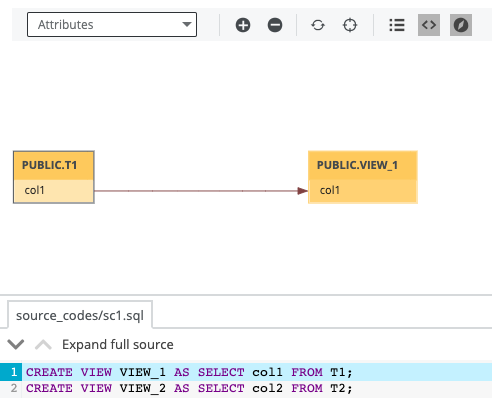
The following image shows the transformation view of the same technical lineage graph. The transformation has the display name "view creation", as specified in the
transformation_display_nameproperty, in the lineage file.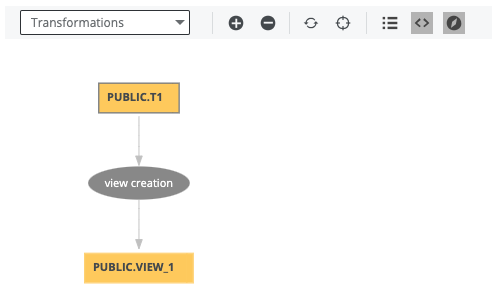
Finally, the following image shows the end-to-end lineage, including the stitched File asset and indirect lineage, where the target is the parent node, table T1.
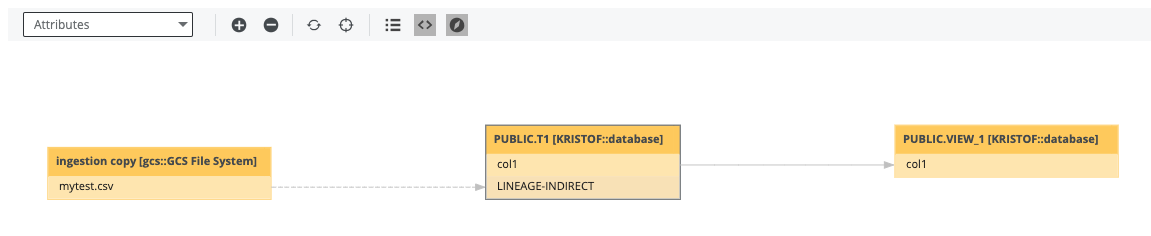
-
Add a technical lineage capability to your Edge site.
Complete the following steps to add the technical lineage capability to your Edge site.
Prerequisites
- You have a global role that has the System administration global permission.
- You have a global role that has the Manage connections and capabilities global permission, for example, Edge integration engineer.
Steps
- Open an Edge site.
-
On the main menu, click , and then click
Settings.
The Collibra settings page opens. -
In the tab pane, click Edge.
The Sites tab opens and shows a table with an overview of the Edge sites. - In the table, click the name of the Edge site whose status is Healthy.
The Edge site page opens.
-
On the main menu, click
- In the Capabilities section, click Add capability.
The Add capability page appears. - Enter the required information.
Field Description Required? Capability This section contains general information about the capability.
NameThe name of the Edge capability.
Yes
DescriptionThe description of the Edge capability.
Yes
Capability templateThe capability template. The value that you select in this field determines which sections appear on the page.
Select the following Edge capability:
Technical Lineage for Amazon Redshift Yes
Main Properties This section contains the information for creating a technical lineage.
Source IDThe name of the data source. Specify a name that is unique.
Yes
JDBC ConnectionThe JDBC connection that you created for Catalog JDBC ingestion.
Yes
Collibra System NameThe system or server name of the data source. This field is also the full name of your System asset in Data Catalog.
The value of this field must be the same as the full name of the System asset that you created when you registered the data source.
Yes
Database NameThe name of your database, which is also the name of your Database asset in Data Catalog.
Tip You can add extra database names by clicking Add property.
Yes
Queries
The queries to download all the data that is required to create technical lineage. The queries vary depending on the data source you use. The query code is automatically available. However, you can modify the query code if needed.
Example Enter the following filter in a Views query:
where v.table_schema not in ('pg_catalog', 'information_schema');. This query excludes the pg_catalog and information_schema schemas, which don't contain customer data. If you want to exclude other schemas, adjust the query to, for examplewhere v.table_schema not in ('pg_catalog', 'information_schema', 'another_schema');.Note- If you change queries, you can only use supported SQL syntax.
- Collibra Support does not provide support for customized SQL files.
Query Description Columns This query retrieves all columns, tables, schemas, databases or projects in the form: database or project > schema > table > column. Views This query retrieves the view definitions. Yes
Custom Properties This section contains the custom parameters you can specify to create technical lineage. Click Add property to add a property.
Warning This applies only to US government customers.
Possible properties for US government customersName Description Type Encryption Example value techlinHostThe URL of the Collibra Data Lineage service instance to which you want to upload metadata, for example
techlin-gcp-eu.collibra.com.Text Not encrypted (plain text) https://techlin-gcp-dev.collibra.com techlinKeyThe unique API key to connect to a Collibra Data Lineage service instance.
Specify a unique user key for each Collibra environment. If you're not sure what your user key is, contact your Collibra Customer Success Manager.
Text To be encrypted by Edge management server Value will be stored on Edge No
Advanced Properties This section contains the advanced properties for creating a technical lineage.
Delete Raw Metadata After ProcessingTechnical lineage via Edge harvests raw metadata from specified data sources and uploads it in a ZIP file to a Collibra Data Lineage service instance. This option indicates whether the raw metadata should be deleted from the Collibra Data Lineage service instance after the metadata that is targeted for ingestion in Data Catalog is processed.
Select this option to indicate that the raw source metadata is deleted after processing.
Clear the checkbox to keep the raw source metadata after processing. In this case, it is stored in the Collibra infrastructure.
Note Selecting this option can negatively impact performance.
No
Analyze OnlyThis option determines whether to only load and analyze the source data on the Collibra Data Lineage service instances.
When you select this option, the technical lineage of the data source is not created during the synchronization of the capability. Selecting this option is equivalent to entering the
load-sourcesandanalyzecommand with a source specified when you use the lineage harvester.This option is not enabled by default.
Use caseYou can use this option to control when to start full synchronization of data sources. For example if you have three data sources, A, B, and C, you can synchronize the data sources as follows:
- During weekdays, synchronize data sources A and B with the Analyze Only checkbox selected in the capabilities. Collibra Data Lineage only loads and analyzes data sources A and B without synchronizing the technical lineage.
- On the weekend, synchronize data source C without selecting the Analyze Only checkbox in the capability. Collibra Data Lineage synchronizes the technical lineage for all data sources including A, B, and C.
No
ActiveThe option determines whether to include or remove the technical lineage of the data source.
Select this option to include the technical lineage of this data source.
Clear the checkbox to exclude the technical lineage of this data source.
Yes
General This section contains general information about logging.
Note Collibra Data Lineage does not use this logging feature on Edge. You can ignore this section. If you see any technical lineage synchronization issues when view the summary of the results, use the Technical Lineage via Edge common error messages article in Collibra Portal to fix the issues.DebugAn option to automatically send Edge infrastructure log files to Collibra Data Intelligence Cloud. By default, this option is set to false.
Note We highly recommend to only send Edge infrastructure log files to Collibra Data Intelligence Cloud when you have issues with Edge. If you set it to true, it will automatically revert to false after 24h. No
Log levelAn option to determine the verbosity level of Catalog connector log files. By default, this option is set to No logging.
No
Field Description Required? Capability This section contains general information about the capability.
NameThe name of the Edge capability.
Yes
DescriptionThe description of the Edge capability.
Yes
Capability templateThe capability template. The value that you select in this field determines which sections appear on the page.
Select the following Edge capability:
Technical Lineage for SqlDirectory Yes
Main Properties This section contains the information for creating a technical lineage.
Source IDThe name of the data source. Specify a name that is unique.
Yes
Shared Storage ConnectionThe Shared Storage connection that you created.
No
MaskThe pattern of the file names in the directory. By default, the value is
*. Yes
DialectThe dialect of the database.
See the list of allowed values.You can enter one of the following values:
- azure, for an Azure SQL Server data source.
- bigquery, for a Google BigQuery data source.
- db2, for an IBM DB2 data source.
- hana, for an SAP HANA data source.
- hana-cviews, for getting lineage from calculated views in an SAP HANA data source.Important
- The
hana-cviewsdialect is supported for SAP HANA (on-premises). It is not supported for SAP HANA Cloud. - To get technical lineage including calculated views, you must harvest SAP HANA by specifying two data sources in the lineage harvester configuration file. In one data source, specify the hana dialect, and in the other, specify the hana-cviews dialect.
- The
- hive, for a HiveQL data source.
- greenplum, for a Greenplum data source.
- mssql, for a Microsoft SQL Server data source.
- mysql, for a MySQL data source.
- netezza, for a Netezza data source.
- oracle, for an Oracle data source.
- postgres, for a PostgreSQL data source.
- redshift, for an Amazon Redshift data source.
- snowflake, for a Snowflake data source.
- spark, for a Spark SQL data source.
- sybase, for a Sybase data source.
- teradata, for a Teradata data source.
Yes
Collibra System NameThe system or server name of the data source. This field is also the full name of your System asset in Data Catalog.
The value of this field must be the same as the full name of the System asset that you created when you registered the data source.
Yes
DatabaseThe name of your database, which is also the name of your Database asset in Data Catalog.
Note The database and schema names in the SQL statements in your SQL files take precedence over the values that you provide for the Database and Schema fields in the technical lineage for SqlDirectory capability. If your SQL statements contain database and schema names, Collibra Data Lineage uses them for stitching. If your SQL statements do not contain database and schema names, Collibra Data Lineage uses the values of the Database and Schema fields in the capability for stitching. Fore more information, go to Prepare the SQL directory and Automatic stitching for technical lineage. Yes
SchemaThe name of the default schema, if not specified in the data source itself. This corresponds to the name of your Schema asset.
Note The database and schema names in the SQL statements in your SQL files take precedence over the values that you provide for the Database and Schema fields in the technical lineage for SqlDirectory capability. If your SQL statements contain database and schema names, Collibra Data Lineage uses them for stitching. If your SQL statements do not contain database and schema names, Collibra Data Lineage uses the values of the Database and Schema fields in the capability for stitching. Fore more information, go to Prepare the SQL directory and Automatic stitching for technical lineage. Yes
Custom Properties This section contains the custom parameters you can specify to create technical lineage. Click Add property to add a property.
Warning This applies only to US government customers.
Possible properties for US government customersName Description Type Encryption Example value techlinHostThe URL of the Collibra Data Lineage service instance to which you want to upload metadata, for example
techlin-gcp-eu.collibra.com.Text Not encrypted (plain text) https://techlin-gcp-dev.collibra.com techlinKeyThe unique API key to connect to a Collibra Data Lineage service instance.
Specify a unique user key for each Collibra environment. If you're not sure what your user key is, contact your Collibra Customer Success Manager.
Text To be encrypted by Edge management server Value will be stored on Edge No
Advanced Properties This section contains the advanced properties for creating a technical lineage.
Delete Raw Metadata After ProcessingTechnical lineage via Edge harvests raw metadata from specified data sources and uploads it in a ZIP file to a Collibra Data Lineage service instance. This option indicates whether the raw metadata should be deleted from the Collibra Data Lineage service instance after the metadata that is targeted for ingestion in Data Catalog is processed.
Select this option to indicate that the raw source metadata is deleted after processing.
Clear the checkbox to keep the raw source metadata after processing. In this case, it is stored in the Collibra infrastructure.
Note Selecting this option can negatively impact performance.
No
Analyze OnlyThis option determines whether to only load and analyze the source data on the Collibra Data Lineage service instances.
When you select this option, the technical lineage of the data source is not created during the synchronization of the capability. Selecting this option is equivalent to entering the
load-sourcesandanalyzecommand with a source specified when you use the lineage harvester.This option is not enabled by default.
Use caseYou can use this option to control when to start full synchronization of data sources. For example if you have three data sources, A, B, and C, you can synchronize the data sources as follows:
- During weekdays, synchronize data sources A and B with the Analyze Only checkbox selected in the capabilities. Collibra Data Lineage only loads and analyzes data sources A and B without synchronizing the technical lineage.
- On the weekend, synchronize data source C without selecting the Analyze Only checkbox in the capability. Collibra Data Lineage synchronizes the technical lineage for all data sources including A, B, and C.
No
ActiveThe option determines whether to include or remove the technical lineage of the data source.
Select this option to include the technical lineage of this data source.
Clear the checkbox to exclude the technical lineage of this data source.
Yes
Field Description Required? Capability This section contains general information about the capability.
NameThe name of the Edge capability.
Yes
DescriptionThe description of the Edge capability.
Yes
Capability templateThe capability template. The value that you select in this field determines which sections appear on the page.
Select the following Edge capability:
Technical Lineage for ADF Yes
Main Properties This section contains the information for creating a technical lineage.
Source IDThe name of the data source. Specify a name that is unique.
Yes
Authentication TypeThe authentication details for signing in to Azure Data Factory. You can select one of the following values:
Service Principal- When you select this authentication type, ensure that you entered the application secret for the Service Principal in the Service Principal Secret field when you created the Azure connection.
Resource Owner Password Credentials- When you select this authentication type, ensure that you specify the username field in this capability and also entered the password in the Service Principal Secret field when you created the Azure connection.
Yes
ADF ConnectionThe Azure connection that you created.
Yes
UsernameThe email address of your Azure Active Directory user.
This field applies only when you selected
Resource Owner Password Credentialsfor the field. No
Resource Group NameThe name of the resource group that the data factory belongs to.
Yes
Subscription IDThe subscription ID of the resource group.
Yes
FactoriesThe Azure Data Factory factories that Collibra Data Lineage collects and processes. Specify this property with an array of Azure Data Factory factory names. This property is optional.
The following rules apply when you specify this property:
- Enter the factory names in square brackets ([ ]), enclose each factory name in double quotes (" "), and separate them by a comma, for example, ["MyFirstFactory", "MySecondFactory"].
- The factory name is not case-sensitive. For example, the MyFactory and myfactory factories are considered the same by Azure Data Factory and Collibra Data Lineage.
- If you do not specify any factory name, Collibra Data Lineage collects and processes all factories that have datasets and piplelines in them.
No
Source ConfigurationThe source configuration for database mapping, system mapping, schema mapping, and filtering. Specify the following properties in JSON format and enter the content in this field.
If you previously created a technical lineage for this data source with connection definitions by using the lineage harvester, you can enter the content from the connection_definitions.conf file in this field.Connection definition propertiesProperty
Description Mandatory?
found_dbname=<database name>;found_hostname=<server name>;found_schema=<schema name> | found_dbname=<datafactory_name>_<linkedservice_name>;found_hostname=*
The information of the supported data sources in Azure Data Factory to be collected by Collibra Data Lineage. You can specify any of the following values for the
found_dbnameproperty:- A database name. And then you can specify the following properties:
found_hostname=<server name>, where<server name>is the name of the server that the database is running on.found_schema=<schema name>, where<schema name>is the name of the schema. This property is optional.
- The combination of
<datafactory_name>_<linkedservice_name>, where<datafactory_name>is a data factory name and<linkedservice_name>is a linked service name. If you use this combination, specify*for thefound_hostnameproperty.
TipYou can use wildcards to capture multiple connection string combinations:
Show me the supported wildcardsPattern Description * Matches everything. ? Matches any single character. [seq] Matches any character in "seq". [!seq] Matches any character not in "seq". Yes
dbnameThe name of the database asset in Data Catalog.
No
schemaThe name of the schema asset in Data Catalog. Specify this property with the schema name that you created when you registered the data source.
If the Collibra Data Lineage fails to find the schema that you specify, it uses the default schema.
No
dialectIf you specify a database name for the
found_dbnameproperty, select one of the following dialects. If you specify a linked service name for thefound_dbnameproperty, ignore this property.No
collibraSystemNameThe system or server name of a database.
If you don't specify a value for this property, "DEFAULT" is shown in the technical lineage.
How do I configure this property if I have two databases with the same name?"found_dbname=databasename1;found_hostname=*;found_schema=schema1": { "dbname": "Customers", "schema": "mssql-schema-name", "dialect": "mssql", "collibraSystemName": "Customers-Europe" }, "found_dbname=databasename2;found_hostname=server-name.onmicrosoft.com;found_schema=schema2": { "dbname": "Customers", "schema": "oracle-schema-name", "dialect": "oracle", "collibraSystemName": "Customers-USA" },Warning The value of this property must exactly match (including for case-sensitivity) the name of your System asset in Collibra.
Important If you use the Source Configuration field for the purpose of providing the true system name of an ODBC database in Azure Data Factory, you are not required to:- Set the value of the Collibra system name setting to True.
- Specify a Collibra system name in the Source Configuration field.
true, you must specify a Collibra system name in the Source Configuration field.Yes
ExampleShow me an example <source ID> configuration file
{ "found_dbname=databasename1;found_hostname=server-name.onmicrosoft.com;found_schema=schema1": { "dbname": "mssql-database-name", "schema": "mssql-schema-name", "dialect": "mssql", "collibraSystemName": "mssql-system-name" }, "found_dbname=datafactory_linkedservice;found_hostname=*": { "dbname": "linkedservice-dbname", "schema": "linkedservice-schema", "collibraSystemName": "linkedservice-system-name" } }Tip Click
to copy the example to your clipboard. No
Custom Properties This section contains the custom parameters you can specify to create technical lineage. Click Add property to add a property.
Warning This applies only to US government customers.
Possible properties for US government customersName Description Type Encryption Example value techlinHostThe URL of the Collibra Data Lineage service instance to which you want to upload metadata, for example
techlin-gcp-eu.collibra.com.Text Not encrypted (plain text) https://techlin-gcp-dev.collibra.com techlinKeyThe unique API key to connect to a Collibra Data Lineage service instance.
Specify a unique user key for each Collibra environment. If you're not sure what your user key is, contact your Collibra Customer Success Manager.
Text To be encrypted by Edge management server Value will be stored on Edge No
Advanced Properties This section contains the advanced properties for creating a technical lineage.
Delete Raw Metadata After ProcessingTechnical lineage via Edge harvests raw metadata from specified data sources and uploads it in a ZIP file to a Collibra Data Lineage service instance. This option indicates whether the raw metadata should be deleted from the Collibra Data Lineage service instance after the metadata that is targeted for ingestion in Data Catalog is processed.
Select this option to indicate that the raw source metadata is deleted after processing.
Clear the checkbox to keep the raw source metadata after processing. In this case, it is stored in the Collibra infrastructure.
Note Selecting this option can negatively impact performance.
No
Analyze OnlyThis option determines whether to only load and analyze the source data on the Collibra Data Lineage service instances.
When you select this option, the technical lineage of the data source is not created during the synchronization of the capability. Selecting this option is equivalent to entering the
load-sourcesandanalyzecommand with a source specified when you use the lineage harvester.This option is not enabled by default.
Use caseYou can use this option to control when to start full synchronization of data sources. For example if you have three data sources, A, B, and C, you can synchronize the data sources as follows:
- During weekdays, synchronize data sources A and B with the Analyze Only checkbox selected in the capabilities. Collibra Data Lineage only loads and analyzes data sources A and B without synchronizing the technical lineage.
- On the weekend, synchronize data source C without selecting the Analyze Only checkbox in the capability. Collibra Data Lineage synchronizes the technical lineage for all data sources including A, B, and C.
No
ActiveThe option determines whether to include or remove the technical lineage of the data source.
Select this option to include the technical lineage of this data source.
Clear the checkbox to exclude the technical lineage of this data source.
Yes
Field Description Required? Capability This section contains general information about the capability.
NameThe name of the Edge capability.
Yes
DescriptionThe description of the Edge capability.
Yes
Capability templateThe capability template. The value that you select in this field determines which sections appear on the page.
Select the following Edge capability:
Technical Lineage for Azure Yes
Main Properties This section contains the information for creating a technical lineage.
Source IDThe name of the data source. Specify a name that is unique.
Yes
JDBC ConnectionThe JDBC connection that you created for Catalog JDBC ingestion.
Yes
Collibra System NameThe system or server name of the data source. This field is also the full name of your System asset in Data Catalog.
The value of this field must be the same as the full name of the System asset that you created when you registered the data source.
Yes
Database NameThe name of your database, which is also the name of your Database asset in Data Catalog.
Tip You can add extra database names by clicking Add property.
Yes
Queries
The queries to download all the data that is required to create technical lineage. The queries vary depending on the data source you use. The query code is automatically available. However, you can modify the query code if needed.
Example Enter the following filter in a Views query:
where v.table_schema not in ('pg_catalog', 'information_schema');. This query excludes the pg_catalog and information_schema schemas, which don't contain customer data. If you want to exclude other schemas, adjust the query to, for examplewhere v.table_schema not in ('pg_catalog', 'information_schema', 'another_schema');.Note- If you change queries, you can only use supported SQL syntax.
- Collibra Support does not provide support for customized SQL files.
Query Description Columns This query retrieves the columns, tables, schemas, databases or projects fields in the form: database or project > schema > table > column. Synonyms
This query retrieves the alternative names for the database objects.
Views This query retrieves the view definitions.
Other Queries This query retrieves other data that technical lineage needs, for example stored procedures, functions, and packages. Yes
Custom Properties This section contains the custom parameters you can specify to create technical lineage. Click Add property to add a property.
Warning This applies only to US government customers.
Possible properties for US government customersName Description Type Encryption Example value techlinHostThe URL of the Collibra Data Lineage service instance to which you want to upload metadata, for example
techlin-gcp-eu.collibra.com.Text Not encrypted (plain text) https://techlin-gcp-dev.collibra.com techlinKeyThe unique API key to connect to a Collibra Data Lineage service instance.
Specify a unique user key for each Collibra environment. If you're not sure what your user key is, contact your Collibra Customer Success Manager.
Text To be encrypted by Edge management server Value will be stored on Edge No
Advanced Properties This section contains the advanced properties for creating a technical lineage.
Delete Raw Metadata After ProcessingTechnical lineage via Edge harvests raw metadata from specified data sources and uploads it in a ZIP file to a Collibra Data Lineage service instance. This option indicates whether the raw metadata should be deleted from the Collibra Data Lineage service instance after the metadata that is targeted for ingestion in Data Catalog is processed.
Select this option to indicate that the raw source metadata is deleted after processing.
Clear the checkbox to keep the raw source metadata after processing. In this case, it is stored in the Collibra infrastructure.
Note Selecting this option can negatively impact performance.
No
Analyze OnlyThis option determines whether to only load and analyze the source data on the Collibra Data Lineage service instances.
When you select this option, the technical lineage of the data source is not created during the synchronization of the capability. Selecting this option is equivalent to entering the
load-sourcesandanalyzecommand with a source specified when you use the lineage harvester.This option is not enabled by default.
Use caseYou can use this option to control when to start full synchronization of data sources. For example if you have three data sources, A, B, and C, you can synchronize the data sources as follows:
- During weekdays, synchronize data sources A and B with the Analyze Only checkbox selected in the capabilities. Collibra Data Lineage only loads and analyzes data sources A and B without synchronizing the technical lineage.
- On the weekend, synchronize data source C without selecting the Analyze Only checkbox in the capability. Collibra Data Lineage synchronizes the technical lineage for all data sources including A, B, and C.
No
ActiveThe option determines whether to include or remove the technical lineage of the data source.
Select this option to include the technical lineage of this data source.
Clear the checkbox to exclude the technical lineage of this data source.
Yes
General This section contains general information about logging.
Note Collibra Data Lineage does not use this logging feature on Edge. You can ignore this section. If you see any technical lineage synchronization issues when view the summary of the results, use the Technical Lineage via Edge common error messages article in Collibra Portal to fix the issues.DebugAn option to automatically send Edge infrastructure log files to Collibra Data Intelligence Cloud. By default, this option is set to false.
Note We highly recommend to only send Edge infrastructure log files to Collibra Data Intelligence Cloud when you have issues with Edge. If you set it to true, it will automatically revert to false after 24h. No
Log levelAn option to determine the verbosity level of Catalog connector log files. By default, this option is set to No logging.
No
Field Description Required? Capability This section contains general information about the capability.
NameThe name of the Edge capability.
Yes
DescriptionThe description of the Edge capability.
Yes
Capability templateThe capability template. The value that you select in this field determines which sections appear on the page.
Select the following Edge capability:
Technical Lineage for SqlDirectory Yes
Main Properties This section contains the information for creating a technical lineage.
Source IDThe name of the data source. Specify a name that is unique.
Yes
Shared Storage ConnectionThe Shared Storage connection that you created.
No
MaskThe pattern of the file names in the directory. By default, the value is
*. Yes
DialectThe dialect of the database.
See the list of allowed values.You can enter one of the following values:
- azure, for an Azure SQL Server data source.
- bigquery, for a Google BigQuery data source.
- db2, for an IBM DB2 data source.
- hana, for an SAP HANA data source.
- hana-cviews, for getting lineage from calculated views in an SAP HANA data source.Important
- The
hana-cviewsdialect is supported for SAP HANA (on-premises). It is not supported for SAP HANA Cloud. - To get technical lineage including calculated views, you must harvest SAP HANA by specifying two data sources in the lineage harvester configuration file. In one data source, specify the hana dialect, and in the other, specify the hana-cviews dialect.
- The
- hive, for a HiveQL data source.
- greenplum, for a Greenplum data source.
- mssql, for a Microsoft SQL Server data source.
- mysql, for a MySQL data source.
- netezza, for a Netezza data source.
- oracle, for an Oracle data source.
- postgres, for a PostgreSQL data source.
- redshift, for an Amazon Redshift data source.
- snowflake, for a Snowflake data source.
- spark, for a Spark SQL data source.
- sybase, for a Sybase data source.
- teradata, for a Teradata data source.
Yes
Collibra System NameThe system or server name of the data source. This field is also the full name of your System asset in Data Catalog.
The value of this field must be the same as the full name of the System asset that you created when you registered the data source.
Yes
DatabaseThe name of your database, which is also the name of your Database asset in Data Catalog.
Note The database and schema names in the SQL statements in your SQL files take precedence over the values that you provide for the Database and Schema fields in the technical lineage for SqlDirectory capability. If your SQL statements contain database and schema names, Collibra Data Lineage uses them for stitching. If your SQL statements do not contain database and schema names, Collibra Data Lineage uses the values of the Database and Schema fields in the capability for stitching. Fore more information, go to Prepare the SQL directory and Automatic stitching for technical lineage. Yes
SchemaThe name of the default schema, if not specified in the data source itself. This corresponds to the name of your Schema asset.
Note The database and schema names in the SQL statements in your SQL files take precedence over the values that you provide for the Database and Schema fields in the technical lineage for SqlDirectory capability. If your SQL statements contain database and schema names, Collibra Data Lineage uses them for stitching. If your SQL statements do not contain database and schema names, Collibra Data Lineage uses the values of the Database and Schema fields in the capability for stitching. Fore more information, go to Prepare the SQL directory and Automatic stitching for technical lineage. Yes
Custom Properties This section contains the custom parameters you can specify to create technical lineage. Click Add property to add a property.
Warning This applies only to US government customers.
Possible properties for US government customersName Description Type Encryption Example value techlinHostThe URL of the Collibra Data Lineage service instance to which you want to upload metadata, for example
techlin-gcp-eu.collibra.com.Text Not encrypted (plain text) https://techlin-gcp-dev.collibra.com techlinKeyThe unique API key to connect to a Collibra Data Lineage service instance.
Specify a unique user key for each Collibra environment. If you're not sure what your user key is, contact your Collibra Customer Success Manager.
Text To be encrypted by Edge management server Value will be stored on Edge No
Advanced Properties This section contains the advanced properties for creating a technical lineage.
Delete Raw Metadata After ProcessingTechnical lineage via Edge harvests raw metadata from specified data sources and uploads it in a ZIP file to a Collibra Data Lineage service instance. This option indicates whether the raw metadata should be deleted from the Collibra Data Lineage service instance after the metadata that is targeted for ingestion in Data Catalog is processed.
Select this option to indicate that the raw source metadata is deleted after processing.
Clear the checkbox to keep the raw source metadata after processing. In this case, it is stored in the Collibra infrastructure.
Note Selecting this option can negatively impact performance.
No
Analyze OnlyThis option determines whether to only load and analyze the source data on the Collibra Data Lineage service instances.
When you select this option, the technical lineage of the data source is not created during the synchronization of the capability. Selecting this option is equivalent to entering the
load-sourcesandanalyzecommand with a source specified when you use the lineage harvester.This option is not enabled by default.
Use caseYou can use this option to control when to start full synchronization of data sources. For example if you have three data sources, A, B, and C, you can synchronize the data sources as follows:
- During weekdays, synchronize data sources A and B with the Analyze Only checkbox selected in the capabilities. Collibra Data Lineage only loads and analyzes data sources A and B without synchronizing the technical lineage.
- On the weekend, synchronize data source C without selecting the Analyze Only checkbox in the capability. Collibra Data Lineage synchronizes the technical lineage for all data sources including A, B, and C.
No
ActiveThe option determines whether to include or remove the technical lineage of the data source.
Select this option to include the technical lineage of this data source.
Clear the checkbox to exclude the technical lineage of this data source.
Yes
Field Description Required? Capability This section contains general information about the capability.
NameThe name of the Edge capability.
Yes
DescriptionThe description of the Edge capability.
Yes
Capability templateThe capability template. The value that you select in this field determines which sections appear on the page.
Select the following Edge capability:
Technical Lineage for Azure Yes
Main Properties This section contains the information for creating a technical lineage.
Source IDThe name of the data source. Specify a name that is unique.
Yes
JDBC ConnectionThe JDBC connection that you created for Catalog JDBC ingestion.
Yes
Collibra System NameThe system or server name of the data source. This field is also the full name of your System asset in Data Catalog.
The value of this field must be the same as the full name of the System asset that you created when you registered the data source.
Yes
Database NameThe name of your database, which is also the name of your Database asset in Data Catalog.
Tip You can add extra database names by clicking Add property.
Yes
Queries
The queries to download all the data that is required to create technical lineage. The queries vary depending on the data source you use. The query code is automatically available. However, you can modify the query code if needed.
Example Enter the following filter in a Views query:
where v.table_schema not in ('pg_catalog', 'information_schema');. This query excludes the pg_catalog and information_schema schemas, which don't contain customer data. If you want to exclude other schemas, adjust the query to, for examplewhere v.table_schema not in ('pg_catalog', 'information_schema', 'another_schema');.Note- If you change queries, you can only use supported SQL syntax.
- Collibra Support does not provide support for customized SQL files.
Query Description Columns This query retrieves the columns, tables, schemas, databases or projects fields in the form: database or project > schema > table > column. Synonyms
This query retrieves the alternative names for the database objects.
Views This query retrieves the view definitions.
Other Queries This query retrieves other data that technical lineage needs, for example stored procedures, functions, and packages. Yes
Custom Properties This section contains the custom parameters you can specify to create technical lineage. Click Add property to add a property.
Warning This applies only to US government customers.
Possible properties for US government customersName Description Type Encryption Example value techlinHostThe URL of the Collibra Data Lineage service instance to which you want to upload metadata, for example
techlin-gcp-eu.collibra.com.Text Not encrypted (plain text) https://techlin-gcp-dev.collibra.com techlinKeyThe unique API key to connect to a Collibra Data Lineage service instance.
Specify a unique user key for each Collibra environment. If you're not sure what your user key is, contact your Collibra Customer Success Manager.
Text To be encrypted by Edge management server Value will be stored on Edge No
Advanced Properties This section contains the advanced properties for creating a technical lineage.
Delete Raw Metadata After ProcessingTechnical lineage via Edge harvests raw metadata from specified data sources and uploads it in a ZIP file to a Collibra Data Lineage service instance. This option indicates whether the raw metadata should be deleted from the Collibra Data Lineage service instance after the metadata that is targeted for ingestion in Data Catalog is processed.
Select this option to indicate that the raw source metadata is deleted after processing.
Clear the checkbox to keep the raw source metadata after processing. In this case, it is stored in the Collibra infrastructure.
Note Selecting this option can negatively impact performance.
No
Analyze OnlyThis option determines whether to only load and analyze the source data on the Collibra Data Lineage service instances.
When you select this option, the technical lineage of the data source is not created during the synchronization of the capability. Selecting this option is equivalent to entering the
load-sourcesandanalyzecommand with a source specified when you use the lineage harvester.This option is not enabled by default.
Use caseYou can use this option to control when to start full synchronization of data sources. For example if you have three data sources, A, B, and C, you can synchronize the data sources as follows:
- During weekdays, synchronize data sources A and B with the Analyze Only checkbox selected in the capabilities. Collibra Data Lineage only loads and analyzes data sources A and B without synchronizing the technical lineage.
- On the weekend, synchronize data source C without selecting the Analyze Only checkbox in the capability. Collibra Data Lineage synchronizes the technical lineage for all data sources including A, B, and C.
No
ActiveThe option determines whether to include or remove the technical lineage of the data source.
Select this option to include the technical lineage of this data source.
Clear the checkbox to exclude the technical lineage of this data source.
Yes
General This section contains general information about logging.
Note Collibra Data Lineage does not use this logging feature on Edge. You can ignore this section. If you see any technical lineage synchronization issues when view the summary of the results, use the Technical Lineage via Edge common error messages article in Collibra Portal to fix the issues.DebugAn option to automatically send Edge infrastructure log files to Collibra Data Intelligence Cloud. By default, this option is set to false.
Note We highly recommend to only send Edge infrastructure log files to Collibra Data Intelligence Cloud when you have issues with Edge. If you set it to true, it will automatically revert to false after 24h. No
Log levelAn option to determine the verbosity level of Catalog connector log files. By default, this option is set to No logging.
No
Field Description Required? Capability This section contains general information about the capability.
NameThe name of the Edge capability.
Yes
DescriptionThe description of the Edge capability.
Yes
Capability templateThe capability template. The value that you select in this field determines which sections appear on the page.
Select the following Edge capability:
Technical Lineage for SqlDirectory Yes
Main Properties This section contains the information for creating a technical lineage.
Source IDThe name of the data source. Specify a name that is unique.
Yes
Shared Storage ConnectionThe Shared Storage connection that you created.
No
MaskThe pattern of the file names in the directory. By default, the value is
*. Yes
DialectThe dialect of the database.
See the list of allowed values.You can enter one of the following values:
- azure, for an Azure SQL Server data source.
- bigquery, for a Google BigQuery data source.
- db2, for an IBM DB2 data source.
- hana, for an SAP HANA data source.
- hana-cviews, for getting lineage from calculated views in an SAP HANA data source.Important
- The
hana-cviewsdialect is supported for SAP HANA (on-premises). It is not supported for SAP HANA Cloud. - To get technical lineage including calculated views, you must harvest SAP HANA by specifying two data sources in the lineage harvester configuration file. In one data source, specify the hana dialect, and in the other, specify the hana-cviews dialect.
- The
- hive, for a HiveQL data source.
- greenplum, for a Greenplum data source.
- mssql, for a Microsoft SQL Server data source.
- mysql, for a MySQL data source.
- netezza, for a Netezza data source.
- oracle, for an Oracle data source.
- postgres, for a PostgreSQL data source.
- redshift, for an Amazon Redshift data source.
- snowflake, for a Snowflake data source.
- spark, for a Spark SQL data source.
- sybase, for a Sybase data source.
- teradata, for a Teradata data source.
Yes
Collibra System NameThe system or server name of the data source. This field is also the full name of your System asset in Data Catalog.
The value of this field must be the same as the full name of the System asset that you created when you registered the data source.
Yes
DatabaseThe name of your database, which is also the name of your Database asset in Data Catalog.
Note The database and schema names in the SQL statements in your SQL files take precedence over the values that you provide for the Database and Schema fields in the technical lineage for SqlDirectory capability. If your SQL statements contain database and schema names, Collibra Data Lineage uses them for stitching. If your SQL statements do not contain database and schema names, Collibra Data Lineage uses the values of the Database and Schema fields in the capability for stitching. Fore more information, go to Prepare the SQL directory and Automatic stitching for technical lineage. Yes
SchemaThe name of the default schema, if not specified in the data source itself. This corresponds to the name of your Schema asset.
Note The database and schema names in the SQL statements in your SQL files take precedence over the values that you provide for the Database and Schema fields in the technical lineage for SqlDirectory capability. If your SQL statements contain database and schema names, Collibra Data Lineage uses them for stitching. If your SQL statements do not contain database and schema names, Collibra Data Lineage uses the values of the Database and Schema fields in the capability for stitching. Fore more information, go to Prepare the SQL directory and Automatic stitching for technical lineage. Yes
Custom Properties This section contains the custom parameters you can specify to create technical lineage. Click Add property to add a property.
Warning This applies only to US government customers.
Possible properties for US government customersName Description Type Encryption Example value techlinHostThe URL of the Collibra Data Lineage service instance to which you want to upload metadata, for example
techlin-gcp-eu.collibra.com.Text Not encrypted (plain text) https://techlin-gcp-dev.collibra.com techlinKeyThe unique API key to connect to a Collibra Data Lineage service instance.
Specify a unique user key for each Collibra environment. If you're not sure what your user key is, contact your Collibra Customer Success Manager.
Text To be encrypted by Edge management server Value will be stored on Edge No
Advanced Properties This section contains the advanced properties for creating a technical lineage.
Delete Raw Metadata After ProcessingTechnical lineage via Edge harvests raw metadata from specified data sources and uploads it in a ZIP file to a Collibra Data Lineage service instance. This option indicates whether the raw metadata should be deleted from the Collibra Data Lineage service instance after the metadata that is targeted for ingestion in Data Catalog is processed.
Select this option to indicate that the raw source metadata is deleted after processing.
Clear the checkbox to keep the raw source metadata after processing. In this case, it is stored in the Collibra infrastructure.
Note Selecting this option can negatively impact performance.
No
Analyze OnlyThis option determines whether to only load and analyze the source data on the Collibra Data Lineage service instances.
When you select this option, the technical lineage of the data source is not created during the synchronization of the capability. Selecting this option is equivalent to entering the
load-sourcesandanalyzecommand with a source specified when you use the lineage harvester.This option is not enabled by default.
Use caseYou can use this option to control when to start full synchronization of data sources. For example if you have three data sources, A, B, and C, you can synchronize the data sources as follows:
- During weekdays, synchronize data sources A and B with the Analyze Only checkbox selected in the capabilities. Collibra Data Lineage only loads and analyzes data sources A and B without synchronizing the technical lineage.
- On the weekend, synchronize data source C without selecting the Analyze Only checkbox in the capability. Collibra Data Lineage synchronizes the technical lineage for all data sources including A, B, and C.
No
ActiveThe option determines whether to include or remove the technical lineage of the data source.
Select this option to include the technical lineage of this data source.
Clear the checkbox to exclude the technical lineage of this data source.
Yes
Field Description Required? Capability This section contains general information about the capability.
NameThe name of the Edge capability.
Yes
DescriptionThe description of the Edge capability.
Yes
Capability templateThe capability template. The value that you select in this field determines which sections appear on the page.
Select the following Edge capability:
Technical Lineage for Azure Yes
Main Properties This section contains the information for creating a technical lineage.
Source IDThe name of the data source. Specify a name that is unique.
Yes
JDBC ConnectionThe JDBC connection that you created for Catalog JDBC ingestion.
Yes
Collibra System NameThe system or server name of the data source. This field is also the full name of your System asset in Data Catalog.
The value of this field must be the same as the full name of the System asset that you created when you registered the data source.
Yes
Database NameThe name of your database, which is also the name of your Database asset in Data Catalog.
Tip You can add extra database names by clicking Add property.
Yes
SchemaThe name of the default schema, if not specified in the data source itself. This corresponds to the name of your Schema asset.
Yes
Queries
The queries to download all the data that is required to create technical lineage. The queries vary depending on the data source you use. The query code is automatically available. However, you can modify the query code if needed.
Example Enter the following filter in a Views query:
where v.table_schema not in ('pg_catalog', 'information_schema');. This query excludes the pg_catalog and information_schema schemas, which don't contain customer data. If you want to exclude other schemas, adjust the query to, for examplewhere v.table_schema not in ('pg_catalog', 'information_schema', 'another_schema');.Note- If you change queries, you can only use supported SQL syntax.
- Collibra Support does not provide support for customized SQL files.
Query Description Columns This query retrieves the columns, tables, schemas, databases or projects fields in the form: database or project > schema > table > column. Synonyms
This query retrieves the alternative names for the database objects.
Views This query retrieves the view definitions.
Other Queries This query retrieves other data that technical lineage needs, for example stored procedures, functions, and packages. Yes
Custom Properties This section contains the custom parameters you can specify to create technical lineage. Click Add property to add a property.
Warning This applies only to US government customers.
Possible properties for US government customersName Description Type Encryption Example value techlinHostThe URL of the Collibra Data Lineage service instance to which you want to upload metadata, for example
techlin-gcp-eu.collibra.com.Text Not encrypted (plain text) https://techlin-gcp-dev.collibra.com techlinKeyThe unique API key to connect to a Collibra Data Lineage service instance.
Specify a unique user key for each Collibra environment. If you're not sure what your user key is, contact your Collibra Customer Success Manager.
Text To be encrypted by Edge management server Value will be stored on Edge No
Advanced Properties This section contains the advanced properties for creating a technical lineage.
Delete Raw Metadata After ProcessingTechnical lineage via Edge harvests raw metadata from specified data sources and uploads it in a ZIP file to a Collibra Data Lineage service instance. This option indicates whether the raw metadata should be deleted from the Collibra Data Lineage service instance after the metadata that is targeted for ingestion in Data Catalog is processed.
Select this option to indicate that the raw source metadata is deleted after processing.
Clear the checkbox to keep the raw source metadata after processing. In this case, it is stored in the Collibra infrastructure.
Note Selecting this option can negatively impact performance.
No
Analyze OnlyThis option determines whether to only load and analyze the source data on the Collibra Data Lineage service instances.
When you select this option, the technical lineage of the data source is not created during the synchronization of the capability. Selecting this option is equivalent to entering the
load-sourcesandanalyzecommand with a source specified when you use the lineage harvester.This option is not enabled by default.
Use caseYou can use this option to control when to start full synchronization of data sources. For example if you have three data sources, A, B, and C, you can synchronize the data sources as follows:
- During weekdays, synchronize data sources A and B with the Analyze Only checkbox selected in the capabilities. Collibra Data Lineage only loads and analyzes data sources A and B without synchronizing the technical lineage.
- On the weekend, synchronize data source C without selecting the Analyze Only checkbox in the capability. Collibra Data Lineage synchronizes the technical lineage for all data sources including A, B, and C.
No
ActiveThe option determines whether to include or remove the technical lineage of the data source.
Select this option to include the technical lineage of this data source.
Clear the checkbox to exclude the technical lineage of this data source.
Yes
General This section contains general information about logging.
Note Collibra Data Lineage does not use this logging feature on Edge. You can ignore this section. If you see any technical lineage synchronization issues when view the summary of the results, use the Technical Lineage via Edge common error messages article in Collibra Portal to fix the issues.DebugAn option to automatically send Edge infrastructure log files to Collibra Data Intelligence Cloud. By default, this option is set to false.
Note We highly recommend to only send Edge infrastructure log files to Collibra Data Intelligence Cloud when you have issues with Edge. If you set it to true, it will automatically revert to false after 24h. No
Log levelAn option to determine the verbosity level of Catalog connector log files. By default, this option is set to No logging.
No
Field Description Required? Capability This section contains general information about the capability.
NameThe name of the Edge capability.
Yes
DescriptionThe description of the Edge capability.
Yes
Capability templateThe capability template. The value that you select in this field determines which sections appear on the page.
Select the following Edge capability:
Technical Lineage for SqlDirectory Yes
Main Properties This section contains the information for creating a technical lineage.
Source IDThe name of the data source. Specify a name that is unique.
Yes
Shared Storage ConnectionThe Shared Storage connection that you created.
No
MaskThe pattern of the file names in the directory. By default, the value is
*. Yes
DialectThe dialect of the database.
See the list of allowed values.You can enter one of the following values:
- azure, for an Azure SQL Server data source.
- bigquery, for a Google BigQuery data source.
- db2, for an IBM DB2 data source.
- hana, for an SAP HANA data source.
- hana-cviews, for getting lineage from calculated views in an SAP HANA data source.Important
- The
hana-cviewsdialect is supported for SAP HANA (on-premises). It is not supported for SAP HANA Cloud. - To get technical lineage including calculated views, you must harvest SAP HANA by specifying two data sources in the lineage harvester configuration file. In one data source, specify the hana dialect, and in the other, specify the hana-cviews dialect.
- The
- hive, for a HiveQL data source.
- greenplum, for a Greenplum data source.
- mssql, for a Microsoft SQL Server data source.
- mysql, for a MySQL data source.
- netezza, for a Netezza data source.
- oracle, for an Oracle data source.
- postgres, for a PostgreSQL data source.
- redshift, for an Amazon Redshift data source.
- snowflake, for a Snowflake data source.
- spark, for a Spark SQL data source.
- sybase, for a Sybase data source.
- teradata, for a Teradata data source.
Yes
Collibra System NameThe system or server name of the data source. This field is also the full name of your System asset in Data Catalog.
The value of this field must be the same as the full name of the System asset that you created when you registered the data source.
Yes
DatabaseThe name of your database, which is also the name of your Database asset in Data Catalog.
Note The database and schema names in the SQL statements in your SQL files take precedence over the values that you provide for the Database and Schema fields in the technical lineage for SqlDirectory capability. If your SQL statements contain database and schema names, Collibra Data Lineage uses them for stitching. If your SQL statements do not contain database and schema names, Collibra Data Lineage uses the values of the Database and Schema fields in the capability for stitching. Fore more information, go to Prepare the SQL directory and Automatic stitching for technical lineage. Yes
SchemaThe name of the default schema, if not specified in the data source itself. This corresponds to the name of your Schema asset.
Note The database and schema names in the SQL statements in your SQL files take precedence over the values that you provide for the Database and Schema fields in the technical lineage for SqlDirectory capability. If your SQL statements contain database and schema names, Collibra Data Lineage uses them for stitching. If your SQL statements do not contain database and schema names, Collibra Data Lineage uses the values of the Database and Schema fields in the capability for stitching. Fore more information, go to Prepare the SQL directory and Automatic stitching for technical lineage. Yes
Custom Properties This section contains the custom parameters you can specify to create technical lineage. Click Add property to add a property.
Warning This applies only to US government customers.
Possible properties for US government customersName Description Type Encryption Example value techlinHostThe URL of the Collibra Data Lineage service instance to which you want to upload metadata, for example
techlin-gcp-eu.collibra.com.Text Not encrypted (plain text) https://techlin-gcp-dev.collibra.com techlinKeyThe unique API key to connect to a Collibra Data Lineage service instance.
Specify a unique user key for each Collibra environment. If you're not sure what your user key is, contact your Collibra Customer Success Manager.
Text To be encrypted by Edge management server Value will be stored on Edge No
Advanced Properties This section contains the advanced properties for creating a technical lineage.
Delete Raw Metadata After ProcessingTechnical lineage via Edge harvests raw metadata from specified data sources and uploads it in a ZIP file to a Collibra Data Lineage service instance. This option indicates whether the raw metadata should be deleted from the Collibra Data Lineage service instance after the metadata that is targeted for ingestion in Data Catalog is processed.
Select this option to indicate that the raw source metadata is deleted after processing.
Clear the checkbox to keep the raw source metadata after processing. In this case, it is stored in the Collibra infrastructure.
Note Selecting this option can negatively impact performance.
No
Analyze OnlyThis option determines whether to only load and analyze the source data on the Collibra Data Lineage service instances.
When you select this option, the technical lineage of the data source is not created during the synchronization of the capability. Selecting this option is equivalent to entering the
load-sourcesandanalyzecommand with a source specified when you use the lineage harvester.This option is not enabled by default.
Use caseYou can use this option to control when to start full synchronization of data sources. For example if you have three data sources, A, B, and C, you can synchronize the data sources as follows:
- During weekdays, synchronize data sources A and B with the Analyze Only checkbox selected in the capabilities. Collibra Data Lineage only loads and analyzes data sources A and B without synchronizing the technical lineage.
- On the weekend, synchronize data source C without selecting the Analyze Only checkbox in the capability. Collibra Data Lineage synchronizes the technical lineage for all data sources including A, B, and C.
No
ActiveThe option determines whether to include or remove the technical lineage of the data source.
Select this option to include the technical lineage of this data source.
Clear the checkbox to exclude the technical lineage of this data source.
Yes
Field Description Required? Capability This section contains general information about the capability.
NameThe name of the Edge capability.
Yes
DescriptionThe description of the Edge capability.
Yes
Capability templateThe capability template. The value that you select in this field determines which sections appear on the page.
Select the following Edge capability:
Technical Lineage for Custom Technical Lineage Yes
Main Properties This section contains the information for creating a technical lineage.
Source IDThe name of the data source. Specify a name that is unique.
Yes
Shared Storage ConnectionThe Shared Storage connection that you created.
Yes
Custom Properties This section contains the custom parameters you can specify to create technical lineage. Click Add property to add a property.
Warning This applies only to US government customers.
Possible properties for US government customersName Description Type Encryption Example value techlinHostThe URL of the Collibra Data Lineage service instance to which you want to upload metadata, for example
techlin-gcp-eu.collibra.com.Text Not encrypted (plain text) https://techlin-gcp-dev.collibra.com techlinKeyThe unique API key to connect to a Collibra Data Lineage service instance.
Specify a unique user key for each Collibra environment. If you're not sure what your user key is, contact your Collibra Customer Success Manager.
Text To be encrypted by Edge management server Value will be stored on Edge No
Advanced Properties This section contains the advanced properties for creating a technical lineage.
Delete Raw Metadata After ProcessingTechnical lineage via Edge harvests raw metadata from specified data sources and uploads it in a ZIP file to a Collibra Data Lineage service instance. This option indicates whether the raw metadata should be deleted from the Collibra Data Lineage service instance after the metadata that is targeted for ingestion in Data Catalog is processed.
Select this option to indicate that the raw source metadata is deleted after processing.
Clear the checkbox to keep the raw source metadata after processing. In this case, it is stored in the Collibra infrastructure.
Note Selecting this option can negatively impact performance.
No
Analyze OnlyThis option determines whether to only load and analyze the source data on the Collibra Data Lineage service instances.
When you select this option, the technical lineage of the data source is not created during the synchronization of the capability. Selecting this option is equivalent to entering the
load-sourcesandanalyzecommand with a source specified when you use the lineage harvester.This option is not enabled by default.
Use caseYou can use this option to control when to start full synchronization of data sources. For example if you have three data sources, A, B, and C, you can synchronize the data sources as follows:
- During weekdays, synchronize data sources A and B with the Analyze Only checkbox selected in the capabilities. Collibra Data Lineage only loads and analyzes data sources A and B without synchronizing the technical lineage.
- On the weekend, synchronize data source C without selecting the Analyze Only checkbox in the capability. Collibra Data Lineage synchronizes the technical lineage for all data sources including A, B, and C.
No
ActiveThe option determines whether to include or remove the technical lineage of the data source.
Select this option to include the technical lineage of this data source.
Clear the checkbox to exclude the technical lineage of this data source.
Yes
Field Description Required? Capability This section contains general information about the capability.
NameThe name of the Edge capability.
Yes
DescriptionThe description of the Edge capability.
Yes
Capability templateThe capability template. The value that you select in this field determines which sections appear on the page.
Select the following Edge capability:
Technical Lineage for DataStage Yes
Main Properties This section contains the information for creating a technical lineage.
Source IDThe name of the data source. Specify a name that is unique.
Yes
Shared Storage ConnectionThe Shared Storage connection that you created.
Yes
MaskThe pattern of the file names in the directory. By default, the value is
*. No
Source ConfigurationThe connection definitions, where you specify relevant translations for each data source. Specify the following properties in JSON format and enter the content in this field.
If you previously created a technical lineage for this data source with connection definitions by using the lineage harvester, you can enter the content from the connection_definitions.conf file in this field.Connection definition propertiesProperty
Description OdbcDataSources
Open Database Connectivity data sources in IBM InfoSphere DataStage for which you want to create a technical lineage.
<data-source-name>The ODBC data source name that you use in your DataStage projects.
This section contains the properties to translate the database, schema and dialect.
dbnameThe name of your database, to which the ODBC data source connection refers. schemaThe name of your schema, to which the ODBC data source connection refers.
dialectThe dialect of the referenced database.
See the list of allowed values.You can enter one of the following values:
- azure, for an Azure SQL Server data source.
- bigquery, for a Google BigQuery data source.
- db2, for an IBM DB2 data source.
- hana, for an SAP HANA data source.
- hana-cviews, for getting lineage from calculated views in an SAP HANA data source.Important
- The
hana-cviewsdialect is supported for SAP HANA (on-premises). It is not supported for SAP HANA Cloud. - To get technical lineage including calculated views, you must harvest SAP HANA by specifying two data sources in the lineage harvester configuration file. In one data source, specify the hana dialect, and in the other, specify the hana-cviews dialect.
- The
- hive, for a HiveQL data source.
- greenplum, for a Greenplum data source.
- mssql, for a Microsoft SQL Server data source.
- mysql, for a MySQL data source.
- netezza, for a Netezza data source.
- oracle, for an Oracle data source.
- postgres, for a PostgreSQL data source.
- redshift, for an Amazon Redshift data source.
- snowflake, for a Snowflake data source.
- spark, for a Spark SQL data source.
- sybase, for a Sybase data source.
- teradata, for a Teradata data source.
collibraSystemNameThe name of the data source's system or server.
This property is only required when you set the value of the Collibra system name flag setting to
True. NoteSpecify this property with the same name as the full name of the System asset that you created when you registered the data source.NonOdbcConnectors
Other data source connectors in IBM InfoSphere DataStage for which you want to create a technical lineage. For example, DB2, Oracle or Netezza.
Note This section is optional.
<data-source-connector-ID>The data source username and database of the connector that you use in your DataStage projects. This usually looks like for example admin@database-name. The combination of the username and database name should be unique.
The following section contains the properties to translate the database, schema and dialect.
dbnameThe name of your database, to which the data source connection refers. schemaThe name of your schema, to which the data source connection refers.
dialectThe dialect of the referenced database.
collibraSystemNameThe name of the data source's system or server.
This property is only required when you set the value of the Collibra system name flag setting to
True. NoteSpecify this property with the same name as the full name of the System asset that you created when you registered the data source.Jobs
This section is optional. The following rules apply when you specify this section:
- Specify jobs that are executed so that the technical lineage graph does not include any job parameters with undefined values.
- Specify only the first and parent jobs in a sequence of executed jobs. For example, if you have the a sequence of jobs that include job1, job2, job3, job4, and job5, where job1 calls job2, job2 calls job3, job3 calls job5, and job4 calls job3. Specify only job1 and job4, and
If you do not specify this section,
JobParametersThe runtime parameters that are not in the DSX and ENV files. You can specify multiple job parameters. nameThe name of the job parameter. valueThe value of the job parameter. See an example.{ "OdbcDataSources": { "oracle-data-source": { "dbname": "my-oracle-database", "schema": "my-oracle-schema", "dialect": "oracle", "collibraSystemName": "my-system" }, "mssql-data-source": { "dbname": "my-mssql-database", "schema": "my-mssql-schema", "dialect": "mssql", "collibraSystemName": "my-system" } }, "NonOdbcConnectors": { "admin@database-name": { "dbname": "my-netezza-database", "schema": "my-netezza-schema", "dialect": "netezza", "collibraSystemName": "my-system" }, "admin@second-database-name": { "dbname": "my-second-netezza-database", "schema": "my-second-netezza-schema", "dialect": "netezza", "collibraSystemName": "my-system" } }, "jobs": [ "my_job_1", "my_job_2" ], "jobParameters": [ { "name": "job_parameter_name_1", "value": "job_parameter_value_1" }, { "name": "job_parameter_name_2", "value": "job_parameter_value_2" } ] }Tip Click
to copy the example to your clipboard.Example of the connection_definitions.conf file No
Custom Properties This section contains the custom parameters you can specify to create technical lineage. Click Add property to add a property.
Warning This applies only to US government customers.
Possible properties for US government customersName Description Type Encryption Example value techlinHostThe URL of the Collibra Data Lineage service instance to which you want to upload metadata, for example
techlin-gcp-eu.collibra.com.Text Not encrypted (plain text) https://techlin-gcp-dev.collibra.com techlinKeyThe unique API key to connect to a Collibra Data Lineage service instance.
Specify a unique user key for each Collibra environment. If you're not sure what your user key is, contact your Collibra Customer Success Manager.
Text To be encrypted by Edge management server Value will be stored on Edge No
Advanced Properties This section contains the advanced properties for creating a technical lineage.
Delete Raw Metadata After ProcessingTechnical lineage via Edge harvests raw metadata from specified data sources and uploads it in a ZIP file to a Collibra Data Lineage service instance. This option indicates whether the raw metadata should be deleted from the Collibra Data Lineage service instance after the metadata that is targeted for ingestion in Data Catalog is processed.
Select this option to indicate that the raw source metadata is deleted after processing.
Clear the checkbox to keep the raw source metadata after processing. In this case, it is stored in the Collibra infrastructure.
Note Selecting this option can negatively impact performance.
No
Analyze OnlyThis option determines whether to only load and analyze the source data on the Collibra Data Lineage service instances.
When you select this option, the technical lineage of the data source is not created during the synchronization of the capability. Selecting this option is equivalent to entering the
load-sourcesandanalyzecommand with a source specified when you use the lineage harvester.This option is not enabled by default.
Use caseYou can use this option to control when to start full synchronization of data sources. For example if you have three data sources, A, B, and C, you can synchronize the data sources as follows:
- During weekdays, synchronize data sources A and B with the Analyze Only checkbox selected in the capabilities. Collibra Data Lineage only loads and analyzes data sources A and B without synchronizing the technical lineage.
- On the weekend, synchronize data source C without selecting the Analyze Only checkbox in the capability. Collibra Data Lineage synchronizes the technical lineage for all data sources including A, B, and C.
No
ActiveThe option determines whether to include or remove the technical lineage of the data source.
Select this option to include the technical lineage of this data source.
Clear the checkbox to exclude the technical lineage of this data source.
Yes
Field Description Required? Capability This section contains general information about the capability.
NameThe name of the Edge capability.
Yes
DescriptionThe description of the Edge capability.
Yes
Capability templateThe capability template. The value that you select in this field determines which sections appear on the page.
Select the following Edge capability:
Technical Lineage for Db2 Yes
Main Properties This section contains the information for creating a technical lineage.
Source IDThe name of the data source. Specify a name that is unique.
Yes
JDBC ConnectionThe JDBC connection that you created for Catalog JDBC ingestion.
Yes
Collibra System NameThe system or server name of the data source. This field is also the full name of your System asset in Data Catalog.
The value of this field must be the same as the full name of the System asset that you created when you registered the data source.
Yes
Database NameThe name of your database, which is also the name of your Database asset in Data Catalog.
Tip You can add extra database names by clicking Add property.
Yes
Queries
The queries to download all the data that is required to create technical lineage. The queries vary depending on the data source you use. The query code is automatically available. However, you can modify the query code if needed.
Example Enter the following filter in a Views query:
where v.table_schema not in ('pg_catalog', 'information_schema');. This query excludes the pg_catalog and information_schema schemas, which don't contain customer data. If you want to exclude other schemas, adjust the query to, for examplewhere v.table_schema not in ('pg_catalog', 'information_schema', 'another_schema');.Note- If you change queries, you can only use supported SQL syntax.
- Collibra Support does not provide support for customized SQL files.
Query Description Columns This query retrieves all columns, tables, schemas, databases or projects in the form: database or project > schema > table > column. Views This query retrieves the view definitions. Yes
Custom Properties This section contains the custom parameters you can specify to create technical lineage. Click Add property to add a property.
Warning This applies only to US government customers.
Possible properties for US government customersName Description Type Encryption Example value techlinHostThe URL of the Collibra Data Lineage service instance to which you want to upload metadata, for example
techlin-gcp-eu.collibra.com.Text Not encrypted (plain text) https://techlin-gcp-dev.collibra.com techlinKeyThe unique API key to connect to a Collibra Data Lineage service instance.
Specify a unique user key for each Collibra environment. If you're not sure what your user key is, contact your Collibra Customer Success Manager.
Text To be encrypted by Edge management server Value will be stored on Edge No
Advanced Properties This section contains the advanced properties for creating a technical lineage.
Delete Raw Metadata After ProcessingTechnical lineage via Edge harvests raw metadata from specified data sources and uploads it in a ZIP file to a Collibra Data Lineage service instance. This option indicates whether the raw metadata should be deleted from the Collibra Data Lineage service instance after the metadata that is targeted for ingestion in Data Catalog is processed.
Select this option to indicate that the raw source metadata is deleted after processing.
Clear the checkbox to keep the raw source metadata after processing. In this case, it is stored in the Collibra infrastructure.
Note Selecting this option can negatively impact performance.
No
Analyze OnlyThis option determines whether to only load and analyze the source data on the Collibra Data Lineage service instances.
When you select this option, the technical lineage of the data source is not created during the synchronization of the capability. Selecting this option is equivalent to entering the
load-sourcesandanalyzecommand with a source specified when you use the lineage harvester.This option is not enabled by default.
Use caseYou can use this option to control when to start full synchronization of data sources. For example if you have three data sources, A, B, and C, you can synchronize the data sources as follows:
- During weekdays, synchronize data sources A and B with the Analyze Only checkbox selected in the capabilities. Collibra Data Lineage only loads and analyzes data sources A and B without synchronizing the technical lineage.
- On the weekend, synchronize data source C without selecting the Analyze Only checkbox in the capability. Collibra Data Lineage synchronizes the technical lineage for all data sources including A, B, and C.
No
ActiveThe option determines whether to include or remove the technical lineage of the data source.
Select this option to include the technical lineage of this data source.
Clear the checkbox to exclude the technical lineage of this data source.
Yes
General This section contains general information about logging.
Note Collibra Data Lineage does not use this logging feature on Edge. You can ignore this section. If you see any technical lineage synchronization issues when view the summary of the results, use the Technical Lineage via Edge common error messages article in Collibra Portal to fix the issues.DebugAn option to automatically send Edge infrastructure log files to Collibra Data Intelligence Cloud. By default, this option is set to false.
Note We highly recommend to only send Edge infrastructure log files to Collibra Data Intelligence Cloud when you have issues with Edge. If you set it to true, it will automatically revert to false after 24h. No
Log levelAn option to determine the verbosity level of Catalog connector log files. By default, this option is set to No logging.
No
Field Description Required? Capability This section contains general information about the capability.
NameThe name of the Edge capability.
Yes
DescriptionThe description of the Edge capability.
Yes
Capability templateThe capability template. The value that you select in this field determines which sections appear on the page.
Select the following Edge capability:
Technical Lineage for SqlDirectory Yes
Main Properties This section contains the information for creating a technical lineage.
Source IDThe name of the data source. Specify a name that is unique.
Yes
Shared Storage ConnectionThe Shared Storage connection that you created.
No
MaskThe pattern of the file names in the directory. By default, the value is
*. Yes
DialectThe dialect of the database.
See the list of allowed values.You can enter one of the following values:
- azure, for an Azure SQL Server data source.
- bigquery, for a Google BigQuery data source.
- db2, for an IBM DB2 data source.
- hana, for an SAP HANA data source.
- hana-cviews, for getting lineage from calculated views in an SAP HANA data source.Important
- The
hana-cviewsdialect is supported for SAP HANA (on-premises). It is not supported for SAP HANA Cloud. - To get technical lineage including calculated views, you must harvest SAP HANA by specifying two data sources in the lineage harvester configuration file. In one data source, specify the hana dialect, and in the other, specify the hana-cviews dialect.
- The
- hive, for a HiveQL data source.
- greenplum, for a Greenplum data source.
- mssql, for a Microsoft SQL Server data source.
- mysql, for a MySQL data source.
- netezza, for a Netezza data source.
- oracle, for an Oracle data source.
- postgres, for a PostgreSQL data source.
- redshift, for an Amazon Redshift data source.
- snowflake, for a Snowflake data source.
- spark, for a Spark SQL data source.
- sybase, for a Sybase data source.
- teradata, for a Teradata data source.
Yes
Collibra System NameThe system or server name of the data source. This field is also the full name of your System asset in Data Catalog.
The value of this field must be the same as the full name of the System asset that you created when you registered the data source.
Yes
DatabaseThe name of your database, which is also the name of your Database asset in Data Catalog.
Note The database and schema names in the SQL statements in your SQL files take precedence over the values that you provide for the Database and Schema fields in the technical lineage for SqlDirectory capability. If your SQL statements contain database and schema names, Collibra Data Lineage uses them for stitching. If your SQL statements do not contain database and schema names, Collibra Data Lineage uses the values of the Database and Schema fields in the capability for stitching. Fore more information, go to Prepare the SQL directory and Automatic stitching for technical lineage. Yes
SchemaThe name of the default schema, if not specified in the data source itself. This corresponds to the name of your Schema asset.
Note The database and schema names in the SQL statements in your SQL files take precedence over the values that you provide for the Database and Schema fields in the technical lineage for SqlDirectory capability. If your SQL statements contain database and schema names, Collibra Data Lineage uses them for stitching. If your SQL statements do not contain database and schema names, Collibra Data Lineage uses the values of the Database and Schema fields in the capability for stitching. Fore more information, go to Prepare the SQL directory and Automatic stitching for technical lineage. Yes
Custom Properties This section contains the custom parameters you can specify to create technical lineage. Click Add property to add a property.
Warning This applies only to US government customers.
Possible properties for US government customersName Description Type Encryption Example value techlinHostThe URL of the Collibra Data Lineage service instance to which you want to upload metadata, for example
techlin-gcp-eu.collibra.com.Text Not encrypted (plain text) https://techlin-gcp-dev.collibra.com techlinKeyThe unique API key to connect to a Collibra Data Lineage service instance.
Specify a unique user key for each Collibra environment. If you're not sure what your user key is, contact your Collibra Customer Success Manager.
Text To be encrypted by Edge management server Value will be stored on Edge No
Advanced Properties This section contains the advanced properties for creating a technical lineage.
Delete Raw Metadata After ProcessingTechnical lineage via Edge harvests raw metadata from specified data sources and uploads it in a ZIP file to a Collibra Data Lineage service instance. This option indicates whether the raw metadata should be deleted from the Collibra Data Lineage service instance after the metadata that is targeted for ingestion in Data Catalog is processed.
Select this option to indicate that the raw source metadata is deleted after processing.
Clear the checkbox to keep the raw source metadata after processing. In this case, it is stored in the Collibra infrastructure.
Note Selecting this option can negatively impact performance.
No
Analyze OnlyThis option determines whether to only load and analyze the source data on the Collibra Data Lineage service instances.
When you select this option, the technical lineage of the data source is not created during the synchronization of the capability. Selecting this option is equivalent to entering the
load-sourcesandanalyzecommand with a source specified when you use the lineage harvester.This option is not enabled by default.
Use caseYou can use this option to control when to start full synchronization of data sources. For example if you have three data sources, A, B, and C, you can synchronize the data sources as follows:
- During weekdays, synchronize data sources A and B with the Analyze Only checkbox selected in the capabilities. Collibra Data Lineage only loads and analyzes data sources A and B without synchronizing the technical lineage.
- On the weekend, synchronize data source C without selecting the Analyze Only checkbox in the capability. Collibra Data Lineage synchronizes the technical lineage for all data sources including A, B, and C.
No
ActiveThe option determines whether to include or remove the technical lineage of the data source.
Select this option to include the technical lineage of this data source.
Clear the checkbox to exclude the technical lineage of this data source.
Yes
Field Description Required? Capability This section contains general information about the capability.
NameThe name of the Edge capability.
Yes
DescriptionThe description of the Edge capability.
Yes
Capability templateThe capability template. The value that you select in this field determines which sections appear on the page.
Select the following Edge capability:
Technical Lineage for dbt Cloud Yes
Main Properties This section contains the information for creating a technical lineage.
Source IDThe name of the data source. Specify a name that is unique.
Yes
dbt ConnectionThe dbt connection that you created.
Yes
Source ConfigurationThe source configuration to reduce the amount of data objects to be downloaded and enhance the performance of Collibra Data Lineage in the following ways:
- Filter the projects and jobs to be downloaded. Include projects and jobs to be downloaded by specifying the
filterproperty. - Specify different Collibra system names for different projects by specifying the
collibraSystemNamesproperty . - Map a materialization as a view instead of a table by specifying the
materializedMappingproperty.
Specify the following properties in JSON format and enter the content in this field.
Example{ "collibraSystemNames":{ "projects":[ {"project_id":"654321","collibraSystemName":"SystemName"} ] }, "filter":{ "jobIds":[1234], "projectIds":[654321] }, "materializedMapping":{ "ELS_MATERIALIZE_MULTIPLE_EXTERNAL_TABLES":"VIEW" } }Tip Click
to copy the example to your clipboard.Connection definition propertiesProperty
Description Required?
collibraSystemNamesYou can use this section to specify the Collibra System Name for each project.
No
projectsThis section contains the project names and the Collibra system names.
No
project_idYour project ID. You can find the project ID in the dbt URL right after
projects. For example, if your dbt URL ishttps://cloud.getdbt.com/develop/54321/projects/12345, your project_id is12345.No
collibraSystemNameThe system or server name of the data source. This is also the name of your System asset in Data Catalog.
Specify this property with the same name as the name of the System asset that you created when you registered the data source.See an example.In this code example, the project with the
12345project ID is stitched to thesystemname1System asset in Data Catalog.{ "collibraSystemNames":{ "projects":[ {"project_id":"12345","collibraSystemName":"systemname1"} ] }, }No filterYou can use this section to include projects and jobs to be downloaded. Collibra Data Lineage downloads and processes only the specified jobs and projects.
See an example.In this code example, the job with the 1234 job ID and the projects with the 98 and 5678 project IDs are downloaded.
{ "filter": { "jobIds": [ 1234 ], "projectIds": [ 98, 5678 ] } }No
jobIdsThe job IDs of the jobs that you want to include.
Specify an integer. Do not specify a string.
To get your job ID, in your dbt, select Deploy and then Jobs. Select a job and you can find your job ID in the URL. For example, if your URL is
cloud.getdbt.com/deploy/65432/projects/23456/jobs/123456,123456is your job ID.No
projectIdsThe account IDs of the accounts that you want to include.
Specify an integer. Do not specify a string.
To get your account ID, in dbt, click the gear icon in the upper right, select Account Settings and find your account ID in the URL. For example, if your URL is
cloud.getdbt.com/settings/accounts/65432,65432is your account ID.No materializedMappingIndicates how materializations in dbt are mapped. If you do not specify this property, CollibraData Lineage maps materializations to tables by default. You can change the mapping of a materialization to view.
In the following example, the ELS_MATERIALIZE_MULTIPLE_EXTERNAL_TABLES materialization is mapped to a view.
"materializedMapping":{ "ELS_MATERIALIZE_MULTIPLE_EXTERNAL_TABLES":"VIEW" }No Tip If you previously created a technical lineage for this data source with connection definitions by using the lineage harvester, you can enter the content from the connection_definitions.conf file in this field. No
Custom Properties This section contains the custom parameters you can specify to create technical lineage. Click Add property to add a property.
Warning This applies only to US government customers.
Possible properties for US government customersName Description Type Encryption Example value techlinHostThe URL of the Collibra Data Lineage service instance to which you want to upload metadata, for example
techlin-gcp-eu.collibra.com.Text Not encrypted (plain text) https://techlin-gcp-dev.collibra.com techlinKeyThe unique API key to connect to a Collibra Data Lineage service instance.
Specify a unique user key for each Collibra environment. If you're not sure what your user key is, contact your Collibra Customer Success Manager.
Text To be encrypted by Edge management server Value will be stored on Edge No
Advanced Properties This section contains the advanced properties for creating a technical lineage.
Delete Raw Metadata After ProcessingTechnical lineage via Edge harvests raw metadata from specified data sources and uploads it in a ZIP file to a Collibra Data Lineage service instance. This option indicates whether the raw metadata should be deleted from the Collibra Data Lineage service instance after the metadata that is targeted for ingestion in Data Catalog is processed.
Select this option to indicate that the raw source metadata is deleted after processing.
Clear the checkbox to keep the raw source metadata after processing. In this case, it is stored in the Collibra infrastructure.
Note Selecting this option can negatively impact performance.
No
Analyze OnlyThis option determines whether to only load and analyze the source data on the Collibra Data Lineage service instances.
When you select this option, the technical lineage of the data source is not created during the synchronization of the capability. Selecting this option is equivalent to entering the
load-sourcesandanalyzecommand with a source specified when you use the lineage harvester.This option is not enabled by default.
Use caseYou can use this option to control when to start full synchronization of data sources. For example if you have three data sources, A, B, and C, you can synchronize the data sources as follows:
- During weekdays, synchronize data sources A and B with the Analyze Only checkbox selected in the capabilities. Collibra Data Lineage only loads and analyzes data sources A and B without synchronizing the technical lineage.
- On the weekend, synchronize data source C without selecting the Analyze Only checkbox in the capability. Collibra Data Lineage synchronizes the technical lineage for all data sources including A, B, and C.
No
ActiveThe option determines whether to include or remove the technical lineage of the data source.
Select this option to include the technical lineage of this data source.
Clear the checkbox to exclude the technical lineage of this data source.
Yes
Field Description Required? Capability This section contains general information about the capability.
NameThe name of the Edge capability.
Yes
DescriptionThe description of the Edge capability.
Yes
Capability templateThe capability template. The value that you select in this field determines which sections appear on the page.
Select the following Edge capability:
Technical Lineage for BigQuery Yes
Main Properties This section contains the information for creating a technical lineage.
Source IDThe name of the data source. Specify a name that is unique.
Yes
JDBC ConnectionThe JDBC connection that you created for Catalog JDBC ingestion.
Yes
Collibra System NameThe system or server name of the data source. This field is also the full name of your System asset in Data Catalog.
The value of this field must be the same as the full name of the System asset that you created when you registered the data source.
Yes
Project IDThe ID of the project.
Tip You can add extra project IDs by clicking Add property.
Yes
RegionThe location of your BigQuery data. This is the region that you specified when you create a data set. No
Queries
The queries to download all the data that is required to create technical lineage. The queries vary depending on the data source you use. The query code is automatically available. However, you can modify the query code if needed.
Example Enter the following filter in a Views query:
where v.table_schema not in ('pg_catalog', 'information_schema');. This query excludes the pg_catalog and information_schema schemas, which don't contain customer data. If you want to exclude other schemas, adjust the query to, for examplewhere v.table_schema not in ('pg_catalog', 'information_schema', 'another_schema');.Note- If you change queries, you can only use supported SQL syntax.
- Collibra Support does not provide support for customized SQL files.
Query Description Columns
This query retrieves the columns, tables, schemas, databases or projects fields in the form: database or project > schema > table > column.
Columns Tail
This query retrieves all columns tails.
Views
This query retrieves the view definitions.
Dataset names
This query retrieves all logical units in the project.
Other Queries
This query retrieves other data that technical lineage needs, for example stored procedures, functions, and packages.
Yes
Custom Properties This section contains the custom parameters you can specify to create technical lineage. Click Add property to add a property.
Warning This applies only to US government customers.
Possible properties for US government customersName Description Type Encryption Example value techlinHostThe URL of the Collibra Data Lineage service instance to which you want to upload metadata, for example
techlin-gcp-eu.collibra.com.Text Not encrypted (plain text) https://techlin-gcp-dev.collibra.com techlinKeyThe unique API key to connect to a Collibra Data Lineage service instance.
Specify a unique user key for each Collibra environment. If you're not sure what your user key is, contact your Collibra Customer Success Manager.
Text To be encrypted by Edge management server Value will be stored on Edge No
Advanced Properties This section contains the advanced properties for creating a technical lineage.
Delete Raw Metadata After ProcessingTechnical lineage via Edge harvests raw metadata from specified data sources and uploads it in a ZIP file to a Collibra Data Lineage service instance. This option indicates whether the raw metadata should be deleted from the Collibra Data Lineage service instance after the metadata that is targeted for ingestion in Data Catalog is processed.
Select this option to indicate that the raw source metadata is deleted after processing.
Clear the checkbox to keep the raw source metadata after processing. In this case, it is stored in the Collibra infrastructure.
Note Selecting this option can negatively impact performance.
No
Analyze OnlyThis option determines whether to only load and analyze the source data on the Collibra Data Lineage service instances.
When you select this option, the technical lineage of the data source is not created during the synchronization of the capability. Selecting this option is equivalent to entering the
load-sourcesandanalyzecommand with a source specified when you use the lineage harvester.This option is not enabled by default.
Use caseYou can use this option to control when to start full synchronization of data sources. For example if you have three data sources, A, B, and C, you can synchronize the data sources as follows:
- During weekdays, synchronize data sources A and B with the Analyze Only checkbox selected in the capabilities. Collibra Data Lineage only loads and analyzes data sources A and B without synchronizing the technical lineage.
- On the weekend, synchronize data source C without selecting the Analyze Only checkbox in the capability. Collibra Data Lineage synchronizes the technical lineage for all data sources including A, B, and C.
No
ActiveThe option determines whether to include or remove the technical lineage of the data source.
Select this option to include the technical lineage of this data source.
Clear the checkbox to exclude the technical lineage of this data source.
Yes
General This section contains general information about logging.
Note Collibra Data Lineage does not use this logging feature on Edge. You can ignore this section. If you see any technical lineage synchronization issues when view the summary of the results, use the Technical Lineage via Edge common error messages article in Collibra Portal to fix the issues.DebugAn option to automatically send Edge infrastructure log files to Collibra Data Intelligence Cloud. By default, this option is set to false.
Note We highly recommend to only send Edge infrastructure log files to Collibra Data Intelligence Cloud when you have issues with Edge. If you set it to true, it will automatically revert to false after 24h. No
Log levelAn option to determine the verbosity level of Catalog connector log files. By default, this option is set to No logging.
No
Field Description Required? Capability This section contains general information about the capability.
NameThe name of the Edge capability.
Yes
DescriptionThe description of the Edge capability.
Yes
Capability templateThe capability template. The value that you select in this field determines which sections appear on the page.
Select the following Edge capability:
Technical Lineage for SqlDirectory Yes
Main Properties This section contains the information for creating a technical lineage.
Source IDThe name of the data source. Specify a name that is unique.
Yes
Shared Storage ConnectionThe Shared Storage connection that you created.
No
MaskThe pattern of the file names in the directory. By default, the value is
*. Yes
DialectThe dialect of the database.
See the list of allowed values.You can enter one of the following values:
- azure, for an Azure SQL Server data source.
- bigquery, for a Google BigQuery data source.
- db2, for an IBM DB2 data source.
- hana, for an SAP HANA data source.
- hana-cviews, for getting lineage from calculated views in an SAP HANA data source.Important
- The
hana-cviewsdialect is supported for SAP HANA (on-premises). It is not supported for SAP HANA Cloud. - To get technical lineage including calculated views, you must harvest SAP HANA by specifying two data sources in the lineage harvester configuration file. In one data source, specify the hana dialect, and in the other, specify the hana-cviews dialect.
- The
- hive, for a HiveQL data source.
- greenplum, for a Greenplum data source.
- mssql, for a Microsoft SQL Server data source.
- mysql, for a MySQL data source.
- netezza, for a Netezza data source.
- oracle, for an Oracle data source.
- postgres, for a PostgreSQL data source.
- redshift, for an Amazon Redshift data source.
- snowflake, for a Snowflake data source.
- spark, for a Spark SQL data source.
- sybase, for a Sybase data source.
- teradata, for a Teradata data source.
Yes
Collibra System NameThe system or server name of the data source. This field is also the full name of your System asset in Data Catalog.
The value of this field must be the same as the full name of the System asset that you created when you registered the data source.
Yes
DatabaseThe name of your database, which is also the name of your Database asset in Data Catalog.
Note The database and schema names in the SQL statements in your SQL files take precedence over the values that you provide for the Database and Schema fields in the technical lineage for SqlDirectory capability. If your SQL statements contain database and schema names, Collibra Data Lineage uses them for stitching. If your SQL statements do not contain database and schema names, Collibra Data Lineage uses the values of the Database and Schema fields in the capability for stitching. Fore more information, go to Prepare the SQL directory and Automatic stitching for technical lineage. Yes
SchemaThe name of the default schema, if not specified in the data source itself. This corresponds to the name of your Schema asset.
Note The database and schema names in the SQL statements in your SQL files take precedence over the values that you provide for the Database and Schema fields in the technical lineage for SqlDirectory capability. If your SQL statements contain database and schema names, Collibra Data Lineage uses them for stitching. If your SQL statements do not contain database and schema names, Collibra Data Lineage uses the values of the Database and Schema fields in the capability for stitching. Fore more information, go to Prepare the SQL directory and Automatic stitching for technical lineage. Yes
Custom Properties This section contains the custom parameters you can specify to create technical lineage. Click Add property to add a property.
Warning This applies only to US government customers.
Possible properties for US government customersName Description Type Encryption Example value techlinHostThe URL of the Collibra Data Lineage service instance to which you want to upload metadata, for example
techlin-gcp-eu.collibra.com.Text Not encrypted (plain text) https://techlin-gcp-dev.collibra.com techlinKeyThe unique API key to connect to a Collibra Data Lineage service instance.
Specify a unique user key for each Collibra environment. If you're not sure what your user key is, contact your Collibra Customer Success Manager.
Text To be encrypted by Edge management server Value will be stored on Edge No
Advanced Properties This section contains the advanced properties for creating a technical lineage.
Delete Raw Metadata After ProcessingTechnical lineage via Edge harvests raw metadata from specified data sources and uploads it in a ZIP file to a Collibra Data Lineage service instance. This option indicates whether the raw metadata should be deleted from the Collibra Data Lineage service instance after the metadata that is targeted for ingestion in Data Catalog is processed.
Select this option to indicate that the raw source metadata is deleted after processing.
Clear the checkbox to keep the raw source metadata after processing. In this case, it is stored in the Collibra infrastructure.
Note Selecting this option can negatively impact performance.
No
Analyze OnlyThis option determines whether to only load and analyze the source data on the Collibra Data Lineage service instances.
When you select this option, the technical lineage of the data source is not created during the synchronization of the capability. Selecting this option is equivalent to entering the
load-sourcesandanalyzecommand with a source specified when you use the lineage harvester.This option is not enabled by default.
Use caseYou can use this option to control when to start full synchronization of data sources. For example if you have three data sources, A, B, and C, you can synchronize the data sources as follows:
- During weekdays, synchronize data sources A and B with the Analyze Only checkbox selected in the capabilities. Collibra Data Lineage only loads and analyzes data sources A and B without synchronizing the technical lineage.
- On the weekend, synchronize data source C without selecting the Analyze Only checkbox in the capability. Collibra Data Lineage synchronizes the technical lineage for all data sources including A, B, and C.
No
ActiveThe option determines whether to include or remove the technical lineage of the data source.
Select this option to include the technical lineage of this data source.
Clear the checkbox to exclude the technical lineage of this data source.
Yes
Field Description Required? Capability This section contains general information about the capability.
NameThe name of the Edge capability.
Yes
DescriptionThe description of the Edge capability.
Yes
Capability templateThe capability template. The value that you select in this field determines which sections appear on the page.
Select the following Edge capability:
Technical Lineage for Greenplum Yes
Main Properties This section contains the information for creating a technical lineage.
Source IDThe name of the data source. Specify a name that is unique.
Yes
JDBC ConnectionThe JDBC connection that you created for Catalog JDBC ingestion.
Yes
Collibra System NameThe system or server name of the data source. This field is also the full name of your System asset in Data Catalog.
The value of this field must be the same as the full name of the System asset that you created when you registered the data source.
Yes
Database NameThe name of your database, which is also the name of your Database asset in Data Catalog.
Tip You can add extra database names by clicking Add property.
Yes
Queries
The queries to download all the data that is required to create technical lineage. The queries vary depending on the data source you use. The query code is automatically available. However, you can modify the query code if needed.
Example Enter the following filter in a Views query:
where v.table_schema not in ('pg_catalog', 'information_schema');. This query excludes the pg_catalog and information_schema schemas, which don't contain customer data. If you want to exclude other schemas, adjust the query to, for examplewhere v.table_schema not in ('pg_catalog', 'information_schema', 'another_schema');.Note- If you change queries, you can only use supported SQL syntax.
- Collibra Support does not provide support for customized SQL files.
Query Description Columns This query retrieves all columns, tables, schemas, databases or projects in the form: database or project > schema > table > column. Views This query retrieves the view definitions. Yes
Custom Properties This section contains the custom parameters you can specify to create technical lineage. Click Add property to add a property.
Warning This applies only to US government customers.
Possible properties for US government customersName Description Type Encryption Example value techlinHostThe URL of the Collibra Data Lineage service instance to which you want to upload metadata, for example
techlin-gcp-eu.collibra.com.Text Not encrypted (plain text) https://techlin-gcp-dev.collibra.com techlinKeyThe unique API key to connect to a Collibra Data Lineage service instance.
Specify a unique user key for each Collibra environment. If you're not sure what your user key is, contact your Collibra Customer Success Manager.
Text To be encrypted by Edge management server Value will be stored on Edge No
Advanced Properties This section contains the advanced properties for creating a technical lineage.
Delete Raw Metadata After ProcessingTechnical lineage via Edge harvests raw metadata from specified data sources and uploads it in a ZIP file to a Collibra Data Lineage service instance. This option indicates whether the raw metadata should be deleted from the Collibra Data Lineage service instance after the metadata that is targeted for ingestion in Data Catalog is processed.
Select this option to indicate that the raw source metadata is deleted after processing.
Clear the checkbox to keep the raw source metadata after processing. In this case, it is stored in the Collibra infrastructure.
Note Selecting this option can negatively impact performance.
No
Analyze OnlyThis option determines whether to only load and analyze the source data on the Collibra Data Lineage service instances.
When you select this option, the technical lineage of the data source is not created during the synchronization of the capability. Selecting this option is equivalent to entering the
load-sourcesandanalyzecommand with a source specified when you use the lineage harvester.This option is not enabled by default.
Use caseYou can use this option to control when to start full synchronization of data sources. For example if you have three data sources, A, B, and C, you can synchronize the data sources as follows:
- During weekdays, synchronize data sources A and B with the Analyze Only checkbox selected in the capabilities. Collibra Data Lineage only loads and analyzes data sources A and B without synchronizing the technical lineage.
- On the weekend, synchronize data source C without selecting the Analyze Only checkbox in the capability. Collibra Data Lineage synchronizes the technical lineage for all data sources including A, B, and C.
No
ActiveThe option determines whether to include or remove the technical lineage of the data source.
Select this option to include the technical lineage of this data source.
Clear the checkbox to exclude the technical lineage of this data source.
Yes
General This section contains general information about logging.
Note Collibra Data Lineage does not use this logging feature on Edge. You can ignore this section. If you see any technical lineage synchronization issues when view the summary of the results, use the Technical Lineage via Edge common error messages article in Collibra Portal to fix the issues.DebugAn option to automatically send Edge infrastructure log files to Collibra Data Intelligence Cloud. By default, this option is set to false.
Note We highly recommend to only send Edge infrastructure log files to Collibra Data Intelligence Cloud when you have issues with Edge. If you set it to true, it will automatically revert to false after 24h. No
Log levelAn option to determine the verbosity level of Catalog connector log files. By default, this option is set to No logging.
No
Field Description Required? Capability This section contains general information about the capability.
NameThe name of the Edge capability.
Yes
DescriptionThe description of the Edge capability.
Yes
Capability templateThe capability template. The value that you select in this field determines which sections appear on the page.
Select the following Edge capability:
Technical Lineage for SqlDirectory Yes
Main Properties This section contains the information for creating a technical lineage.
Source IDThe name of the data source. Specify a name that is unique.
Yes
Shared Storage ConnectionThe Shared Storage connection that you created.
No
MaskThe pattern of the file names in the directory. By default, the value is
*. Yes
DialectThe dialect of the database.
See the list of allowed values.You can enter one of the following values:
- azure, for an Azure SQL Server data source.
- bigquery, for a Google BigQuery data source.
- db2, for an IBM DB2 data source.
- hana, for an SAP HANA data source.
- hana-cviews, for getting lineage from calculated views in an SAP HANA data source.Important
- The
hana-cviewsdialect is supported for SAP HANA (on-premises). It is not supported for SAP HANA Cloud. - To get technical lineage including calculated views, you must harvest SAP HANA by specifying two data sources in the lineage harvester configuration file. In one data source, specify the hana dialect, and in the other, specify the hana-cviews dialect.
- The
- hive, for a HiveQL data source.
- greenplum, for a Greenplum data source.
- mssql, for a Microsoft SQL Server data source.
- mysql, for a MySQL data source.
- netezza, for a Netezza data source.
- oracle, for an Oracle data source.
- postgres, for a PostgreSQL data source.
- redshift, for an Amazon Redshift data source.
- snowflake, for a Snowflake data source.
- spark, for a Spark SQL data source.
- sybase, for a Sybase data source.
- teradata, for a Teradata data source.
Yes
Collibra System NameThe system or server name of the data source. This field is also the full name of your System asset in Data Catalog.
The value of this field must be the same as the full name of the System asset that you created when you registered the data source.
Yes
DatabaseThe name of your database, which is also the name of your Database asset in Data Catalog.
Note The database and schema names in the SQL statements in your SQL files take precedence over the values that you provide for the Database and Schema fields in the technical lineage for SqlDirectory capability. If your SQL statements contain database and schema names, Collibra Data Lineage uses them for stitching. If your SQL statements do not contain database and schema names, Collibra Data Lineage uses the values of the Database and Schema fields in the capability for stitching. Fore more information, go to Prepare the SQL directory and Automatic stitching for technical lineage. Yes
SchemaThe name of the default schema, if not specified in the data source itself. This corresponds to the name of your Schema asset.
Note The database and schema names in the SQL statements in your SQL files take precedence over the values that you provide for the Database and Schema fields in the technical lineage for SqlDirectory capability. If your SQL statements contain database and schema names, Collibra Data Lineage uses them for stitching. If your SQL statements do not contain database and schema names, Collibra Data Lineage uses the values of the Database and Schema fields in the capability for stitching. Fore more information, go to Prepare the SQL directory and Automatic stitching for technical lineage. Yes
Custom Properties This section contains the custom parameters you can specify to create technical lineage. Click Add property to add a property.
Warning This applies only to US government customers.
Possible properties for US government customersName Description Type Encryption Example value techlinHostThe URL of the Collibra Data Lineage service instance to which you want to upload metadata, for example
techlin-gcp-eu.collibra.com.Text Not encrypted (plain text) https://techlin-gcp-dev.collibra.com techlinKeyThe unique API key to connect to a Collibra Data Lineage service instance.
Specify a unique user key for each Collibra environment. If you're not sure what your user key is, contact your Collibra Customer Success Manager.
Text To be encrypted by Edge management server Value will be stored on Edge No
Advanced Properties This section contains the advanced properties for creating a technical lineage.
Delete Raw Metadata After ProcessingTechnical lineage via Edge harvests raw metadata from specified data sources and uploads it in a ZIP file to a Collibra Data Lineage service instance. This option indicates whether the raw metadata should be deleted from the Collibra Data Lineage service instance after the metadata that is targeted for ingestion in Data Catalog is processed.
Select this option to indicate that the raw source metadata is deleted after processing.
Clear the checkbox to keep the raw source metadata after processing. In this case, it is stored in the Collibra infrastructure.
Note Selecting this option can negatively impact performance.
No
Analyze OnlyThis option determines whether to only load and analyze the source data on the Collibra Data Lineage service instances.
When you select this option, the technical lineage of the data source is not created during the synchronization of the capability. Selecting this option is equivalent to entering the
load-sourcesandanalyzecommand with a source specified when you use the lineage harvester.This option is not enabled by default.
Use caseYou can use this option to control when to start full synchronization of data sources. For example if you have three data sources, A, B, and C, you can synchronize the data sources as follows:
- During weekdays, synchronize data sources A and B with the Analyze Only checkbox selected in the capabilities. Collibra Data Lineage only loads and analyzes data sources A and B without synchronizing the technical lineage.
- On the weekend, synchronize data source C without selecting the Analyze Only checkbox in the capability. Collibra Data Lineage synchronizes the technical lineage for all data sources including A, B, and C.
No
ActiveThe option determines whether to include or remove the technical lineage of the data source.
Select this option to include the technical lineage of this data source.
Clear the checkbox to exclude the technical lineage of this data source.
Yes
Field Description Required? Capability This section contains general information about the capability.
NameThe name of the Edge capability.
Yes
DescriptionThe description of the Edge capability.
Yes
Capability templateThe capability template. The value that you select in this field determines which sections appear on the page.
Select the following Edge capability:
Technical Lineage for Hive Yes
Main Properties This section contains the information for creating a technical lineage.
Source IDThe name of the data source. Specify a name that is unique.
Yes
JDBC ConnectionThe JDBC connection that you created for Catalog JDBC ingestion.
Yes
Collibra System NameThe system or server name of the data source. This field is also the full name of your System asset in Data Catalog.
The value of this field must be the same as the full name of the System asset that you created when you registered the data source.
Yes
External Database NameThe database value to be used as the database name in the full path (system -> database -> schema -> table). Use this field to ensure successful stitching for a database-less data source. You can specify one of the following values:
CData, which Cdata drivers returned as a placeholder. Use this value if you did not create a custom database name by using theCustomizedDefaultCatalogNameproperty when you registered your data source.- The custom database name that you specified for the
CustomizedDefaultCatalogNameproperty when you registered your data source.
See an exampleWhen you registered a HiveQL data source on Edge and did not specify the
CustomizedDefaultCatalogNameproperty, the following full path to a column in Data Catalog is created and CData is used as the database name:Hive_123(system) >CData(database) >Hive_ABC(schema) >Table>ColumnWhen Collibra Data Lineage collects metadata from the HiveQL data source, the value of the Database Name field is used as the schema name because HiveQL is database-less.
If you do not enter a value for the External Database Name field, the value of the Collibra System Name field is used as the database name. If you set the Collibra system name setting to
true, the value of the Collibra System Name field is also used as the system name. In this case, the full path is shown as follows and does not match the full path in Data Catalog:Hive_123(system) >Hive_123(database) >Hive_ABC(schema) >Table>ColumnIn this case, the stitching fails because of the mismatch of the full paths. To match the full path and preserve stitching, you must specify
CDatafor the External Database Name field. No
Database NameThe name of your database, which is also the name of your Database asset in Data Catalog.
Tip You can add extra database names by clicking Add property.
Yes
Queries
The queries to download all the data that is required to create technical lineage. The queries vary depending on the data source you use. The query code is automatically available. However, you can modify the query code if needed.
Example Enter the following filter in a Views query:
where v.table_schema not in ('pg_catalog', 'information_schema');. This query excludes the pg_catalog and information_schema schemas, which don't contain customer data. If you want to exclude other schemas, adjust the query to, for examplewhere v.table_schema not in ('pg_catalog', 'information_schema', 'another_schema');.Note- If you change queries, you can only use supported SQL syntax.
- Collibra Support does not provide support for customized SQL files.
Query Description Columns
This query retrieves the columns, tables, schemas, databases or projects fields in the form: database or project > schema > table > column.
Object Names
This query retrieves a list of object names from which technical lineage can be created. The objects can include stored procedures, views, macros, and so on. Yes
Custom Properties This section contains the custom parameters you can specify to create technical lineage. Click Add property to add a property.
Warning This applies only to US government customers.
Possible properties for US government customersName Description Type Encryption Example value techlinHostThe URL of the Collibra Data Lineage service instance to which you want to upload metadata, for example
techlin-gcp-eu.collibra.com.Text Not encrypted (plain text) https://techlin-gcp-dev.collibra.com techlinKeyThe unique API key to connect to a Collibra Data Lineage service instance.
Specify a unique user key for each Collibra environment. If you're not sure what your user key is, contact your Collibra Customer Success Manager.
Text To be encrypted by Edge management server Value will be stored on Edge No
Advanced Properties This section contains the advanced properties for creating a technical lineage.
Delete Raw Metadata After ProcessingTechnical lineage via Edge harvests raw metadata from specified data sources and uploads it in a ZIP file to a Collibra Data Lineage service instance. This option indicates whether the raw metadata should be deleted from the Collibra Data Lineage service instance after the metadata that is targeted for ingestion in Data Catalog is processed.
Select this option to indicate that the raw source metadata is deleted after processing.
Clear the checkbox to keep the raw source metadata after processing. In this case, it is stored in the Collibra infrastructure.
Note Selecting this option can negatively impact performance.
No
Analyze OnlyThis option determines whether to only load and analyze the source data on the Collibra Data Lineage service instances.
When you select this option, the technical lineage of the data source is not created during the synchronization of the capability. Selecting this option is equivalent to entering the
load-sourcesandanalyzecommand with a source specified when you use the lineage harvester.This option is not enabled by default.
Use caseYou can use this option to control when to start full synchronization of data sources. For example if you have three data sources, A, B, and C, you can synchronize the data sources as follows:
- During weekdays, synchronize data sources A and B with the Analyze Only checkbox selected in the capabilities. Collibra Data Lineage only loads and analyzes data sources A and B without synchronizing the technical lineage.
- On the weekend, synchronize data source C without selecting the Analyze Only checkbox in the capability. Collibra Data Lineage synchronizes the technical lineage for all data sources including A, B, and C.
No
ActiveThe option determines whether to include or remove the technical lineage of the data source.
Select this option to include the technical lineage of this data source.
Clear the checkbox to exclude the technical lineage of this data source.
Yes
General This section contains general information about logging.
Note Collibra Data Lineage does not use this logging feature on Edge. You can ignore this section. If you see any technical lineage synchronization issues when view the summary of the results, use the Technical Lineage via Edge common error messages article in Collibra Portal to fix the issues.DebugAn option to automatically send Edge infrastructure log files to Collibra Data Intelligence Cloud. By default, this option is set to false.
Note We highly recommend to only send Edge infrastructure log files to Collibra Data Intelligence Cloud when you have issues with Edge. If you set it to true, it will automatically revert to false after 24h. No
Log levelAn option to determine the verbosity level of Catalog connector log files. By default, this option is set to No logging.
No
Field Description Required? Capability This section contains general information about the capability.
NameThe name of the Edge capability.
Yes
DescriptionThe description of the Edge capability.
Yes
Capability templateThe capability template. The value that you select in this field determines which sections appear on the page.
Select the following Edge capability:
Technical Lineage for SqlDirectory Yes
Main Properties This section contains the information for creating a technical lineage.
Source IDThe name of the data source. Specify a name that is unique.
Yes
Shared Storage ConnectionThe Shared Storage connection that you created.
No
MaskThe pattern of the file names in the directory. By default, the value is
*. Yes
DialectThe dialect of the database.
See the list of allowed values.You can enter one of the following values:
- azure, for an Azure SQL Server data source.
- bigquery, for a Google BigQuery data source.
- db2, for an IBM DB2 data source.
- hana, for an SAP HANA data source.
- hana-cviews, for getting lineage from calculated views in an SAP HANA data source.Important
- The
hana-cviewsdialect is supported for SAP HANA (on-premises). It is not supported for SAP HANA Cloud. - To get technical lineage including calculated views, you must harvest SAP HANA by specifying two data sources in the lineage harvester configuration file. In one data source, specify the hana dialect, and in the other, specify the hana-cviews dialect.
- The
- hive, for a HiveQL data source.
- greenplum, for a Greenplum data source.
- mssql, for a Microsoft SQL Server data source.
- mysql, for a MySQL data source.
- netezza, for a Netezza data source.
- oracle, for an Oracle data source.
- postgres, for a PostgreSQL data source.
- redshift, for an Amazon Redshift data source.
- snowflake, for a Snowflake data source.
- spark, for a Spark SQL data source.
- sybase, for a Sybase data source.
- teradata, for a Teradata data source.
Yes
Collibra System NameThe system or server name of the data source. This field is also the full name of your System asset in Data Catalog.
The value of this field must be the same as the full name of the System asset that you created when you registered the data source.
Yes
DatabaseThe name of your database, which is also the name of your Database asset in Data Catalog.
Note The database and schema names in the SQL statements in your SQL files take precedence over the values that you provide for the Database and Schema fields in the technical lineage for SqlDirectory capability. If your SQL statements contain database and schema names, Collibra Data Lineage uses them for stitching. If your SQL statements do not contain database and schema names, Collibra Data Lineage uses the values of the Database and Schema fields in the capability for stitching. Fore more information, go to Prepare the SQL directory and Automatic stitching for technical lineage. Yes
SchemaThe name of the default schema, if not specified in the data source itself. This corresponds to the name of your Schema asset.
Note The database and schema names in the SQL statements in your SQL files take precedence over the values that you provide for the Database and Schema fields in the technical lineage for SqlDirectory capability. If your SQL statements contain database and schema names, Collibra Data Lineage uses them for stitching. If your SQL statements do not contain database and schema names, Collibra Data Lineage uses the values of the Database and Schema fields in the capability for stitching. Fore more information, go to Prepare the SQL directory and Automatic stitching for technical lineage. Yes
Custom Properties This section contains the custom parameters you can specify to create technical lineage. Click Add property to add a property.
Warning This applies only to US government customers.
Possible properties for US government customersName Description Type Encryption Example value techlinHostThe URL of the Collibra Data Lineage service instance to which you want to upload metadata, for example
techlin-gcp-eu.collibra.com.Text Not encrypted (plain text) https://techlin-gcp-dev.collibra.com techlinKeyThe unique API key to connect to a Collibra Data Lineage service instance.
Specify a unique user key for each Collibra environment. If you're not sure what your user key is, contact your Collibra Customer Success Manager.
Text To be encrypted by Edge management server Value will be stored on Edge No
Advanced Properties This section contains the advanced properties for creating a technical lineage.
Delete Raw Metadata After ProcessingTechnical lineage via Edge harvests raw metadata from specified data sources and uploads it in a ZIP file to a Collibra Data Lineage service instance. This option indicates whether the raw metadata should be deleted from the Collibra Data Lineage service instance after the metadata that is targeted for ingestion in Data Catalog is processed.
Select this option to indicate that the raw source metadata is deleted after processing.
Clear the checkbox to keep the raw source metadata after processing. In this case, it is stored in the Collibra infrastructure.
Note Selecting this option can negatively impact performance.
No
Analyze OnlyThis option determines whether to only load and analyze the source data on the Collibra Data Lineage service instances.
When you select this option, the technical lineage of the data source is not created during the synchronization of the capability. Selecting this option is equivalent to entering the
load-sourcesandanalyzecommand with a source specified when you use the lineage harvester.This option is not enabled by default.
Use caseYou can use this option to control when to start full synchronization of data sources. For example if you have three data sources, A, B, and C, you can synchronize the data sources as follows:
- During weekdays, synchronize data sources A and B with the Analyze Only checkbox selected in the capabilities. Collibra Data Lineage only loads and analyzes data sources A and B without synchronizing the technical lineage.
- On the weekend, synchronize data source C without selecting the Analyze Only checkbox in the capability. Collibra Data Lineage synchronizes the technical lineage for all data sources including A, B, and C.
No
ActiveThe option determines whether to include or remove the technical lineage of the data source.
Select this option to include the technical lineage of this data source.
Clear the checkbox to exclude the technical lineage of this data source.
Yes
Field Description Required? Capability This section contains general information about the capability.
NameThe name of the Edge capability.
Yes
DescriptionThe description of the Edge capability.
Yes
Capability templateThe capability template. The value that you select in this field determines which sections appear on the page.
Select the following Edge capability:
Technical lineage for Informatica Intelligent Cloud Services (IICS) Yes
Main Properties This section contains the information for creating a technical lineage.
Source IDThe name of the data source. Specify a name that is unique.
Yes
IICS connectionThe Informatica Intelligent Cloud Services (IICS) connection that you created.
Note Collibra Data Intelligence Cloud 2023.03 or newer is required to use the Informatica Intelligent Cloud Services (IICS) connection.
No
ObjectsThe objects that you want to retrieve.
Each object requires a path and a type as shown in the following example, where,
path- The path to the object, which is relative to the Explore directory in IICS, for example,
Sales. typeThe type of the object, for example, Taskflow.
IICS scanner's starting point is a Taskflow or Linear Taskflow (Workflow). Therefore the only meaningful types to retrieve are: Taskflow, Workflow, Project and Folder.
The types are not case sensitive.
Example 1The following example retrieves the Project, Folder, and Taskflow objects.
[ { "path" : "Sales", "type" : "Project" }, { "path" : "Finance/Task_Flows", "type" : "Folder" }, { "path" : "Common/Task_Flows/tf_CalendarDimension", "type" : "Taskflow" } ]Example 2The following example retrieves the Project, Folder, and Workflow objects.
[ { "path" : "Sales", "type" : "Project" }, { "path" : "Finance/Task_Flows", "type" : "Folder" }, { "path" : "Common/Linear_Task_Flows/wf_StateProvinceDimension", "type" : "Workflow" } ]Tip For more information about the objects that you can retrieve and the required information, go to the Informatica documentation.
Yes
Parameter FilesUpload a ZIP file that contains Informatica Intelligent Cloud Services parameter files. You can name the ZIP file as you prefer. Ensure that the ZIP file contains all parameter files that you want Collibra Data Lineage to collect.
No
Source ConfigurationThe connection definitions and system names. Specify the following properties in JSON format and enter the content in this field.
Connection definitionsProperty
Description Required? collibraSystemNames
This section contains the system information for Informatica Intelligent Cloud Services.
connectionsThis section contains the system connection information. This is required to reference to the system or server of the connection.
connectionNameThe name of the connection. The name must match the System asset name in Data Catalog for stitching.
Yes collibraSystemNameThe system or server name of the connection.
Yes connectionDefinitions
This section contains the database, schema and dialect information for each connection in Informatica Intelligent Cloud Services.
Note You can add connection information for each connection in the
connectionssection.connectionNameThe name of the connection. The name must match with the name in a connection name in the
connectionssection.This property is required.
Yes databaseNameThe name of your database. The name must match the Database asset name in Data Catalog for stitching.
Yes schemaNameThe name of your schema. The name must match the Schema asset name in Data Catalog for stitching.
Yes dialectThe dialect of the connection. Specify this property for Collibra Data Lineage to properly extract and parse queries that are related to this connection.
You can enter one of the following values:
bigquerydb2hanahivegreenplummssqlmysqlnetezzaoraclepostgresredshiftsnowflakesparkteradata
No Example{ "collibraSystemNames": { "connections": [ { "connectionName": "DG_con_standby_cmdm_clientors", "collibraSystemName": "PUBLIC" }, { "connectionName": "DG_con_dev_dg_dgiauser_su", "collibraSystemName": "PUBLIC" } ] }, "connectionDefinitions": [ { "connectionName": "DG_con_standby_cmdm_clientors", "databaseName": "main", "schemaName": "dbo", "dialect": "oracle" }, { "connectionName": "DG_con_dev_dg_dgiauser_su", "databaseName": "main", "schemaName": "dbo", "dialect": "oracle" } ] }Tip Click
to copy the example to your clipboard.Tip If you previously created a technical lineage for this data source with connection definitions by using the lineage harvester, you can enter the content from the source ID configuration file in this field. No
Custom Properties This section contains the custom parameters you can specify to create technical lineage. Click Add property to add a property.
Warning This applies only to US government customers.
Possible properties for US government customersName Description Type Encryption Example value techlinHostThe URL of the Collibra Data Lineage service instance to which you want to upload metadata, for example
techlin-gcp-eu.collibra.com.Text Not encrypted (plain text) https://techlin-gcp-dev.collibra.com techlinKeyThe unique API key to connect to a Collibra Data Lineage service instance.
Specify a unique user key for each Collibra environment. If you're not sure what your user key is, contact your Collibra Customer Success Manager.
Text To be encrypted by Edge management server Value will be stored on Edge No
Advanced Properties This section contains the advanced properties for creating a technical lineage.
Delete Raw Metadata After ProcessingTechnical lineage via Edge harvests raw metadata from specified data sources and uploads it in a ZIP file to a Collibra Data Lineage service instance. This option indicates whether the raw metadata should be deleted from the Collibra Data Lineage service instance after the metadata that is targeted for ingestion in Data Catalog is processed.
Select this option to indicate that the raw source metadata is deleted after processing.
Clear the checkbox to keep the raw source metadata after processing. In this case, it is stored in the Collibra infrastructure.
Note Selecting this option can negatively impact performance.
No
Analyze OnlyThis option determines whether to only load and analyze the source data on the Collibra Data Lineage service instances.
When you select this option, the technical lineage of the data source is not created during the synchronization of the capability. Selecting this option is equivalent to entering the
load-sourcesandanalyzecommand with a source specified when you use the lineage harvester.This option is not enabled by default.
Use caseYou can use this option to control when to start full synchronization of data sources. For example if you have three data sources, A, B, and C, you can synchronize the data sources as follows:
- During weekdays, synchronize data sources A and B with the Analyze Only checkbox selected in the capabilities. Collibra Data Lineage only loads and analyzes data sources A and B without synchronizing the technical lineage.
- On the weekend, synchronize data source C without selecting the Analyze Only checkbox in the capability. Collibra Data Lineage synchronizes the technical lineage for all data sources including A, B, and C.
No
ActiveThe option determines whether to include or remove the technical lineage of the data source.
Select this option to include the technical lineage of this data source.
Clear the checkbox to exclude the technical lineage of this data source.
Yes
Field Description Required? Capability This section contains general information about the capability.
NameThe name of the Edge capability.
Yes
DescriptionThe description of the Edge capability.
Yes
Capability templateThe capability template. The value that you select in this field determines which sections appear on the page.
Select the following Edge capability:
Technical Lineage for Informatica PowerCenter Yes
Main Properties This section contains the information for creating a technical lineage.
Source IDThe name of the data source. Specify a name that is unique.
Yes
Shared Storage ConnectionThe Shared Storage connection that you created.
Yes
MaskThe pattern of the file names in the directory. By default, the value is
*. No
Source ConfigurationThe connection definitions and system names. Specify the following properties in JSON format and enter the content in this field.
If the connection definitions are provided but certain properties are not specified, an analyze error called CONFIGURATION is displayed in the transformations table on the Sources tab page when the technical lineage is created. The unspecified properties are marked as
UNDEFINEDin the analyze error. For more information about the analyze errors, go to Analyze errors and possible solutions in Technical lineage Sources tab page.Connection definitionsProperty
Description connectionDefinitions
This section contains the connection properties to a source in Informatica PowerCenter.
<connectionName>The type of your source or target data source.
This section contains the connection properties to a source or target in Informatica PowerCenter.
Note Define a connection in the connection definitions only once; specifically, define a data source with the<connectionName>property specified only once in the connection definitions. If you define a connection multiple times, unexpected lineage and stitching issues might occur.dbnameThe name of your source or target database. schemaThe name of your source or target schema.
dialectThe dialect of the referenced database.
See the list of allowed values.You can enter one of the following values:
- azure, for an Azure SQL Server data source.
- bigquery, for a Google BigQuery data source.
- db2, for an IBM DB2 data source.
- hana, for an SAP HANA data source.
- hana-cviews, for getting lineage from calculated views in an SAP HANA data source.Important
- The
hana-cviewsdialect is supported for SAP HANA (on-premises). It is not supported for SAP HANA Cloud. - To get technical lineage including calculated views, you must harvest SAP HANA by specifying two data sources in the lineage harvester configuration file. In one data source, specify the hana dialect, and in the other, specify the hana-cviews dialect.
- The
- hive, for a HiveQL data source.
- greenplum, for a Greenplum data source.
- mssql, for a Microsoft SQL Server data source.
- mysql, for a MySQL data source.
- netezza, for a Netezza data source.
- oracle, for an Oracle data source.
- postgres, for a PostgreSQL data source.
- redshift, for an Amazon Redshift data source.
- snowflake, for a Snowflake data source.
- spark, for a Spark SQL data source.
- sybase, for a Sybase data source.
- teradata, for a Teradata data source.
collibraSystemNames
This section contains the system or server name that is specified in your database and referenced in your connection.
Note This section is only required when you set the Collibra system name flag setting to
True.databasesThis section contains the database information. This is required to connect directly to the system or server of the database.
dbnameThe name of the database. The database name is the same as the name you entered in the <connectionName> section. collibraSystemNameThe system or server name of the database.
connectionsThis section contains the connection information. This is required to reference to the system or server of the connection.
connectionNameThe name of the connection.
collibraSystemNameThe system or server name of the connection.
Important If you are using variables in Informatica PowerCenter, add the value of the variable instead of the name in the connection definitions. For example, if the parameter file contains$DBConnection_dwh=DWH_EXPORTthen you add the following connection definitions:{ "DWH_EXPORT": { "dbname": "DWH", "schema": "DBO" } }Example{ "connectionDefinitions": { "oracle_source": { "dbname": "oracle-source-database-name1", "schema": "my Oracle source schema", "dialect": "oracle" }, "oracle_target": { "dbname": "oracle-target-database-name2", "schema": "my other oracle target schema", "dialect": "oracle" } }, "collibraSystemNames": { "databases": [ { "dbname": "oracle-source-database-name1", "collibraSystemName": "oracle-system-name1" }, { "dbname": "oracle-target-database-name2", "collibraSystemName": "oracle-system-name2" } ], "connections": [ { "connectionName": "oracle-connection-name1", "collibraSystemName": "oracle-system-name1" }, { "connectionName": "oracle-connection-name2", "collibraSystemName": "oracle-system-name2" } ] } }Tip Click
to copy the example to your clipboard.Tip If you previously created a technical lineage for this data source with connection definitions by using the lineage harvester, you can enter the content from the source ID configuration file in this field. No
Custom Properties This section contains the custom parameters you can specify to create technical lineage. Click Add property to add a property.
Warning This applies only to US government customers.
Possible properties for US government customersName Description Type Encryption Example value techlinHostThe URL of the Collibra Data Lineage service instance to which you want to upload metadata, for example
techlin-gcp-eu.collibra.com.Text Not encrypted (plain text) https://techlin-gcp-dev.collibra.com techlinKeyThe unique API key to connect to a Collibra Data Lineage service instance.
Specify a unique user key for each Collibra environment. If you're not sure what your user key is, contact your Collibra Customer Success Manager.
Text To be encrypted by Edge management server Value will be stored on Edge No
Advanced Properties This section contains the advanced properties for creating a technical lineage.
Delete Raw Metadata After ProcessingTechnical lineage via Edge harvests raw metadata from specified data sources and uploads it in a ZIP file to a Collibra Data Lineage service instance. This option indicates whether the raw metadata should be deleted from the Collibra Data Lineage service instance after the metadata that is targeted for ingestion in Data Catalog is processed.
Select this option to indicate that the raw source metadata is deleted after processing.
Clear the checkbox to keep the raw source metadata after processing. In this case, it is stored in the Collibra infrastructure.
Note Selecting this option can negatively impact performance.
No
Analyze OnlyThis option determines whether to only load and analyze the source data on the Collibra Data Lineage service instances.
When you select this option, the technical lineage of the data source is not created during the synchronization of the capability. Selecting this option is equivalent to entering the
load-sourcesandanalyzecommand with a source specified when you use the lineage harvester.This option is not enabled by default.
Use caseYou can use this option to control when to start full synchronization of data sources. For example if you have three data sources, A, B, and C, you can synchronize the data sources as follows:
- During weekdays, synchronize data sources A and B with the Analyze Only checkbox selected in the capabilities. Collibra Data Lineage only loads and analyzes data sources A and B without synchronizing the technical lineage.
- On the weekend, synchronize data source C without selecting the Analyze Only checkbox in the capability. Collibra Data Lineage synchronizes the technical lineage for all data sources including A, B, and C.
No
ActiveThe option determines whether to include or remove the technical lineage of the data source.
Select this option to include the technical lineage of this data source.
Clear the checkbox to exclude the technical lineage of this data source.
Yes
Field Description Required? Capability This section contains general information about the capability.
NameThe name of the Edge capability.
Yes
DescriptionThe description of the Edge capability.
Yes
Capability templateThe capability template. The value that you select in this field determines which sections appear on the page.
Select the following Edge capability:
Technical Lineage for Matillion Yes
Main Properties This section contains the information for creating a technical lineage.
Source IDThe name of the data source. Specify a name that is unique.
Yes
Matillion connectionThe Matillion connection that you created.
Note Collibra Data Intelligence Cloud 2023.03 or newer is required to use the Matillion connection.
No
Group NameThe name of your group in Matillion. Yes
Project NameThe name of your project in Matillion.
You can only add the name of one project. If you want to create a technical lineage for other projects, add a technical lineage for Matillion capability for each project.
Yes
Environment NameThe name of your environment in Matillion.
You can only add the name of one environment. If you want to create a technical lineage for other environments, add a technical lineage for Matillion capability for each environment.
Yes
DialectThe dialect of the database.
Select one of the following values:
Snowflake- A Snowflake data source.
Redshift- An Amazon Redshift data source.
Yes
Start timestampThe timestamp of tasks in Matillion, which indicates the amount of metadata that technical lineage via Edge collects.
Specify this field with a UNIX timestamp in milliseconds. The default value is
1, which gets as much history as Matillion provides. Matillion provides 7 days of history by default. Yes
Source ConfigurationThe connection definitions and system names. Specify the following properties in JSON format and enter the content in this field.
Connection definitionsProperty
Description Mandatory?
found_dbname=<database name>;found_hostname=<server name>
The information of the supported data sources in Matillion to be collected by Collibra Data Lineage.
<database name>- The database name in Matillion.
<server name>- The name of the server that the database is running on. You can specify
found_hostname=*to include all servers.
Note Define a connection in the connection definitions only once; specifically, define a data source with thefound_dbnameandfound_hostnameproperties specified only once in the connection definitions. If you define a connection multiple times, unexpected lineage and stitching issues might occur.TipYou can use wildcards to capture multiple connection string combinations:
Show me the supported wildcardsPattern Description * Matches everything. ? Matches any single character. [seq] Matches any character in "seq". [!seq] Matches any character not in "seq". Yes
dbnameThe name of the database asset in Data Catalog.
If you leave this property blank, the database is stitched to the database of DEFAULT in Data Catalog.
No
schemaThe name of the schema asset in Data Catalog. Specify this property with the schema name that you created when you registered the data source.
If you leave this property blank, the schema is stitched to the schema of DEFAULT in Data Catalog.
No
dialectSelect one of the following dialects for your data source
No
collibraSystemNameThe system or server name of a database. Specify this property to ensure mapping between the Matillion source names and the System assets in your Collibra Data Catalog.
If you leave this property blank, the system is stitched to the system of DEFAULT in Data Catalog. If you are missing lineage or your lineage objects aren’t stitching to Catalog assets in Data Catalog as you expect, ensure this property is specified properly.
How do I configure this property if I have two databases with the same name?For example, if you have two databases named Customers.
{ "found_dbname=dbtest;found_hostname=test": { "dbname": "Customers", "dialect": "mssql", "collibraSystemName": "Customers-Europe" }, "found_dbname=testsid;found_hostname=*": { "dbname": "Customers", "schema": "oracle-schema-name", "dialect": "oracle", "collibraSystemName": "Customers-USA" } }Warning The value of this property must exactly match (including for case-sensitivity) the name of your System asset in Collibra.
Important If you are using a <source ID> configuration file for the purpose of providing the true system name of an ODBC database in Matillion, you are not required to:
Yes
Example{ "found_dbname=dbtest;found_hostname=test": { "dialect": "mssql", "collibraSystemName": "mssql-system-name" }, "found_dbname=testsid;found_hostname=*": { "dbname": "oracle-database-name", "schema": "oracle-schema-name", "dialect": "oracle", "collibraSystemName": "oracle-system-name" } }Tip Click
to copy the example to your clipboard.Tip If you previously created a technical lineage for this data source with connection definitions by using the lineage harvester, you can enter the content from the source ID configuration file in this field. No
Collibra System NameThe system or server name of the data source. This field is also the full name of your System asset in Data Catalog.
The value of this field must be the same as the full name of the System asset that you created when you registered the data source.
Yes
Custom Properties This section contains the custom parameters you can specify to create technical lineage. Click Add property to add a property.
Warning This applies only to US government customers.
Possible properties for US government customersName Description Type Encryption Example value techlinHostThe URL of the Collibra Data Lineage service instance to which you want to upload metadata, for example
techlin-gcp-eu.collibra.com.Text Not encrypted (plain text) https://techlin-gcp-dev.collibra.com techlinKeyThe unique API key to connect to a Collibra Data Lineage service instance.
Specify a unique user key for each Collibra environment. If you're not sure what your user key is, contact your Collibra Customer Success Manager.
Text To be encrypted by Edge management server Value will be stored on Edge No
Advanced Properties This section contains the advanced properties for creating a technical lineage.
Delete Raw Metadata After ProcessingTechnical lineage via Edge harvests raw metadata from specified data sources and uploads it in a ZIP file to a Collibra Data Lineage service instance. This option indicates whether the raw metadata should be deleted from the Collibra Data Lineage service instance after the metadata that is targeted for ingestion in Data Catalog is processed.
Select this option to indicate that the raw source metadata is deleted after processing.
Clear the checkbox to keep the raw source metadata after processing. In this case, it is stored in the Collibra infrastructure.
Note Selecting this option can negatively impact performance.
No
Analyze OnlyThis option determines whether to only load and analyze the source data on the Collibra Data Lineage service instances.
When you select this option, the technical lineage of the data source is not created during the synchronization of the capability. Selecting this option is equivalent to entering the
load-sourcesandanalyzecommand with a source specified when you use the lineage harvester.This option is not enabled by default.
Use caseYou can use this option to control when to start full synchronization of data sources. For example if you have three data sources, A, B, and C, you can synchronize the data sources as follows:
- During weekdays, synchronize data sources A and B with the Analyze Only checkbox selected in the capabilities. Collibra Data Lineage only loads and analyzes data sources A and B without synchronizing the technical lineage.
- On the weekend, synchronize data source C without selecting the Analyze Only checkbox in the capability. Collibra Data Lineage synchronizes the technical lineage for all data sources including A, B, and C.
No
ActiveThe option determines whether to include or remove the technical lineage of the data source.
Select this option to include the technical lineage of this data source.
Clear the checkbox to exclude the technical lineage of this data source.
Yes
Field Description Required Capability
This section contains general information about the capability.
NameThe name of the Edge capability.
Yes
DescriptionThe description of the Edge capability.
NoCapability templateThe capability template. The value that you select in this field determines which sections appear on the page.
Select the following Edge capability:
Technical lineage for MicroStrategy Yes
Main Properties
The required information for creating a technical lineage.
Source IDThe name of the data source. You can give this any name, as long as it is unique.
Warning If you are switching between the lineage harvester and Edge, the value in this field must exactly match the value of the
idproperty in your lineage harvester configuration file. Yes
MicroStrategy connectionThe MicroStrategy connection that you created for ingestion in Data Catalog.
Tip Select the name that you provided in the Name field when you created a connection to MicroStrategy.
Yes
Domain IDThe unique reference ID of the domain in Collibra Data Intelligence Cloud in which you want to ingest the MicroStrategy assets.
How do I find a domain reference ID?Open the relevant domain in Collibra. The URL looks like: https://<yourcollibrainstance>/domain/22258f64-40b6-4b16-9c08-c95f8ec0da26?view=00000000-0000-0000-0000-000000040001. In this example, the reference ID is in bold.
Yes
URL for reportsThis optional property ensures that the correct URL to data objects in MicroStrategy is included on the asset pages of corresponding MicroStrategy assets. The required value depends on which platform you run MicroStrategy: - For J2EE, use:
"appUrlSuffix": "MicroStrategy/servlet/mstrWeb" -
For .NET, use:
"appUrlSuffix": "MicroStrategy/asp/Main.aspx"
Yes
MicroStrategy Library URLIf you are using a custom URL to connect to the MicroStrategy Library Server, use this
Important You only need to specify the URL if both of the following are true:- You are connecting to a proxy server.
-
You are not using the default, hardcoded URL to the MicroStrategy Library Server.
Example If the URL to your MicroStrategy Library is https://collibra.microstrategy.com/MicroStrategyLibrary/api, you don't need to use this
"microStrategyLibraryUrl": "MicroStrategyLibraryProd"
NoSource configurationThis field allows you to provide JSON code, to:
- Specify the default domain, meaning the domain in Collibra in which the corresponding assets of MicroStrategy metadata will be ingested if domain mapping is not configured.Note If you do configure domain mapping, the default domain is still the destination domain of the MicroStrategy Server asset.
- Optionally, specify from which MicroStrategy projects you want to ingest metadata, and into which domains you want to ingest the corresponding assets.
-
Optionally, configure data source mapping, to map the name of a data source returned by the lineage harvester to the true name of the data source.Note Mapping doesn't work for custom SQL.
If you previously integrated MicroStrategy via the lineage harvester, you can copy and paste in this field the JSON code from your MicroStrategy <source ID> configuration file.
Property
Description
Mandatory
default_domain_id
The domain in which you want the corresponding assets of MicroStrategy metadata to be ingested.
Note If you configure filtering, only the MicroStrategy Server asset is ingested into this default domain.
Yes
This section allows you to specify:
- From which MicroStrategy projects you want to harvest metadata.
- Into which domains in Collibra you want to ingest the corresponding assets.
If you don't want to filter on projects, don't include this section in your <source ID> configuration file.
No
domainIdThe unique resource ID of the domain (or domains) in Collibra in which you want to ingest the MicroStrategy assets.
Tip If you use afilterssection, you must include thedomainIdproperty in the section. If, by chance, you want to filter on certain projects, but you want to ingest all assets into the default domain, then the value of thedomainIdproperty must match the value of thedefault_domain_idproperty.Show me an example"default_domain_id": "1234567890", "filters": [ { "domainId": "1234567890", "projectNames": ["MicroStrategy Tutorial","Testing_MSTR"] },How do I find a domain reference ID?Open the relevant domain in Collibra. The URL looks like: https://<yourcollibrainstance>/domain/22258f64-40b6-4b16-9c08-c95f8ec0da26?view=00000000-0000-0000-0000-000000040001. In this example, the reference ID is in bold.
No
projectIdsThe IDs of the MicroStrategy projects from which you want to ingest metadata. No
projectNamesThe project names of the MicroStrategy projects from which you want to ingest metadata. No
datasourceMapping
This optional section allows you to configure data source mapping. Include this section only if you need to differentiate between multiple data sources that have the same name.
Note Mapping doesn't work for custom SQL.No
found_datasourceThe name of the data source that was returned by the lineage harvester, as shown in the technical lineage.
Note The data source name is case-sensitive.Yes
found_projectThe name of the project in which the data source information resides. You can specify an asterisk (*) to search for data source information across all projects.
Yes
mappingUse this section to map the data source name that was returned by the lineage harvester to the true name of the data source.
Example You have a Redshift data source named "RD_pearl", but the lineage harvester has returned the name "Redshift_connection". You can configure thedatasourceMappingsection as follows:{ "datasourceMapping": [ { "found_datasource": "REDSHIFT", "found_project": "*", "mapping": { "dbname": "RD_pearl", "collibraSystemName": "TV_dev" } } ] }Yes
dbnameThe name of the database to which you want to map the found data source.
Yes
schemaThe name of the schema in MicroStrategy.
No
dialectThe dialect of the data source in MicroStrategy.
No
collibraSystemNameThe system or server name of a database.
If you set the
useCollibraSystemNameproperty totruein your lineage harvester configuration file, but you either don't create a <source ID> configuration file, or don't specify a value for thecollibraSystemNameproperty in your <source ID> configuration file, the system name in the technical lineage is "DEFAULT".If you set the
useCollibraSystemNameproperty tofalsein your lineage harvester configuration file, leave this property empty as follows:"collibraSystemName": "".How do I configure this property if I have two databases with the same name?Let's assume that you have a data source named Customers. You use this data source connection in two different projects, Project_A and Project_B, but they are actually two different databases. When you prepare the physical data layer in Data Catalog, you create a System asset for each of these databases. Let's say you named them Customers-North and Customers-South. You can then configure this property as follows.
"datasourceMapping": [ { "found_datasource": "Customers", "found_project": "Project_A", "mapping": { "dbname": "Customers", "collibraSystemName": "Customers_North" } }, { "found_datasource": "Customers", "found_project": "Project_B", "mapping": { "dbname": "Customers", "collibraSystemName": "Customers_South" } } ]Warning The values of this property must exactly match the name of your System asset in Collibra.
Yes
Example{ "default_domain_id": "66ab7911-d84a-43d6-b9f7-40130jd84ds98", "filters": [ { "domainId": "3ae946ec-9030-46b8-ad86-a217b8f99bab", "projectIDs": ["3FF7CF7D4C5A2AEBF14D8B9802698B27"] }, { "domainId": "21cfb3ae-0616-478e-9060-114130540be5", "projectNames": ["Human Resources Analysis Module"] } ], "datasourceMapping": [ { "found_datasource": "REDSHIFT", "found_project": "*", "mapping": { "dbname": "RD_pearl", "schema": "Default_North", "dialect": "spark", "collibraSystemName": "TV_dev" } } ] }Tip Click
to copy the example to your clipboard. NoCustom Properties
This section identifies to which Collibra Data Lineage service instance you want to upload the MicroStrategy metadata.
Warning This applies only to US government customers.
techlinKeyThe unique API key to connect to the Collibra Data Lineage service instance.
A unique user key is needed for each Collibra environment. If you're not sure what your user key is, please contact your Collibra Customer Success Manager.
Warning This applies only to US government customers.
NotechlinHostThe URL of he Collibra Data Lineage service instance to which you want to upload Tableau metadata, for example "techlin-gcp-eu.collibra.com".
Warning This applies only to US government customers.
NoAdvanced Properties
This section contains the advanced properties for creating a technical lineage.
Delete Raw Metadata After ProcessingTechnical lineage via Edge harvests raw metadata from specified data sources and uploads it in a ZIP file to a Collibra Data Lineage service instance. This option indicates whether the raw metadata should be deleted from the Collibra Data Lineage service instance after the metadata that is targeted for ingestion in Data Catalog is processed.
Select this option to indicate that the raw source metadata is deleted after processing.
Clear the checkbox to keep the raw source metadata after processing. In this case, it is stored in the Collibra infrastructure.
Note Selecting this option can negatively impact performance.
NoAnalyze OnlyThis option determines whether to only load and analyze the source data on the Collibra Data Lineage service instances.
When you select this option, the technical lineage of the data source is not created during the synchronization of the capability. Selecting this option is equivalent to entering the
load-sourcesandanalyzecommand with a source specified when you use the lineage harvester.This option is not enabled by default.
Use caseYou can use this option to control when to start full synchronization of data sources. For example if you have three data sources, A, B, and C, you can synchronize the data sources as follows:
- During weekdays, synchronize data sources A and B with the Analyze Only checkbox selected in the capabilities. Collibra Data Lineage only loads and analyzes data sources A and B without synchronizing the technical lineage.
- On the weekend, synchronize data source C without selecting the Analyze Only checkbox in the capability. Collibra Data Lineage synchronizes the technical lineage for all data sources including A, B, and C.
NoActiveThe option determines whether to include or remove the technical lineage of the data source.
Select this option to include the technical lineage of this data source.
Clear the checkbox to exclude the technical lineage of this data source.
NoMaximum parallel requestsThis optional property allows you to specify the internal sizing, meaning the amount of tasks that can be executed at the same time.
The default value is "1", which means that HTTP requests are run in a synchronous manner, instead of in parallel. As value of "5", for example, means that as many as 5 HTTP requests can take place in parallel.
A lower value reduces the chances of experiencing HTTP 401 Unauthorized errors.
NoField Description Required? Capability This section contains general information about the capability.
NameThe name of the Edge capability.
Yes
DescriptionThe description of the Edge capability.
Yes
Capability templateThe capability template. The value that you select in this field determines which sections appear on the page.
Select the following Edge capability:
Technical Lineage for MySQL Yes
Main Properties This section contains the information for creating a technical lineage.
Source IDThe name of the data source. Specify a name that is unique.
Yes
JDBC ConnectionThe JDBC connection that you created for Catalog JDBC ingestion.
Yes
Collibra System NameThe system or server name of the data source. This field is also the full name of your System asset in Data Catalog.
The value of this field must be the same as the full name of the System asset that you created when you registered the data source.
Yes
Database NameThe name of your database, which is also the name of your Database asset in Data Catalog.
Tip You can add extra database names by clicking Add property.
Yes
Queries
The queries to download all the data that is required to create technical lineage. The queries vary depending on the data source you use. The query code is automatically available. However, you can modify the query code if needed.
Example Enter the following filter in a Views query:
where v.table_schema not in ('pg_catalog', 'information_schema');. This query excludes the pg_catalog and information_schema schemas, which don't contain customer data. If you want to exclude other schemas, adjust the query to, for examplewhere v.table_schema not in ('pg_catalog', 'information_schema', 'another_schema');.Note- If you change queries, you can only use supported SQL syntax.
- Collibra Support does not provide support for customized SQL files.
Query Description Columns This query retrieves all columns, tables, schemas, databases or projects in the form: database or project > schema > table > column. Views This query retrieves the view definitions. Yes
Custom Properties This section contains the custom parameters you can specify to create technical lineage. Click Add property to add a property.
Warning This applies only to US government customers.
Possible properties for US government customersName Description Type Encryption Example value techlinHostThe URL of the Collibra Data Lineage service instance to which you want to upload metadata, for example
techlin-gcp-eu.collibra.com.Text Not encrypted (plain text) https://techlin-gcp-dev.collibra.com techlinKeyThe unique API key to connect to a Collibra Data Lineage service instance.
Specify a unique user key for each Collibra environment. If you're not sure what your user key is, contact your Collibra Customer Success Manager.
Text To be encrypted by Edge management server Value will be stored on Edge No
Advanced Properties This section contains the advanced properties for creating a technical lineage.
Delete Raw Metadata After ProcessingTechnical lineage via Edge harvests raw metadata from specified data sources and uploads it in a ZIP file to a Collibra Data Lineage service instance. This option indicates whether the raw metadata should be deleted from the Collibra Data Lineage service instance after the metadata that is targeted for ingestion in Data Catalog is processed.
Select this option to indicate that the raw source metadata is deleted after processing.
Clear the checkbox to keep the raw source metadata after processing. In this case, it is stored in the Collibra infrastructure.
Note Selecting this option can negatively impact performance.
No
Analyze OnlyThis option determines whether to only load and analyze the source data on the Collibra Data Lineage service instances.
When you select this option, the technical lineage of the data source is not created during the synchronization of the capability. Selecting this option is equivalent to entering the
load-sourcesandanalyzecommand with a source specified when you use the lineage harvester.This option is not enabled by default.
Use caseYou can use this option to control when to start full synchronization of data sources. For example if you have three data sources, A, B, and C, you can synchronize the data sources as follows:
- During weekdays, synchronize data sources A and B with the Analyze Only checkbox selected in the capabilities. Collibra Data Lineage only loads and analyzes data sources A and B without synchronizing the technical lineage.
- On the weekend, synchronize data source C without selecting the Analyze Only checkbox in the capability. Collibra Data Lineage synchronizes the technical lineage for all data sources including A, B, and C.
No
ActiveThe option determines whether to include or remove the technical lineage of the data source.
Select this option to include the technical lineage of this data source.
Clear the checkbox to exclude the technical lineage of this data source.
Yes
General This section contains general information about logging.
Note Collibra Data Lineage does not use this logging feature on Edge. You can ignore this section. If you see any technical lineage synchronization issues when view the summary of the results, use the Technical Lineage via Edge common error messages article in Collibra Portal to fix the issues.DebugAn option to automatically send Edge infrastructure log files to Collibra Data Intelligence Cloud. By default, this option is set to false.
Note We highly recommend to only send Edge infrastructure log files to Collibra Data Intelligence Cloud when you have issues with Edge. If you set it to true, it will automatically revert to false after 24h. No
Log levelAn option to determine the verbosity level of Catalog connector log files. By default, this option is set to No logging.
No
Field Description Required? Capability This section contains general information about the capability.
NameThe name of the Edge capability.
Yes
DescriptionThe description of the Edge capability.
Yes
Capability templateThe capability template. The value that you select in this field determines which sections appear on the page.
Select the following Edge capability:
Technical Lineage for SqlDirectory Yes
Main Properties This section contains the information for creating a technical lineage.
Source IDThe name of the data source. Specify a name that is unique.
Yes
Shared Storage ConnectionThe Shared Storage connection that you created.
No
MaskThe pattern of the file names in the directory. By default, the value is
*. Yes
DialectThe dialect of the database.
See the list of allowed values.You can enter one of the following values:
- azure, for an Azure SQL Server data source.
- bigquery, for a Google BigQuery data source.
- db2, for an IBM DB2 data source.
- hana, for an SAP HANA data source.
- hana-cviews, for getting lineage from calculated views in an SAP HANA data source.Important
- The
hana-cviewsdialect is supported for SAP HANA (on-premises). It is not supported for SAP HANA Cloud. - To get technical lineage including calculated views, you must harvest SAP HANA by specifying two data sources in the lineage harvester configuration file. In one data source, specify the hana dialect, and in the other, specify the hana-cviews dialect.
- The
- hive, for a HiveQL data source.
- greenplum, for a Greenplum data source.
- mssql, for a Microsoft SQL Server data source.
- mysql, for a MySQL data source.
- netezza, for a Netezza data source.
- oracle, for an Oracle data source.
- postgres, for a PostgreSQL data source.
- redshift, for an Amazon Redshift data source.
- snowflake, for a Snowflake data source.
- spark, for a Spark SQL data source.
- sybase, for a Sybase data source.
- teradata, for a Teradata data source.
Yes
Collibra System NameThe system or server name of the data source. This field is also the full name of your System asset in Data Catalog.
The value of this field must be the same as the full name of the System asset that you created when you registered the data source.
Yes
DatabaseThe name of your database, which is also the name of your Database asset in Data Catalog.
Note The database and schema names in the SQL statements in your SQL files take precedence over the values that you provide for the Database and Schema fields in the technical lineage for SqlDirectory capability. If your SQL statements contain database and schema names, Collibra Data Lineage uses them for stitching. If your SQL statements do not contain database and schema names, Collibra Data Lineage uses the values of the Database and Schema fields in the capability for stitching. Fore more information, go to Prepare the SQL directory and Automatic stitching for technical lineage. Yes
SchemaThe name of the default schema, if not specified in the data source itself. This corresponds to the name of your Schema asset.
Note The database and schema names in the SQL statements in your SQL files take precedence over the values that you provide for the Database and Schema fields in the technical lineage for SqlDirectory capability. If your SQL statements contain database and schema names, Collibra Data Lineage uses them for stitching. If your SQL statements do not contain database and schema names, Collibra Data Lineage uses the values of the Database and Schema fields in the capability for stitching. Fore more information, go to Prepare the SQL directory and Automatic stitching for technical lineage. Yes
Custom Properties This section contains the custom parameters you can specify to create technical lineage. Click Add property to add a property.
Warning This applies only to US government customers.
Possible properties for US government customersName Description Type Encryption Example value techlinHostThe URL of the Collibra Data Lineage service instance to which you want to upload metadata, for example
techlin-gcp-eu.collibra.com.Text Not encrypted (plain text) https://techlin-gcp-dev.collibra.com techlinKeyThe unique API key to connect to a Collibra Data Lineage service instance.
Specify a unique user key for each Collibra environment. If you're not sure what your user key is, contact your Collibra Customer Success Manager.
Text To be encrypted by Edge management server Value will be stored on Edge No
Advanced Properties This section contains the advanced properties for creating a technical lineage.
Delete Raw Metadata After ProcessingTechnical lineage via Edge harvests raw metadata from specified data sources and uploads it in a ZIP file to a Collibra Data Lineage service instance. This option indicates whether the raw metadata should be deleted from the Collibra Data Lineage service instance after the metadata that is targeted for ingestion in Data Catalog is processed.
Select this option to indicate that the raw source metadata is deleted after processing.
Clear the checkbox to keep the raw source metadata after processing. In this case, it is stored in the Collibra infrastructure.
Note Selecting this option can negatively impact performance.
No
Analyze OnlyThis option determines whether to only load and analyze the source data on the Collibra Data Lineage service instances.
When you select this option, the technical lineage of the data source is not created during the synchronization of the capability. Selecting this option is equivalent to entering the
load-sourcesandanalyzecommand with a source specified when you use the lineage harvester.This option is not enabled by default.
Use caseYou can use this option to control when to start full synchronization of data sources. For example if you have three data sources, A, B, and C, you can synchronize the data sources as follows:
- During weekdays, synchronize data sources A and B with the Analyze Only checkbox selected in the capabilities. Collibra Data Lineage only loads and analyzes data sources A and B without synchronizing the technical lineage.
- On the weekend, synchronize data source C without selecting the Analyze Only checkbox in the capability. Collibra Data Lineage synchronizes the technical lineage for all data sources including A, B, and C.
No
ActiveThe option determines whether to include or remove the technical lineage of the data source.
Select this option to include the technical lineage of this data source.
Clear the checkbox to exclude the technical lineage of this data source.
Yes
Field Description Required? Capability This section contains general information about the capability.
NameThe name of the Edge capability.
Yes
DescriptionThe description of the Edge capability.
Yes
Capability templateThe capability template. The value that you select in this field determines which sections appear on the page.
Select the following Edge capability:
Technical Lineage for Netezza Yes
Main Properties This section contains the information for creating a technical lineage.
Source IDThe name of the data source. Specify a name that is unique.
Yes
JDBC ConnectionThe JDBC connection that you created for Catalog JDBC ingestion.
Yes
Collibra System NameThe system or server name of the data source. This field is also the full name of your System asset in Data Catalog.
The value of this field must be the same as the full name of the System asset that you created when you registered the data source.
Yes
Database NameThe name of your database, which is also the name of your Database asset in Data Catalog.
Tip You can add extra database names by clicking Add property.
Yes
Queries
The queries to download all the data that is required to create technical lineage. The queries vary depending on the data source you use. The query code is automatically available. However, you can modify the query code if needed.
Example Enter the following filter in a Views query:
where v.table_schema not in ('pg_catalog', 'information_schema');. This query excludes the pg_catalog and information_schema schemas, which don't contain customer data. If you want to exclude other schemas, adjust the query to, for examplewhere v.table_schema not in ('pg_catalog', 'information_schema', 'another_schema');.Note- If you change queries, you can only use supported SQL syntax.
- Collibra Support does not provide support for customized SQL files.
Query Description Columns This query retrieves all columns, tables, schemas, databases or projects in the form: database or project > schema > table > column. Views This query retrieves the view definitions. Yes
Custom Properties This section contains the custom parameters you can specify to create technical lineage. Click Add property to add a property.
Warning This applies only to US government customers.
Possible properties for US government customersName Description Type Encryption Example value techlinHostThe URL of the Collibra Data Lineage service instance to which you want to upload metadata, for example
techlin-gcp-eu.collibra.com.Text Not encrypted (plain text) https://techlin-gcp-dev.collibra.com techlinKeyThe unique API key to connect to a Collibra Data Lineage service instance.
Specify a unique user key for each Collibra environment. If you're not sure what your user key is, contact your Collibra Customer Success Manager.
Text To be encrypted by Edge management server Value will be stored on Edge No
Advanced Properties This section contains the advanced properties for creating a technical lineage.
Delete Raw Metadata After ProcessingTechnical lineage via Edge harvests raw metadata from specified data sources and uploads it in a ZIP file to a Collibra Data Lineage service instance. This option indicates whether the raw metadata should be deleted from the Collibra Data Lineage service instance after the metadata that is targeted for ingestion in Data Catalog is processed.
Select this option to indicate that the raw source metadata is deleted after processing.
Clear the checkbox to keep the raw source metadata after processing. In this case, it is stored in the Collibra infrastructure.
Note Selecting this option can negatively impact performance.
No
Analyze OnlyThis option determines whether to only load and analyze the source data on the Collibra Data Lineage service instances.
When you select this option, the technical lineage of the data source is not created during the synchronization of the capability. Selecting this option is equivalent to entering the
load-sourcesandanalyzecommand with a source specified when you use the lineage harvester.This option is not enabled by default.
Use caseYou can use this option to control when to start full synchronization of data sources. For example if you have three data sources, A, B, and C, you can synchronize the data sources as follows:
- During weekdays, synchronize data sources A and B with the Analyze Only checkbox selected in the capabilities. Collibra Data Lineage only loads and analyzes data sources A and B without synchronizing the technical lineage.
- On the weekend, synchronize data source C without selecting the Analyze Only checkbox in the capability. Collibra Data Lineage synchronizes the technical lineage for all data sources including A, B, and C.
No
ActiveThe option determines whether to include or remove the technical lineage of the data source.
Select this option to include the technical lineage of this data source.
Clear the checkbox to exclude the technical lineage of this data source.
Yes
General This section contains general information about logging.
Note Collibra Data Lineage does not use this logging feature on Edge. You can ignore this section. If you see any technical lineage synchronization issues when view the summary of the results, use the Technical Lineage via Edge common error messages article in Collibra Portal to fix the issues.DebugAn option to automatically send Edge infrastructure log files to Collibra Data Intelligence Cloud. By default, this option is set to false.
Note We highly recommend to only send Edge infrastructure log files to Collibra Data Intelligence Cloud when you have issues with Edge. If you set it to true, it will automatically revert to false after 24h. No
Log levelAn option to determine the verbosity level of Catalog connector log files. By default, this option is set to No logging.
No
Field Description Required? Capability This section contains general information about the capability.
NameThe name of the Edge capability.
Yes
DescriptionThe description of the Edge capability.
Yes
Capability templateThe capability template. The value that you select in this field determines which sections appear on the page.
Select the following Edge capability:
Technical Lineage for SqlDirectory Yes
Main Properties This section contains the information for creating a technical lineage.
Source IDThe name of the data source. Specify a name that is unique.
Yes
Shared Storage ConnectionThe Shared Storage connection that you created.
No
MaskThe pattern of the file names in the directory. By default, the value is
*. Yes
DialectThe dialect of the database.
See the list of allowed values.You can enter one of the following values:
- azure, for an Azure SQL Server data source.
- bigquery, for a Google BigQuery data source.
- db2, for an IBM DB2 data source.
- hana, for an SAP HANA data source.
- hana-cviews, for getting lineage from calculated views in an SAP HANA data source.Important
- The
hana-cviewsdialect is supported for SAP HANA (on-premises). It is not supported for SAP HANA Cloud. - To get technical lineage including calculated views, you must harvest SAP HANA by specifying two data sources in the lineage harvester configuration file. In one data source, specify the hana dialect, and in the other, specify the hana-cviews dialect.
- The
- hive, for a HiveQL data source.
- greenplum, for a Greenplum data source.
- mssql, for a Microsoft SQL Server data source.
- mysql, for a MySQL data source.
- netezza, for a Netezza data source.
- oracle, for an Oracle data source.
- postgres, for a PostgreSQL data source.
- redshift, for an Amazon Redshift data source.
- snowflake, for a Snowflake data source.
- spark, for a Spark SQL data source.
- sybase, for a Sybase data source.
- teradata, for a Teradata data source.
Yes
Collibra System NameThe system or server name of the data source. This field is also the full name of your System asset in Data Catalog.
The value of this field must be the same as the full name of the System asset that you created when you registered the data source.
Yes
DatabaseThe name of your database, which is also the name of your Database asset in Data Catalog.
Note The database and schema names in the SQL statements in your SQL files take precedence over the values that you provide for the Database and Schema fields in the technical lineage for SqlDirectory capability. If your SQL statements contain database and schema names, Collibra Data Lineage uses them for stitching. If your SQL statements do not contain database and schema names, Collibra Data Lineage uses the values of the Database and Schema fields in the capability for stitching. Fore more information, go to Prepare the SQL directory and Automatic stitching for technical lineage. Yes
SchemaThe name of the default schema, if not specified in the data source itself. This corresponds to the name of your Schema asset.
Note The database and schema names in the SQL statements in your SQL files take precedence over the values that you provide for the Database and Schema fields in the technical lineage for SqlDirectory capability. If your SQL statements contain database and schema names, Collibra Data Lineage uses them for stitching. If your SQL statements do not contain database and schema names, Collibra Data Lineage uses the values of the Database and Schema fields in the capability for stitching. Fore more information, go to Prepare the SQL directory and Automatic stitching for technical lineage. Yes
Custom Properties This section contains the custom parameters you can specify to create technical lineage. Click Add property to add a property.
Warning This applies only to US government customers.
Possible properties for US government customersName Description Type Encryption Example value techlinHostThe URL of the Collibra Data Lineage service instance to which you want to upload metadata, for example
techlin-gcp-eu.collibra.com.Text Not encrypted (plain text) https://techlin-gcp-dev.collibra.com techlinKeyThe unique API key to connect to a Collibra Data Lineage service instance.
Specify a unique user key for each Collibra environment. If you're not sure what your user key is, contact your Collibra Customer Success Manager.
Text To be encrypted by Edge management server Value will be stored on Edge No
Advanced Properties This section contains the advanced properties for creating a technical lineage.
Delete Raw Metadata After ProcessingTechnical lineage via Edge harvests raw metadata from specified data sources and uploads it in a ZIP file to a Collibra Data Lineage service instance. This option indicates whether the raw metadata should be deleted from the Collibra Data Lineage service instance after the metadata that is targeted for ingestion in Data Catalog is processed.
Select this option to indicate that the raw source metadata is deleted after processing.
Clear the checkbox to keep the raw source metadata after processing. In this case, it is stored in the Collibra infrastructure.
Note Selecting this option can negatively impact performance.
No
Analyze OnlyThis option determines whether to only load and analyze the source data on the Collibra Data Lineage service instances.
When you select this option, the technical lineage of the data source is not created during the synchronization of the capability. Selecting this option is equivalent to entering the
load-sourcesandanalyzecommand with a source specified when you use the lineage harvester.This option is not enabled by default.
Use caseYou can use this option to control when to start full synchronization of data sources. For example if you have three data sources, A, B, and C, you can synchronize the data sources as follows:
- During weekdays, synchronize data sources A and B with the Analyze Only checkbox selected in the capabilities. Collibra Data Lineage only loads and analyzes data sources A and B without synchronizing the technical lineage.
- On the weekend, synchronize data source C without selecting the Analyze Only checkbox in the capability. Collibra Data Lineage synchronizes the technical lineage for all data sources including A, B, and C.
No
ActiveThe option determines whether to include or remove the technical lineage of the data source.
Select this option to include the technical lineage of this data source.
Clear the checkbox to exclude the technical lineage of this data source.
Yes
Field Description Required? Capability This section contains general information about the capability.
NameThe name of the Edge capability.
Yes
DescriptionThe description of the Edge capability.
Yes
Capability templateThe capability template. The value that you select in this field determines which sections appear on the page.
Select the following Edge capability:
Technical Lineage for Oracle Yes
Main Properties This section contains the information for creating a technical lineage.
Source IDThe name of the data source. Specify a name that is unique.
Yes
JDBC ConnectionThe JDBC connection that you created for Catalog JDBC ingestion.
Yes
Collibra System NameThe system or server name of the data source. This field is also the full name of your System asset in Data Catalog.
The value of this field must be the same as the full name of the System asset that you created when you registered the data source.
Yes
Database NameThe name of your database, which is also the name of your Database asset in Data Catalog.
Tip You can add extra database names by clicking Add property.
Yes
Queries
The queries to download all the data that is required to create technical lineage. The queries vary depending on the data source you use. The query code is automatically available. However, you can modify the query code if needed.
Example Enter the following filter in a Views query:
where v.table_schema not in ('pg_catalog', 'information_schema');. This query excludes the pg_catalog and information_schema schemas, which don't contain customer data. If you want to exclude other schemas, adjust the query to, for examplewhere v.table_schema not in ('pg_catalog', 'information_schema', 'another_schema');.Note- If you change queries, you can only use supported SQL syntax.
- Collibra Support does not provide support for customized SQL files.
Query Description Columns This query retrieves the columns, tables, schemas, databases or projects fields in the form: database or project > schema > table > column. Database Links This query retrieves links to other databases. Synonyms This query retrieves the alternative names for the database objects. Views This query retrieves the view definitions. Materialized Views This query retrieves materialized view definitions. Other Queries This query retrieves other data that technical lineage needs, for example stored procedures, functions, and packages. Yes
Custom Properties This section contains the custom parameters you can specify to create technical lineage. Click Add property to add a property.
Warning This applies only to US government customers.
Possible properties for US government customersName Description Type Encryption Example value techlinHostThe URL of the Collibra Data Lineage service instance to which you want to upload metadata, for example
techlin-gcp-eu.collibra.com.Text Not encrypted (plain text) https://techlin-gcp-dev.collibra.com techlinKeyThe unique API key to connect to a Collibra Data Lineage service instance.
Specify a unique user key for each Collibra environment. If you're not sure what your user key is, contact your Collibra Customer Success Manager.
Text To be encrypted by Edge management server Value will be stored on Edge No
Advanced Properties This section contains the advanced properties for creating a technical lineage.
Delete Raw Metadata After ProcessingTechnical lineage via Edge harvests raw metadata from specified data sources and uploads it in a ZIP file to a Collibra Data Lineage service instance. This option indicates whether the raw metadata should be deleted from the Collibra Data Lineage service instance after the metadata that is targeted for ingestion in Data Catalog is processed.
Select this option to indicate that the raw source metadata is deleted after processing.
Clear the checkbox to keep the raw source metadata after processing. In this case, it is stored in the Collibra infrastructure.
Note Selecting this option can negatively impact performance.
No
Analyze OnlyThis option determines whether to only load and analyze the source data on the Collibra Data Lineage service instances.
When you select this option, the technical lineage of the data source is not created during the synchronization of the capability. Selecting this option is equivalent to entering the
load-sourcesandanalyzecommand with a source specified when you use the lineage harvester.This option is not enabled by default.
Use caseYou can use this option to control when to start full synchronization of data sources. For example if you have three data sources, A, B, and C, you can synchronize the data sources as follows:
- During weekdays, synchronize data sources A and B with the Analyze Only checkbox selected in the capabilities. Collibra Data Lineage only loads and analyzes data sources A and B without synchronizing the technical lineage.
- On the weekend, synchronize data source C without selecting the Analyze Only checkbox in the capability. Collibra Data Lineage synchronizes the technical lineage for all data sources including A, B, and C.
No
ActiveThe option determines whether to include or remove the technical lineage of the data source.
Select this option to include the technical lineage of this data source.
Clear the checkbox to exclude the technical lineage of this data source.
Yes
General This section contains general information about logging.
Note Collibra Data Lineage does not use this logging feature on Edge. You can ignore this section. If you see any technical lineage synchronization issues when view the summary of the results, use the Technical Lineage via Edge common error messages article in Collibra Portal to fix the issues.DebugAn option to automatically send Edge infrastructure log files to Collibra Data Intelligence Cloud. By default, this option is set to false.
Note We highly recommend to only send Edge infrastructure log files to Collibra Data Intelligence Cloud when you have issues with Edge. If you set it to true, it will automatically revert to false after 24h. No
Log levelAn option to determine the verbosity level of Catalog connector log files. By default, this option is set to No logging.
No
Field Description Required? Capability This section contains general information about the capability.
NameThe name of the Edge capability.
Yes
DescriptionThe description of the Edge capability.
Yes
Capability templateThe capability template. The value that you select in this field determines which sections appear on the page.
Select the following Edge capability:
Technical Lineage for SqlDirectory Yes
Main Properties This section contains the information for creating a technical lineage.
Source IDThe name of the data source. Specify a name that is unique.
Yes
Shared Storage ConnectionThe Shared Storage connection that you created.
No
MaskThe pattern of the file names in the directory. By default, the value is
*. Yes
DialectThe dialect of the database.
See the list of allowed values.You can enter one of the following values:
- azure, for an Azure SQL Server data source.
- bigquery, for a Google BigQuery data source.
- db2, for an IBM DB2 data source.
- hana, for an SAP HANA data source.
- hana-cviews, for getting lineage from calculated views in an SAP HANA data source.Important
- The
hana-cviewsdialect is supported for SAP HANA (on-premises). It is not supported for SAP HANA Cloud. - To get technical lineage including calculated views, you must harvest SAP HANA by specifying two data sources in the lineage harvester configuration file. In one data source, specify the hana dialect, and in the other, specify the hana-cviews dialect.
- The
- hive, for a HiveQL data source.
- greenplum, for a Greenplum data source.
- mssql, for a Microsoft SQL Server data source.
- mysql, for a MySQL data source.
- netezza, for a Netezza data source.
- oracle, for an Oracle data source.
- postgres, for a PostgreSQL data source.
- redshift, for an Amazon Redshift data source.
- snowflake, for a Snowflake data source.
- spark, for a Spark SQL data source.
- sybase, for a Sybase data source.
- teradata, for a Teradata data source.
Yes
Collibra System NameThe system or server name of the data source. This field is also the full name of your System asset in Data Catalog.
The value of this field must be the same as the full name of the System asset that you created when you registered the data source.
Yes
DatabaseThe name of your database, which is also the name of your Database asset in Data Catalog.
Note The database and schema names in the SQL statements in your SQL files take precedence over the values that you provide for the Database and Schema fields in the technical lineage for SqlDirectory capability. If your SQL statements contain database and schema names, Collibra Data Lineage uses them for stitching. If your SQL statements do not contain database and schema names, Collibra Data Lineage uses the values of the Database and Schema fields in the capability for stitching. Fore more information, go to Prepare the SQL directory and Automatic stitching for technical lineage. Yes
SchemaThe name of the default schema, if not specified in the data source itself. This corresponds to the name of your Schema asset.
Note The database and schema names in the SQL statements in your SQL files take precedence over the values that you provide for the Database and Schema fields in the technical lineage for SqlDirectory capability. If your SQL statements contain database and schema names, Collibra Data Lineage uses them for stitching. If your SQL statements do not contain database and schema names, Collibra Data Lineage uses the values of the Database and Schema fields in the capability for stitching. Fore more information, go to Prepare the SQL directory and Automatic stitching for technical lineage. Yes
Custom Properties This section contains the custom parameters you can specify to create technical lineage. Click Add property to add a property.
Warning This applies only to US government customers.
Possible properties for US government customersName Description Type Encryption Example value techlinHostThe URL of the Collibra Data Lineage service instance to which you want to upload metadata, for example
techlin-gcp-eu.collibra.com.Text Not encrypted (plain text) https://techlin-gcp-dev.collibra.com techlinKeyThe unique API key to connect to a Collibra Data Lineage service instance.
Specify a unique user key for each Collibra environment. If you're not sure what your user key is, contact your Collibra Customer Success Manager.
Text To be encrypted by Edge management server Value will be stored on Edge No
Advanced Properties This section contains the advanced properties for creating a technical lineage.
Delete Raw Metadata After ProcessingTechnical lineage via Edge harvests raw metadata from specified data sources and uploads it in a ZIP file to a Collibra Data Lineage service instance. This option indicates whether the raw metadata should be deleted from the Collibra Data Lineage service instance after the metadata that is targeted for ingestion in Data Catalog is processed.
Select this option to indicate that the raw source metadata is deleted after processing.
Clear the checkbox to keep the raw source metadata after processing. In this case, it is stored in the Collibra infrastructure.
Note Selecting this option can negatively impact performance.
No
Analyze OnlyThis option determines whether to only load and analyze the source data on the Collibra Data Lineage service instances.
When you select this option, the technical lineage of the data source is not created during the synchronization of the capability. Selecting this option is equivalent to entering the
load-sourcesandanalyzecommand with a source specified when you use the lineage harvester.This option is not enabled by default.
Use caseYou can use this option to control when to start full synchronization of data sources. For example if you have three data sources, A, B, and C, you can synchronize the data sources as follows:
- During weekdays, synchronize data sources A and B with the Analyze Only checkbox selected in the capabilities. Collibra Data Lineage only loads and analyzes data sources A and B without synchronizing the technical lineage.
- On the weekend, synchronize data source C without selecting the Analyze Only checkbox in the capability. Collibra Data Lineage synchronizes the technical lineage for all data sources including A, B, and C.
No
ActiveThe option determines whether to include or remove the technical lineage of the data source.
Select this option to include the technical lineage of this data source.
Clear the checkbox to exclude the technical lineage of this data source.
Yes
Field Description Required? Capability This section contains general information about the capability.
NameThe name of the Edge capability.
Yes
DescriptionThe description of the Edge capability.
Yes
Capability templateThe capability template. The value that you select in this field determines which sections appear on the page.
Select the following Edge capability:
Technical Lineage for PostgreSQL Yes
Main Properties This section contains the information for creating a technical lineage.
Source IDThe name of the data source. Specify a name that is unique.
Yes
JDBC ConnectionThe JDBC connection that you created for Catalog JDBC ingestion.
Yes
Collibra System NameThe system or server name of the data source. This field is also the full name of your System asset in Data Catalog.
The value of this field must be the same as the full name of the System asset that you created when you registered the data source.
Yes
Database NameThe name of your database, which is also the name of your Database asset in Data Catalog.
Tip You can add extra database names by clicking Add property.
Yes
Queries
The queries to download all the data that is required to create technical lineage. The queries vary depending on the data source you use. The query code is automatically available. However, you can modify the query code if needed.
Example Enter the following filter in a Views query:
where v.table_schema not in ('pg_catalog', 'information_schema');. This query excludes the pg_catalog and information_schema schemas, which don't contain customer data. If you want to exclude other schemas, adjust the query to, for examplewhere v.table_schema not in ('pg_catalog', 'information_schema', 'another_schema');.Note- If you change queries, you can only use supported SQL syntax.
- Collibra Support does not provide support for customized SQL files.
Query Description Columns This query retrieves all columns, tables, schemas, databases or projects in the form: database or project > schema > table > column. Views This query retrieves the view definitions. Yes
Custom Properties This section contains the custom parameters you can specify to create technical lineage. Click Add property to add a property.
Warning This applies only to US government customers.
Possible properties for US government customersName Description Type Encryption Example value techlinHostThe URL of the Collibra Data Lineage service instance to which you want to upload metadata, for example
techlin-gcp-eu.collibra.com.Text Not encrypted (plain text) https://techlin-gcp-dev.collibra.com techlinKeyThe unique API key to connect to a Collibra Data Lineage service instance.
Specify a unique user key for each Collibra environment. If you're not sure what your user key is, contact your Collibra Customer Success Manager.
Text To be encrypted by Edge management server Value will be stored on Edge No
Advanced Properties This section contains the advanced properties for creating a technical lineage.
Delete Raw Metadata After ProcessingTechnical lineage via Edge harvests raw metadata from specified data sources and uploads it in a ZIP file to a Collibra Data Lineage service instance. This option indicates whether the raw metadata should be deleted from the Collibra Data Lineage service instance after the metadata that is targeted for ingestion in Data Catalog is processed.
Select this option to indicate that the raw source metadata is deleted after processing.
Clear the checkbox to keep the raw source metadata after processing. In this case, it is stored in the Collibra infrastructure.
Note Selecting this option can negatively impact performance.
No
Analyze OnlyThis option determines whether to only load and analyze the source data on the Collibra Data Lineage service instances.
When you select this option, the technical lineage of the data source is not created during the synchronization of the capability. Selecting this option is equivalent to entering the
load-sourcesandanalyzecommand with a source specified when you use the lineage harvester.This option is not enabled by default.
Use caseYou can use this option to control when to start full synchronization of data sources. For example if you have three data sources, A, B, and C, you can synchronize the data sources as follows:
- During weekdays, synchronize data sources A and B with the Analyze Only checkbox selected in the capabilities. Collibra Data Lineage only loads and analyzes data sources A and B without synchronizing the technical lineage.
- On the weekend, synchronize data source C without selecting the Analyze Only checkbox in the capability. Collibra Data Lineage synchronizes the technical lineage for all data sources including A, B, and C.
No
ActiveThe option determines whether to include or remove the technical lineage of the data source.
Select this option to include the technical lineage of this data source.
Clear the checkbox to exclude the technical lineage of this data source.
Yes
General This section contains general information about logging.
Note Collibra Data Lineage does not use this logging feature on Edge. You can ignore this section. If you see any technical lineage synchronization issues when view the summary of the results, use the Technical Lineage via Edge common error messages article in Collibra Portal to fix the issues.DebugAn option to automatically send Edge infrastructure log files to Collibra Data Intelligence Cloud. By default, this option is set to false.
Note We highly recommend to only send Edge infrastructure log files to Collibra Data Intelligence Cloud when you have issues with Edge. If you set it to true, it will automatically revert to false after 24h. No
Log levelAn option to determine the verbosity level of Catalog connector log files. By default, this option is set to No logging.
No
Field Description Required? Capability This section contains general information about the capability.
NameThe name of the Edge capability.
Yes
DescriptionThe description of the Edge capability.
Yes
Capability templateThe capability template. The value that you select in this field determines which sections appear on the page.
Select the following Edge capability:
Technical Lineage for SqlDirectory Yes
Main Properties This section contains the information for creating a technical lineage.
Source IDThe name of the data source. Specify a name that is unique.
Yes
Shared Storage ConnectionThe Shared Storage connection that you created.
No
MaskThe pattern of the file names in the directory. By default, the value is
*. Yes
DialectThe dialect of the database.
See the list of allowed values.You can enter one of the following values:
- azure, for an Azure SQL Server data source.
- bigquery, for a Google BigQuery data source.
- db2, for an IBM DB2 data source.
- hana, for an SAP HANA data source.
- hana-cviews, for getting lineage from calculated views in an SAP HANA data source.Important
- The
hana-cviewsdialect is supported for SAP HANA (on-premises). It is not supported for SAP HANA Cloud. - To get technical lineage including calculated views, you must harvest SAP HANA by specifying two data sources in the lineage harvester configuration file. In one data source, specify the hana dialect, and in the other, specify the hana-cviews dialect.
- The
- hive, for a HiveQL data source.
- greenplum, for a Greenplum data source.
- mssql, for a Microsoft SQL Server data source.
- mysql, for a MySQL data source.
- netezza, for a Netezza data source.
- oracle, for an Oracle data source.
- postgres, for a PostgreSQL data source.
- redshift, for an Amazon Redshift data source.
- snowflake, for a Snowflake data source.
- spark, for a Spark SQL data source.
- sybase, for a Sybase data source.
- teradata, for a Teradata data source.
Yes
Collibra System NameThe system or server name of the data source. This field is also the full name of your System asset in Data Catalog.
The value of this field must be the same as the full name of the System asset that you created when you registered the data source.
Yes
DatabaseThe name of your database, which is also the name of your Database asset in Data Catalog.
Note The database and schema names in the SQL statements in your SQL files take precedence over the values that you provide for the Database and Schema fields in the technical lineage for SqlDirectory capability. If your SQL statements contain database and schema names, Collibra Data Lineage uses them for stitching. If your SQL statements do not contain database and schema names, Collibra Data Lineage uses the values of the Database and Schema fields in the capability for stitching. Fore more information, go to Prepare the SQL directory and Automatic stitching for technical lineage. Yes
SchemaThe name of the default schema, if not specified in the data source itself. This corresponds to the name of your Schema asset.
Note The database and schema names in the SQL statements in your SQL files take precedence over the values that you provide for the Database and Schema fields in the technical lineage for SqlDirectory capability. If your SQL statements contain database and schema names, Collibra Data Lineage uses them for stitching. If your SQL statements do not contain database and schema names, Collibra Data Lineage uses the values of the Database and Schema fields in the capability for stitching. Fore more information, go to Prepare the SQL directory and Automatic stitching for technical lineage. Yes
Custom Properties This section contains the custom parameters you can specify to create technical lineage. Click Add property to add a property.
Warning This applies only to US government customers.
Possible properties for US government customersName Description Type Encryption Example value techlinHostThe URL of the Collibra Data Lineage service instance to which you want to upload metadata, for example
techlin-gcp-eu.collibra.com.Text Not encrypted (plain text) https://techlin-gcp-dev.collibra.com techlinKeyThe unique API key to connect to a Collibra Data Lineage service instance.
Specify a unique user key for each Collibra environment. If you're not sure what your user key is, contact your Collibra Customer Success Manager.
Text To be encrypted by Edge management server Value will be stored on Edge No
Advanced Properties This section contains the advanced properties for creating a technical lineage.
Delete Raw Metadata After ProcessingTechnical lineage via Edge harvests raw metadata from specified data sources and uploads it in a ZIP file to a Collibra Data Lineage service instance. This option indicates whether the raw metadata should be deleted from the Collibra Data Lineage service instance after the metadata that is targeted for ingestion in Data Catalog is processed.
Select this option to indicate that the raw source metadata is deleted after processing.
Clear the checkbox to keep the raw source metadata after processing. In this case, it is stored in the Collibra infrastructure.
Note Selecting this option can negatively impact performance.
No
Analyze OnlyThis option determines whether to only load and analyze the source data on the Collibra Data Lineage service instances.
When you select this option, the technical lineage of the data source is not created during the synchronization of the capability. Selecting this option is equivalent to entering the
load-sourcesandanalyzecommand with a source specified when you use the lineage harvester.This option is not enabled by default.
Use caseYou can use this option to control when to start full synchronization of data sources. For example if you have three data sources, A, B, and C, you can synchronize the data sources as follows:
- During weekdays, synchronize data sources A and B with the Analyze Only checkbox selected in the capabilities. Collibra Data Lineage only loads and analyzes data sources A and B without synchronizing the technical lineage.
- On the weekend, synchronize data source C without selecting the Analyze Only checkbox in the capability. Collibra Data Lineage synchronizes the technical lineage for all data sources including A, B, and C.
No
ActiveThe option determines whether to include or remove the technical lineage of the data source.
Select this option to include the technical lineage of this data source.
Clear the checkbox to exclude the technical lineage of this data source.
Yes
Field Description Required Capability
This section contains general information about the capability.
NameThe name of the Edge capability.
Yes
DescriptionThe description of the Edge capability.
No
Capability templateThe capability template. The value that you select in this field determines which sections appear on the page.
Select the following Edge capability:
Technical lineage for Power BI Yes
Main Properties
The required custom properties are based on the selected capability template.
Source IDThe name of the data source. You can give this any name, as long as it is unique.
Warning If you are switching between the lineage harvester and Edge, the value in this field must exactly match the value of the
idproperty in your lineage harvester configuration file. Yes
Power BI connectionThe Power BI connection that you created for ingestion in Data Catalog.
Tip Select the name that you provided in the Name field when you created a connection to Power BI.
Yes
API URLThe API URL of your Power BI service.
The default value is
https://api.powerbi.com.Important This property is only relevant for US government or national cloud Power BI customers, in which case you must include and specify values for both this property and the
scopeproperty. For complete information, consult Microsoft's documentation on Power BI for US government customers. No
ScopeOptional property that is intended only for customers with a different scope, such as Chinese tenants.
Example https://analysis.chinacloudapi.cn/powerbi/api/.default
Important If you are a US government or national cloud Power BI customer, you must include and specify values for both this property and the
apiUrlproperty. For complete information, consult Microsoft's documentation on Power BI for US government customers. No
Domain IDThe unique reference ID of the domain in Collibra Data Intelligence Cloud in which you want to ingest the Power BI assets.
How do I find a domain reference ID?Open the relevant domain in Collibra. The URL looks like: https://<yourcollibrainstance>/domain/22258f64-40b6-4b16-9c08-c95f8ec0da26?view=00000000-0000-0000-0000-000000040001. In this example, the reference ID is in bold.
Yes
Source configurationThis field allows you to provide JSON code for database mapping, workspace filtering and specifying the name of a System asset in Collibra.
-
Map the names of the server, database and schema that were collected by the lineage harvester to their true names.Note Mapping doesn't work for custom SQL.
-
Configure workspace filtering.Tip We highly recommend that you read through Filtering Power BI workspaces for important information and guidance before configuring your filters.
-
If
useCollibraSystemNamein the lineage harvester configuration file is set totrue, use thecollibraSystemNameproperty to specify the system name of databases in Power BI. Collibra Data Lineage uses the system names to match the structure of databases in Power BI to assets in Data Catalog.
If you previously integrated Power BI via the lineage harvester, you can copy and paste in this field the JSON code from your Power BI <source ID> configuration file.
Property
Description Mandatory?
found_dbname=<database name>;found_hostname=<server name>;found_schema=<schema name>
The database information of supported data sources in Power BI that is typically collected by the lineage harvester. Specify the name of the database (
found_dbname), on which server a database is running (found_hostname), and optionally, the name of the schema (found_schema). You then use the child properties to map the names collected by the lineage harvester to the true names.Important Schema mapping is available for schemas that come from Power Query connections. It is not available, however, if a Power Query connection is created with SQL (or MDX) statements and the schema is specified in those statements.
Important The keys that you specify must be unique.Show me an example of a duplicate key that would result in an errorThe following configuration would result in an error, becausee the keyfound_dbname=databasename1;found_hostname=*;found_schema=schema1is specified twice.{ "found_dbname=databasename1;found_hostname=*;found_schema=schema1": { "dbname": "mssql-database-name", "schema": "mssql-schema-name", "dialect": "mssql", "collibraSystemName": "mssql-system-name" }, "found_dbname=databasename1;found_hostname=*;found_schema=schema1": { "dbname": "oracle-database-name", "schema": "oracle-schema-name", "dialect": "oracle", "collibraSystemName": "oracle-system-name" }, "filters":[ { "domainId": "<domain-ref-id>", "description": "FirstFilter", "workspaceNames": "*", "excludeWorkspaceIds": ["workspaceC", "workspaceD"] }, { "domainId": "<domain-ref-id>", "description": "SecondFilter", "workspaceNames": ["workspace3", "workspace4"], "capacityIds": ["id1","id2"] } ] }TipYou can use wildcards to capture multiple connection string combinations:
Show me the supported wildcardsPattern Description * Matches everything. ? Matches any single character. [seq] Matches any character in "seq". [!seq] Matches any character not in "seq". Yes
dbnameThe name of the database of a supported data source in Power BI. No
schemaThe name of the default schema of a supported data source in Power BI.
If the lineage harvester fails to find a specific schema, it uses the default schema you specify in this property.
Important Schema mapping is available for schemas that come from Power Query connections. It is not available, however, if a Power Query connection is created with SQL (or MDX) statements and the schema is specified in those statements.
No
dialectThe dialect of the supported data source in Power BI.
Click here for a list of dialects of supported data sources in Power BI.- azure, for an Azure SQL Server data source.
- bigquery, for a Google BigQuery data source.
- mssql, for a Microsoft SQL Server data source.
- oracle, for an Oracle data source.
- redshift, for an Amazon Redshift data source.
- snowflake, for a Snowflake data source.
- sybase, for a Sybase data source.
No
collibraSystemNameThe system or server name of a database.
If you set the
useCollibraSystemNameproperty totruein your lineage harvester configuration file, but you either don't create a <source ID> configuration file, or don't specify a value for thecollibraSystemNameproperty in your <source ID> configuration file, the system name in the technical lineage is "DEFAULT".How do I configure this property if I have two databases with the same name?Let's assume you have two databases named Customers. When you prepare the physical data layer in Data Catalog, you create a System asset for each of these databases. Let's say you named them Customers-Europe and Customers-USA. You can then configure this property as follows.
"found_dbname=databasename1;found_hostname=*;found_schema=schema1": {
	"dbname": "Customers",
	"schema": "mssql-schema-name",
	"dialect": "mssql",
	"collibraSystemName": "Customers-Europe"
},
"found_dbname=databasename2;found_hostname=server-name.onmicrosoft.com;found_schema=schema2": {
	"dbname": "Customers",
	"schema": "oracle-schema-name",
	"dialect": "oracle",
	"collibraSystemName": "Customers-USA"
},
Warning The value of this property must exactly match (including for case-sensitivity) the name of your System asset in Collibra.
Important If you are using a <source ID> configuration file for the purpose of providing the true system name of an ODBC database in Power BI, you are not required to:- Set the
useCollibraSystemNameproperty in the lineage harvester configuration file totrue. - Specify a Collibra system name in the <source ID> configuration file.
useCollibraSystemNameproperty is set totruein the lineage harvester configuration file, then you must specify a Collibra system name in the <source ID> configuration file.Yes (unless you are using the <source ID> file to provide the true system names of ODBC databases in Power BI.)
This section allows you to specify the Power BI workspaces from which you want to ingest metadata.
The filters work as "workspace AND workspace AND capacity AND capacity", meaning that if you specify a capacity, all of the workspaces in that capacity are also ingested.
Warning If you don't want to specify the Power BI workspaces from which to ingest, you must completely remove this filters section.
TipYou can use wildcards to capture multiple connection string combinations:
Show me the supported wildcardsPattern Description * Matches everything. ? Matches any single character. [seq] Matches any character in "seq". [!seq] Matches any character not in "seq". No
The unique resource ID of the domain (or domains), in Collibra Data Intelligence Cloud, in which you want to ingest the Power BI assets.
Tip You can find the domain ID by clicking the domain type. Then look in the URL of your browser to find the ID. The URL looks like https://<yourcollibrainstance>/domain/<domain ID>?<view>.
Yes
descriptionAny description, as you see fit.
Yes
workspaceNamesThe names of Power BI workspaces from which you want to ingest metadata.
Important Any meta-characters in the name of a workspace must be enclosed in square brackets "[ ]". For example, a workspace with the name "Sale and Marketing [automobiles]" should be formatted as follows:
Sale and Marketing [[]automobiles[]]No
workspaceIdsThe IDs of Power BI workspaces from which you want to ingest metadata.
Tip We highly recommend that you read through Filtering Power BI workspaces for important information and guidance before configuring your filters.
No capacityNamesThe names of capacities on which you want to filter.
No capacityIdsThe IDs of capacities on which you want to filter.
Warning Any letters in a capacity ID must be in upper case.
No excludeWorkspaceNamesThe names of Power BI workspaces that you want to exclude from the ingestion job.
This is useful if you want to exclude, for example, dedicated development and testing workspaces.
Note The metadata of inactive and personal workspaces is not harvested or uploaded to the Collibra Data Lineage service instance. An inactive workspace is one for which no reports or dashboards have been viewed in the past 60 days. My workspace is the personal workspace for any Power BI customer to work with their own, personal content.
For complete details on the advantages, limitations and configuration considerations of this property, see Filtering Power BI workspaces.
No excludeWorkspaceIdsThe IDs of Power BI workspaces that you want to exclude from the ingestion job.
This is useful if you want to exclude, for example, dedicated development and testing workspaces.
For complete details on the advantages, limitations and configuration considerations of this property, see Filtering Power BI workspaces.
No ExampleShow me an example <source ID> configuration file{ "found_dbname=databasename1;found_hostname=*;found_schema=schema1": { "dbname": "mssql-database-name", "schema": "mssql-schema-name", "dialect": "mssql", "collibraSystemName": "mssql-system-name" }, "found_dbname=databasename2;found_hostname=server-name.onmicrosoft.com;found_schema=schema2": { "dbname": "oracle-database-name", "schema": "oracle-schema-name", "dialect": "oracle", "collibraSystemName": "oracle-system-name" }, "filters":[ { "domainId": "<domain-ref-id>", "description": "FirstFilter", "workspaceNames": "*", "excludeWorkspaceIds": ["workspaceC", "workspaceD"] }, { "domainId": "<domain-ref-id>", "description": "SecondFilter", "workspaceNames": ["workspace3", "workspace4"], "capacityIds": ["id1","id2"] } ] }Tip Click
to copy the example to your clipboard. NoCustom Properties
This section identifies to which Collibra Data Lineage service instance you want to upload the Power BI metadata.
techlinKeyThe unique API key to connect to the Collibra Data Lineage service instance.
A unique user key is needed for each Collibra environment. If you're not sure what your user key is, please contact your Collibra Customer Success Manager.
Warning This applies only to US government customers.
NotechlinHostThe URL of he Collibra Data Lineage service instance to which you want to upload Power BI metadata, for example "techlin-gcp-eu.collibra.com".
Warning This applies only to US government customers.
NoAdvanced Properties
This section contains the advanced properties for creating a technical lineage.
Delete Raw Metadata After ProcessingMetadata is harvested and uploaded in a ZIP file to a Collibra Data Lineage service instance, for processing.
Use this optional property to specify whether or not the raw metadata should be deleted after it has been processed.
If you select this option, the raw metadata is deleted after processing. If you don't select this option, it is stored in an Amazon S3 bucket.
Analyze OnlyThis option determines whether to only load and analyze the source data on the Collibra Data Lineage service instances.
When you select this option, the technical lineage of the data source is not created during the synchronization of the capability. Selecting this option is equivalent to entering the
load-sourcesandanalyzecommand with a source specified when you use the lineage harvester.This option is not enabled by default.
Use caseYou can use this option to control when to start full synchronization of data sources. For example if you have three data sources, A, B, and C, you can synchronize the data sources as follows:
- During weekdays, synchronize data sources A and B with the Analyze Only checkbox selected in the capabilities. Collibra Data Lineage only loads and analyzes data sources A and B without synchronizing the technical lineage.
- On the weekend, synchronize data source C without selecting the Analyze Only checkbox in the capability. Collibra Data Lineage synchronizes the technical lineage for all data sources including A, B, and C.
No
ActiveThe option determines whether to include or remove the technical lineage of the data source.
Select this option to include the technical lineage of this data source.
Clear the checkbox to exclude the technical lineage of this data source.
No
Use HTTP/1.1 protocolOption to use HTTP/1.1 streams, in case file-size limitations are resulting in timeout errors when using the default HTTP/2 streams. No
Field Description Required? Capability This section contains general information about the capability.
NameThe name of the Edge capability.
Yes
DescriptionThe description of the Edge capability.
Yes
Capability templateThe capability template. The value that you select in this field determines which sections appear on the page.
Select the following Edge capability:
Technical Lineage for SAP HANA Yes
Main Properties This section contains the information for creating a technical lineage.
Source IDThe name of the data source. Specify a name that is unique.
Note If you are migrating an SAP HANA data source from the lineage harvester, ensure that you run theignore-sourcecommand with the source ID from the lineage harvester configuration file. When you synchronize this capability, an error occurs if the source ID from the lineage harvester exists even if you use the same source ID for this field. For more information, go to Migrate the technical lineage of a data source. Yes
JDBC ConnectionThe JDBC connection that you created for Catalog JDBC ingestion.
Yes
Collibra System NameThe system or server name of the data source. This field is also the full name of your System asset in Data Catalog.
The value of this field must be the same as the full name of the System asset that you created when you registered the data source.
Yes
Database NameThe name of your database, which is also the name of your Database asset in Data Catalog.
Tip You can add extra database names by clicking Add property.
Yes
Queries
The queries to download all the data that is required to create technical lineage. The queries vary depending on the data source you use. The query code is automatically available. However, you can modify the query code if needed.
Example Enter the following filter in a Views query:
where v.table_schema not in ('pg_catalog', 'information_schema');. This query excludes the pg_catalog and information_schema schemas, which don't contain customer data. If you want to exclude other schemas, adjust the query to, for examplewhere v.table_schema not in ('pg_catalog', 'information_schema', 'another_schema');.Note- If you change queries, you can only use supported SQL syntax.
- Collibra Support does not provide support for customized SQL files.
Query Description Columns
This query retrieves the columns, tables, schemas, databases or projects fields in the form: database or project > schema > table > column. Views This query retrieves the view definitions. Calculated Views
This query retrieves calculated views.
Dependencies of Calculated Views
This query retrieves dependencies of calculated views.
Cross-references of Calculated Views
Cross-references of Calculated Views Yes
Custom Properties This section contains the custom parameters you can specify to create technical lineage. Click Add property to add a property.
Warning This applies only to US government customers.
Possible properties for US government customersName Description Type Encryption Example value techlinHostThe URL of the Collibra Data Lineage service instance to which you want to upload metadata, for example
techlin-gcp-eu.collibra.com.Text Not encrypted (plain text) https://techlin-gcp-dev.collibra.com techlinKeyThe unique API key to connect to a Collibra Data Lineage service instance.
Specify a unique user key for each Collibra environment. If you're not sure what your user key is, contact your Collibra Customer Success Manager.
Text To be encrypted by Edge management server Value will be stored on Edge No
Advanced Properties This section contains the advanced properties for creating a technical lineage.
Delete Raw Metadata After ProcessingTechnical lineage via Edge harvests raw metadata from specified data sources and uploads it in a ZIP file to a Collibra Data Lineage service instance. This option indicates whether the raw metadata should be deleted from the Collibra Data Lineage service instance after the metadata that is targeted for ingestion in Data Catalog is processed.
Select this option to indicate that the raw source metadata is deleted after processing.
Clear the checkbox to keep the raw source metadata after processing. In this case, it is stored in the Collibra infrastructure.
Note Selecting this option can negatively impact performance.
No
Analyze OnlyThis option determines whether to only load and analyze the source data on the Collibra Data Lineage service instances.
When you select this option, the technical lineage of the data source is not created during the synchronization of the capability. Selecting this option is equivalent to entering the
load-sourcesandanalyzecommand with a source specified when you use the lineage harvester.This option is not enabled by default.
Use caseYou can use this option to control when to start full synchronization of data sources. For example if you have three data sources, A, B, and C, you can synchronize the data sources as follows:
- During weekdays, synchronize data sources A and B with the Analyze Only checkbox selected in the capabilities. Collibra Data Lineage only loads and analyzes data sources A and B without synchronizing the technical lineage.
- On the weekend, synchronize data source C without selecting the Analyze Only checkbox in the capability. Collibra Data Lineage synchronizes the technical lineage for all data sources including A, B, and C.
No
SQL ActiveAn option to determine whether to include or remove the technical lineage of the data source with the SQL based input.
Select this option to include the technical lineage of this data source.
Clear the checkbox to exclude the technical lineage of this data source.
No
Calculated Views ActiveAn option to determine whether to include or remove the technical lineage of the data source with the calculated views input.
Select this option to include the technical lineage of this data source.
Clear the checkbox to exclude the technical lineage of this data source.
Important Calculated views are not supported for SAP HANA Cloud. For details, go to Supported data sources for technical lineage. No
General This section contains general information about logging.
Note Collibra Data Lineage does not use this logging feature on Edge. You can ignore this section. If you see any technical lineage synchronization issues when view the summary of the results, use the Technical Lineage via Edge common error messages article in Collibra Portal to fix the issues.DebugAn option to automatically send Edge infrastructure log files to Collibra Data Intelligence Cloud. By default, this option is set to false.
Note We highly recommend to only send Edge infrastructure log files to Collibra Data Intelligence Cloud when you have issues with Edge. If you set it to true, it will automatically revert to false after 24h. No
Log levelAn option to determine the verbosity level of Catalog connector log files. By default, this option is set to No logging.
No
Field Description Required? Capability This section contains general information about the capability.
NameThe name of the Edge capability.
Yes
DescriptionThe description of the Edge capability.
Yes
Capability templateThe capability template. The value that you select in this field determines which sections appear on the page.
Select the following Edge capability:
Technical Lineage for SqlDirectory Yes
Main Properties This section contains the information for creating a technical lineage.
Source IDThe name of the data source. Specify a name that is unique.
Yes
Shared Storage ConnectionThe Shared Storage connection that you created.
No
MaskThe pattern of the file names in the directory. By default, the value is
*. Yes
DialectThe dialect of the database.
See the list of allowed values.You can enter one of the following values:
- azure, for an Azure SQL Server data source.
- bigquery, for a Google BigQuery data source.
- db2, for an IBM DB2 data source.
- hana, for an SAP HANA data source.
- hana-cviews, for getting lineage from calculated views in an SAP HANA data source.Important
- The
hana-cviewsdialect is supported for SAP HANA (on-premises). It is not supported for SAP HANA Cloud. - To get technical lineage including calculated views, you must harvest SAP HANA by specifying two data sources in the lineage harvester configuration file. In one data source, specify the hana dialect, and in the other, specify the hana-cviews dialect.
- The
- hive, for a HiveQL data source.
- greenplum, for a Greenplum data source.
- mssql, for a Microsoft SQL Server data source.
- mysql, for a MySQL data source.
- netezza, for a Netezza data source.
- oracle, for an Oracle data source.
- postgres, for a PostgreSQL data source.
- redshift, for an Amazon Redshift data source.
- snowflake, for a Snowflake data source.
- spark, for a Spark SQL data source.
- sybase, for a Sybase data source.
- teradata, for a Teradata data source.
Yes
Collibra System NameThe system or server name of the data source. This field is also the full name of your System asset in Data Catalog.
The value of this field must be the same as the full name of the System asset that you created when you registered the data source.
Yes
DatabaseThe name of your database, which is also the name of your Database asset in Data Catalog.
Note The database and schema names in the SQL statements in your SQL files take precedence over the values that you provide for the Database and Schema fields in the technical lineage for SqlDirectory capability. If your SQL statements contain database and schema names, Collibra Data Lineage uses them for stitching. If your SQL statements do not contain database and schema names, Collibra Data Lineage uses the values of the Database and Schema fields in the capability for stitching. Fore more information, go to Prepare the SQL directory and Automatic stitching for technical lineage. Yes
SchemaThe name of the default schema, if not specified in the data source itself. This corresponds to the name of your Schema asset.
Note The database and schema names in the SQL statements in your SQL files take precedence over the values that you provide for the Database and Schema fields in the technical lineage for SqlDirectory capability. If your SQL statements contain database and schema names, Collibra Data Lineage uses them for stitching. If your SQL statements do not contain database and schema names, Collibra Data Lineage uses the values of the Database and Schema fields in the capability for stitching. Fore more information, go to Prepare the SQL directory and Automatic stitching for technical lineage. Yes
Custom Properties This section contains the custom parameters you can specify to create technical lineage. Click Add property to add a property.
Warning This applies only to US government customers.
Possible properties for US government customersName Description Type Encryption Example value techlinHostThe URL of the Collibra Data Lineage service instance to which you want to upload metadata, for example
techlin-gcp-eu.collibra.com.Text Not encrypted (plain text) https://techlin-gcp-dev.collibra.com techlinKeyThe unique API key to connect to a Collibra Data Lineage service instance.
Specify a unique user key for each Collibra environment. If you're not sure what your user key is, contact your Collibra Customer Success Manager.
Text To be encrypted by Edge management server Value will be stored on Edge No
Advanced Properties This section contains the advanced properties for creating a technical lineage.
Delete Raw Metadata After ProcessingTechnical lineage via Edge harvests raw metadata from specified data sources and uploads it in a ZIP file to a Collibra Data Lineage service instance. This option indicates whether the raw metadata should be deleted from the Collibra Data Lineage service instance after the metadata that is targeted for ingestion in Data Catalog is processed.
Select this option to indicate that the raw source metadata is deleted after processing.
Clear the checkbox to keep the raw source metadata after processing. In this case, it is stored in the Collibra infrastructure.
Note Selecting this option can negatively impact performance.
No
Analyze OnlyThis option determines whether to only load and analyze the source data on the Collibra Data Lineage service instances.
When you select this option, the technical lineage of the data source is not created during the synchronization of the capability. Selecting this option is equivalent to entering the
load-sourcesandanalyzecommand with a source specified when you use the lineage harvester.This option is not enabled by default.
Use caseYou can use this option to control when to start full synchronization of data sources. For example if you have three data sources, A, B, and C, you can synchronize the data sources as follows:
- During weekdays, synchronize data sources A and B with the Analyze Only checkbox selected in the capabilities. Collibra Data Lineage only loads and analyzes data sources A and B without synchronizing the technical lineage.
- On the weekend, synchronize data source C without selecting the Analyze Only checkbox in the capability. Collibra Data Lineage synchronizes the technical lineage for all data sources including A, B, and C.
No
ActiveThe option determines whether to include or remove the technical lineage of the data source.
Select this option to include the technical lineage of this data source.
Clear the checkbox to exclude the technical lineage of this data source.
Yes
Field Description Required? Capability This section contains general information about the capability.
NameThe name of the Edge capability.
Yes
DescriptionThe description of the Edge capability.
Yes
Capability templateThe capability template. The value that you select in this field determines which sections appear on the page.
Select the following Edge capability:
Technical Lineage for Snowflake Yes
Main Properties This section contains the information for creating a technical lineage.
Source IDThe name of the data source. Specify a name that is unique.
Yes
JDBC ConnectionThe JDBC connection that you created for Catalog JDBC ingestion.
Yes
Collibra System NameThe system or server name of the data source. This field is also the full name of your System asset in Data Catalog.
The value of this field must be the same as the full name of the System asset that you created when you registered the data source.
Yes
Database NameThe name of your database, which is also the name of your Database asset in Data Catalog.
Tip You can add extra database names by clicking Add property.
Yes
Ingestion MethodThe Snowflake ingestion methods that Collibra Data Lineage uses to ingest metadata from Snowflake data sources. Select one of the following values:
- SQL
- The SQL Snowflake ingestion mode. Collibra Data Lineage creates a column-level technical lineage based on SQL statements.
- SQL-API
- The SQL-API Snowflake ingestion mode. Collibra Data Lineage creates a column-level technical lineage based on Snowflake schemas and the access history.
For more information, go to Technical lineage for Snowflake ingestion methods.
Yes
DaysThe number of days of the user access history that Collibra Data Lineage collects and processes. For example, if you set the value to 20, Collibra Data Lineage collects the last 20 days of user access history.
You can use this
Specify a value in the range of 1 - 366. If you do not enter a value, all user access history is collected by default.
No
Extra Database DefinitionsTip You can add extra database definitions by clicking Add property. No
Schema NamesThe schema name of your data source. This field takes effect only when you use the SQL-API Snowflake ingestion mode. You can use this field as a filter to include lineage for objects only in the specified schema.
Ensure that the schema name you specify matches the Schema asset name that you created when you registered the data source in Data Catalog.
Tip You can add extra schema names by clicking Add property. No
Source ConfigurationThe source configuration for the data source. Specify the following property in JSON format and enter the content in this field. This field applies only when you select the SQL-API Snowflake ingestion mode.
Property
Description Required?
displaySampleQueries Indicates whether to display transformations with a question mark (?) or with actual values from queries in the Source code pane in the technical lineage graph. For example, you can choose to display
WHERE amount < 100orWHERE amount < ?.Specify one of the following values:
true- Actual values from queries are displayed.
false- A question mark (?) is displayed. This is the default value.
No analyzeTemporaryTables Indicates whether to parse the CREATE TEMPORARY TABLE statement in the ingested queries. Specify one of the following values:
true- Collibra Data Lineage examines the queries and parses the CREATE TEMPORARY TABLE statement when the following conditions are met:
The query starts with the CREATE TEMPORARY TABLE statement.
Collibra Data Lineage did not encounter the CREATE TEMPORARY TABLE statement before this query.
false- Collibra Data Lineage does not examine or parse the CREATE TEMPORARY TABLE statement in the ingested queries. This is the default value.
No Example{ "displaySampleQueries": true|false "analyzeTemporaryTables": true|false }Tip Click
to copy the example to your clipboard. No
Queries
The queries to download all the data that is required to create technical lineage. The queries vary depending on the data source you use. The query code is automatically available. However, you can modify the query code if needed.
Example Enter the following filter in a Views query:
where v.table_schema not in ('pg_catalog', 'information_schema');. This query excludes the pg_catalog and information_schema schemas, which don't contain customer data. If you want to exclude other schemas, adjust the query to, for examplewhere v.table_schema not in ('pg_catalog', 'information_schema', 'another_schema');.Note- If you change queries, you can only use supported SQL syntax.
- Collibra Support does not provide support for customized SQL files.
If you select the SQL Snowflake ingestion mode, the following queries apply:
Query Description Columns This query retrieves the columns, tables, schemas, databases or projects fields in the form: database or project > schema > table > column. Views
This query retrieves the view definitions.
If you select the SQL-API Snowflake ingestion mode, the following queries apply:
Query Description Object Dependencies
This query retrieves view definitions.
Columns Joined
This query retrieves table and column definition information.
Access History
This query retrieves lineage and transformation details.
Yes
Custom Properties This section contains the custom parameters you can specify to create technical lineage. Click Add property to add a property.
Warning This applies only to US government customers.
Possible properties for US government customersName Description Type Encryption Example value techlinHostThe URL of the Collibra Data Lineage service instance to which you want to upload metadata, for example
techlin-gcp-eu.collibra.com.Text Not encrypted (plain text) https://techlin-gcp-dev.collibra.com techlinKeyThe unique API key to connect to a Collibra Data Lineage service instance.
Specify a unique user key for each Collibra environment. If you're not sure what your user key is, contact your Collibra Customer Success Manager.
Text To be encrypted by Edge management server Value will be stored on Edge No
Advanced Properties This section contains the advanced properties for creating a technical lineage.
Delete Raw Metadata After ProcessingTechnical lineage via Edge harvests raw metadata from specified data sources and uploads it in a ZIP file to a Collibra Data Lineage service instance. This option indicates whether the raw metadata should be deleted from the Collibra Data Lineage service instance after the metadata that is targeted for ingestion in Data Catalog is processed.
Select this option to indicate that the raw source metadata is deleted after processing.
Clear the checkbox to keep the raw source metadata after processing. In this case, it is stored in the Collibra infrastructure.
Note Selecting this option can negatively impact performance.
No
Analyze OnlyThis option determines whether to only load and analyze the source data on the Collibra Data Lineage service instances.
When you select this option, the technical lineage of the data source is not created during the synchronization of the capability. Selecting this option is equivalent to entering the
load-sourcesandanalyzecommand with a source specified when you use the lineage harvester.This option is not enabled by default.
Use caseYou can use this option to control when to start full synchronization of data sources. For example if you have three data sources, A, B, and C, you can synchronize the data sources as follows:
- During weekdays, synchronize data sources A and B with the Analyze Only checkbox selected in the capabilities. Collibra Data Lineage only loads and analyzes data sources A and B without synchronizing the technical lineage.
- On the weekend, synchronize data source C without selecting the Analyze Only checkbox in the capability. Collibra Data Lineage synchronizes the technical lineage for all data sources including A, B, and C.
No
ActiveThe option determines whether to include or remove the technical lineage of the data source.
Select this option to include the technical lineage of this data source.
Clear the checkbox to exclude the technical lineage of this data source.
Yes
General This section contains general information about logging.
Note Collibra Data Lineage does not use this logging feature on Edge. You can ignore this section. If you see any technical lineage synchronization issues when view the summary of the results, use the Technical Lineage via Edge common error messages article in Collibra Portal to fix the issues.DebugAn option to automatically send Edge infrastructure log files to Collibra Data Intelligence Cloud. By default, this option is set to false.
Note We highly recommend to only send Edge infrastructure log files to Collibra Data Intelligence Cloud when you have issues with Edge. If you set it to true, it will automatically revert to false after 24h. No
Log levelAn option to determine the verbosity level of Catalog connector log files. By default, this option is set to No logging.
No
Field Description Required? Capability This section contains general information about the capability.
NameThe name of the Edge capability.
Yes
DescriptionThe description of the Edge capability.
Yes
Capability templateThe capability template. The value that you select in this field determines which sections appear on the page.
Select the following Edge capability:
Technical Lineage for SqlDirectory Yes
Main Properties This section contains the information for creating a technical lineage.
Source IDThe name of the data source. Specify a name that is unique.
Yes
Shared Storage ConnectionThe Shared Storage connection that you created.
No
MaskThe pattern of the file names in the directory. By default, the value is
*. Yes
DialectThe dialect of the database.
See the list of allowed values.You can enter one of the following values:
- azure, for an Azure SQL Server data source.
- bigquery, for a Google BigQuery data source.
- db2, for an IBM DB2 data source.
- hana, for an SAP HANA data source.
- hana-cviews, for getting lineage from calculated views in an SAP HANA data source.Important
- The
hana-cviewsdialect is supported for SAP HANA (on-premises). It is not supported for SAP HANA Cloud. - To get technical lineage including calculated views, you must harvest SAP HANA by specifying two data sources in the lineage harvester configuration file. In one data source, specify the hana dialect, and in the other, specify the hana-cviews dialect.
- The
- hive, for a HiveQL data source.
- greenplum, for a Greenplum data source.
- mssql, for a Microsoft SQL Server data source.
- mysql, for a MySQL data source.
- netezza, for a Netezza data source.
- oracle, for an Oracle data source.
- postgres, for a PostgreSQL data source.
- redshift, for an Amazon Redshift data source.
- snowflake, for a Snowflake data source.
- spark, for a Spark SQL data source.
- sybase, for a Sybase data source.
- teradata, for a Teradata data source.
Yes
Collibra System NameThe system or server name of the data source. This field is also the full name of your System asset in Data Catalog.
The value of this field must be the same as the full name of the System asset that you created when you registered the data source.
Yes
DatabaseThe name of your database, which is also the name of your Database asset in Data Catalog.
Note The database and schema names in the SQL statements in your SQL files take precedence over the values that you provide for the Database and Schema fields in the technical lineage for SqlDirectory capability. If your SQL statements contain database and schema names, Collibra Data Lineage uses them for stitching. If your SQL statements do not contain database and schema names, Collibra Data Lineage uses the values of the Database and Schema fields in the capability for stitching. Fore more information, go to Prepare the SQL directory and Automatic stitching for technical lineage. Yes
SchemaThe name of the default schema, if not specified in the data source itself. This corresponds to the name of your Schema asset.
Note The database and schema names in the SQL statements in your SQL files take precedence over the values that you provide for the Database and Schema fields in the technical lineage for SqlDirectory capability. If your SQL statements contain database and schema names, Collibra Data Lineage uses them for stitching. If your SQL statements do not contain database and schema names, Collibra Data Lineage uses the values of the Database and Schema fields in the capability for stitching. Fore more information, go to Prepare the SQL directory and Automatic stitching for technical lineage. Yes
Custom Properties This section contains the custom parameters you can specify to create technical lineage. Click Add property to add a property.
Warning This applies only to US government customers.
Possible properties for US government customersName Description Type Encryption Example value techlinHostThe URL of the Collibra Data Lineage service instance to which you want to upload metadata, for example
techlin-gcp-eu.collibra.com.Text Not encrypted (plain text) https://techlin-gcp-dev.collibra.com techlinKeyThe unique API key to connect to a Collibra Data Lineage service instance.
Specify a unique user key for each Collibra environment. If you're not sure what your user key is, contact your Collibra Customer Success Manager.
Text To be encrypted by Edge management server Value will be stored on Edge No
Advanced Properties This section contains the advanced properties for creating a technical lineage.
Delete Raw Metadata After ProcessingTechnical lineage via Edge harvests raw metadata from specified data sources and uploads it in a ZIP file to a Collibra Data Lineage service instance. This option indicates whether the raw metadata should be deleted from the Collibra Data Lineage service instance after the metadata that is targeted for ingestion in Data Catalog is processed.
Select this option to indicate that the raw source metadata is deleted after processing.
Clear the checkbox to keep the raw source metadata after processing. In this case, it is stored in the Collibra infrastructure.
Note Selecting this option can negatively impact performance.
No
Analyze OnlyThis option determines whether to only load and analyze the source data on the Collibra Data Lineage service instances.
When you select this option, the technical lineage of the data source is not created during the synchronization of the capability. Selecting this option is equivalent to entering the
load-sourcesandanalyzecommand with a source specified when you use the lineage harvester.This option is not enabled by default.
Use caseYou can use this option to control when to start full synchronization of data sources. For example if you have three data sources, A, B, and C, you can synchronize the data sources as follows:
- During weekdays, synchronize data sources A and B with the Analyze Only checkbox selected in the capabilities. Collibra Data Lineage only loads and analyzes data sources A and B without synchronizing the technical lineage.
- On the weekend, synchronize data source C without selecting the Analyze Only checkbox in the capability. Collibra Data Lineage synchronizes the technical lineage for all data sources including A, B, and C.
No
ActiveThe option determines whether to include or remove the technical lineage of the data source.
Select this option to include the technical lineage of this data source.
Clear the checkbox to exclude the technical lineage of this data source.
Yes
Field Description Required? Capability The capability template. The value that you select in this field determines which sections appear on the page.
Select the following Edge capability:
Technical Lineage for Spark SQLNameThe name of the Edge capability.
Yes
DescriptionThe description of the Edge capability.
Yes
Capability templateThe capability template. The value that you select in this field determines which sections appear on the page.
Select the following Edge capability:
Select the Technical lineage capability template for your data source to create a technical lineage for the JDBC data source.
Important Technical lineage via Edge is only available in private beta. Please create a support ticket to get access.
Yes
Main Properties This section contains the information for creating a technical lineage.
Source IDThe name of the data source. Specify a name that is unique.
Yes
JDBC ConnectionThe JDBC connection that you created for Catalog JDBC ingestion.
Yes
Collibra System NameThe system or server name of the data source. This field is also the full name of your System asset in Data Catalog.
The value of this field must be the same as the full name of the System asset that you created when you registered the data source.
Yes
External Database NameThe database value to be used as the database name in the full path (system -> database -> schema -> table). Use this field to ensure successful stitching for a database-less data source. You can specify one of the following values:
CData, which Cdata drivers returned as a placeholder. Use this value if you did not create a custom database name by using theCustomizedDefaultCatalogNameproperty when you registered your data source.- The custom database name that you specified for the
CustomizedDefaultCatalogNameproperty when you registered your data source.
See an exampleWhen you registered a Spark SQL data source on Edge and did not specify the
CustomizedDefaultCatalogNameproperty, the following full path to a column in Data Catalog is created and CData is used as the database name:SparkSQL_123(system) >CData(database) >SparkSQL_ABC(schema) >Table>ColumnWhen CollibraData Lineage collects metadata from the Spark SQL data source, the value of the Database Name field is used as the schema name because Spark SQL is database-less.
If you do not enter a value for the External Database Name field, the value of the Collibra System Name field is used as the database name. If you set the Collibra system name setting to
true, the value of the Collibra System Name field is also used as the system name. In this case, the full path is shown as follows and does not match the full path in Data Catalog:SparkSQL_123(system) >SparkSQL_123(database) >SparkSQL_ABC(schema) >Table>ColumnIn this case, the stitching fails because of the mismatch of the full paths. To match the full path and preserve stitching, you must specify
CDatafor the External Database Name field. No
Database NameThe name of your database, which is also the name of your Database asset in Data Catalog.
Tip You can add extra database names by clicking Add property.
Yes
Queries
The queries to download all the data that is required to create technical lineage. The queries vary depending on the data source you use. The query code is automatically available. However, you can modify the query code if needed.
Example Enter the following filter in a Views query:
where v.table_schema not in ('pg_catalog', 'information_schema');. This query excludes the pg_catalog and information_schema schemas, which don't contain customer data. If you want to exclude other schemas, adjust the query to, for examplewhere v.table_schema not in ('pg_catalog', 'information_schema', 'another_schema');.Note- If you change queries, you can only use supported SQL syntax.
- Collibra Support does not provide support for customized SQL files.
Query Description Columns This query retrieves all columns, tables, schemas, databases or projects in the form: database or project > schema > table > column. Object names This query retrieves a list of object names from which technical lineage can be created. The objects can include stored procedures, views, macros, and so on. Yes
Custom Properties This section contains the custom parameters you can specify to create technical lineage. Click Add property to add a property.
Warning This applies only to US government customers.
Possible properties for US government customersName Description Type Encryption Example value techlinHostThe URL of the Collibra Data Lineage service instance to which you want to upload metadata, for example
techlin-gcp-eu.collibra.com.Text Not encrypted (plain text) https://techlin-gcp-dev.collibra.com techlinKeyThe unique API key to connect to a Collibra Data Lineage service instance.
Specify a unique user key for each Collibra environment. If you're not sure what your user key is, contact your Collibra Customer Success Manager.
Text To be encrypted by Edge management server Value will be stored on Edge No
Advanced Properties This section contains the advanced properties for creating a technical lineage.
Delete Raw Metadata After ProcessingTechnical lineage via Edge harvests raw metadata from specified data sources and uploads it in a ZIP file to a Collibra Data Lineage service instance. This option indicates whether the raw metadata should be deleted from the Collibra Data Lineage service instance after the metadata that is targeted for ingestion in Data Catalog is processed.
Select this option to indicate that the raw source metadata is deleted after processing.
Clear the checkbox to keep the raw source metadata after processing. In this case, it is stored in the Collibra infrastructure.
Note Selecting this option can negatively impact performance.
No
Analyze OnlyThis option determines whether to only load and analyze the source data on the Collibra Data Lineage service instances.
When you select this option, the technical lineage of the data source is not created during the synchronization of the capability. Selecting this option is equivalent to entering the
load-sourcesandanalyzecommand with a source specified when you use the lineage harvester.This option is not enabled by default.
Use caseYou can use this option to control when to start full synchronization of data sources. For example if you have three data sources, A, B, and C, you can synchronize the data sources as follows:
- During weekdays, synchronize data sources A and B with the Analyze Only checkbox selected in the capabilities. Collibra Data Lineage only loads and analyzes data sources A and B without synchronizing the technical lineage.
- On the weekend, synchronize data source C without selecting the Analyze Only checkbox in the capability. Collibra Data Lineage synchronizes the technical lineage for all data sources including A, B, and C.
No
ActiveThe option determines whether to include or remove the technical lineage of the data source.
Select this option to include the technical lineage of this data source.
Clear the checkbox to exclude the technical lineage of this data source.
Yes
General This section contains general information about logging.
Note Collibra Data Lineage does not use this logging feature on Edge. You can ignore this section. If you see any technical lineage synchronization issues when view the summary of the results, use the Technical Lineage via Edge common error messages article in Collibra Portal to fix the issues.DebugAn option to automatically send Edge infrastructure log files to Collibra Data Intelligence Cloud. By default, this option is set to false.
Note We highly recommend to only send Edge infrastructure log files to Collibra Data Intelligence Cloud when you have issues with Edge. If you set it to true, it will automatically revert to false after 24h. No
Log levelAn option to determine the verbosity level of Catalog connector log files. By default, this option is set to No logging.
No
Field Description Required? Capability This section contains general information about the capability.
NameThe name of the Edge capability.
Yes
DescriptionThe description of the Edge capability.
Yes
Capability templateThe capability template. The value that you select in this field determines which sections appear on the page.
Select the following Edge capability:
Technical Lineage for SqlDirectory Yes
Main Properties This section contains the information for creating a technical lineage.
Source IDThe name of the data source. Specify a name that is unique.
Yes
Shared Storage ConnectionThe Shared Storage connection that you created.
No
MaskThe pattern of the file names in the directory. By default, the value is
*. Yes
DialectThe dialect of the database.
See the list of allowed values.You can enter one of the following values:
- azure, for an Azure SQL Server data source.
- bigquery, for a Google BigQuery data source.
- db2, for an IBM DB2 data source.
- hana, for an SAP HANA data source.
- hana-cviews, for getting lineage from calculated views in an SAP HANA data source.Important
- The
hana-cviewsdialect is supported for SAP HANA (on-premises). It is not supported for SAP HANA Cloud. - To get technical lineage including calculated views, you must harvest SAP HANA by specifying two data sources in the lineage harvester configuration file. In one data source, specify the hana dialect, and in the other, specify the hana-cviews dialect.
- The
- hive, for a HiveQL data source.
- greenplum, for a Greenplum data source.
- mssql, for a Microsoft SQL Server data source.
- mysql, for a MySQL data source.
- netezza, for a Netezza data source.
- oracle, for an Oracle data source.
- postgres, for a PostgreSQL data source.
- redshift, for an Amazon Redshift data source.
- snowflake, for a Snowflake data source.
- spark, for a Spark SQL data source.
- sybase, for a Sybase data source.
- teradata, for a Teradata data source.
Yes
Collibra System NameThe system or server name of the data source. This field is also the full name of your System asset in Data Catalog.
The value of this field must be the same as the full name of the System asset that you created when you registered the data source.
Yes
DatabaseThe name of your database, which is also the name of your Database asset in Data Catalog.
Note The database and schema names in the SQL statements in your SQL files take precedence over the values that you provide for the Database and Schema fields in the technical lineage for SqlDirectory capability. If your SQL statements contain database and schema names, Collibra Data Lineage uses them for stitching. If your SQL statements do not contain database and schema names, Collibra Data Lineage uses the values of the Database and Schema fields in the capability for stitching. Fore more information, go to Prepare the SQL directory and Automatic stitching for technical lineage. Yes
SchemaThe name of the default schema, if not specified in the data source itself. This corresponds to the name of your Schema asset.
Note The database and schema names in the SQL statements in your SQL files take precedence over the values that you provide for the Database and Schema fields in the technical lineage for SqlDirectory capability. If your SQL statements contain database and schema names, Collibra Data Lineage uses them for stitching. If your SQL statements do not contain database and schema names, Collibra Data Lineage uses the values of the Database and Schema fields in the capability for stitching. Fore more information, go to Prepare the SQL directory and Automatic stitching for technical lineage. Yes
Custom Properties This section contains the custom parameters you can specify to create technical lineage. Click Add property to add a property.
Warning This applies only to US government customers.
Possible properties for US government customersName Description Type Encryption Example value techlinHostThe URL of the Collibra Data Lineage service instance to which you want to upload metadata, for example
techlin-gcp-eu.collibra.com.Text Not encrypted (plain text) https://techlin-gcp-dev.collibra.com techlinKeyThe unique API key to connect to a Collibra Data Lineage service instance.
Specify a unique user key for each Collibra environment. If you're not sure what your user key is, contact your Collibra Customer Success Manager.
Text To be encrypted by Edge management server Value will be stored on Edge No
Advanced Properties This section contains the advanced properties for creating a technical lineage.
Delete Raw Metadata After ProcessingTechnical lineage via Edge harvests raw metadata from specified data sources and uploads it in a ZIP file to a Collibra Data Lineage service instance. This option indicates whether the raw metadata should be deleted from the Collibra Data Lineage service instance after the metadata that is targeted for ingestion in Data Catalog is processed.
Select this option to indicate that the raw source metadata is deleted after processing.
Clear the checkbox to keep the raw source metadata after processing. In this case, it is stored in the Collibra infrastructure.
Note Selecting this option can negatively impact performance.
No
Analyze OnlyThis option determines whether to only load and analyze the source data on the Collibra Data Lineage service instances.
When you select this option, the technical lineage of the data source is not created during the synchronization of the capability. Selecting this option is equivalent to entering the
load-sourcesandanalyzecommand with a source specified when you use the lineage harvester.This option is not enabled by default.
Use caseYou can use this option to control when to start full synchronization of data sources. For example if you have three data sources, A, B, and C, you can synchronize the data sources as follows:
- During weekdays, synchronize data sources A and B with the Analyze Only checkbox selected in the capabilities. Collibra Data Lineage only loads and analyzes data sources A and B without synchronizing the technical lineage.
- On the weekend, synchronize data source C without selecting the Analyze Only checkbox in the capability. Collibra Data Lineage synchronizes the technical lineage for all data sources including A, B, and C.
No
ActiveThe option determines whether to include or remove the technical lineage of the data source.
Select this option to include the technical lineage of this data source.
Clear the checkbox to exclude the technical lineage of this data source.
Yes
Field Description Required? Capability This section contains general information about the capability.
NameThe name of the Edge capability.
Yes
DescriptionThe description of the Edge capability.
Yes
Capability templateThe capability template. The value that you select in this field determines which sections appear on the page.
Select the following Edge capability:
Technical Lineage for SQL Server Yes
Main Properties This section contains the information for creating a technical lineage.
Source IDThe name of the data source. Specify a name that is unique.
Yes
JDBC ConnectionThe JDBC connection that you created for Catalog JDBC ingestion.
Yes
Collibra System NameThe system or server name of the data source. This field is also the full name of your System asset in Data Catalog.
The value of this field must be the same as the full name of the System asset that you created when you registered the data source.
Yes
Database NameThe name of your database, which is also the name of your Database asset in Data Catalog.
Tip You can add extra database names by clicking Add property.
Yes
Queries
The queries to download all the data that is required to create technical lineage. The queries vary depending on the data source you use. The query code is automatically available. However, you can modify the query code if needed.
Example Enter the following filter in a Views query:
where v.table_schema not in ('pg_catalog', 'information_schema');. This query excludes the pg_catalog and information_schema schemas, which don't contain customer data. If you want to exclude other schemas, adjust the query to, for examplewhere v.table_schema not in ('pg_catalog', 'information_schema', 'another_schema');.Note- If you change queries, you can only use supported SQL syntax.
- Collibra Support does not provide support for customized SQL files.
Query Description Columns
This query retrieves the columns, tables, schemas, databases or projects fields in the form: database or project > schema > table > column.
Database Links This query retrieves links to other databases.
Synonyms This query retrieves the alternative names for the database objects. Views This query retrieves the view definitions. Other Queries This query retrieves other data that technical lineage needs, for example stored procedures, functions, and packages. Yes
Custom Properties This section contains the custom parameters you can specify to create technical lineage. Click Add property to add a property.
Warning This applies only to US government customers.
Possible properties for US government customersName Description Type Encryption Example value techlinHostThe URL of the Collibra Data Lineage service instance to which you want to upload metadata, for example
techlin-gcp-eu.collibra.com.Text Not encrypted (plain text) https://techlin-gcp-dev.collibra.com techlinKeyThe unique API key to connect to a Collibra Data Lineage service instance.
Specify a unique user key for each Collibra environment. If you're not sure what your user key is, contact your Collibra Customer Success Manager.
Text To be encrypted by Edge management server Value will be stored on Edge No
Advanced Properties This section contains the advanced properties for creating a technical lineage.
Delete Raw Metadata After ProcessingTechnical lineage via Edge harvests raw metadata from specified data sources and uploads it in a ZIP file to a Collibra Data Lineage service instance. This option indicates whether the raw metadata should be deleted from the Collibra Data Lineage service instance after the metadata that is targeted for ingestion in Data Catalog is processed.
Select this option to indicate that the raw source metadata is deleted after processing.
Clear the checkbox to keep the raw source metadata after processing. In this case, it is stored in the Collibra infrastructure.
Note Selecting this option can negatively impact performance.
No
Analyze OnlyThis option determines whether to only load and analyze the source data on the Collibra Data Lineage service instances.
When you select this option, the technical lineage of the data source is not created during the synchronization of the capability. Selecting this option is equivalent to entering the
load-sourcesandanalyzecommand with a source specified when you use the lineage harvester.This option is not enabled by default.
Use caseYou can use this option to control when to start full synchronization of data sources. For example if you have three data sources, A, B, and C, you can synchronize the data sources as follows:
- During weekdays, synchronize data sources A and B with the Analyze Only checkbox selected in the capabilities. Collibra Data Lineage only loads and analyzes data sources A and B without synchronizing the technical lineage.
- On the weekend, synchronize data source C without selecting the Analyze Only checkbox in the capability. Collibra Data Lineage synchronizes the technical lineage for all data sources including A, B, and C.
No
ActiveThe option determines whether to include or remove the technical lineage of the data source.
Select this option to include the technical lineage of this data source.
Clear the checkbox to exclude the technical lineage of this data source.
Yes
General This section contains general information about logging.
Note Collibra Data Lineage does not use this logging feature on Edge. You can ignore this section. If you see any technical lineage synchronization issues when view the summary of the results, use the Technical Lineage via Edge common error messages article in Collibra Portal to fix the issues.DebugAn option to automatically send Edge infrastructure log files to Collibra Data Intelligence Cloud. By default, this option is set to false.
Note We highly recommend to only send Edge infrastructure log files to Collibra Data Intelligence Cloud when you have issues with Edge. If you set it to true, it will automatically revert to false after 24h. No
Log levelAn option to determine the verbosity level of Catalog connector log files. By default, this option is set to No logging.
No
Field Description Required? Capability This section contains general information about the capability.
NameThe name of the Edge capability.
Yes
DescriptionThe description of the Edge capability.
Yes
Capability templateThe capability template. The value that you select in this field determines which sections appear on the page.
Select the following Edge capability:
Technical Lineage for SqlDirectory Yes
Main Properties This section contains the information for creating a technical lineage.
Source IDThe name of the data source. Specify a name that is unique.
Yes
Shared Storage ConnectionThe Shared Storage connection that you created.
No
MaskThe pattern of the file names in the directory. By default, the value is
*. Yes
DialectThe dialect of the database.
See the list of allowed values.You can enter one of the following values:
- azure, for an Azure SQL Server data source.
- bigquery, for a Google BigQuery data source.
- db2, for an IBM DB2 data source.
- hana, for an SAP HANA data source.
- hana-cviews, for getting lineage from calculated views in an SAP HANA data source.Important
- The
hana-cviewsdialect is supported for SAP HANA (on-premises). It is not supported for SAP HANA Cloud. - To get technical lineage including calculated views, you must harvest SAP HANA by specifying two data sources in the lineage harvester configuration file. In one data source, specify the hana dialect, and in the other, specify the hana-cviews dialect.
- The
- hive, for a HiveQL data source.
- greenplum, for a Greenplum data source.
- mssql, for a Microsoft SQL Server data source.
- mysql, for a MySQL data source.
- netezza, for a Netezza data source.
- oracle, for an Oracle data source.
- postgres, for a PostgreSQL data source.
- redshift, for an Amazon Redshift data source.
- snowflake, for a Snowflake data source.
- spark, for a Spark SQL data source.
- sybase, for a Sybase data source.
- teradata, for a Teradata data source.
Yes
Collibra System NameThe system or server name of the data source. This field is also the full name of your System asset in Data Catalog.
The value of this field must be the same as the full name of the System asset that you created when you registered the data source.
Yes
DatabaseThe name of your database, which is also the name of your Database asset in Data Catalog.
Note The database and schema names in the SQL statements in your SQL files take precedence over the values that you provide for the Database and Schema fields in the technical lineage for SqlDirectory capability. If your SQL statements contain database and schema names, Collibra Data Lineage uses them for stitching. If your SQL statements do not contain database and schema names, Collibra Data Lineage uses the values of the Database and Schema fields in the capability for stitching. Fore more information, go to Prepare the SQL directory and Automatic stitching for technical lineage. Yes
SchemaThe name of the default schema, if not specified in the data source itself. This corresponds to the name of your Schema asset.
Note The database and schema names in the SQL statements in your SQL files take precedence over the values that you provide for the Database and Schema fields in the technical lineage for SqlDirectory capability. If your SQL statements contain database and schema names, Collibra Data Lineage uses them for stitching. If your SQL statements do not contain database and schema names, Collibra Data Lineage uses the values of the Database and Schema fields in the capability for stitching. Fore more information, go to Prepare the SQL directory and Automatic stitching for technical lineage. Yes
Custom Properties This section contains the custom parameters you can specify to create technical lineage. Click Add property to add a property.
Warning This applies only to US government customers.
Possible properties for US government customersName Description Type Encryption Example value techlinHostThe URL of the Collibra Data Lineage service instance to which you want to upload metadata, for example
techlin-gcp-eu.collibra.com.Text Not encrypted (plain text) https://techlin-gcp-dev.collibra.com techlinKeyThe unique API key to connect to a Collibra Data Lineage service instance.
Specify a unique user key for each Collibra environment. If you're not sure what your user key is, contact your Collibra Customer Success Manager.
Text To be encrypted by Edge management server Value will be stored on Edge No
Advanced Properties This section contains the advanced properties for creating a technical lineage.
Delete Raw Metadata After ProcessingTechnical lineage via Edge harvests raw metadata from specified data sources and uploads it in a ZIP file to a Collibra Data Lineage service instance. This option indicates whether the raw metadata should be deleted from the Collibra Data Lineage service instance after the metadata that is targeted for ingestion in Data Catalog is processed.
Select this option to indicate that the raw source metadata is deleted after processing.
Clear the checkbox to keep the raw source metadata after processing. In this case, it is stored in the Collibra infrastructure.
Note Selecting this option can negatively impact performance.
No
Analyze OnlyThis option determines whether to only load and analyze the source data on the Collibra Data Lineage service instances.
When you select this option, the technical lineage of the data source is not created during the synchronization of the capability. Selecting this option is equivalent to entering the
load-sourcesandanalyzecommand with a source specified when you use the lineage harvester.This option is not enabled by default.
Use caseYou can use this option to control when to start full synchronization of data sources. For example if you have three data sources, A, B, and C, you can synchronize the data sources as follows:
- During weekdays, synchronize data sources A and B with the Analyze Only checkbox selected in the capabilities. Collibra Data Lineage only loads and analyzes data sources A and B without synchronizing the technical lineage.
- On the weekend, synchronize data source C without selecting the Analyze Only checkbox in the capability. Collibra Data Lineage synchronizes the technical lineage for all data sources including A, B, and C.
No
ActiveThe option determines whether to include or remove the technical lineage of the data source.
Select this option to include the technical lineage of this data source.
Clear the checkbox to exclude the technical lineage of this data source.
Yes
Field Description Required? Capability This section contains general information about the capability.
NameThe name of the Edge capability.
Yes
DescriptionThe description of the Edge capability.
Yes
Capability templateThe capability template. The value that you select in this field determines which sections appear on the page.
Select the following Edge capability:
Technical Lineage for SQL Server Integration Services (SSIS) Yes
Main Properties This section contains the information for creating a technical lineage.
Source IDThe name of the data source. Specify a name that is unique.
Yes
Shared Storage ConnectionThe Shared Storage connection that you created.
Yes
MaskThe pattern of the file names in the directory. By default, the value is
*. No
Source ConfigurationThe connection definitions, where you specify relevant translations for each data source. Specify the following properties in JSON format and enter the content in this field.
If you previously created a technical lineage for this data source with connection definitions by using the lineage harvester, you can enter the content from the source ID configuration file in this field.Connection definition propertiesProperty
Description ConnStringRegExTranslation
The parent element that opens the connection definitions.
<regular expression>
A regular expression that must match one or more connection strings.
NoteImportant considerations:
- By default, the regular expression is not case sensitive. As a consequence, a regular expression can match with connection strings containing uppercase characters or lowercase characters.
- The connection string is part of the SSIS connection manager.
- SSIS connection managers are included in an SSIS package files (DTSX) or in connection manager files (CONMGR).
ExampleRegular expression:
Server=sb-dhub;User ID=SYB_USER2;Initial Catalog=STAGEDB;Port=6306.*
Explanation: The first section, up to .*, is a literal, but not case-sensitive, match of the characters. The dot (.) can match any single character. The asterisk (*) means zero or more of the previous, in this case any character.
Match: Any connection string that starts withServer=sb-dhub;User ID=SYB_USER2;Initial Catalog=STAGEDB;Port=6306.
Example:Server=sb-dhub;User ID=SYB_USER2;Initial Catalog=STAGEDB;Port=6306;Persist Security Info=True;Auto Translate=False;.dbnameThe name of your database, to which the data source connection refers. schemaThe name of your schema, to which the regular expression refers.
dialectThe dialect of the referenced database.
See the list of allowed values.You can enter one of the following values:
- azure, for an Azure SQL Server data source.
- bigquery, for a Google BigQuery data source.
- db2, for an IBM DB2 data source.
- hana, for an SAP HANA data source.
- hana-cviews, for getting lineage from calculated views in an SAP HANA data source.Important
- The
hana-cviewsdialect is supported for SAP HANA (on-premises). It is not supported for SAP HANA Cloud. - To get technical lineage including calculated views, you must harvest SAP HANA by specifying two data sources in the lineage harvester configuration file. In one data source, specify the hana dialect, and in the other, specify the hana-cviews dialect.
- The
- hive, for a HiveQL data source.
- greenplum, for a Greenplum data source.
- mssql, for a Microsoft SQL Server data source.
- mysql, for a MySQL data source.
- netezza, for a Netezza data source.
- oracle, for an Oracle data source.
- postgres, for a PostgreSQL data source.
- redshift, for an Amazon Redshift data source.
- snowflake, for a Snowflake data source.
- spark, for a Spark SQL data source.
- sybase, for a Sybase data source.
- teradata, for a Teradata data source.
collibraSystemNameThe name of the referenced data source's system or server.
The system or server names in table references are considered to be represented by different System assets in Data Catalog. The value of this field is used as the default system or server name.
This property is only required when you set the value of the Collibra system name flag setting to
True. Note Specify this property with the same name as the name of the System asset that you created when you registered the data source.See an example{ "ConnStringRegExTranslation": { "Data Source=dhb-sql-prod;Initial Catalog=SFG_repl_staging;Provider=SQLNCLI11;Integrated Security=SSPI.*": { "dbname": "DATAHUB", "schema": "DBO", "dialect": "mssql", "collibraSystemName" : "WAREHOUSE" }, "Server=sb-dhub;User ID=SYS_USER;Initial Catalog=STAGEDB;Port=6306.*": { "dbname": "STAGEDB", "schema": "STAGE_OWNER", "dialect": "sybase", "collibraSystemName" : "" } } }Tip Click
to copy the example to your clipboard. No
Custom Properties This section contains the custom parameters you can specify to create technical lineage. Click Add property to add a property.
Warning This applies only to US government customers.
Possible properties for US government customersName Description Type Encryption Example value techlinHostThe URL of the Collibra Data Lineage service instance to which you want to upload metadata, for example
techlin-gcp-eu.collibra.com.Text Not encrypted (plain text) https://techlin-gcp-dev.collibra.com techlinKeyThe unique API key to connect to a Collibra Data Lineage service instance.
Specify a unique user key for each Collibra environment. If you're not sure what your user key is, contact your Collibra Customer Success Manager.
Text To be encrypted by Edge management server Value will be stored on Edge No
Advanced Properties This section contains the advanced properties for creating a technical lineage.
Delete Raw Metadata After ProcessingTechnical lineage via Edge harvests raw metadata from specified data sources and uploads it in a ZIP file to a Collibra Data Lineage service instance. This option indicates whether the raw metadata should be deleted from the Collibra Data Lineage service instance after the metadata that is targeted for ingestion in Data Catalog is processed.
Select this option to indicate that the raw source metadata is deleted after processing.
Clear the checkbox to keep the raw source metadata after processing. In this case, it is stored in the Collibra infrastructure.
Note Selecting this option can negatively impact performance.
No
Analyze OnlyThis option determines whether to only load and analyze the source data on the Collibra Data Lineage service instances.
When you select this option, the technical lineage of the data source is not created during the synchronization of the capability. Selecting this option is equivalent to entering the
load-sourcesandanalyzecommand with a source specified when you use the lineage harvester.This option is not enabled by default.
Use caseYou can use this option to control when to start full synchronization of data sources. For example if you have three data sources, A, B, and C, you can synchronize the data sources as follows:
- During weekdays, synchronize data sources A and B with the Analyze Only checkbox selected in the capabilities. Collibra Data Lineage only loads and analyzes data sources A and B without synchronizing the technical lineage.
- On the weekend, synchronize data source C without selecting the Analyze Only checkbox in the capability. Collibra Data Lineage synchronizes the technical lineage for all data sources including A, B, and C.
No
ActiveThe option determines whether to include or remove the technical lineage of the data source.
Select this option to include the technical lineage of this data source.
Clear the checkbox to exclude the technical lineage of this data source.
Yes
Field Description Required? Capability This section contains general information about the capability.
NameThe name of the Edge capability.
Yes
DescriptionThe description of the Edge capability.
Yes
Capability templateThe capability template. The value that you select in this field determines which sections appear on the page.
Select the following Edge capability:
Technical Lineage for Sybase Yes
Main Properties This section contains the information for creating a technical lineage.
Source IDThe name of the data source. Specify a name that is unique.
Yes
JDBC ConnectionThe JDBC connection that you created for Catalog JDBC ingestion.
Yes
Collibra System NameThe system or server name of the data source. This field is also the full name of your System asset in Data Catalog.
The value of this field must be the same as the full name of the System asset that you created when you registered the data source.
Yes
Database NameThe name of your database, which is also the name of your Database asset in Data Catalog.
Tip You can add extra database names by clicking Add property.
Yes
Queries
The queries to download all the data that is required to create technical lineage. The queries vary depending on the data source you use. The query code is automatically available. However, you can modify the query code if needed.
Example Enter the following filter in a Views query:
where v.table_schema not in ('pg_catalog', 'information_schema');. This query excludes the pg_catalog and information_schema schemas, which don't contain customer data. If you want to exclude other schemas, adjust the query to, for examplewhere v.table_schema not in ('pg_catalog', 'information_schema', 'another_schema');.Note- If you change queries, you can only use supported SQL syntax.
- Collibra Support does not provide support for customized SQL files.
Query Description Columns This query retrieves all columns, tables, schemas, databases or projects in the form: database or project > schema > table > column. Views This query retrieves the view definitions. Yes
Custom Properties This section contains the custom parameters you can specify to create technical lineage. Click Add property to add a property.
Warning This applies only to US government customers.
Possible properties for US government customersName Description Type Encryption Example value techlinHostThe URL of the Collibra Data Lineage service instance to which you want to upload metadata, for example
techlin-gcp-eu.collibra.com.Text Not encrypted (plain text) https://techlin-gcp-dev.collibra.com techlinKeyThe unique API key to connect to a Collibra Data Lineage service instance.
Specify a unique user key for each Collibra environment. If you're not sure what your user key is, contact your Collibra Customer Success Manager.
Text To be encrypted by Edge management server Value will be stored on Edge No
Advanced Properties This section contains the advanced properties for creating a technical lineage.
Delete Raw Metadata After ProcessingTechnical lineage via Edge harvests raw metadata from specified data sources and uploads it in a ZIP file to a Collibra Data Lineage service instance. This option indicates whether the raw metadata should be deleted from the Collibra Data Lineage service instance after the metadata that is targeted for ingestion in Data Catalog is processed.
Select this option to indicate that the raw source metadata is deleted after processing.
Clear the checkbox to keep the raw source metadata after processing. In this case, it is stored in the Collibra infrastructure.
Note Selecting this option can negatively impact performance.
No
Analyze OnlyThis option determines whether to only load and analyze the source data on the Collibra Data Lineage service instances.
When you select this option, the technical lineage of the data source is not created during the synchronization of the capability. Selecting this option is equivalent to entering the
load-sourcesandanalyzecommand with a source specified when you use the lineage harvester.This option is not enabled by default.
Use caseYou can use this option to control when to start full synchronization of data sources. For example if you have three data sources, A, B, and C, you can synchronize the data sources as follows:
- During weekdays, synchronize data sources A and B with the Analyze Only checkbox selected in the capabilities. Collibra Data Lineage only loads and analyzes data sources A and B without synchronizing the technical lineage.
- On the weekend, synchronize data source C without selecting the Analyze Only checkbox in the capability. Collibra Data Lineage synchronizes the technical lineage for all data sources including A, B, and C.
No
ActiveThe option determines whether to include or remove the technical lineage of the data source.
Select this option to include the technical lineage of this data source.
Clear the checkbox to exclude the technical lineage of this data source.
Yes
General This section contains general information about logging.
Note Collibra Data Lineage does not use this logging feature on Edge. You can ignore this section. If you see any technical lineage synchronization issues when view the summary of the results, use the Technical Lineage via Edge common error messages article in Collibra Portal to fix the issues.DebugAn option to automatically send Edge infrastructure log files to Collibra Data Intelligence Cloud. By default, this option is set to false.
Note We highly recommend to only send Edge infrastructure log files to Collibra Data Intelligence Cloud when you have issues with Edge. If you set it to true, it will automatically revert to false after 24h. No
Log levelAn option to determine the verbosity level of Catalog connector log files. By default, this option is set to No logging.
No
Field Description Required? Capability This section contains general information about the capability.
NameThe name of the Edge capability.
Yes
DescriptionThe description of the Edge capability.
Yes
Capability templateThe capability template. The value that you select in this field determines which sections appear on the page.
Select the following Edge capability:
Technical Lineage for SqlDirectory Yes
Main Properties This section contains the information for creating a technical lineage.
Source IDThe name of the data source. Specify a name that is unique.
Yes
Shared Storage ConnectionThe Shared Storage connection that you created.
No
MaskThe pattern of the file names in the directory. By default, the value is
*. Yes
DialectThe dialect of the database.
See the list of allowed values.You can enter one of the following values:
- azure, for an Azure SQL Server data source.
- bigquery, for a Google BigQuery data source.
- db2, for an IBM DB2 data source.
- hana, for an SAP HANA data source.
- hana-cviews, for getting lineage from calculated views in an SAP HANA data source.Important
- The
hana-cviewsdialect is supported for SAP HANA (on-premises). It is not supported for SAP HANA Cloud. - To get technical lineage including calculated views, you must harvest SAP HANA by specifying two data sources in the lineage harvester configuration file. In one data source, specify the hana dialect, and in the other, specify the hana-cviews dialect.
- The
- hive, for a HiveQL data source.
- greenplum, for a Greenplum data source.
- mssql, for a Microsoft SQL Server data source.
- mysql, for a MySQL data source.
- netezza, for a Netezza data source.
- oracle, for an Oracle data source.
- postgres, for a PostgreSQL data source.
- redshift, for an Amazon Redshift data source.
- snowflake, for a Snowflake data source.
- spark, for a Spark SQL data source.
- sybase, for a Sybase data source.
- teradata, for a Teradata data source.
Yes
Collibra System NameThe system or server name of the data source. This field is also the full name of your System asset in Data Catalog.
The value of this field must be the same as the full name of the System asset that you created when you registered the data source.
Yes
DatabaseThe name of your database, which is also the name of your Database asset in Data Catalog.
Note The database and schema names in the SQL statements in your SQL files take precedence over the values that you provide for the Database and Schema fields in the technical lineage for SqlDirectory capability. If your SQL statements contain database and schema names, Collibra Data Lineage uses them for stitching. If your SQL statements do not contain database and schema names, Collibra Data Lineage uses the values of the Database and Schema fields in the capability for stitching. Fore more information, go to Prepare the SQL directory and Automatic stitching for technical lineage. Yes
SchemaThe name of the default schema, if not specified in the data source itself. This corresponds to the name of your Schema asset.
Note The database and schema names in the SQL statements in your SQL files take precedence over the values that you provide for the Database and Schema fields in the technical lineage for SqlDirectory capability. If your SQL statements contain database and schema names, Collibra Data Lineage uses them for stitching. If your SQL statements do not contain database and schema names, Collibra Data Lineage uses the values of the Database and Schema fields in the capability for stitching. Fore more information, go to Prepare the SQL directory and Automatic stitching for technical lineage. Yes
Custom Properties This section contains the custom parameters you can specify to create technical lineage. Click Add property to add a property.
Warning This applies only to US government customers.
Possible properties for US government customersName Description Type Encryption Example value techlinHostThe URL of the Collibra Data Lineage service instance to which you want to upload metadata, for example
techlin-gcp-eu.collibra.com.Text Not encrypted (plain text) https://techlin-gcp-dev.collibra.com techlinKeyThe unique API key to connect to a Collibra Data Lineage service instance.
Specify a unique user key for each Collibra environment. If you're not sure what your user key is, contact your Collibra Customer Success Manager.
Text To be encrypted by Edge management server Value will be stored on Edge No
Advanced Properties This section contains the advanced properties for creating a technical lineage.
Delete Raw Metadata After ProcessingTechnical lineage via Edge harvests raw metadata from specified data sources and uploads it in a ZIP file to a Collibra Data Lineage service instance. This option indicates whether the raw metadata should be deleted from the Collibra Data Lineage service instance after the metadata that is targeted for ingestion in Data Catalog is processed.
Select this option to indicate that the raw source metadata is deleted after processing.
Clear the checkbox to keep the raw source metadata after processing. In this case, it is stored in the Collibra infrastructure.
Note Selecting this option can negatively impact performance.
No
Analyze OnlyThis option determines whether to only load and analyze the source data on the Collibra Data Lineage service instances.
When you select this option, the technical lineage of the data source is not created during the synchronization of the capability. Selecting this option is equivalent to entering the
load-sourcesandanalyzecommand with a source specified when you use the lineage harvester.This option is not enabled by default.
Use caseYou can use this option to control when to start full synchronization of data sources. For example if you have three data sources, A, B, and C, you can synchronize the data sources as follows:
- During weekdays, synchronize data sources A and B with the Analyze Only checkbox selected in the capabilities. Collibra Data Lineage only loads and analyzes data sources A and B without synchronizing the technical lineage.
- On the weekend, synchronize data source C without selecting the Analyze Only checkbox in the capability. Collibra Data Lineage synchronizes the technical lineage for all data sources including A, B, and C.
No
ActiveThe option determines whether to include or remove the technical lineage of the data source.
Select this option to include the technical lineage of this data source.
Clear the checkbox to exclude the technical lineage of this data source.
Yes
Field Description Required Capability
This section contains general information about the capability.
NameThe name of the Edge capability.
Yes
DescriptionThe description of the Edge capability.
NoCapability templateThe capability template. The value that you select in this field determines which sections appear on the page.
Select the following Edge capability:
Technical lineage for Tableau Yes
Main Properties
The required information for creating a technical lineage.
Source IDThe name of the data source. You can give this any name, as long as it is unique.
Warning If you are switching between the lineage harvester and Edge, the value in this field must exactly match the value of the
idproperty in your lineage harvester configuration file. Yes
Tableau connectionThe Tableau connection that you created for ingestion in Data Catalog.
Tip Select the name that you provided in the Name field when you created a connection to Tableau.
Yes
Domain IDThe unique reference ID of the domain in Collibra Data Intelligence Cloud in which you want to ingest the Tableau assets.
How do I find a domain reference ID?Open the relevant domain in Collibra. The URL looks like: https://<yourcollibrainstance>/domain/22258f64-40b6-4b16-9c08-c95f8ec0da26?view=00000000-0000-0000-0000-000000040001. In this example, the reference ID is in bold.
Yes
REST onlyIndication whether or not you want to use both the Tableau REST API and Tableau Metadata API to harvest Tableau metadata.
- Cleared (default): The lineage harvester will use the REST API and Metadata API to harvest Tableau metadata.
- Selected: The lineage harvester will only use the REST API to harvest Tableau metadata.
Note This filed must be cleared, to:- Enable technical lineage and the automatic stitching of Column assets to Tableau Data Attribute assets.
- Harvest owner information for Tableau projects, workbooks and data models.
NoExclude imagesIndication whether or not you want to excluding the downloading of images.
- Cleared: Images are downloaded.
- Selected (default): Images are not downloaded.
Note The maximum number of images that can be uploaded to Collibra per day is determined by the configuration of the file upload service, in Collibra Console. For complete details, see the Upload configuration settings in DGC service configuration: options.
NoSite IDThe site IDs of the Tableau sites that you want to include in the ingestion process.
If you leave this field empty, Collibra Data Lineage will ingest the default Tableau site.
To ingest from multiple Tableau sites, enter each site ID in a separate Site ID field.
To ingest the default Tableau site, enter "Default" or leave the field empty. This field is not case sensitive.
Warning If you enter "Default", you must include the double quotation marks. The site IDs of any other Tableau sites must not be enclosed in double quotation marks. If the formatting of the site IDs does not conform to this detail, ingestion will fail.See an exampleLet's say that you want to ingest from the default Tableau site and a site named "ABC".
- In the Site ID field, enter "Default" for the default Tableau site.
- Click Add property.
An empty Site ID field is aded. - In the new Site ID field, enter the ID of the Tableau site ABC.
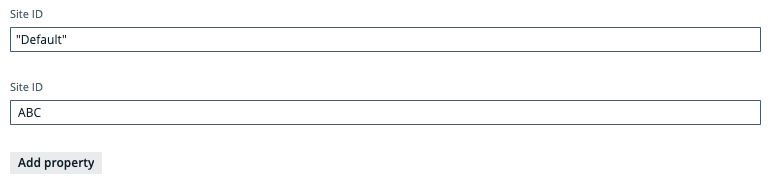 Tip Ensure that you specify the correct value. The correct value is the URL of the site to which you want to sign in. When you manually sign in to Tableau Server or Tableau Online, the site ID is the value that appears after /site/ in the browser address bar. In the following example URLs, the site ID is
MarketingTeam:- Tableau Server: http://MyServer/#/site/MarketingTeam/projects
- Tableau Online: https://10ay.online.tableau.com/#/site/MarketingTeam/workbooks
On Tableau Server, however, the URL of the default site does not specify the site. For example, the URL for a view named Profits, on a site named Sales, is http://localhost/#/site/sales/views/profits. The URL for this same view on the default site is http://localhost/#/views/profits. The site name Sales does not figure in the URL. NoSite NameThe site name, or names, of the Tableau sites you specified in the Site ID field.
If you don't provide a site ID in the Site ID field, in which case the default Tableau site is ingested, leave this field blank.
NoConcurrency levelThis field is intended to help if you are experiencing HTTP 401 Unauthorized errors due to too many concurrent HTTP calls, using the same token. It allows you to specify the internal sizing, meaning the amount of tasks that can be executed at the same time.
The default value is "10", meaning as many as 10 HTTP requests can take place in parallel. Consider reducing the value if you are experiencing HTTP 401 Unauthorized errors. Setting the value to "1" effectively disables the concurrency level, so that HTTP requests will be run in a synchronous manner, instead of in parallel.
NoSource configurationThis field allows you to provide JSON code for database mapping, domain mapping and filtering.
If you previously integrated Tableau via the lineage harvester, you can copy and paste in this field the JSON code from your Tableau <source ID> configuration file.
Property
Description collibraSystemNames This section contains the system information for different Tableau data sources. Depending on the kind of data source or connection, you have to specify how to connect to this data source.
Tip For more information, see the Tableau documentation. We also recommend to check the list of supported connectors in Tableau.
This section allows you to map Tableau technical database, server and schema names to the respective real names, to preserve stitching.
WarninghostnameMappingreplaces the following deprecated properties- The
databaseMappingproperty. - The
databasessub-section of thecollibraSystemNamessection.
- The
hostnameMappingmust not be used in combination with either of these properties.If you use the
hostnameMappingsection, you can still use thecollibraSystemNameproperty in conjunction with thefiles,connectorsorcloudfilessub-sections.Example configuration"hostnameMapping": { "found_dbname=databasename1;found_hostname=*;found_schema=test": { "dbname": "mssql-database-name", "schema": "mssql-schema-name", "dialect": "mssql", "collibraSystemName": "mssql-system-name" } }No
found_dbname=<database name>;found_hostname=<server name>;found_schema=<schema name>The database information of supported data sources in Tableau that is typically collected by the lineage harvester. It allows you to specify the name of the database (found_dbname), on which server a database is running (found_hostname), and optionally, the name of the schema (found_schema).
No
dbnameThe name of the database of a supported data source in Tableau.
No
schemaThe name of the default schema of a supported data source in Tableau.
If the lineage harvester fails to find a specific schema, it uses the default schema.
No
dialectThe dialect of the supported data source in Tableau.
You don't have to specify a dialect; it will automatically be detected. If, however, you are using a dialect that is not supported, you can use this property to specify a supported dialect that is a close comparison. That way, most of your queries will be detected and processed.
Show me a list of dialects of supported data sources in Tableau.- redshift, for an Amazon Redshift data source.
- azure, for an Azure SQL Server data source.
- bigquery, for a Google BigQuery data source.
- greenplum, for a Greenplum data source.
- hive, for a HiveQL data source.
- oracle, for an Oracle data source.
- postgres, for a PostgreSQL data source.
- mssql, for a Microsoft SQL Server data source.
- mysql, for a MySQL data source.
- netezza, for a Netezza data source.
- hana, for a SAP HANA data source.
- spark, for a Spark SQL data source.
- sybase, for a Sybase data source.
- teradata, for a Teradata data source.
No
collibraSystemNameThe system or server name of the database.
Warning The value of this property must exactly match the name of your System asset in Collibra.
No
filesThis section contains connection information to one or more files in Tableau.
Tip If you do not have files in Tableau, you can remove this section.
filePathThe full path to the file. For example, the path to a JSON file. collibraSystemNameThe system name of the file. connectorsThis section contains connection information to one or more connectors in Tableau.
Tip- If you do not have connectors in Tableau, you can remove this section.
- The values that you specify for this property are not case-sensitive.
connectorUrlThe URL of the connector. For example, the URL to Google Analytics. collibraSystemNameThe system name of the connector. cloudFilesThis section contains connection information to one or more cloud files in Tableau's input data.
Tip If you do not have cloud files in Tableau, you can remove this section.
nameThe name of the file. For example, the name of a Zendesk file. collibraSystemNameThe system name of the cloud file. This section defines:
- From which Tableau sites and projects you want to harvest metadata.
- Into which domains in Collibra you want to ingest the corresponding assets.
Filtering is transitive, which means that all resources in a specified project, such as Tableau workbooks and all sub-projects, are ingested.
Tableau assets that are not mapped to the specified domains, for example the Tableau Server assets and the parent projects (if you specify their sub-projects), are ingested in the default domain.
Important- Filtering does not affect the amount of raw metadata that is harvested from Tableau and sent to the Collibra Data Lineage service instance. Rather, it determines which metadata is ingested as assets in Data Catalog.
- The
domainMappingandfilterssections are mutually exclusive. Do not include bothdomainMappingandfilterssections in your JSON file.
Tip- If you want to ingest all of the projects in a Tableau site into multiple domains in Collibra, use
domainMappingsection. - If you want to ingest all of the projects in a Tableau site into the default domain, use only the
domainIDproperty in the lineage harvester configuration file. ThedomainIDproperty represents the default domain. - If you want to ingest all of the projects in a Tableau site into a single domain in Collibra, use site filtering.
- If you want to ingest metadata from only some of the projects in a Tableau site, use project filtering.
- You can use site filtering and project filtering together:
- If filtering on the same site, this "filtering" is actually domain mapping, because nothing is filtered out. The contents of the projects are ingested in the specified domains, and the rest of the contents of the site are ingested in a different, specified domain.
- If you are site filtering on a specific site and project filtering a different site, then site filtering is again a form of domain mapping, and the filtered projects are ingested in their specified domains.
- If your lineage harvester configuration file includes sites that are not mentioned in the
filterssection of your <source ID> configuration file, those sites are ingested in the default domain.
The Tableau sites to be ingested and the domain in which you want to ingest metadata from the Tableau sites.
Tip If you have only one Tableau site, do not include asitessection in your <source ID> file. Instead, use aprojectssection, to filter on Tableau projects. Include asitessection only if all of the following are true:- You have more than one Tableau site.
- You want to ingest all of the metadata from only one Tableau site into a single domain in Collibra.
- The domain into which you want to ingest is not the default domain, meaning the domain specified in the
domainIdproperty in your lineage harvester configuration file.
site_name: domain_idsite_name- The name of the site to be ingested. The site name is case-sensitive.
domain_id- The unique reference ID of the domain in Collibra in which you want to ingest metadata. The domain ID is case-sensitive.
siteIdsproperty in the lineage harvester configuration file for Tableau. If thesite_nameordomain_idproperty is not specified for a site, the metadata from the site is ingested in the default domain.How do I find a domain reference ID?Open the relevant domain in Collibra. The URL looks like: https://<yourcollibrainstance>/domain/22258f64-40b6-4b16-9c08-c95f8ec0da26?view=00000000-0000-0000-0000-000000040001. In this example, the reference ID is in bold.
Show me the example{ "filters":{ "sites":{ "Training":"ca60b822-781b-4b3a-b44d-f65bd107ff92" }, "projects":{ "Testing > Databricks":"e8f4e4a8-4062-4a33-9b44-3ce3e18e4e22", "Product Demo > Customer Insights":"a305e6f7-7a49-49aa-aa85-41b1e689121b" } } }The Tableau projects to be ingested and the domain in which you want to ingest metadata from the Tableau projects or sub-projects.
Tip Project filtering is not relevant for those who have an Explorer role in Tableau, because Explorers need to configure permissions for each data object in Tableau that they want to ingest. As the Administrator role has access to all data objects, project filtering allows Administrators to specify which projects to ingest.
site_name > project_name : domain_idThe
site_nameshould be the Tableau site name. Theproject_nameshould be the Tableau project name.The
domain_idshould be the unique reference ID of the domain in Collibra in which you want to ingest metadata.When you specify the site and project names, the following rules apply:
- Add spaces before and after >. The spaces are separators between the site and project.
- Specify the full exact site and project names.
- The values are case-sensitive.
When you specify a Tableau project, all assets in the project are ingested in the specified domain. If you want to ingest assets from different Tableau projects in one domain, you can specify the same value for
domain idfor different projects.Example
"Collibra_tab_partner_site > JB_Test_2812": "d224a1a5-43b4-43b2-8df0-ddf8f2726b82"site_name > project_name > sub-project_name : domain_idThe
site_nameshould be the Tableau site name. Theproject_nameshould be the Tableau project name. Optionally, usesub-project_nameto specify the Tableau sub-project name.The
domain_idproperty should be the unique reference ID of the domain in Collibra in which you want to ingest metadata.When you specify the site, project and sub-project names, the following rules apply:
- Add spaces before and after >. The spaces are separators between the site and project.
- Specify the full exact site and project names.
- The values are case-sensitive.
Example
"Collibra_tab_partner_site > JB_Test_2812 > ProjectJJ2": "d224a1a5-43b4-43b2-8df0-ddf8f2726b82"domainMapping This section defines in which domains in Collibra you want to ingest assets from your Tableau sites and Tableau projects.
Domain mapping is transitive, meaning that all resources, such as Tableau workbooks and data attributes in a parent Tableau site, project or sub-project, are ingested in the same domain as the parent.
Important The
domainMappingandfilterssections are mutually exclusive. Do not include bothdomainMappingandfilterssections in your JSON file.Tip- If you want to ingest all of the projects in a Tableau site into multiple domains in Collibra, use
domainMappingsection. - If you want to ingest all of the projects in a Tableau site into the default domain, use only the
domainIDproperty in the lineage harvester configuration file. ThedomainIDproperty represents the default domain.Note Tableau assets that are not mapped to specific domains via thisdomainMappingsection, for example Tableau Server assets, are ingested in that default domain. - If you want to ingest all of the projects in a Tableau site into a single domain in Collibra, use site filtering.
- If you want to ingest metadata from only some of the projects in a Tableau site, use project filtering.
Show me an exampleLet's say that you have a Tableau site named "Site-1". You want to ingest all Tableau projects in "Site-1" in a domain named "Domain-1" in Collibra, with the exception of one Tableau project named "Project-Default", which you want to ingest in "Domain-2". You should configure the
domainMappingsection as follows."domainMapping": { "<Site-1>": "reference-id-of-Domain-1", "<Site-1> > <Project-Default>": "reference-id-of-Domain-2" }If you want to specify a domain for a sub-project of "Project-Default", use the
<site name> > <project name> > <sub-project name>property, as described below.Tip For the properties in thisdomainMappingsection, ensure that you maintain the spaces before and after ">", for example"Site-1 > Project-Default". The spaces serve as a separator between the site and the projects.site nameThe Tableau site name, followed by the unique reference ID of the domain in Collibra in which you want to ingest resources from the Tableau site.
Important In the configuration file, use the actual site name, along with the domain reference ID, for example:"Collibra_tab_partner_site": "afc8cfb0-91f1-4075-a3e5-7ce6d1f9bcc9"site name > project nameThe Tableau project name, preceded by the name of the Tableau site to which it belongs, and followed by the unique reference ID of the domain in Collibra in which you want to ingest resources from the Tableau project.
Important In the configuration file, use the actual site and project names, along with the domain reference ID, for example:"Collibra_tab_partner_site > JB_Test_2812": "d224a1a5-43b4-43b2-8df0-ddf8f2726b82"site name > project name > sub-project nameThe Tableau sub-project name, preceded by the name of the Tableau site and project to which it belongs, and followed by the unique reference ID of the domain in Collibra in which you want to ingest resources from the Tableau sub-project.
Important In the configuration file, use the actual site, project and sub-project names, along with the domain reference ID, for example:"Collibra_tab_partner_site > JB_Test_2812 > ProjectJJ2": "d224a1a5-43b4-43b2-8df0-ddf8f2726b82"ExampleFor more
hostnameMappingconfiguration examples and results, go to Tableau hostname, schema, and system name mapping.{ "collibraSystemNames": { "files": [ {"filePath": "C:\\ProgramData\\Tableau\\Tableau Server\\data\\files\\sample.xls", "collibraSystemName": "sample-files" } ], "connectors": [ { "connectorUrl": "tableau-server-connector-url.com", "collibraSystemName": "Oracle-connector" } ], "cloudFiles": [ { "name": "file-name", "collibraSystemName": "FILE" } ] }, "hostnameMapping": { "found_dbname=*;found_hostname=abc.net;found_schema=DEFAULT": { "dbname": "CData", "schema": "Jan_1_2022", "dialect": "spark", "collibraSystemName": "TV_testing" } }, "filters": { "sites":{ "site_name":"domain_id" }, "projects":{ "site_name2 > project_name2": "domain-reference-id2", "site_name3 > project_name3 > subproject_name": "domain-reference-id2" } } }Tip Click
to copy the example to your clipboard.For more
hostnameMappingconfiguration examples and results, go to Tableau hostname, schema, and system name mapping.{ "collibraSystemNames": { "files": [ {"filePath": "C:\\ProgramData\\Tableau\\Tableau Server\\data\\files\\sample.xls", "collibraSystemName": "sample-files" } ], "connectors": [ { "connectorUrl": "tableau-server-connector-url.com", "collibraSystemName": "Oracle-connector" } ], "cloudFiles": [ { "name": "file-name", "collibraSystemName": "FILE" } ] }, "hostnameMapping": { "found_dbname=Test;found_hostname=*;found_schema=DEFAULT": { "dbname": "CData", "schema": "Jan_1_2022", "dialect": "spark", "collibraSystemName": "TV_testing" } }, "domainMapping": { "<Site-1>": "reference-id-of-Domain-1", "<Site-1> > <Project-Default>": "reference-id-of-Domain-2" } }Tip Click
to copy the example to your clipboard. NoCustom Properties
This section identifies to which Collibra Data Lineage service instance you want to upload the Tableau metadata.
Warning This applies only to US government customers.
techlinKeyThe unique API key to connect to the Collibra Data Lineage service instance.
A unique user key is needed for each Collibra environment. If you're not sure what your user key is, please contact your Collibra Customer Success Manager.
Warning This applies only to US government customers.
NotechlinHostThe URL of he Collibra Data Lineage service instance to which you want to upload Tableau metadata, for example "techlin-gcp-eu.collibra.com".
Warning This applies only to US government customers.
NoAdvanced Properties
This section contains the advanced properties for creating a technical lineage.
Delete Raw Metadata After ProcessingTechnical lineage via Edge harvests raw metadata from specified data sources and uploads it in a ZIP file to a Collibra Data Lineage service instance. This option indicates whether the raw metadata should be deleted from the Collibra Data Lineage service instance after the metadata that is targeted for ingestion in Data Catalog is processed.
Select this option to indicate that the raw source metadata is deleted after processing.
Clear the checkbox to keep the raw source metadata after processing. In this case, it is stored in the Collibra infrastructure.
Note Selecting this option can negatively impact performance.
Analyze OnlyThis option determines whether to only load and analyze the source data on the Collibra Data Lineage service instances.
When you select this option, the technical lineage of the data source is not created during the synchronization of the capability. Selecting this option is equivalent to entering the
load-sourcesandanalyzecommand with a source specified when you use the lineage harvester.This option is not enabled by default.
Use caseYou can use this option to control when to start full synchronization of data sources. For example if you have three data sources, A, B, and C, you can synchronize the data sources as follows:
- During weekdays, synchronize data sources A and B with the Analyze Only checkbox selected in the capabilities. Collibra Data Lineage only loads and analyzes data sources A and B without synchronizing the technical lineage.
- On the weekend, synchronize data source C without selecting the Analyze Only checkbox in the capability. Collibra Data Lineage synchronizes the technical lineage for all data sources including A, B, and C.
No
ActiveThe option determines whether to include or remove the technical lineage of the data source.
Select this option to include the technical lineage of this data source.
Clear the checkbox to exclude the technical lineage of this data source.
NoPagingThis section allows you to customize the Tableau API pagination settings.
The default values are sufficient in most cases; however, you can decrease them to help mitigate node limit errors, or increase them to speed up API calls.The complete list of pagination settings, descriptions and default values"paging": { "databasesPageSize": 100, "tablesPageSize": 100, "tablesColumnsPageSize": 100, "tableColumnsPageSize": 1000, "datasourcesPageSize": 50, "datasourcesFieldsPageSize": 50, "datasourceFieldsPageSize": 100, "worksheetsPageSize": 100, "worksheetsFieldsPageSize": 100, "worksheetFieldsPageSize": 1000, "usersPageSize": 100, "dashboardsPageSize": 100, "columnsLimit": 20, "fieldsLimit": 20 }Settings per metadata type and descriptions
Metadata type Setting and description Dashboard dashboardsPageSize: The number of dashboards per page.
Worksheet worksheetsPageSize: The number of worksheets per page.worksheetsFieldsPageSize: The number of worksheet fields per page.
Database databasesPageSize: The number of databases per page.
Table tablesPageSize: The number of tables per page.tablesColumnsPageSize: The number of table columns per page.
Table columns tableColumnsPageSize: The number of table columns per page.
Users usersPageSize: The number of users per page.
Data source datasourcesPageSize: The number of data sources per page.datasourcesFieldsPageSize: The number of data source fields per page.columnsLimit: The number of data source field columns per page.fieldsLimit: The number of referenced data source fields per page.
Data source field datasourceFieldsPageSize: The number of data source fields per page.columnsLimit: The number of data source field columns per page.fieldsLimit: The number of referenced data source fields per page.
NoField Description Required? Capability This section contains general information about the capability.
NameThe name of the Edge capability.
Yes
DescriptionThe description of the Edge capability.
Yes
Capability templateThe capability template. The value that you select in this field determines which sections appear on the page.
Select the following Edge capability:
Technical Lineage for Teradata Yes
Main Properties This section contains the information for creating a technical lineage.
Source IDThe name of the data source. Specify a name that is unique.
Yes
JDBC ConnectionThe JDBC connection that you created for Catalog JDBC ingestion.
Yes
Collibra System NameThe system or server name of the data source. This field is also the full name of your System asset in Data Catalog.
The value of this field must be the same as the full name of the System asset that you created when you registered the data source.
Yes
External Database NameThe database value to be used as the database name in the full path (system -> database -> schema -> table). Use this field to ensure successful stitching for a database-less data source. You can specify one of the following values:
CData, which Cdata drivers returned as a placeholder. Use this value if you did not create a custom database name by using theCustomizedDefaultCatalogNameproperty when you registered your data source.- The custom database name that you specified for the
CustomizedDefaultCatalogNameproperty when you registered your data source.
See an exampleWhen you registered a Teradata data source on Edge and did not specify the
CustomizedDefaultCatalogNameproperty, the following full path to a column in Data Catalog is created and CData is used as the database name:Teredata_123(system) >CData(database) >Teredata_ABC(schema) >Table>ColumnWhen Collibra Data Lineage collects metadata from the Teradata data source, the value of the Database Name field is used as the schema name because Teradata is database-less.
If you do not enter a value for the External Database Name field, the value of the Collibra System Name field is used as the database name. If you set the Collibra system name setting to
true, the value of the Collibra System Name field is also used as the system name. In this case, the full path is shown as follows and does not match the full path in Data Catalog:Teredata_123(system) >Teredata_123(database) >Teredata_ABC(schema) >Table>ColumnIn this case, the stitching fails because of the mismatch of the full paths. To match the full path and preserve stitching, you must specify
CDatafor the External Database Name field. No
Database NameThe name of your database, which is also the name of your Database asset in Data Catalog.
Tip You can add extra database names by clicking Add property.
Yes
Queries
The queries to download all the data that is required to create technical lineage. The queries vary depending on the data source you use. The query code is automatically available. However, you can modify the query code if needed.
Example Enter the following filter in a Views query:
where v.table_schema not in ('pg_catalog', 'information_schema');. This query excludes the pg_catalog and information_schema schemas, which don't contain customer data. If you want to exclude other schemas, adjust the query to, for examplewhere v.table_schema not in ('pg_catalog', 'information_schema', 'another_schema');.Note- If you change queries, you can only use supported SQL syntax.
- Collibra Support does not provide support for customized SQL files.
Query Description Columns This query retrieves the columns, tables, schemas, databases or projects fields in the form: database or project > schema > table > column. Object Names
This query retrieves a list of object names from which technical lineage can be created. The objects can include stored procedures, views, macros, and so on. Yes
Custom Properties This section contains the custom parameters you can specify to create technical lineage. Click Add property to add a property.
Warning This applies only to US government customers.
Possible properties for US government customersName Description Type Encryption Example value techlinHostThe URL of the Collibra Data Lineage service instance to which you want to upload metadata, for example
techlin-gcp-eu.collibra.com.Text Not encrypted (plain text) https://techlin-gcp-dev.collibra.com techlinKeyThe unique API key to connect to a Collibra Data Lineage service instance.
Specify a unique user key for each Collibra environment. If you're not sure what your user key is, contact your Collibra Customer Success Manager.
Text To be encrypted by Edge management server Value will be stored on Edge No
Advanced Properties This section contains the advanced properties for creating a technical lineage.
Delete Raw Metadata After ProcessingTechnical lineage via Edge harvests raw metadata from specified data sources and uploads it in a ZIP file to a Collibra Data Lineage service instance. This option indicates whether the raw metadata should be deleted from the Collibra Data Lineage service instance after the metadata that is targeted for ingestion in Data Catalog is processed.
Select this option to indicate that the raw source metadata is deleted after processing.
Clear the checkbox to keep the raw source metadata after processing. In this case, it is stored in the Collibra infrastructure.
Note Selecting this option can negatively impact performance.
No
Analyze OnlyThis option determines whether to only load and analyze the source data on the Collibra Data Lineage service instances.
When you select this option, the technical lineage of the data source is not created during the synchronization of the capability. Selecting this option is equivalent to entering the
load-sourcesandanalyzecommand with a source specified when you use the lineage harvester.This option is not enabled by default.
Use caseYou can use this option to control when to start full synchronization of data sources. For example if you have three data sources, A, B, and C, you can synchronize the data sources as follows:
- During weekdays, synchronize data sources A and B with the Analyze Only checkbox selected in the capabilities. Collibra Data Lineage only loads and analyzes data sources A and B without synchronizing the technical lineage.
- On the weekend, synchronize data source C without selecting the Analyze Only checkbox in the capability. Collibra Data Lineage synchronizes the technical lineage for all data sources including A, B, and C.
No
ActiveThe option determines whether to include or remove the technical lineage of the data source.
Select this option to include the technical lineage of this data source.
Clear the checkbox to exclude the technical lineage of this data source.
Yes
General This section contains general information about logging.
Note Collibra Data Lineage does not use this logging feature on Edge. You can ignore this section. If you see any technical lineage synchronization issues when view the summary of the results, use the Technical Lineage via Edge common error messages article in Collibra Portal to fix the issues.DebugAn option to automatically send Edge infrastructure log files to Collibra Data Intelligence Cloud. By default, this option is set to false.
Note We highly recommend to only send Edge infrastructure log files to Collibra Data Intelligence Cloud when you have issues with Edge. If you set it to true, it will automatically revert to false after 24h. No
Log levelAn option to determine the verbosity level of Catalog connector log files. By default, this option is set to No logging.
No
Field Description Required? Capability This section contains general information about the capability.
NameThe name of the Edge capability.
Yes
DescriptionThe description of the Edge capability.
Yes
Capability templateThe capability template. The value that you select in this field determines which sections appear on the page.
Select the following Edge capability:
Technical Lineage for SqlDirectory Yes
Main Properties This section contains the information for creating a technical lineage.
Source IDThe name of the data source. Specify a name that is unique.
Yes
Shared Storage ConnectionThe Shared Storage connection that you created.
No
MaskThe pattern of the file names in the directory. By default, the value is
*. Yes
DialectThe dialect of the database.
See the list of allowed values.You can enter one of the following values:
- azure, for an Azure SQL Server data source.
- bigquery, for a Google BigQuery data source.
- db2, for an IBM DB2 data source.
- hana, for an SAP HANA data source.
- hana-cviews, for getting lineage from calculated views in an SAP HANA data source.Important
- The
hana-cviewsdialect is supported for SAP HANA (on-premises). It is not supported for SAP HANA Cloud. - To get technical lineage including calculated views, you must harvest SAP HANA by specifying two data sources in the lineage harvester configuration file. In one data source, specify the hana dialect, and in the other, specify the hana-cviews dialect.
- The
- hive, for a HiveQL data source.
- greenplum, for a Greenplum data source.
- mssql, for a Microsoft SQL Server data source.
- mysql, for a MySQL data source.
- netezza, for a Netezza data source.
- oracle, for an Oracle data source.
- postgres, for a PostgreSQL data source.
- redshift, for an Amazon Redshift data source.
- snowflake, for a Snowflake data source.
- spark, for a Spark SQL data source.
- sybase, for a Sybase data source.
- teradata, for a Teradata data source.
Yes
Collibra System NameThe system or server name of the data source. This field is also the full name of your System asset in Data Catalog.
The value of this field must be the same as the full name of the System asset that you created when you registered the data source.
Yes
DatabaseThe name of your database, which is also the name of your Database asset in Data Catalog.
Note The database and schema names in the SQL statements in your SQL files take precedence over the values that you provide for the Database and Schema fields in the technical lineage for SqlDirectory capability. If your SQL statements contain database and schema names, Collibra Data Lineage uses them for stitching. If your SQL statements do not contain database and schema names, Collibra Data Lineage uses the values of the Database and Schema fields in the capability for stitching. Fore more information, go to Prepare the SQL directory and Automatic stitching for technical lineage. Yes
SchemaThe name of the default schema, if not specified in the data source itself. This corresponds to the name of your Schema asset.
Note The database and schema names in the SQL statements in your SQL files take precedence over the values that you provide for the Database and Schema fields in the technical lineage for SqlDirectory capability. If your SQL statements contain database and schema names, Collibra Data Lineage uses them for stitching. If your SQL statements do not contain database and schema names, Collibra Data Lineage uses the values of the Database and Schema fields in the capability for stitching. Fore more information, go to Prepare the SQL directory and Automatic stitching for technical lineage. Yes
Custom Properties This section contains the custom parameters you can specify to create technical lineage. Click Add property to add a property.
Warning This applies only to US government customers.
Possible properties for US government customersName Description Type Encryption Example value techlinHostThe URL of the Collibra Data Lineage service instance to which you want to upload metadata, for example
techlin-gcp-eu.collibra.com.Text Not encrypted (plain text) https://techlin-gcp-dev.collibra.com techlinKeyThe unique API key to connect to a Collibra Data Lineage service instance.
Specify a unique user key for each Collibra environment. If you're not sure what your user key is, contact your Collibra Customer Success Manager.
Text To be encrypted by Edge management server Value will be stored on Edge No
Advanced Properties This section contains the advanced properties for creating a technical lineage.
Delete Raw Metadata After ProcessingTechnical lineage via Edge harvests raw metadata from specified data sources and uploads it in a ZIP file to a Collibra Data Lineage service instance. This option indicates whether the raw metadata should be deleted from the Collibra Data Lineage service instance after the metadata that is targeted for ingestion in Data Catalog is processed.
Select this option to indicate that the raw source metadata is deleted after processing.
Clear the checkbox to keep the raw source metadata after processing. In this case, it is stored in the Collibra infrastructure.
Note Selecting this option can negatively impact performance.
No
Analyze OnlyThis option determines whether to only load and analyze the source data on the Collibra Data Lineage service instances.
When you select this option, the technical lineage of the data source is not created during the synchronization of the capability. Selecting this option is equivalent to entering the
load-sourcesandanalyzecommand with a source specified when you use the lineage harvester.This option is not enabled by default.
Use caseYou can use this option to control when to start full synchronization of data sources. For example if you have three data sources, A, B, and C, you can synchronize the data sources as follows:
- During weekdays, synchronize data sources A and B with the Analyze Only checkbox selected in the capabilities. Collibra Data Lineage only loads and analyzes data sources A and B without synchronizing the technical lineage.
- On the weekend, synchronize data source C without selecting the Analyze Only checkbox in the capability. Collibra Data Lineage synchronizes the technical lineage for all data sources including A, B, and C.
No
ActiveThe option determines whether to include or remove the technical lineage of the data source.
Select this option to include the technical lineage of this data source.
Clear the checkbox to exclude the technical lineage of this data source.
Yes
- Click Save.
The capability is added to the Edge site.
The fields become read-only.
-
Synchronize your technical lineage.
You can synchronize your technical lineage manually or automatically by adding a synchronization schedule.
If you want to synchronize technical lineage by using the Collibra Catalog Cloud Ingestions API, use the

/genericIntegration/{ingestibleId}/runAPI. For details, go to Collibra Developer Portal.When you synchronize a technical lineage capability, a full synchronization is run, which is equivalent to the
full-synccommand with the-sargument specified when you use the lineage harvester. You can synchronize as many technical lineage capabilities in parallel as you want. If a full synchronization is in progress, the other capabilities are put in a queue until a new full synchronization starts automatically.Prerequisites
- A global role that has the following global permission:
- The Catalog, for example Catalog Author
- View Edge connections and capabilities
- A resource role with Configure external system resource permission, for example Owner.
- Data source-specific permissions as identified in Data source-specific permissions.
Steps
- Manually synchronize the technical lineage
- Add a synchronization schedule
- Open a Database asset page of a registered database.
-
In the tab pane, click
 Configuration.
 - On the Lineage extraction tab pane, click Synchronize lineage.A notification indicates synchronization has started.The synchronization job is started. The tables and columns from the selected schema are ingested based on the configured table rules.
- Open the Database asset page of a registered database.
-
In the tab pane, click
Configuration.
- On the Lineage extraction tab pane, click Add Schedule in the Synchronization schedule section.
- Enter the required information and click Save:
Field Description Repeat The interval when you want to synchronize automatically. The possible values are: Daily, Weekly, Monthly, and Cron expression. CronThe Quartz Cron expression that determines when the synchronization takes place.
This field is only visible if you select
Cron expressionin the Repeat field.EveryThe day on which you want to synchronize, for example, Sunday.
This field is only visible if you select
Weeklyin the Repeat field.Every firstThe day of the month on which you want to synchronize, for example, Tuesday.
This field is only visible if you select
Monthlyin the Repeat field.At
The time at which you want to synchronize automatically, for example, 14:00.
- You can only schedule on the hour. For example, you can add a synchronization schedule at 8:00, but not at 8:45. If you try to add it at 8:45, we will default it to 8:00. Use a cron expression if you don't want to schedule on the hour.
- This field is only visible if you select
Daily,Weekly, orMonthlyin the Repeat field.
Time zone The time zone for the schedule.
- A global role that has the following global permission:
-
Synchronize your technical lineage.
You can synchronize your technical lineage manually or automatically by adding a synchronization schedule.
If you want to synchronize technical lineage by using the Collibra Catalog Cloud Ingestions API, use the
/genericIntegration/{ingestibleId}/runAPI. For details, go to Collibra Developer Portal.When you synchronize a technical lineage capability, a full synchronization is run, which is equivalent to the
full-synccommand with the-sargument specified when you use the lineage harvester. You can synchronize as many technical lineage capabilities in parallel as you want. If a full synchronization is in progress, the other capabilities are put in a queue until a new full synchronization starts automatically.Prerequisites
- A global role that has the following global permission:
- The Catalog, for example Catalog Author
- View Edge connections and capabilities
- A resource role with Configure external system resource permission, for example Owner.
- Data source-specific permissions as identified in Data source-specific permissions.
Steps
- Manually synchronize the technical lineage
- Add a synchronization schedule
-
On the main menu, click , and then click
 Catalog.
The Catalog Home opens. - On the main toolbar, click
 .
.
The Create dialog box appears. - In the Register with Edge section of the Create dialog box, click Register a data source.
The Register content page opens. - In the Connection name column, locate the Shared Storage connection that you used when you added the technical lineage capability. Then, click the capability name in the Data sources/Capabilities column of your Shared Storage connection. The technical lineage capability configuration page opens.
- On the Configuration Section tab pane, click Synchronize now.
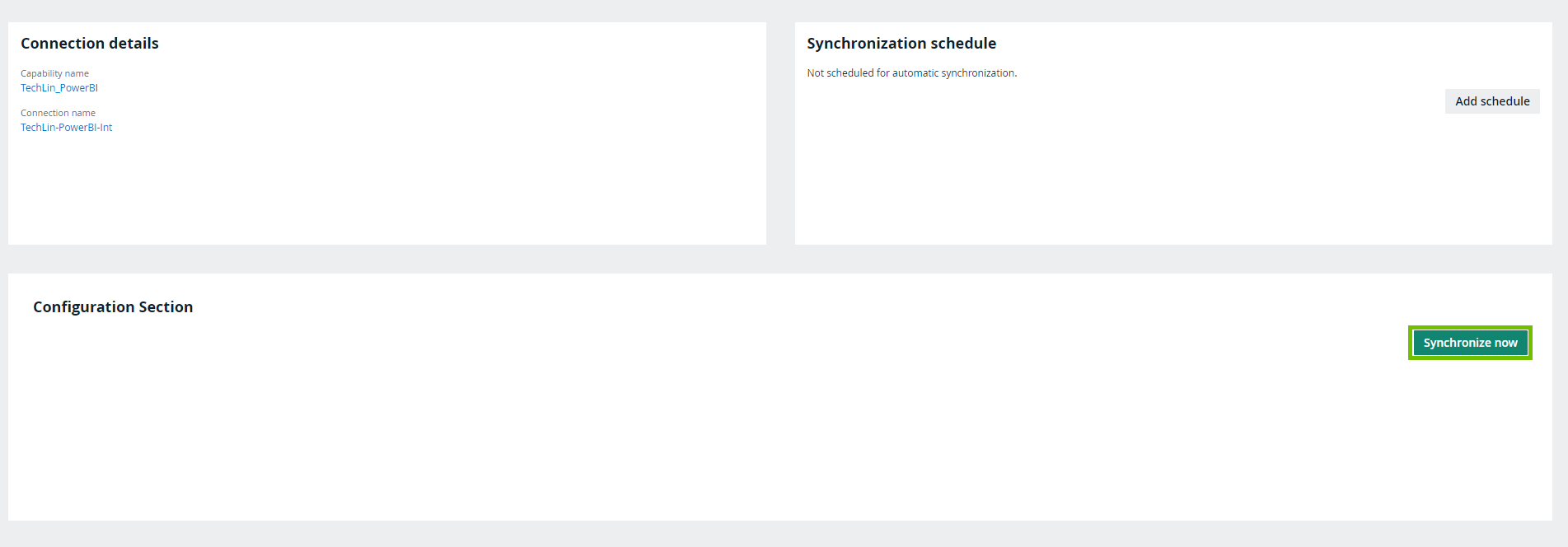 A notification indicates synchronization has started.The synchronization job is started. The tables and columns from the selected schema are ingested based on the configured table rules.
-
On the main menu, click , and then click
Catalog.
The Catalog Home opens. - On the main toolbar, click .
The Create dialog box appears. - In the Register with Edge section of the Create dialog box, click Register a data source.
The Register content page opens. - In the Connection name column, locate the Shared Storage connection that you used when you added the technical lineage capability. Then, click the capability name in the Data sources/Capabilities column of your Shared Storage connection. The technical lineage capability configuration page opens.
- On the Synchronization schedule tab pane, click Add schedule.
- Enter the required information and click Save:
Field Description Repeat The interval when you want to synchronize automatically. The possible values are: Daily, Weekly, Monthly, and Cron expression. CronThe Quartz Cron expression that determines when the synchronization takes place.
This field is only visible if you select
Cron expressionin the Repeat field.EveryThe day on which you want to synchronize, for example, Sunday.
This field is only visible if you select
Weeklyin the Repeat field.Every firstThe day of the month on which you want to synchronize, for example, Tuesday.
This field is only visible if you select
Monthlyin the Repeat field.At
The time at which you want to synchronize automatically, for example, 14:00.
- You can only schedule on the hour. For example, you can add a synchronization schedule at 8:00, but not at 8:45. If you try to add it at 8:45, we will default it to 8:00. Use a cron expression if you don't want to schedule on the hour.
- This field is only visible if you select
Daily,Weekly, orMonthlyin the Repeat field.
Time zone The time zone for the schedule.
- A global role that has the following global permission:
-
Synchronize your technical lineage.
You can synchronize your technical lineage manually or automatically by adding a synchronization schedule.
If you want to synchronize technical lineage by using the Collibra Catalog Cloud Ingestions API, use the
/genericIntegration/{ingestibleId}/runAPI. For details, go to Collibra Developer Portal.When you synchronize a technical lineage capability, a full synchronization is run, which is equivalent to the
full-synccommand with the-sargument specified when you use the lineage harvester. You can synchronize as many technical lineage capabilities in parallel as you want. If a full synchronization is in progress, the other capabilities are put in a queue until a new full synchronization starts automatically.Prerequisites
- A global role that has the following global permission:
- The Catalog, for example Catalog Author
- View Edge connections and capabilities
- A resource role with Configure external system resource permission, for example Owner.
- Data source-specific permissions as identified in Data source-specific permissions.
Steps
- Manually synchronize the technical lineage
- Add a synchronization schedule
-
On the main menu, click , and then click
Catalog.
The Catalog Home opens. - On the main toolbar, click .
The Create dialog box appears. - In the Register with Edge section of the Create dialog box, click Register a data source.
The Register content page opens. - In the Connection name column, locate the Shared Storage connection that you used when you added the technical lineage capability. Then, click the capability name in the Data sources/Capabilities column of your Shared Storage connection. The technical lineage capability configuration page opens.
- On the Configuration Section tab pane, click Synchronize now.A notification indicates synchronization has started.The synchronization job is started. The tables and columns from the selected schema are ingested based on the configured table rules.
-
On the main menu, click , and then click
Catalog.
The Catalog Home opens. - On the main toolbar, click .
The Create dialog box appears. - In the Register with Edge section of the Create dialog box, click Register a data source.
The Register content page opens. - In the Connection name column, locate the Shared Storage connection that you used when you added the technical lineage capability. Then, click the capability name in the Data sources/Capabilities column of your Shared Storage connection. The technical lineage capability configuration page opens.
- On the Synchronization schedule tab pane, click Add schedule.
- Enter the required information and click Save:
Field Description Repeat The interval when you want to synchronize automatically. The possible values are: Daily, Weekly, Monthly, and Cron expression. CronThe Quartz Cron expression that determines when the synchronization takes place.
This field is only visible if you select
Cron expressionin the Repeat field.EveryThe day on which you want to synchronize, for example, Sunday.
This field is only visible if you select
Weeklyin the Repeat field.Every firstThe day of the month on which you want to synchronize, for example, Tuesday.
This field is only visible if you select
Monthlyin the Repeat field.At
The time at which you want to synchronize automatically, for example, 14:00.
- You can only schedule on the hour. For example, you can add a synchronization schedule at 8:00, but not at 8:45. If you try to add it at 8:45, we will default it to 8:00. Use a cron expression if you don't want to schedule on the hour.
- This field is only visible if you select
Daily,Weekly, orMonthlyin the Repeat field.
Time zone The time zone for the schedule.
- A global role that has the following global permission:
-
Synchronize your technical lineage.
You can synchronize your technical lineage manually or automatically by adding a synchronization schedule.
If you want to synchronize technical lineage by using the Collibra Catalog Cloud Ingestions API, use the
/genericIntegration/{ingestibleId}/runAPI. For details, go to Collibra Developer Portal.When you synchronize a technical lineage capability, a full synchronization is run, which is equivalent to the
full-synccommand with the-sargument specified when you use the lineage harvester. You can synchronize as many technical lineage capabilities in parallel as you want. If a full synchronization is in progress, the other capabilities are put in a queue until a new full synchronization starts automatically.Prerequisites
- A global role that has the following global permission:
- The Catalog, for example Catalog Author
- View Edge connections and capabilities
- A resource role with Configure external system resource permission, for example Owner.
- Ensure that you meet the Azure Data Factory-specific permissions described in Set up Azure Data Factory.
Steps
- Manually synchronize technical lineage for ADF
- Add a synchronization schedule
-
On the main menu, click , and then click
Catalog.
The Catalog Home opens. - On the main toolbar, click .
The Create dialog box appears. - In the Register with Edge section of the Create dialog box, click Register a data source.
The Register content page opens. - In the Connection name column, locate the Azure connection that you used when you added the technical lineage capability. Then, click the capability name in the Data sources/Capabilities column of your Azure connection. The technical lineage capability configuration page opens.
- On the Configuration Section tab pane, click Synchronize now.A notification indicates synchronization has started.The synchronization job is started. The tables and columns from the selected schema are ingested based on the configured table rules.
-
On the main menu, click , and then click
Catalog.
The Catalog Home opens. - On the main toolbar, click .
The Create dialog box appears. - In the Register with Edge section of the Create dialog box, click Register a data source.
The Register content page opens. - In the Connection name column, locate the Azure connection that you used when you added the technical lineage capability. Then, click the capability name in the Data sources/Capabilities column of your Azure connection. The technical lineage capability configuration page opens.
- On the Synchronization schedule tab pane, click Add schedule.
- Enter the required information and click Save:
Field Description Repeat The interval when you want to synchronize automatically. The possible values are: Daily, Weekly, Monthly, and Cron expression. CronThe Quartz Cron expression that determines when the synchronization takes place.
This field is only visible if you select
Cron expressionin the Repeat field.EveryThe day on which you want to synchronize, for example, Sunday.
This field is only visible if you select
Weeklyin the Repeat field.Every firstThe day of the month on which you want to synchronize, for example, Tuesday.
This field is only visible if you select
Monthlyin the Repeat field.At
The time at which you want to synchronize automatically, for example, 14:00.
- You can only schedule on the hour. For example, you can add a synchronization schedule at 8:00, but not at 8:45. If you try to add it at 8:45, we will default it to 8:00. Use a cron expression if you don't want to schedule on the hour.
- This field is only visible if you select
Daily,Weekly, orMonthlyin the Repeat field.
Time zone The time zone for the schedule.
- A global role that has the following global permission:
-
Synchronize your technical lineage.
You can synchronize your technical lineage manually or automatically by adding a synchronization schedule.
If you want to synchronize technical lineage by using the Collibra Catalog Cloud Ingestions API, use the
/genericIntegration/{ingestibleId}/runAPI. For details, go to Collibra Developer Portal.When you synchronize a technical lineage capability, a full synchronization is run, which is equivalent to the
full-synccommand with the-sargument specified when you use the lineage harvester. You can synchronize as many technical lineage capabilities in parallel as you want. If a full synchronization is in progress, the other capabilities are put in a queue until a new full synchronization starts automatically.Prerequisites
- A global role that has the following global permission:
- The Catalog, for example Catalog Author
- View Edge connections and capabilities
- A resource role with Configure external system resource permission, for example Owner.
- The permissions to retrieve the metadata of the following database components through the JDBC Driver Database Metadata methods:
- Schemas
- Tables
- Columns
Steps
- Manually synchronize technical lineage for dbt Cloud(Beta)
- Add a synchronization schedule
-
On the main menu, click , and then click
Catalog.
The Catalog Home opens. - On the main toolbar, click .
The Create dialog box appears. - In the Register with Edge section of the Create dialog box, click Register a data source.
The Register content page opens. - In the Connection name column, locate the dbt connection that you used when you added the technical lineage capability. Then, click the capability name in the Data sources/Capabilities column of your dbt connection. The technical lineage capability configuration page opens.
- On the Configuration Section tab pane, click Synchronize now.A notification indicates synchronization has started.The synchronization job is started. The tables and columns from the selected schema are ingested based on the configured table rules.
-
On the main menu, click , and then click
Catalog.
The Catalog Home opens. - On the main toolbar, click .
The Create dialog box appears. - In the Register with Edge section of the Create dialog box, click Register a data source.
The Register content page opens. - In the Connection name column, locate the dbt connection that you used when you added the technical lineage capability. Then, click the capability name in the Data sources/Capabilities column of your dbt connection. The technical lineage capability configuration page opens.
- On the Synchronization schedule tab pane, click Add schedule.
- Enter the required information and click Save:
Field Description Repeat The interval when you want to synchronize automatically. The possible values are: Daily, Weekly, Monthly, and Cron expression. CronThe Quartz Cron expression that determines when the synchronization takes place.
This field is only visible if you select
Cron expressionin the Repeat field.EveryThe day on which you want to synchronize, for example, Sunday.
This field is only visible if you select
Weeklyin the Repeat field.Every firstThe day of the month on which you want to synchronize, for example, Tuesday.
This field is only visible if you select
Monthlyin the Repeat field.At
The time at which you want to synchronize automatically, for example, 14:00.
- You can only schedule on the hour. For example, you can add a synchronization schedule at 8:00, but not at 8:45. If you try to add it at 8:45, we will default it to 8:00. Use a cron expression if you don't want to schedule on the hour.
- This field is only visible if you select
Daily,Weekly, orMonthlyin the Repeat field.
Time zone The time zone for the schedule.
- A global role that has the following global permission:
-
Synchronize your technical lineage.
You can synchronize your technical lineage manually or automatically by adding a synchronization schedule.
If you want to synchronize technical lineage by using the Collibra Catalog Cloud Ingestions API, use the
/genericIntegration/{ingestibleId}/runAPI. For details, go to Collibra Developer Portal.When you synchronize a technical lineage capability, a full synchronization is run, which is equivalent to the
full-synccommand with the-sargument specified when you use the lineage harvester. You can synchronize as many technical lineage capabilities in parallel as you want. If a full synchronization is in progress, the other capabilities are put in a queue until a new full synchronization starts automatically.Prerequisites
- A global role that has the following global permission:
- The Catalog, for example Catalog Author
- View Edge connections and capabilities
- A resource role with Configure external system resource permission, for example Owner.
- The following Matillion-specific permissions:
- You have at least a Matillion Enterprise license.
- You have generated the Matillion certificate. For more information, go to Recreating self-signed SSL certificates on a Matillion ETL instance.
- You have added the Matillion certificate to a Java truststore. For more information about adding a certificate to a Java truststore, go to Add a Certificate to a Truststore Using Keytool.
Steps
- Manually synchronize technical lineage for Matillion
- Add a synchronization schedule
-
On the main menu, click , and then click
Catalog.
The Catalog Home opens. - On the main toolbar, click .
The Create dialog box appears. - In the Register with Edge section of the Create dialog box, click Register a data source.
The Register content page opens. - In the Connection name column, locate the Matillion connection that you used when you added the technical lineage capability. Then, click the capability name in the Data sources/Capabilities column of the Matillion connection. The technical lineage capability configuration page opens.
- On the Configuration Section tab pane, click Synchronize now.A notification indicates synchronization has started.The synchronization job is started. The tables and columns from the selected schema are ingested based on the configured table rules.
-
On the main menu, click , and then click
Catalog.
The Catalog Home opens. - On the main toolbar, click .
The Create dialog box appears. - In the Register with Edge section of the Create dialog box, click Register a data source.
The Register content page opens. - In the Connection name column, locate the Matillion connection that you used when you added the technical lineage capability. Then, click the capability name in the Data sources/Capabilities column of the Matillion connection. The technical lineage capability configuration page opens.
- On the Synchronization schedule tab pane, click Add schedule.
- Enter the required information and click Save:
Field Description Repeat The interval when you want to synchronize automatically. The possible values are: Daily, Weekly, Monthly, and Cron expression. CronThe Quartz Cron expression that determines when the synchronization takes place.
This field is only visible if you select
Cron expressionin the Repeat field.EveryThe day on which you want to synchronize, for example, Sunday.
This field is only visible if you select
Weeklyin the Repeat field.Every firstThe day of the month on which you want to synchronize, for example, Tuesday.
This field is only visible if you select
Monthlyin the Repeat field.At
The time at which you want to synchronize automatically, for example, 14:00.
- You can only schedule on the hour. For example, you can add a synchronization schedule at 8:00, but not at 8:45. If you try to add it at 8:45, we will default it to 8:00. Use a cron expression if you don't want to schedule on the hour.
- This field is only visible if you select
Daily,Weekly, orMonthlyin the Repeat field.
Time zone The time zone for the schedule.
- A global role that has the following global permission:
-
Synchronize a Tableau technical lineage.
You can synchronize your technical lineage manually or automatically by adding a synchronization schedule.
When you synchronize a technical lineage capability, a full synchronization is run, which is equivalent to the
full-synccommand with the-sargument specified when you use the lineage harvester. You can synchronize as many technical lineage capabilities in parallel as you want. If a full synchronization is in progress, the other capabilities are put in a queue until a new full synchronization starts automatically.Prerequisites
- A global role that has the following global permission:
- The Catalog, for example Catalog Author
- View Edge connections and capabilities
- A resource role with Configure external system resource permission, for example Owner.
Steps
- Manually synchronize technical lineage for Tableau
- Add a synchronization schedule
-
On the main menu, click , and then click
Catalog.
The Catalog Home opens. - On the main toolbar, click .
The Create dialog box appears. - In the Register with Edge section of the Create dialog box, click Register a data source.
The Register content page opens. - In the Connection name column, locate the Tableau connection that you used when you added the Tableau capability. Then, click the capability name in the Data sources/Capabilities column of the Tableau connection. The technical lineage capability configuration page opens.
- On the Configuration Section tab pane, click Synchronize now.A notification indicates synchronization has started.The synchronization job is started. The tables and columns from the selected schema are ingested based on the configured table rules.
-
On the main menu, click , and then click
Catalog.
The Catalog Home opens. - On the main toolbar, click .
The Create dialog box appears. - In the Register with Edge section of the Create dialog box, click Register a data source.
The Register content page opens. - In the Connection name column, locate the Tableau connection that you used when you added the Tableau capability. Then, click the capability name in the Data sources/Capabilities column of the Tableau connection. The technical lineage capability configuration page opens.
- On the Synchronization schedule tab pane, click Add schedule.
- Enter the required information and click Save:
Field Description Repeat The interval when you want to synchronize automatically. The possible values are: Daily, Weekly, Monthly, and Cron expression. CronThe Quartz Cron expression that determines when the synchronization takes place.
This field is only visible if you select
Cron expressionin the Repeat field.EveryThe day on which you want to synchronize, for example, Sunday.
This field is only visible if you select
Weeklyin the Repeat field.Every firstThe day of the month on which you want to synchronize, for example, Tuesday.
This field is only visible if you select
Monthlyin the Repeat field.At
The time at which you want to synchronize automatically, for example, 14:00.
- You can only schedule on the hour. For example, you can add a synchronization schedule at 8:00, but not at 8:45. If you try to add it at 8:45, we will default it to 8:00. Use a cron expression if you don't want to schedule on the hour.
- This field is only visible if you select
Daily,Weekly, orMonthlyin the Repeat field.
Time zone The time zone for the schedule.
- A global role that has the following global permission:
-
Synchronize a Power BI technical lineage.
You can synchronize your technical lineage manually or automatically by adding a synchronization schedule.
When you synchronize a technical lineage capability, a full synchronization is run, which is equivalent to the
full-synccommand with the-sargument specified when you use the lineage harvester. You can synchronize as many technical lineage capabilities in parallel as you want. If a full synchronization is in progress, the other capabilities are put in a queue until a new full synchronization starts automatically.Prerequisites
- A global role that has the following global permission:
- The Catalog, for example Catalog Author
- View Edge connections and capabilities
- A resource role with Configure external system resource permission, for example Owner.
Steps
- Manually synchronize technical lineage for Power BI
- Add a synchronization schedule
-
On the main menu, click , and then click
Catalog.
The Catalog Home opens. - On the main toolbar, click .
The Create dialog box appears. - In the Register with Edge section of the Create dialog box, click Register a data source.
The Register content page opens. - In the Connection name column, locate the Power BI connection that you used when you added the Power BI capability. Then, click the capability name in the Data sources/Capabilities column of the Power BI connection.The technical lineage capability configuration page opens.
- On the Configuration Section tab pane, click Synchronize now.A notification indicates synchronization has started.The synchronization job is started. The tables and columns from the selected schema are ingested based on the configured table rules.
-
On the main menu, click , and then click
Catalog.
The Catalog Home opens. - On the main toolbar, click .
The Create dialog box appears. - In the Register with Edge section of the Create dialog box, click Register a data source.
The Register content page opens. - In the Connection name column, locate the Power BI connection that you used when you added the Power BI capability. Then, click the capability name in the Data sources/Capabilities column of the Power BI connection.The technical lineage capability configuration page opens.
- On the Synchronization schedule tab pane, click Add schedule.
- Enter the required information and click Save:
Field Description Repeat The interval when you want to synchronize automatically. The possible values are: Daily, Weekly, Monthly, and Cron expression. CronThe Quartz Cron expression that determines when the synchronization takes place.
This field is only visible if you select
Cron expressionin the Repeat field.EveryThe day on which you want to synchronize, for example, Sunday.
This field is only visible if you select
Weeklyin the Repeat field.Every firstThe day of the month on which you want to synchronize, for example, Tuesday.
This field is only visible if you select
Monthlyin the Repeat field.At
The time at which you want to synchronize automatically, for example, 14:00.
- You can only schedule on the hour. For example, you can add a synchronization schedule at 8:00, but not at 8:45. If you try to add it at 8:45, we will default it to 8:00. Use a cron expression if you don't want to schedule on the hour.
- This field is only visible if you select
Daily,Weekly, orMonthlyin the Repeat field.
Time zone The time zone for the schedule.
- A global role that has the following global permission:
-
Synchronize a MicroStrategy technical lineage.
You can synchronize your technical lineage manually or automatically by adding a synchronization schedule.
When you synchronize a technical lineage capability, a full synchronization is run, which is equivalent to the
full-synccommand with the-sargument specified when you use the lineage harvester. You can synchronize as many technical lineage capabilities in parallel as you want. If a full synchronization is in progress, the other capabilities are put in a queue until a new full synchronization starts automatically.Prerequisites
- A global role that has the following global permission:
- The Catalog, for example Catalog Author
- View Edge connections and capabilities
- A resource role with Configure external system resource permission, for example Owner.
Steps
- Manually synchronize technical lineage for MicroStrategy
- Add a synchronization schedule
-
On the main menu, click , and then click
Catalog.
The Catalog Home opens. - On the main toolbar, click .
The Create dialog box appears. - In the Register with Edge section of the Create dialog box, click Register a data source.
The Register content page opens. -
In the Connection name column, locate the MicroStrategy connection that you used when you added the MicroStrategy capability. Then, click the capability name in the Data sources/Capabilities column of the MicroStrategy connection.
The technical lineage capability configuration page opens. - On the Configuration Section tab pane, click Synchronize now.A notification indicates synchronization has started.The synchronization job is started. The tables and columns from the selected schema are ingested based on the configured table rules.
-
On the main menu, click , and then click
Catalog.
The Catalog Home opens. - On the main toolbar, click .
The Create dialog box appears. - In the Register with Edge section of the Create dialog box, click Register a data source.
The Register content page opens. -
In the Connection name column, locate the MicroStrategy connection that you used when you added the MicroStrategy capability. Then, click the capability name in the Data sources/Capabilities column of the MicroStrategy connection.
The technical lineage capability configuration page opens. - On the Synchronization schedule tab pane, click Add schedule.
- Enter the required information and click Save:
Field Description Repeat The interval when you want to synchronize automatically. The possible values are: Daily, Weekly, Monthly, and Cron expression. CronThe Quartz Cron expression that determines when the synchronization takes place.
This field is only visible if you select
Cron expressionin the Repeat field.EveryThe day on which you want to synchronize, for example, Sunday.
This field is only visible if you select
Weeklyin the Repeat field.Every firstThe day of the month on which you want to synchronize, for example, Tuesday.
This field is only visible if you select
Monthlyin the Repeat field.At
The time at which you want to synchronize automatically, for example, 14:00.
- You can only schedule on the hour. For example, you can add a synchronization schedule at 8:00, but not at 8:45. If you try to add it at 8:45, we will default it to 8:00. Use a cron expression if you don't want to schedule on the hour.
- This field is only visible if you select
Daily,Weekly, orMonthlyin the Repeat field.
Time zone The time zone for the schedule.
- A global role that has the following global permission:
-
Synchronize your technical lineage.
You can synchronize your technical lineage manually or automatically by adding a synchronization schedule.
If you want to synchronize technical lineage by using the Collibra Catalog Cloud Ingestions API, use the
/genericIntegration/{ingestibleId}/runAPI. For details, go to Collibra Developer Portal.When you synchronize a technical lineage capability, a full synchronization is run, which is equivalent to the
full-synccommand with the-sargument specified when you use the lineage harvester. You can synchronize as many technical lineage capabilities in parallel as you want. If a full synchronization is in progress, the other capabilities are put in a queue until a new full synchronization starts automatically.Prerequisites
- A global role that has the following global permission:
- The Catalog, for example Catalog Author
- View Edge connections and capabilities
- A resource role with Configure external system resource permission, for example Owner.
- The following IICS-specific permissions:
- Your user role must have privileges to export assets.
- You must have read permission on all assets that you want to export.
Steps
- Manually synchronize technical lineage for IICS
- Add a synchronization schedule
-
On the main menu, click , and then click
Catalog.
The Catalog Home opens. - On the main toolbar, click .
The Create dialog box appears. - In the Register with Edge section of the Create dialog box, click Register a data source.
The Register content page opens. - In the Connection name column, locate the IICS connection that you used when you added the technical lineage capability. Then, click the capability name in the Data sources/Capabilities column of the IICS connection. The technical lineage capability configuration page opens.
- On the Configuration Section tab pane, click Synchronize now.A notification indicates synchronization has started.The synchronization job is started. The tables and columns from the selected schema are ingested based on the configured table rules.
-
On the main menu, click , and then click
Catalog.
The Catalog Home opens. - On the main toolbar, click .
The Create dialog box appears. - In the Register with Edge section of the Create dialog box, click Register a data source.
The Register content page opens. - In the Connection name column, locate the IICS connection that you used when you added the technical lineage capability. Then, click the capability name in the Data sources/Capabilities column of the IICS connection. The technical lineage capability configuration page opens.
- On the Synchronization schedule tab pane, click Add schedule.
- Enter the required information and click Save:
Field Description Repeat The interval when you want to synchronize automatically. The possible values are: Daily, Weekly, Monthly, and Cron expression. CronThe Quartz Cron expression that determines when the synchronization takes place.
This field is only visible if you select
Cron expressionin the Repeat field.EveryThe day on which you want to synchronize, for example, Sunday.
This field is only visible if you select
Weeklyin the Repeat field.Every firstThe day of the month on which you want to synchronize, for example, Tuesday.
This field is only visible if you select
Monthlyin the Repeat field.At
The time at which you want to synchronize automatically, for example, 14:00.
- You can only schedule on the hour. For example, you can add a synchronization schedule at 8:00, but not at 8:45. If you try to add it at 8:45, we will default it to 8:00. Use a cron expression if you don't want to schedule on the hour.
- This field is only visible if you select
Daily,Weekly, orMonthlyin the Repeat field.
Time zone The time zone for the schedule.
- A global role that has the following global permission:
-
View the summary of the results.
After you synchronize the technical lineage, you can view the summary of the results. This shows the impact of technical lineage synchronization on the assets in Collibra Data Intelligence Cloud.
Steps
- Open the Activities list.
- In the row containing the Lineage harvester synchronization job, click Result.The Lineage harvester synchronization results dialog box appears.
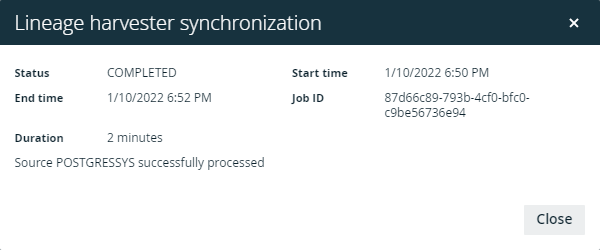
Tip The Job ID is useful when troubleshooting your synchronization process with Collibra Support.
If the synchronization fails or completes with errors, you can use the technical lineage via Edge common error messages in Collibra Support Portal to fix the errors.
