When you conduct an assessment and click Save draft or Submit for review, the assessment is shown on the Assessments landing page. You can click the assessment to view its details.
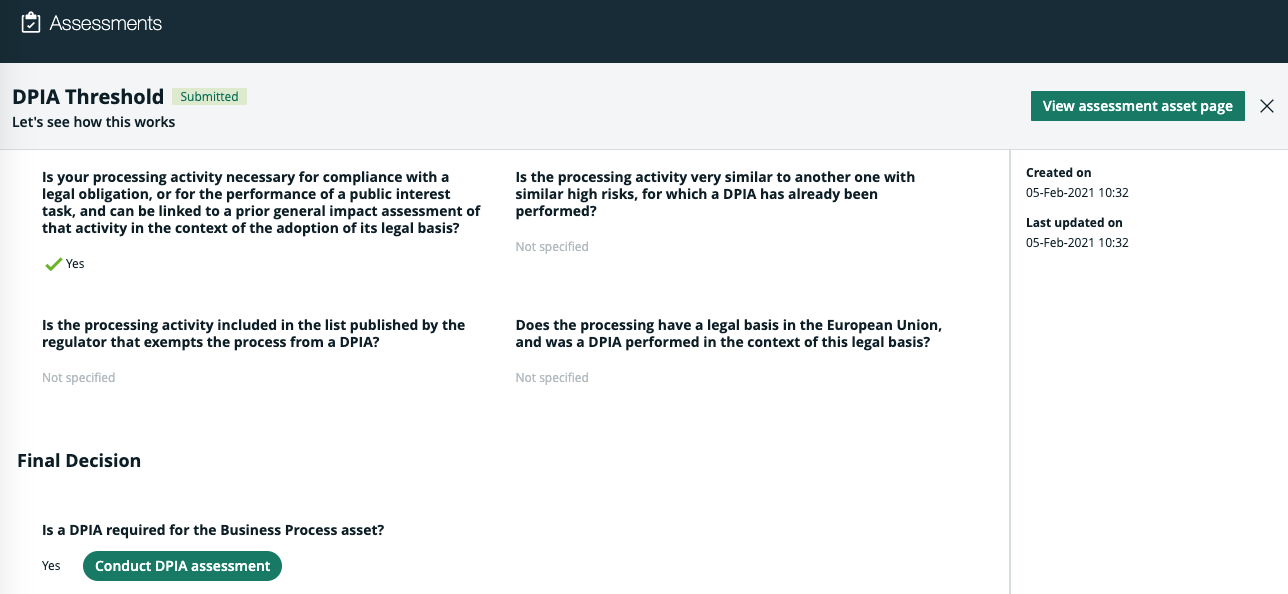
The assessment details page:
- Shows the responses to all answered questions.
- Identifies the date and time on which the assessment was started.
- Identifies the date and time on which the last changes were made to the assessment.Note You cannot edit an assessment that is in the Submitted or Completed status.
- Includes the Edit draft button for assessments in the Draft status.
- Includes the following for assessments in the Published status:
- A button to the launch a follow-up assessment, if the template that was used included a Yes/No and Decision questions and the score threshold was reached.
- The View submission button, to access the Assessment Review asset page in your Collibra Data Intelligence Cloud environment.Note If the Assessment Review asset was deleted from your Collibra environment:
- The status of the assessment remains Submitted.
- Clicking the View submission button shows the following message: Entity not found.
The following example shows the assessment details page of a published assessment in which it was determined, by the responses to the Yes/No questions, that a DPIA assessment should be conducted for the underlying asset.