During the data classification process, we predict the data class for a column. The percentage next to the data class indicates the confidence level of the data classification suggestion.
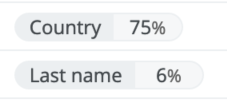
You can manually accept or reject a suggested data class, but you can also configure thresholds to automatically accept or reject the data classification suggestions.
- If you set the automatic acceptance threshold to 75%, then a data classification suggestion with a confidence level of 75% or higher is accepted automatically.
- If you set the automatic rejection threshold to 49%, then a data classification suggestion with a confidence level of 49% or lower is automatically rejected and does not appear for the column.
You can use the thresholds with both classification methods, via Cloud Data Classification Platform and via Edge.
Tip Start using the Automatic Data Classification tool by manually accepting and rejecting the data classification suggestions. Only activate the automatic acceptance and rejection feature if you are comfortable with the results the tool provides.