Start forms

Start forms set the process variables that your workflow requires. You can configure start forms by adding forms to your start event.
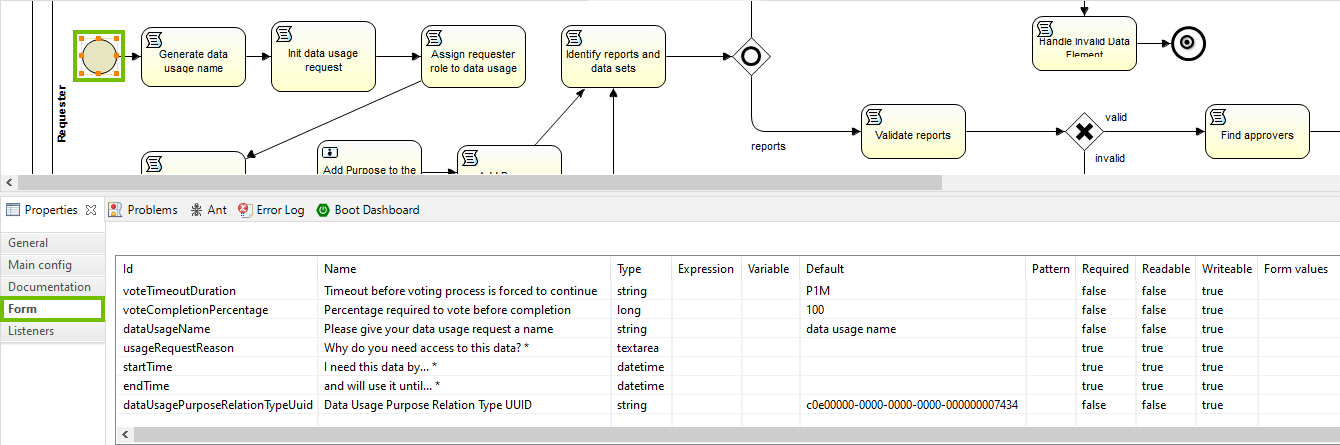
You can use any form type that is not exclusively reserved for user tasks. The properties you set for each start form determine how the workflow shows that start form.

Property Configuration
Readable
  • True (default): A dialog box appears before the start of the workflow. You must fill in the required information or accept the default values and submit them to start the workflow.
  • False: These variables become configuration variables. When you configure the start form, you must provide a default value for these variables.
Required
  • True: You must provide a value for these variables to start the workflow. When you configure the start form, you must either provide a default value or set the Writable property to true.
  • False (default): You can start the workflow without providing a value for these variables.
Writable
  • True (default): You can provide a value or overwrite the default value for these variables, either as input in a start form dialog box or by editing the configuration variables on the workflow definition page.
  • False: You cannot provide another value for these variables in the UI. You can change the value with a script task.
Default The default value of the process variable.

Note The term start form refers to both the start event forms and the dialog box that appears before the start of the worklow.