Create start and end events
Events represent something that happens in the process. A start event is the trigger of the process and is depicted as a circle. The end event concludes a process and is depicted as a circle with a bold outline. Each workflow must only have one start event but there may be multiple end events.
To create start and end events in Flowable Eclipse Designer:
- From the Start event section of the Palette, drag a StartEvent to the Start user lane.
- From the End event section of the Palette, drag an EndEvent to the Start user lane.
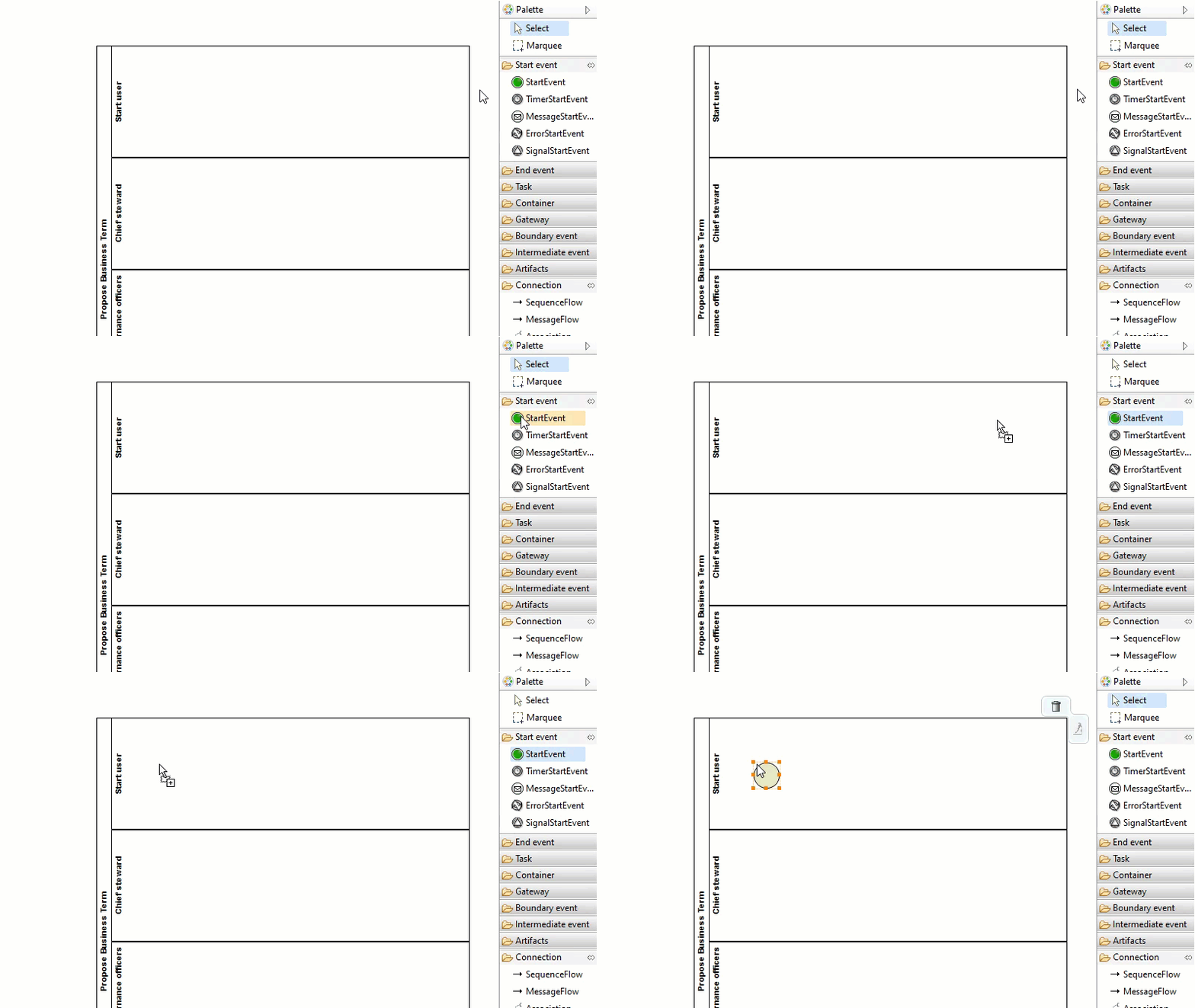
Note The start and end events are now disconnected but for the workflow definition to be executable there must always be a connection between them. You will create that connection as you add more elements to the workflow.
Configure the start event
In the start event configuration, you can define a variable that identifies the user who starts the workflow if you need that user to perform any other task or to receive workflow notifications.
To identify the user who starts the workflow:
- In the shared area, select the start event.
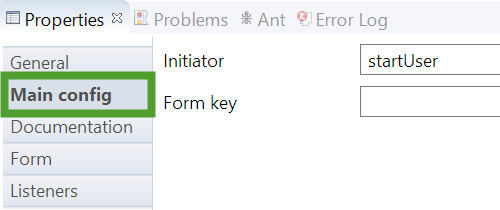
- In the Properties view, select the Main config section.
- In the Initiator field, enter a name for the variable that defines the user who starts the workflow. We are using startUser in this example.
The value of the variable becomes the username of that user.
The start event form variables set values that are used throughout the workflow. You can change these variables from the worfklow definition page in Collibra Data Intelligence Cloud. You can use these variables to identify the users that need to perform workflow tasks and to set customizable values that are used by this or another workflow, for example the Voting Sub-Process.
Tip Set the Readable property to false to prevent the user who starts the workflow from being prompted for input.
| Id | Name | Type | Default | Required | Readable |
|---|---|---|---|---|---|
| chiefStewardUserExpression | The Chief Steward user expression | string | role(Chief Steward) | true |
false |
| officersUserExpression | The Data Governance Officers user expression | string | role(Data Governance Officer) | true |
false |
| stewardUserExpression | The Steward user expression | string | role(Steward) | true |
false |
| votePercentage | The percentage of voters that are needed to approve | string | 100 | true |
false |
| voteWarningTimeDuration | Time before a warning mail is sent to the voter | string | P5D | false |
false |
| voteTimeoutDuration | Time before the voting is stopped and the process continued | string | P10D | true |
false |
To add a start event form variable:
- In the shared area, select the start event.
- In the Properties view, select the Form section.
- Click New.

The Form property configuration window appears.
- In the Form property configuration window, enter the required information:
- Id: chiefStewardUserExpression
- Name: The Chief Steward user expression
- Type: string
- Default: role(Chief Steward)
- Readable: False
- Required: True
- Click OK.

To update your workflow with all the required start event variables, use the text editor in Eclipse to replace the startEvent element with:
<startEvent id="startevent1" name="Start" activiti:initiator="startUser">
    <extensionElements>
        <activiti:formProperty id="chiefStewardUserExpression" name="The Chief Steward user expression" type="string" default="role(Chief Steward)" readable="false" required="true"></activiti:formProperty>
        <activiti:formProperty id="stewardUserExpression" name="The Steward user expression" type="string" default="role(Steward)" readable="false" required="true"></activiti:formProperty>
        <activiti:formProperty id="officersUserExpression" name="The Data Governance Officers user expression" type="string" default="role(Data Governance Officer)" readable="false" required="true"></activiti:formProperty>
        <activiti:formProperty id="votePercentage" name="The percentage of voters that are needed to approve" type="string" default="100" readable="false" required="true"></activiti:formProperty>
        <activiti:formProperty id="voteWarningTimeDuration" name="Time before a warning mail is sent to the voter" type="string" default="P10D" readable="false" required="true"></activiti:formProperty>
        <activiti:formProperty id="voteTimeoutDuration" name="Time before the voting is stopped and the process continued" type="string" default="P5D" readable="false"></activiti:formProperty>
    </extensionElements>
</startEvent>