Sample data
Sample data is a set of randomly collected data from a data source. Sample data can be displayed for Table, Column, or Data Set assets. The purpose of showing sample data is to provide examples of the data so you know what to expect when you use the asset.
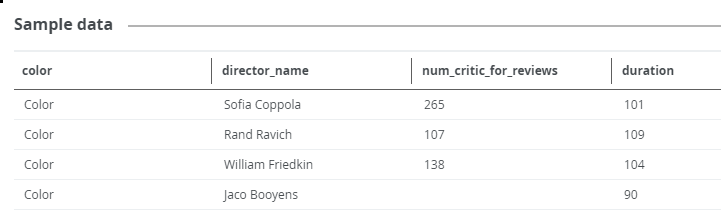
You can only view sample data for an asset:
- If the sample data feature is active.
- If you have the required permissions.
- If the asset is a Table, Column, or Data Set asset.
- If sample data is available for the asset.
Sample data is available in:
| Asset type | If Catalog experience is active, you can see the sample data in: | If Catalog experience is not active, you can see the sample data in: |
|---|---|---|
| Table | Summarytab pane
Sample data tab pane |
Details tab pane Sample data tab pane |
| Column | Summary tab pane
Data profiling tab pane |
Details tab pane Sample data tab pane |
| Data Set | Summary tab pane
Sample data tab pane |
Details tab pane |
Tip
In Table and Data Set assets, you only see sample data for columns for which you have the required permission. If you do not have access, you see the text <sensitive> in the column instead of sample data.
The way Collibra handles sample data depends on how the assets are added in Collibra and how the sample data is collected:
|
Assets are created by registering a data source via Edge. |
Assets are created by registering a data source via Jobserver. |
Assets are manually added or imported. |
|
|---|---|---|---|
|
Sample data for an asset is uploaded via the Catalog REST API - Profiling. |
The sample data is stored in the Collibra cloud repository. The sample data is displayed to all users with the required permissions. |
The sample data is stored in the Collibra cloud repository. This sample data is also used for data classification via the Data Classification Platform. The sample data is displayed to all users with the required permissions. |
The sample data is stored in the Collibra cloud repository. The sample data is displayed to all users with the required permissions. |
|
Sample data is collected and stored when the data source is registered via Jobserver. |
Not applicable. |
The sample data is stored in the Collibra cloud repository. This sample data is also used for data classification via the Data Classification Platform. The sample data is displayed to all users with the required permissions. |
Not applicable. |
|
Sample data can be manually requested for an asset that is registered via Edge. |
The requested sample data is cached on the Edge site for 24-48 hours. The sample data is only displayed to users with the required permissions and if the sample data has been requested. Note Currently, you can only request sample data via Edge for Table and Column assets.
|
Not applicable.
|
Not applicable.
|
For details on the process, go to Understanding the process to display sample data.
For details on the sample data limitations and guidelines, go to Limitations and guidelines.