The Data Marketplace landing page

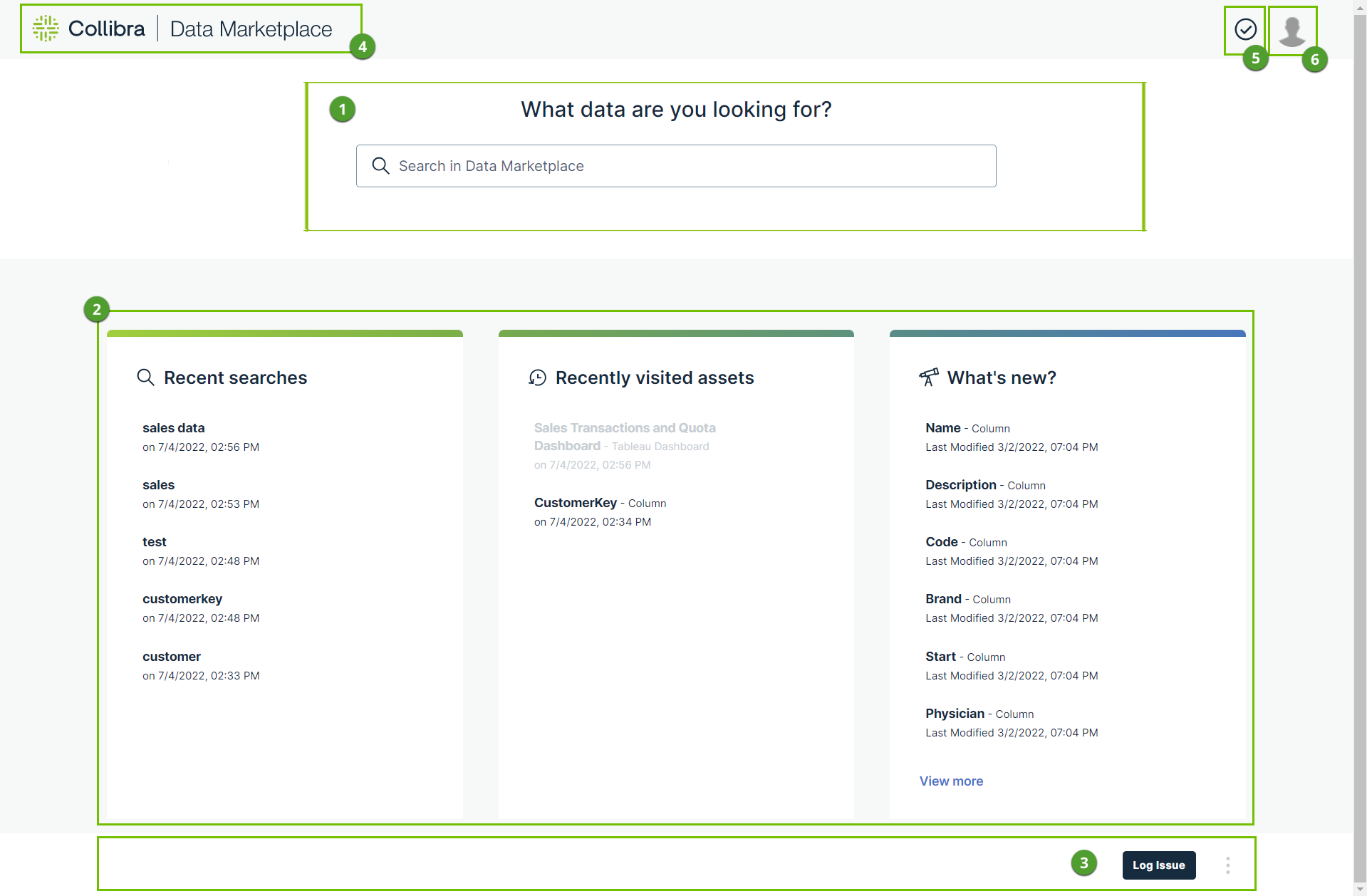
The Data Marketplace landing page is your starting point for finding the data you need. The page consists of multiple sections.
  Section Description
Search

The search field allows you to find any Data Catalog asset, such as Data Set, Schema, Table, Column, Tableau Workbook, BI report, and Power BI Dashboard within the Data Marketplace scope.

  • If search suggestions are enabled, Data Marketplace provides suggestions while you are typing. Click one of the suggestions to use it or press Enter to ignore the suggestions.
  • If search suggestions are not enabled, the search starts automatically after a few seconds.

Cards

Cards allow you to navigate quickly to data that might interest you.
The available cards depend on whether usage data is collected in your environment.

  • If data is collected, you have access to Popular Data, Recent Data Visits, and Recommended Data. ClosedView more information.
    Popular DataThis card shows the assets your colleagues visited the most in the last 30 days in Data Marketplace, Collibra, Collibra for Desktop, and Collibra for Mobile and that are in the scope of Data Marketplace. .
    • Data Marketplace checks the usage data once a day.
    • Click Show more to view more popular assets.
    • Loading this card can take a few seconds.
    My Recent Data VisitsThis card shows the assets for which you opened the preview in Data Marketplace.
    • Click Show more to view more recently visited assets.
    • Click to remove the visited asset.
    • An asset is grayed out when the asset is no longer available in Data Marketplace. Usually this is due to a change in the Data Marketplace scope.
    Recommended DataThis card shows data based on the data you search for and visit in Data Marketplace, Collibra, Collibra for Desktop, and Collibra for Mobile and that are in the scope of Data Marketplace.
    • Data Marketplace checks the usage data once a day.
    • Loading this card can take a few seconds.

    Tip No recommendations can be given to new users because no data is available yet. Recommendations will be provided after one day.

  • If no data is collected, you have access to Recent searches, Recent data visits, and What's new. ClosedView more information.

Landing page actions Your Data Marketplace administrator can make buttons available in this section.

Back to landing page Click this button to bring you back to the Data Marketplace landing page.

Notifications Click this button to get an overview of the messages you received from Data Marketplace.

Avatar Click your avatar to: