The out-of-the-box Data Marketplace experience
After Data Marketplace is activated, Data Marketplace is ready for use based on the out-of-the-box configuration. This includes the Data Marketplace scope, filter tabs, filters, and actions.
Scope
By default, Data Marketplace finds assets of the following Data Catalog asset types with any status, anywhere in the organization.
- Data Set
- Report
- Table
- Column
- Database View
- BI Data Set, BI Report
- Power BI Tile, Power BI Data Model, Power BI Dashboard, Power BI Report
- Tableau Dashboard, Tableau View, Tableau Story, Tableau Workbook, Tableau Worksheet
Administrators can configure the scope.
Filter tabs
Data Marketplace shows the search results in tab pages, which are based on filter sets. Filter sets are typically based on an asset type or on a group of filters that are frequently used and allow you to quickly apply a filter to the search results.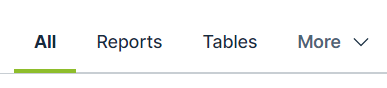
By default, Data Marketplace provides the following filter sets:
| Filter tab name | Description |
|---|---|
| All | No filter set is applied. All search results in the Data Marketplace scope to which you have View permissions are listed. |
| Tables | Only assets of the type Table or an out-of-the-box child asset type of Table are listed in the search results. |
| Data Sets | Only assets of the type Data Set or an out-of-the-box child asset type of Data Set are listed in the search results. |
| Reports | Only assets of the type Report or an out-of-the-box child asset type of Report are listed in the search results. |
Administrators can configure the filter tabs.
Filters
By default, Data Marketplace provides the filters in the table below.
Note Some of these filters rely on relation path indexing.
If your Collibra environment does not use one or more of the indexed relation types, the out-of-the-box filters based on relations do not work.
| Filter name | Description | Uses relations |
|---|---|---|
|
Business Asset |
Business Asset refers to the business assets that are related to the data, such as Tip For a detailed narrative on the differences between business terms, data domains and data concepts, see Conceptual data layer versus the Business Glossary. |
Yes |
|
Certified |
This filter limits your search results to data that has been certified, meaning approved, endorsed or guaranteed. Tip For complete information on certifying reports, see Trusted Business Reporting. |
No |
|
Data Domain refers to a high-level conceptual category to which the data belongs, such as Assets of this type:
Important To benefit from this, your data structure must follow the Data Stewardship meta model. See Conceptual data layer. |
Yes | |
|
Data Concept refers to the lower-level conceptual category to which the data belongs, such as Assets of this type:
Important To benefit from this, your data structure must follow the Data Stewardship meta model. See Conceptual data layer. |
Yes | |
|
Source System refers to the technology asset that stores the data, like HR Cloud. Via this filter, you can limit the search results to assets that exist in specified systems. |
Yes | |
|
Data source limits the search results to assets that exist in specified data sources. |
Yes | |
| Rating is a colleague’s perception of the data’s usefulness and quality. | No | |
|
Tag is a label that adds extra context to an asset. |
No | |
| Status refers to which governance process stage the asset is in, like Approved or Candidate. | No | |
|
Asset Type refers to the kind of data you are looking for, like data set, report, or table. |
No |
Administrators can configure the filters.
Actions
Data Marketplace provides following actions to the data consumers. The following actions are always available in the asset preview:
- Share an asset. This action allows data consumers to get a link to the asset.
- Open all details. This action allows data consumers to open the asset in Collibra.
