Operating Model migration best practices
Applies to: Operating Model migration
Recommendation
The Operating Model migration process is used when promoting changes to the Operating model from Dev or Test (source) environments to Production (target). Content changes in the source environment are not typically migrated to Production, where actual content will be added after the Operating Model has been updated.
Impact
Following best practices when migrating across environments provides a smoother, safer update, avoiding issues and interruptions to the user experience and, specifically, can help with:
- Saves many manual steps, reducing the risk of error and saves significant time.
- Maintaining UUIDs of objects in the model.
- Maintaining Workflow definition and configuration.
Best practice recommendations
- Make sure you are running the same version in both the source and target environments.
- Perform a code-freeze on all changes in both the source and target Operating Models.
- Backup the target instance and Operating Model (in case you later need to restore it).
- In the Source environment:
Select the objects in the Operating Model to be migrated. - Export/download the created .cma file and spreadsheet report documenting what has been exported.
- Review the report to ensure all change elements required have been included in the export. Remediate and re-export if any changes or other elements were missed from the export.
- In the Target environment:
Upload the exported .cma file to the target environment using the migration feature. - Review the simulation report to ensure all changes to the target environment are as expected.
- Execute the import.
In general, Communities and Domains are considered content and will not have been migrated with the Operating Model in the steps above. They should be created in the Target environment but can be migrated from the source.
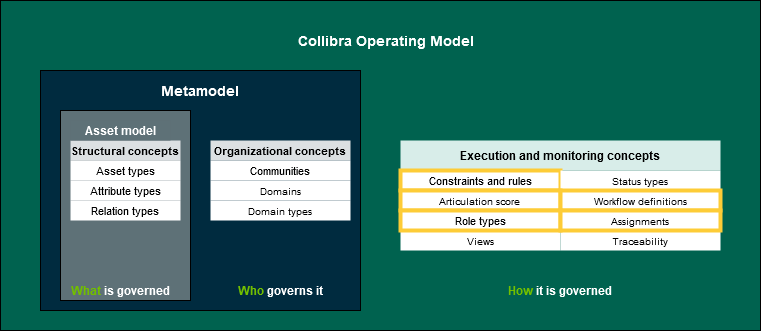
Note, however, that when you export an object, Collibra Data Intelligence Cloud automatically exports all referenced objects. Thus, communities and domains can be migrated with the Operating Model if they are invoked by Execution and Monitoring Concepts highlighted in the diagram below (in contrast to the statement above regarding communities and domains).
Note Content is not migrated with the Operating Model. Advanced users can build workflows to overcome this for some object types if required, or Collibra Professional Services can be employed.
Topic area
Operating Model →
Validation criteria
Run the OMRE (Operating Model Reverse Engineering) on a regular basis to identify the elements above.
For more information see Collibra's Documentation Center: