About profiling and classification via Edge
Profiling and classification via Edge is a functionality offered by Collibra for Collibra Data Intelligence Cloud users. The functionality combines both data profiling and data classification in one process.
-
Data profiling creates a summary of a data source that is registered with Data Catalog and determines the data type of columns in the data source. The summary mainly contains statistics and graphics to give the user an idea what the registered data is about.
- Automatic Data Classification tries to define the data class of a column. You can accept or reject the suggested data class of each column or add your own new classes.
Automatic Data Classification can suggest multiple data classes for a column. If the suggestion is accurate, you can accept multiple data classes for the column.
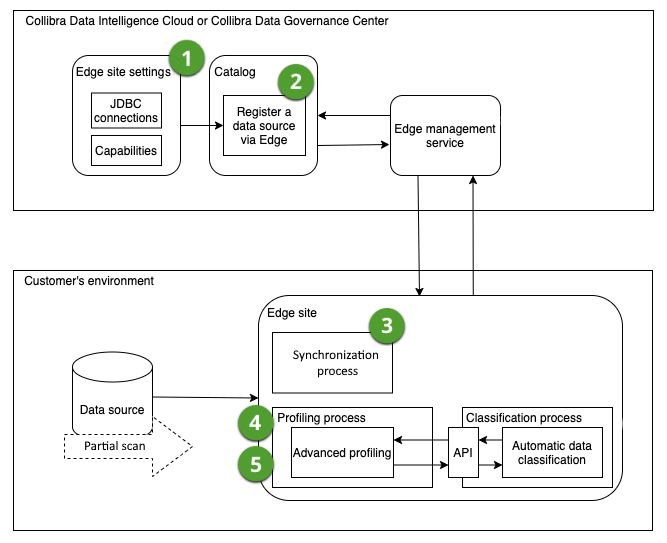
Edge profiles and classifies the data on the Edge site itself and only sends the profiling results and classification suggestions to Collibra Data Intelligence Cloud. As a result, Data Catalog has access to synchronized metadata, anonymized profiling results and classification suggestions, and does not have access to the actual data from your data source.
Profiling and classification flow in Edge
|
Step |
Description |
|---|---|

|
Create an Edge site with a JDBC connection, a JDBC ingestion capability and a JDBC profiling capability. Note Ensure you have defined the profiling and classification settings. |

|
Register a data source via Edge. |
|
|
Synchronize one or more schemas. |

|
Configure the profiling and classification options for the synchronized schemas. |

|
Profile and classify. The Edge site will initiate the profiling and classification process and send the anonymized results to Collibra Data Intelligence Cloud. Tip You can trigger the profiling and classification job manually, based on a schedule or trigger it after synchronizing a schema. |

Limitations
Profiling via Edge has the following limitations:
- Advanced data types are not supported.
- Not all data sources are certified for Edge.
Automatic Data Classification via Edge has the following limitations:
- Automatic Data Classification via Edge is only available for customers using Collibra Data Intelligence Cloud.
- Currently, data classification on Edge does not retrain the classification model to improve future classification predictions. However, the feedback you provide is stored, and will be valuable once retraining is possible.
- Out-of-the-box, automatic data classification can predict several data classes. You can also create user-defined data classes. Currently, these user-defined data classes are not taken into account by the automatic classification process. You need to assign user-defined data classes manually.
- English is the only supported language, but Automatic Data Classification can run on data in other Latin alphabet-based languages as well.
- Automatic Data Classification needs profiling data to predict the data classes. Data classification is performed automatically after the profiling process on an Edge site. That means that you can only classify columns of data sources registered in Data Catalog via an Edge site that has the JDBC profiling capability.
Profiling and classification settings
The following settings in the Services Configuration section of the Collibra settings or in Collibra Console are relevant when you want to profile and classify via Edge.
| Setting | Section | Description |
|---|---|---|
| Database registration via Edge | Register data source |
An option to enable database registration via Edge.
Note Enabling data source registration via Edge does not prevent you from registering a data source via Jobserver as well. |
| Anonymize data | Data profiling | This setting is not relevant. In Edge, all profiled data is automatically anonymized. |
| Database profiling via Edge | Data profiling |
An option to enable profiling and classifying synchronized metadata via Edge instead of Jobserver.
Note You can only enable Database profiling via Edge if you also enabled Database registration via Edge. |
| Enable Data Classification | Cloud Data Classification configuration | Ensure the Enable data classification option in Cloud Data Classification configuration is set to false.If the Enable data classification option in Cloud Data Classification Configuration is set to true, the Classify button is available on Column and Table asset pages. This button allows you to classify data via the Data Classification Platform, However, when using profiling and classification via Edge, you no longer need the Data Classification Platform. |
 True: Register a data source via
  False: Register a data source via Jobserver only.