Technical lineage export types
If you want to share a technical lineage graph of your technical lineage, you can export the information to PDF, PNG or CSV, via the Settings tab pane.
PDF and PNG exports
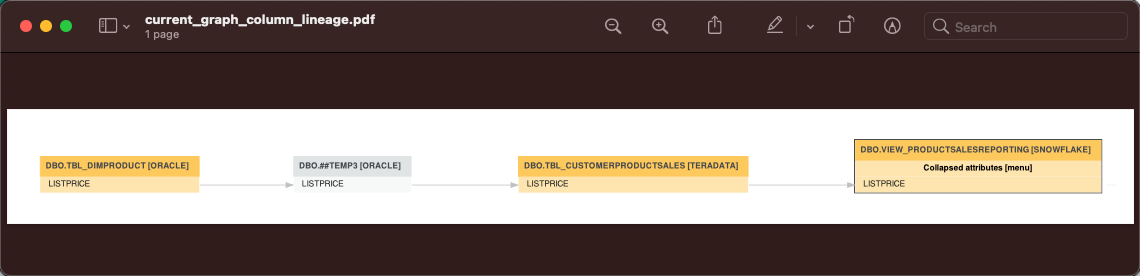
The PDF and PNG exports show only the technical lineage graph of the selected table or column.
CSV export
The CSV export option generates a ZIP file with the following CSV file:
|
File name |
File content |
|---|---|
|
current_graph_column_lineage.csv |
The technical lineage graph of the selected column or table. |
Full CSV
The Full CSV option generates a ZIP file with the following CSV files:
|
File name |
File content |
|---|---|
|
current_graph_column_lineage.csv |
The technical lineage graph of the selected column or table. |
|
full_batch_column_lineage.csv |
The technical lineage graph of the full technical lineage. |
Example
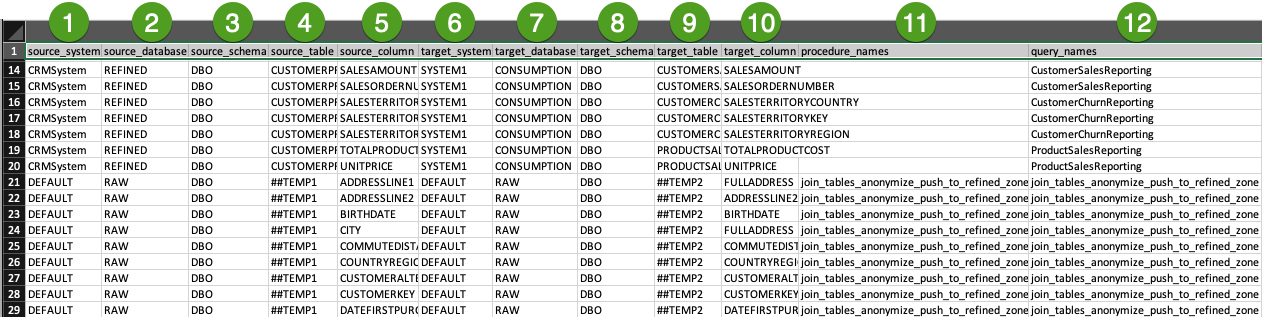
The current_graph_column_lineage CSV file and the full_batch_column_lineage CSV files show the same information, but with a different scope. These files show how data flows from source to target.
|
No |
Column |
Description |
|---|---|---|
|
|
source_system |
The name of the source system. Note This column is only shown when |
|
|
source_database | The name of the source database. |
|
|
source_schema | The name of the source schema. |
|
|
source_table |
The name of the source table. |
|
|
source_column |
The name of the source column. |
|
|
target_system |
The name of the target system. Note This column is only shown when |
|
|
target_database |
The name of the target database. |
|
|
target_schema |
The name of the target schema. |
|
|
target_table |
The name of the target table. |
|
|
target_column |
The name of the target column. |
|
|
procedure_name |
The name of the stored procedure. This column remains empty when an object in your technical lineage doesn't have stored procedure. Warning This column is deprecated and will be removed in the future. |
|
|
query_name |
The name of the specific source code fragment or transformation detail. You can use this name to search for more information in the Sources tab page. |


Tip The names of the source and target objects indicate the full path of the object. For example, the full name of a column is (system) > database > schema > table > column. This path is used to stitch your technical lineage objects to assets in Data Catalog.