The toolbox
In the Template Designer tab, the toolbox contains various question types, such as Single input, Yes/No and Checkbox. You use these question types to add questions and statements to the building area, to elicit input from the user conducting an assessment.
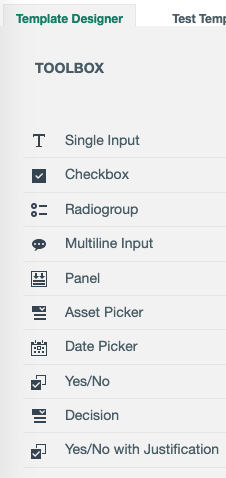
- Click a question type to add it to the current page or click and drag to a specific location on the page.
- You can also add a question to the toolbox.
| Question type | Allows you to... |
|---|---|
| Single Input |
Enter a single line of text. |
| Checkbox | Select one or more of the predefined values. |
|
Radiogroup |
Select only one of the predefined values. |
|
Multiline Input |
Enter multiple lines of text. |
|
Panel |
Frame two or more questions, typically in reference to another question. Tip Let's imagine you have a Radiogroup question that asks if the organization has identified all Controllers. The possible responses are "Yes" and "No". You could then:
|
|
Asset Picker |
Select one or more assets of a predefined asset type. |
|
Date Picker |
Enter a date. |
|
Yes/No |
Select "Yes" or "No". |
|
Decision |
Return the value "Yes" or "No", based on the scoring of Yes/No questions and a scoring threshold. For more information, see Working with scores and decisions. |
|
Yes/No with Justification |
Select "Yes" or "No" and enter a free-text justification. |