Template editor
The template editor enables you to copy the packaged data privacy assessment templates and design your own custom templates.
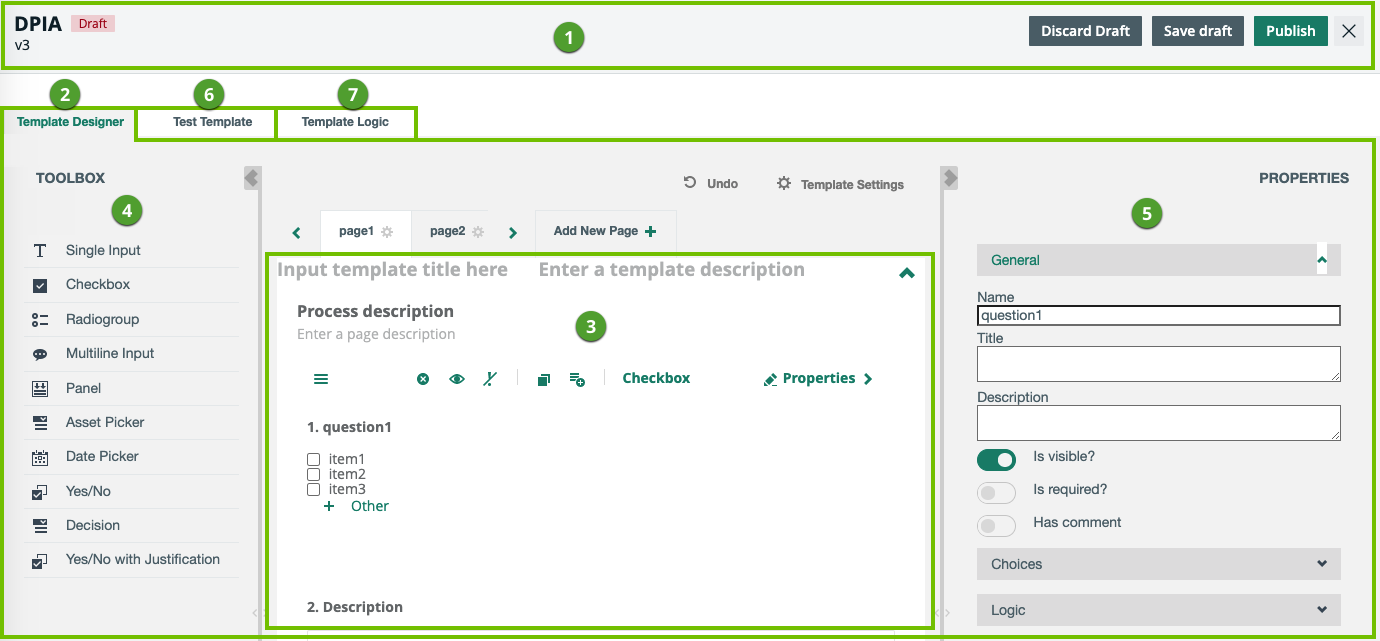
| No. | Part name | Description |
|---|---|---|
|
1 |
|
|
|
2 |
Template Designer tab |
|
|
3 |
Building area
|
The body of the Template Designer tab, where you add and work with questions. |
| 4 |
A set of question types, such as checkbox, comment and date picker. |
|
| 5 | Context-specific settings, based on the active page or question in the questions building area. | |
|
6 |
Test Template tab |
A viewer that allows you to view the result of your work in the Template Designer tab. You can respond to your questions to test, for example, how the configured logic will work when conducting an assessment. |
|
7 |
Template Logic tab |
A view on all logic conditions configured in the template. You can also add, edit and delete logic conditions in this tab. |