About the lineage harvester
You use the lineage harvester to collect source code from your data sources and create new relations between data elements from your data source and existing assets into Data Catalog.
The lineage harvester runs close to the data source and can harvest transformation logic like SQL scripts and ETL scripts from a specific location, for example a database table or a folder on a file system.
The lineage harvester connects to different Collibra Data Lineage servers based on your geographical location and cloud provider. Make sure you have the correct system requirements before you run the lineage harvester. If your location or cloud provider changes, the lineage harvester rescans all your data sources.
Note Technical lineage is created by a cloud-based environment. You only connect to the cloud via an API call that is triggered by the lineage harvester.
The lineage harvester configuration file
The lineage harvester uses a configuration file when it connects to Data Catalog via Collibra REST API. The configuration file contains references to the data sources for which you want to create a technical lineage. You have to prepare the configuration file if you want to create a technical lineage and add new relations of the type "Data Element targets / sources Data Element" between existing assets in Data Catalog and "Column is target of / is source of Data Attribute" between assets from ingested BI sources and assets in Data Catalog.
The lineage harvester scanners
The lineage harvester consists of many scanners that scan the data sources in your configuration file and send their metadata to the Collibra Data Lineage server. Depending on the type of data source that you want to scan, the lineage harvester uses a different scanner. Each scanner requires different properties in the lineage harvester configuration file to access your data source and scan the metadata.
Using the lineage harvester
You can use more than one lineage harvester connected to a single Collibra Data Intelligence Cloud instance, if you want to separately process data sources on different servers. In this case, all lineage harvesters must share the same configuration file, but you can determine which data sources are relevant when you run the full-sync command.
Note You can use different command options and arguments that you can use to perform various actions with the lineage harvester.
Permissions
You need a global role with the System Administration global permission, for example Sysadmin. This role must have access to all assets in the data sources in the configuration file and be able to create new relations between these assets.
Typical workflow
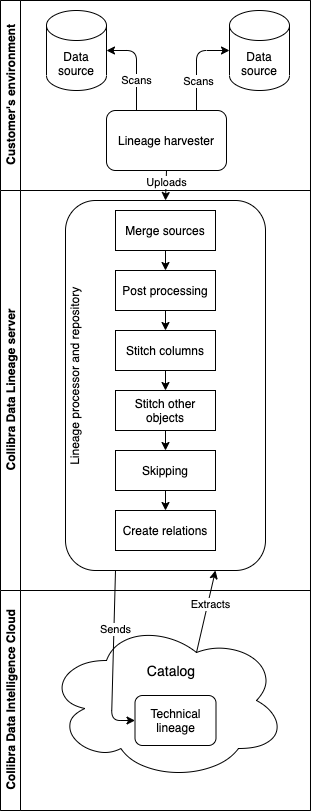
You use the lineage harvester to run the full-sync command. That triggers the following actions:
-
The lineage harvester:
- Scans the data sources that are defined in the configuration file.
- Uploads the data source information to the Collibra Data Lineage server.
- The Lineage processor and repository on the Collibra Data Lineage server:
- Analyzes the data sources.
- Creates and stores the technical lineage.
- Uploads the Column assets that exist in Collibra Data Catalog.
- Filters the results to show only relations between columns that are in Data Catalog..
- Data Catalog:
- Connects to the Collibra Data Lineage server to display the technical lineage.
- Imports new relations of the type "Data Element sources / targets Data Element between existing data objects and assets of registered data sources to Data Catalog.
- Imports new relations of the type "Column is target of / is source of Data Attribute" between BI assets and existing assets of registered data sources to Data Catalog.
Note The lineage harvester can only create Power BI and Looker assets if you included a reference to Power BI and Looker in the configuration file. No other assets are created during the process. Only new relations between existing or newly created Power BI and Looker assets in Data Catalog are created.