Supported data sources for technical lineage
Collibra Data Intelligence Cloud supports many data sources and metadata sources, for example ETL tools or BI sources, for which you can create a technical lineage.
The following table shows the supported (meta)data source types and driver versions that have been tested. You use these data sources when you prepare the configuration file and Data Catalog's physical data layer. You can connect to them via a JDBC driver, API or by creating a folder.
|
(Meta)data source type |
Supported versions |
Connection type |
Scope |
|---|---|---|---|
|
Amazon Redshift |
1.2.34.1058 and newer |
JDBC, Folder |
SQL based input without stored procedures. |
|
AWS Glue script annotations (preview) |
N/A |
Folder |
Only script annotations including transformation details. |
|
Azure SQL server |
Newest version |
JDBC, Folder |
SQL based input and stored procedures. |
|
Azure SQL Data Warehouse |
Newest version |
JDBC, Folder |
SQL based input and stored procedures. |
|
Azure Synapse Analytics |
Newest version |
JDBC, Folder |
SQL based input and stored procedures. |
| Google BigQuery |
Newest version |
JDBC, Folder |
SQL based input without stored procedures. |
|
Greenplum |
6.10 and newer |
JDBC, Folder |
SQL based input. |
|
HiveQL (SQL-like statements) |
2.3.5 and newer |
Folder |
SQL based input and connection via an AWS host. |
|
IBM DB2 |
11.5 and newer |
JDBC, Folder |
SQL based input without stored procedures. |
|
IBM InfoSphere DataStage |
11.5 and newer |
Folder |
Commonly used DataStage ETL components including SQL overrides and transformation details. Collibra Data Lineage supports IBM InfoSphere DataStage transformation logic. You have to prepare a folder with all data objects that you want to process. |
|
Informatica Intelligent Cloud Services, specifically Cloud Data Integration Tip Data Integration is one of the Informatica Intelligent Cloud services. |
Cloud, newest only |
API |
Commonly used transformations in Informatica Intelligent Cloud Services: Data Integration, including SQL overrides. |
|
Informatica PowerCenter |
9.6 and newer |
Folder |
Commonly used transformations in Informatica PowerCenter, including SQL overrides. You have to prepare a folder with all data objects that you want to process. |
|
Oracle |
11g, 12c and newer |
JDBC, Folder |
SQL based input and stored procedures. |
|
PostgreSQL |
9.4, 9.5 and newer |
JDBC, Folder |
SQL based input without stored procedures. |
|
Matillion (preview) |
Newest |
API |
SQL based input without stored procedures. |
|
Microsoft SQL Server |
2014, 2016 and newer |
JDBC, Folder |
SQL based input and stored procedures. |
|
MySQL |
5.7, 8 and newer |
JDBC, Folder |
SQL based input without stored procedures. |
|
Netezza |
7.2.1.0 and newer |
JDBC, Folder |
SQL based input without stored procedures. |
|
SAP Hana |
2.00.40 and newer |
JDBC, Folder |
SQL based input and SAP HANA Information views, which includes attributes, analytic views and calculation views from database table or view data sources. Script-based calculation views and stored procedures are out of scope. |
| Snowflake |
Newest version |
JDBC, Folder |
SQL based input without stored procedures. |
|
Spark SQL |
2.4.3 and newer |
JDBC, Folder |
SQL based input and connection via an AWS host. |
|
SQL Server Integration Services (SSIS) |
2012 and newer Package format version 6 or newer. |
Folder |
All commonly used transformations in SSIS, data flows and mappings, including SQL overrides. You have to prepare a folder with all data objects that you want to process. |
|
Sybase Adaptive Server Enterprise |
16.0 SP02 and newer |
JDBC, Folder |
SQL based input without stored procedures. |
|
Teradata |
15.0, 16.20.07.01 and newer |
JDBC, Folder |
SQL based input, including BTEQ scripts. |
Note Using an older version of a data source might not work as expected. However, we don't expect problems if you use a newer data source version.
|
BI tool |
Tested versions |
Connection type |
|---|---|---|
|
Newest |
Existing lineage. You have to run the Power BI harvester and the lineage harvester to ingest Power BI metadata. |
|
|
Newest |
Looker. You have to prepare a lineage harvester configuration file for Looker ingestion. |
|
|
Power BI Report Server (preview) |
SQL Server 2019 |
PBIRS. You have to prepare a lineage harvester configuration file for Power BI Report Server ingestion. Note Currently, we only support Power BI Report Server ingestion in preview without stitching or technical lineage. |
|
SQL Server Reporting Services (preview) |
2021 |
SSRS. You have to prepare a lineage harvester configuration file for SQL Server Reporting Services ingestion. Note Currently, we only support SQL Server Reporting Services ingestion in preview without stitching or technical lineage. |
|
MicroStrategy (preview) |
Newest |
Currently, we only support MicroStrategy ingestion without stitching or technical lineage. |
Tip If you want to ingest and create a technical lineage for Looker or Power BI, we highly advise you to read the dedicated sections.
Custom technical lineage
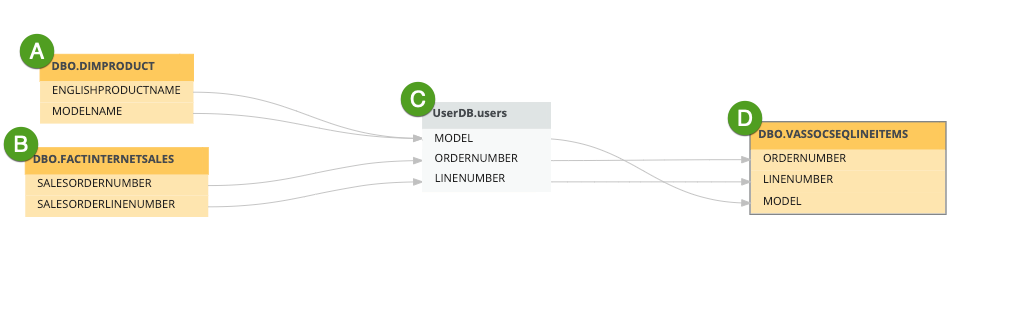
You can create a custom technical lineage to include metadata of unsupported data sources. Since Collibra Data Lineage cannot process or analyze SQL of unsupported data sources, you can create a JSON file with a predefined technical lineage and add the properties of the JSON file to the configuration file.
You want to create a technical lineage that shows relations between tables and columns from system A and system B to system C to system D (A and B -> C -> D). System A, B and D are supported data sources, but system C is a custom application. In this case, you can create a JSON file that contains the metadata of system C. This allows you to create a custom technical lineage that would be otherwise broken.
Authentication
Technical lineage supports authentication by means of username and password, for all data sources, except for external directories. Google BigQuery data sources can also be authenticated via a service account key file. For more information, see the Google BigQuery documentation.
Other authentication methods are not supported.