Configuring logic for questions and pages in a template
For each question or page in a template, you can configure logic, whereby if certain conditions are met, a specified action occurs.
You can create, edit and delete logic conditions using:
Note
- Any logic that you configure for a given question overrides the Is visible? and Is required? settings that you may have set in the General section in Properties.
- Any logic that you configure via the Template Designer tab appears in the Template Logic tab, and vice versa, with the exception of page-related logic conditions, which can only be configured via the Template Designer tab and do not appear in the Template Logic tab.
Example
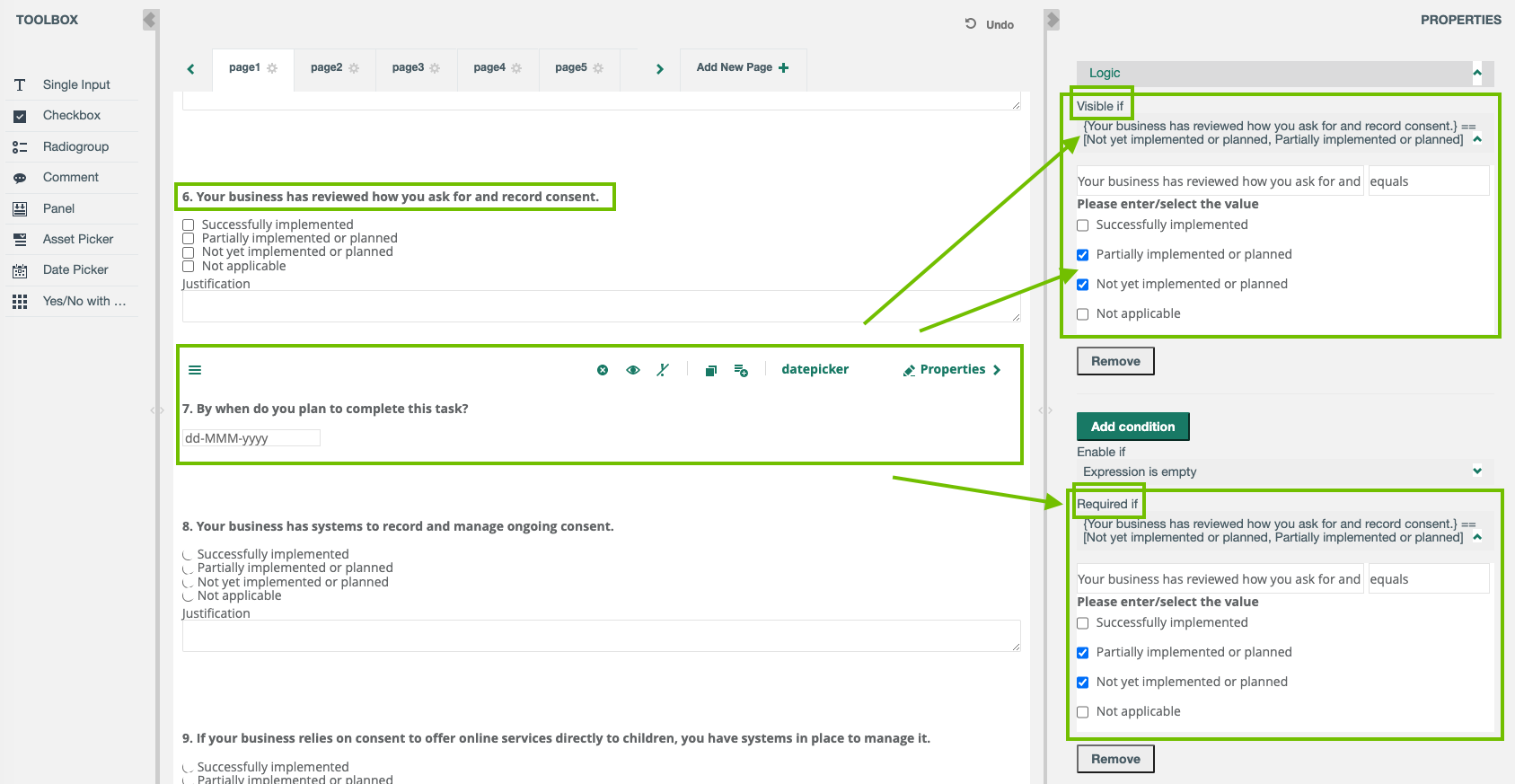
Question 6 in your template, a checkbox question type, asks if your organization has reviewed how they ask for and record consent.
Question 7, a date picker question type, asks by when the task will be complete. If the response to Question 6 is "Successfully implemented" or "Not applicable", there is no need to show Question 7.
Therefore, you configure the logic for Question 7, as follows:
- Visible if: If the user responds to Question 6 with "Partially implemented or planned" or "Net yet implemented or planned", Question 7 is shown.
- Required if: Furthermore, if either of those values are selected for Question 6, Question 7 is a required question.