Create a relation type
You can create a new relation type if, for example, the packaged relation types do not meet your needs.
Prerequisites
You have a global role that has the System administration global permission.
Steps
The steps in this procedure are different for the classic and refreshed navigation.
-
In the main menu, click
 , then
  Settings.
The Collibra settings page appears. - Click Operating Model.
The operating model settings appear on the Asset types tab page. - In the tab pane, click Characteristics → Relations.
- Above the table, to the right, click Add.
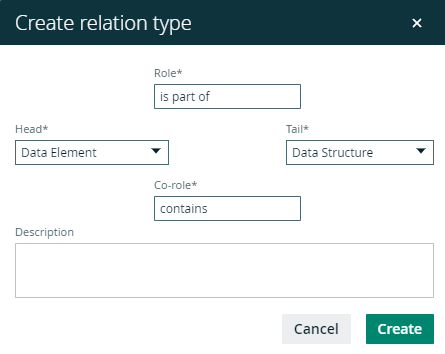
The Create relation type dialog box appears. - Enter the required information.
Element Description Head Asset type of assets that can be the head of the relation.
Tail Asset type of assets that can be the tail of the relation.
Role The description of the relation type going from the head asset to the tail asset.
Co-role The description of the relation type going from the tail asset to the head asset. - Click Create.
Example
The following example creates a part-whole relation type between two assets: Data Element is part of/contains Data Structure.
What's next?
You can now assign the relation type to an asset type and after that add a relation to an asset.