The Tasks page
To open the Tasks page, on the main toolbar, click the  Tasks icon.
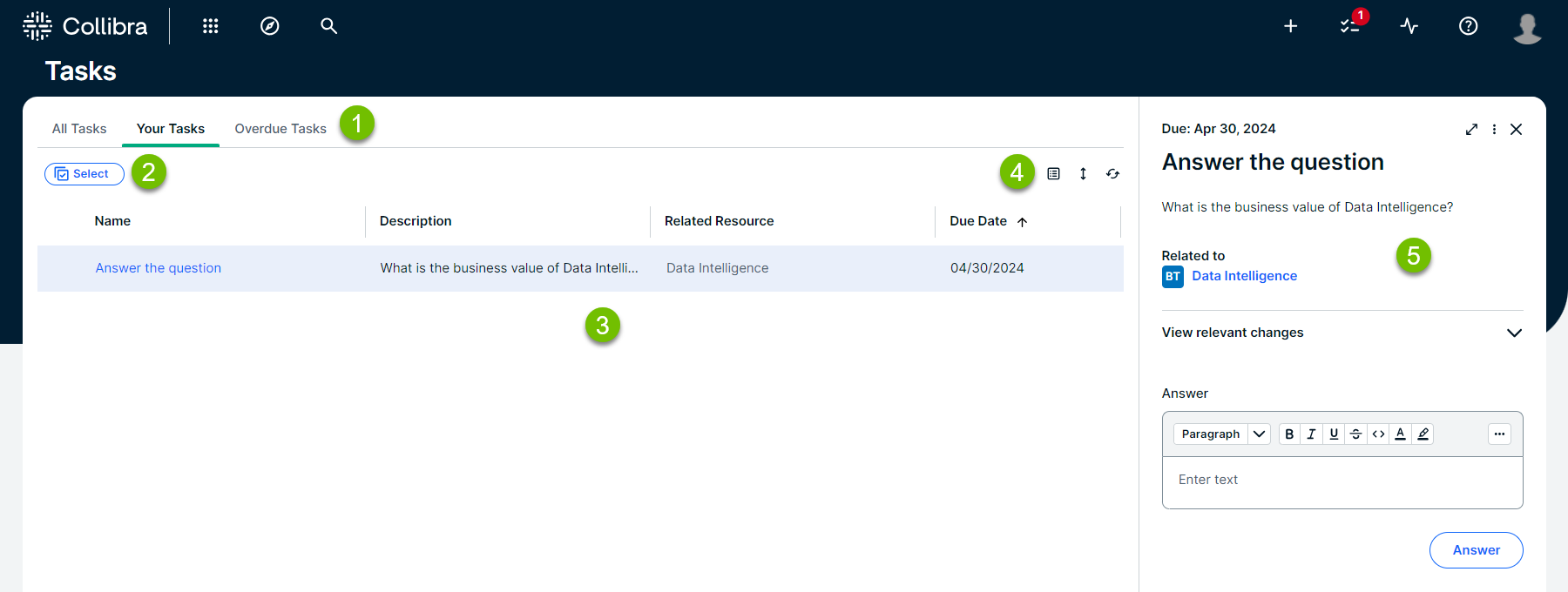
The following image shows the different parts of the Tasks page:
| Element |
Name |
Description |
|---|---|---|

|
Tasks submenu | Contains the following sections:
|

|
Select button | Allows you to select multiple tasks for bulk operations. |

|
Tasks table | Shows a list of tasks. |

|
Table menu | Contains refresh and display options for the tasks table, including column selection, order, width, wrap or trim, rows per page, and sorting. |

|
Sidebar | Contains the details of the selected workflow task. |
Your view settings on the Tasks page are automatically saved for each tab (All Tasks, Your Tasks, and Overdue Tasks). The saved settings include column selection, order, width, wrap or trim, rows per page, and sorting. Settings are saved per user at the browser level. Filtering and row selection are not saved.
Best practices for managing your tasks
- Regularly check Your Tasks: Visit the Tasks page frequently to stay updated on pending items.
- Prioritize using due dates: Focus on tasks with approaching due dates to avoid delays.
- Communicate clearly: Use comments if available when taking actions on tasks to ask questions, report blockers, or provide explanations for better collaboration.
- Delegate when necessary: If you are authorized and unable to complete a task, reassign it promptly to the appropriate person.
- Understand the workflow context: If you are unsure why a task was assigned to you or what its purpose is, review the workflow description or consult your Collibra administrator.