Deasy Labs governs unstructured content, such as documents synced from a source system, by letting you define reusable tags and apply them to named subsets of that content. The operating model is built around three asset types:
- Document Slice, which represents a defined subset of documents.
- Tag Definition, which represents the configuration for deriving a tag.
- Tag Value, which represents a specific value a Tag Definition produced.
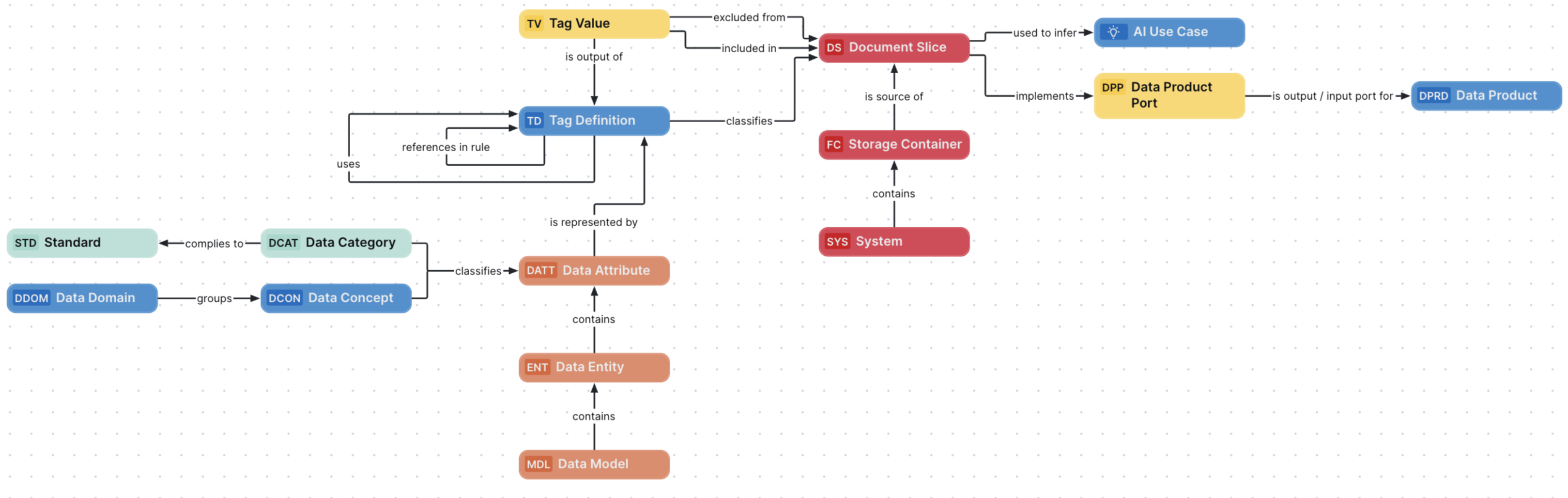
Click the relevant tab below to see descriptions and the out-of-the-box attributes, relation types and more, for each asset type. The details relevant to each asset type apply also to their respective child asset types.
For a worked example showing how these asset types fit together in practice, go to Governance for Unstructured Data operating model: a worked example.
Description
A defined subset of documents from a source system, published and governed as a named collection within the platform.
A Document Slice is a query result over documents, not the documents themselves, so the underlying files stay out of the model. A Document Slice is a member of the Data Product Port Asset asset type group, so it can be used as a Data Product port the same way structured data already is.
Relation types
| Relation type | Head role / corole tail | Public ID | Kind |
|---|---|---|---|
| excludes Tag Value | Document Slice excludes / excluded from Tag Value | DocumentSliceExcludesTagValue | Explicit |
| includes Tag Value | Document Slice includes / included in Tag Value | DocumentSliceIncludesTagValue | Explicit |
| is classified by Tag Definition | Tag Definition classifies / is classified by Document Slice | TagDefinitionClassifiesDocumentSlice | Explicit |
| is sourced from Storage Container | Storage Container is source of / is sourced from Document Slice | StorageContainerIsSourceOfDocumentSlice | Explicit |
| used to infer AI Use Case | AI Use Case transforms / is transformed by Asset | AIUseCaseTransformsAsset | Explicit |
| impacted by Issue | Issue impacts / is impacted by Asset | IssueImpactsAsset | Explicit |
Attribute types
| Attribute type | Description | Public ID |
|---|---|---|
| Document Slice API ID | The identifier used to retrieve this asset's documents through the Deasy API. Read-only. | DocumentSliceApiId |
| Document Language | A language detected among the associated documents. Read-only. | DocumentLanguage |
| Primary Topic | The subject or theme covered by the associated documents. Read-only. | PrimaryTopic |
| Published By | The author or user who published the associated content. Read-only. | PublishedBy |
| Selection Criteria | The rich-text criteria used to define which documents belong to this slice. Summarizes, in one human-readable field, what the Excludes, Includes, and Is classified by relations otherwise show separately. Read-only. | SelectionCriteria |
| Description | A free-text description of the asset. Unlike this asset type's other attributes, this one is not read-only. | Description |
| Description from Source | Description from the source system of the asset. Read-only. | DescriptionFromSourceSystem |
| URL | Uniform Resource Locator, also colloquially known as web address. Read-only. | Url |
| File Type | The type of the associated documents, which may constrain their format, their content, or both. Read-only. | FileType |
| Document Size | Size of the document, in megabytes. Read-only. | DocumentSize |
| Number of Files | The number of files associated with the asset. Read-only. | NumberOfFiles |
| Last Sync Date | Date when the asset was synchronized with the external system. Read-only. | LastSyncDate |
Domain type
Document Slice assets are created in domains of type Technology Assets.
Asset statuses
| Asset status | Description |
|---|---|
| Candidate | The asset is in an initial drafting state. |
| Under Review | The stakeholders are reviewing the asset. |
| Implemented | The asset has been implemented and is available for use. |
| Obsolete | The asset is no longer in use. |
| Missing from source | The asset is no longer available in the source. |
This asset type is not eligible for the Lifecycle management feature.
Tip For information on editing the status of an asset, go to Edit an asset.
Description
A tag used to classify unstructured content and assign Tag Values to Document Slices, defined using a Smart AI, Pattern Match, or Rules-based tagging strategy.
A Tag Definition produces Tag Value assets when it is applied; the Tag Definition itself does not represent a value, only the method for deriving one.
Relation types
| Relation type | Head role / corole tail | Public ID | Kind |
|---|---|---|---|
| represents Data Attribute | Tag Definition represents / is represented by Data Attribute | TagDefinitionRepresentsDataAttribute | Explicit |
| has output Tag Value | Tag Definition has output / is output of Tag Value | TagDefinitionHasOutputTagValue | Explicit |
| classifies Document Slice | Tag Definition classifies / is classified by Document Slice | TagDefinitionClassifiesDocumentSlice | Explicit |
| references in rule Tag Definition | Tag Definition references in rule / is referenced in rule by Tag Definition | TagDefinitionReferencesInRuleTagDefinition | Explicit |
| uses Tag Definition | Tag Definition uses / is used by Tag Definition | TagDefinitionUsesTagDefinition | Explicit |
| complies to Governance Asset | Asset complies to / is complied to by Governance Asset | AssetCompliesToGovernanceAsset | Explicit |
Attribute types
| Attribute type | Description | Public ID |
|---|---|---|
| Tagging Strategy | The extraction method used to derive Tag Values: Smart AI, Pattern Match, or Rules. Read-only. | TaggingStrategy |
| Maximum Values Per Document | The maximum number of Tag Values a single document can be assigned. Read-only. | MaximumValuesPerDocument |
| Output Type | The data type of the values extracted from documents: Word, Number, Date, or Yes/No. Read-only. | OutputType |
| Selection Criteria | The tag filter value used to narrow or refine results. Read-only. | SelectionCriteria |
| Instructions | The guidelines, rules, or commands that define how this Tag Definition derives its value, for example the prompt behind a Smart AI strategy or the logic behind a Rules strategy. Read-only. | Instructions |
| Default Value | The value assigned when this Tag Definition cannot derive one from a document. Read-only. | DefaultValue |
| Description | A free-text description of the asset. Unlike this asset type's other attributes, this one is not read-only. | Description |
Domain type
Tag Definition assets are created in domains of the Tag Library domain type.
Asset statuses
| Asset status | Description |
|---|---|
| Candidate | The asset is in an initial drafting state. |
| Under Review | The stakeholders are reviewing the asset. |
| Accepted | The stewards approved the asset definition. |
| Obsolete | The asset is no longer in use. |
| Missing from source | The asset is no longer available in the source. |
This asset type is not eligible for the Lifecycle management feature.
Tip For information on editing the status of an asset, go to Edit an asset.
Description
A tag value produced by a Tag Definition, used to label and categorize documents within a Document Slice.
Each Tag Value is produced by exactly one Tag Definition.
Relation types
| Relation type | Head role / corole tail | Public ID | Kind |
|---|---|---|---|
| is output of Tag Definition | Tag Definition has output / is output of Tag Value | TagDefinitionHasOutputTagValue | Explicit, required (min. 1) |
| excluded from Document Slice | Document Slice excludes / excluded from Tag Value | DocumentSliceExcludesTagValue | Explicit |
| included in Document Slice | Document Slice includes / included in Tag Value | DocumentSliceIncludesTagValue | Explicit |
Attribute types
| Attribute type | Description | Public ID |
|---|---|---|
| Description | A free-text description of the asset. | Description |
Domain type
Tag Value assets are created in domains of the Tag Library domain type.
Asset statuses
| Asset status | Description |
|---|---|
| Candidate | The asset is in an initial drafting state. |
| Under Review | The stakeholders are reviewing the asset. |
| Accepted | The stewards approved the asset definition. |
| Obsolete | The asset is no longer in use. |
| Missing from source | The asset is no longer available in the source. |
This asset type is not eligible for the Lifecycle management feature.
Tip For information on editing the status of an asset, go to Edit an asset.
Note Document Slice, Tag Definition, and Tag Value all have Allow identical asset names per domain enabled, so multiple assets of these types can share the same display name within a domain.
What's deliberately not modeled
Deasy Patterns, the regex rules behind a tag, aren't governed as separate Collibra assets. Rule logic, where one Tag Definition depends on others, is instead handled by the Tag Definition references in rule self-relation, rather than exposing the underlying detection mechanics as their own governed asset type.
Initial sync behavior
No Tag Definition or Tag Value content is pre-packaged with Deasy Labs. On first sync, Deasy creates Tag Definition and Tag Value assets that mirror Deasy's own default taxonomy. Each Tag Definition gets a fixed, deterministic ID from the Deasy side, so re-syncs are idempotent: if the asset already exists, it's updated, and if not, it's created.
Create a Governance for Unstructured Data operating model diagram view
You can create a diagram view to visualize how Document Slice, Tag Definition, and Tag Value assets relate to each other. The following procedure describes how to quickly create a new diagram view by copying and pasting the JSON code in the diagram view text editor.
Steps
- Open the asset page.
- Click the
Diagram tab.
The diagram is shown in the default diagram view. - Click
 to add a new view.
 - Select the Text option below the diagram view name.
The diagram view text editor is shown. - Copy the code from the Show JSON code section below and paste it in the diagram view text editor.
- Click Save.
- Edit the name and description of the diagram view as needed.
{
  "nodes": [
    {
      "id": "Document Slice",
      "type": {
        "id": "00000000-0000-0000-0000-000000050100"
      },
      "fields": [],
      "editorSettings": {
        "edgePropsExpanded": true,
        "nodePropsExpanded": false
      }
    },
    {
      "id": "Tag Definition",
      "type": {
        "id": "00000000-0000-0000-0000-000000050101"
      }
    },
    {
      "id": "Tag Value",
      "type": {
        "id": "00000000-0000-0000-0000-000000050102"
      }
    },
    {
      "id": "Storage Container",
      "type": {
        "id": "00000000-0000-0000-0001-002900000002"
      }
    },
    {
      "id": "Data Attribute",
      "type": {
        "id": "00000000-0000-0000-0000-000000031005"
      }
    },
    {
      "id": "Data Entity",
      "type": {
        "id": "00000000-0000-0000-0000-000000031004"
      }
    },
    {
      "id": "Data Model",
      "type": {
        "id": "00000000-0000-0000-0000-000000031003"
      }
    },
    {
      "id": "System",
      "type": {
        "id": "00000000-0000-0000-0000-000000031302"
      }
    },
    {
      "id": "Data Concept",
      "type": {
        "id": "00000000-0000-0000-0000-000000031113"
      }
    },
    {
      "id": "Data Domain",
      "type": {
        "id": "00000000-0000-0000-0000-000000031114"
      }
    },
    {
      "id": "Data Category",
      "type": {
        "id": "00000000-0000-0000-0000-000000031109"
      }
    },
    {
      "id": "Standard",
      "type": {
        "id": "00000000-0000-0000-0000-000000031206"
      }
    },
    {
      "id": "Data Product Port",
      "type": {
        "id": "00000000-0000-0000-0000-000000050004"
      }
    },
    {
      "id": "Data Product",
      "type": {
        "id": "00000000-0000-0000-0000-000000050000"
      },
      "layoutRegion": "flow"
    },
    {
      "id": "AI Use Case",
      "type": {
        "id": "00000000-0000-0000-0000-000000031401"
      }
    }
  ],
  "edges": [
    {
      "from": "Tag Definition",
      "to": "Document Slice",
      "label": "",
      "style": "arrow",
      "type": {
        "id": "00000000-0000-0000-0000-000000050124"
      },
      "roleDirection": true
    },
    {
      "from": "Tag Definition",
      "to": "Tag Definition",
      "label": "",
      "style": "arrow",
      "type": {
        "id": "00000000-0000-0000-0000-000000050125"
      },
      "roleDirection": true
    },
    {
      "from": "Tag Definition",
      "to": "Tag Definition",
      "label": "",
      "style": "arrow",
      "type": {
        "id": "00000000-0000-0000-0000-000000050128"
      },
      "roleDirection": true
    },
    {
      "from": "Storage Container",
      "to": "Document Slice",
      "label": "",
      "style": "arrow",
      "type": {
        "id": "00000000-0000-0000-0000-000000050126"
      },
      "roleDirection": true
    },
    {
      "from": "Data Entity",
      "to": "Data Attribute",
      "label": "",
      "style": "arrow",
      "type": {
        "id": "00000000-0000-0000-0000-000000007047"
      },
      "roleDirection": true
    },
    {
      "from": "Data Model",
      "to": "Data Entity",
      "label": "",
      "style": "arrow",
      "type": {
        "id": "00000000-0000-0000-0000-000000007046"
      },
      "roleDirection": false
    },
    {
      "from": "System",
      "to": "Storage Container",
      "label": "",
      "style": "arrow",
      "type": {
        "id": "00000000-0000-0000-0000-000000050127"
      },
      "roleDirection": true
    },
    {
      "from": "Data Concept",
      "to": "Data Attribute",
      "label": "",
      "style": "arrow",
      "type": {
        "id": "00000000-0000-0000-0000-000000007007"
      },
      "roleDirection": true
    },
    {
      "from": "Data Domain",
      "to": "Data Concept",
      "label": "",
      "style": "arrow",
      "type": {
        "id": "00000000-0000-0000-0000-000000007021"
      },
      "roleDirection": true
    },
    {
      "from": "Data Category",
      "to": "Data Attribute",
      "label": "",
      "style": "arrow",
      "type": {
        "id": "00000000-0000-0000-0000-000000007007"
      },
      "roleDirection": true
    },
    {
      "from": "Data Category",
      "to": "Standard",
      "label": "",
      "style": "arrow",
      "type": {
        "id": "00000000-0000-0000-0000-000000007018"
      },
      "roleDirection": true
    },
    {
      "from": "Document Slice",
      "to": "Data Product Port",
      "label": "",
      "style": "arrow",
      "type": {
        "id": "00000000-0000-0000-0000-000000050042"
      },
      "roleDirection": false
    },
    {
      "from": "Data Product Port",
      "to": "Data Product",
      "label": "",
      "style": "arrow",
      "type": {
        "id": "00000000-0000-0000-0000-000000050040"
      },
      "roleDirection": false
    },
    {
      "from": "Document Slice",
      "to": "AI Use Case",
      "label": "",
      "style": "arrow",
      "type": {
        "id": "00000000-0000-0000-0000-000000007099"
      },
      "roleDirection": false
    },
    {
      "from": "Tag Value",
      "to": "Document Slice",
      "label": "",
      "style": "arrow",
      "type": {
        "id": "00000000-0000-0000-0000-000000050122"
      },
      "roleDirection": false
    },
    {
      "from": "Tag Value",
      "to": "Document Slice",
      "label": "",
      "style": "arrow",
      "type": {
        "id": "00000000-0000-0000-0000-000000050121"
      },
      "roleDirection": false
    },
    {
      "from": "Tag Value",
      "to": "Tag Definition",
      "label": "",
      "style": "arrow",
      "type": {
        "id": "00000000-0000-0000-0000-000000050123"
      },
      "roleDirection": false
    },
    {
      "from": "Data Attribute",
      "to": "Tag Definition",
      "label": "",
      "style": "arrow",
      "type": {
        "id": "00000000-0000-0000-0000-000000050120"
      },
      "roleDirection": false
    },
    {
      "from": "Data Product Port",
      "to": "Data Product",
      "label": "",
      "style": "arrow",
      "type": {
        "id": "00000000-0000-0000-0000-000000050041"
      },
      "roleDirection": true
    }
  ],
  "showOverview": false,
  "enableFilters": false,
  "showLabels": true,
  "showFields": true,
  "showLegend": true,
  "showPreview": false,
  "visitStrategy": "completeGraph",
  "layout": "HierarchyLeftRight",
  "maxNodeLabelLength": 50,
  "maxEdgeLabelLength": 30,
  "layoutOptions": {
    "compactGroups": false,
    "componentArrangementPolicy": "topmost",
    "edgeBends": true,
    "edgeBundling": true,
    "edgeToEdgeDistance": 5,
    "minimumLayerDistance": "auto",
    "nodeToEdgeDistance": 5,
    "orthogonalRouting": true,
    "preciseNodeHeightCalculation": true,
    "recursiveGroupLayering": true,
    "separateLayers": true,
    "webWorkers": true,
    "nodePlacer": {
      "barycenterMode": true,
      "breakLongSegments": true,
      "groupCompactionStrategy": "none",
      "nodeCompaction": false,
      "straightenEdges": true
    }
  }
}