The Character tokenizer splits the search text into tokens (individual terms) when it encounters a character that is not in a defined set of allowed characters. This defined set contains the characters that you add to the parameter map when editing the tokenizer settings, in addition to the following set of characters: 0-9a-zA-Z
When editing the tokenizer settings, consider using the Character tokenizer if you know which characters should be allowed during a search, and add those characters to the allowedCharacters parameter. The characters that you add, together with the set 0-9a-zA-Z, form the defined set. For example, if you added -' to the allowedCharacters parameter, then the defined set is as follows: 0-9a-zA-Z-'
Note You don't need to add 0-9a-zA-Z to the allowedCharacters parameter because it is part of the default set of allowed characters for the Character tokenizer.
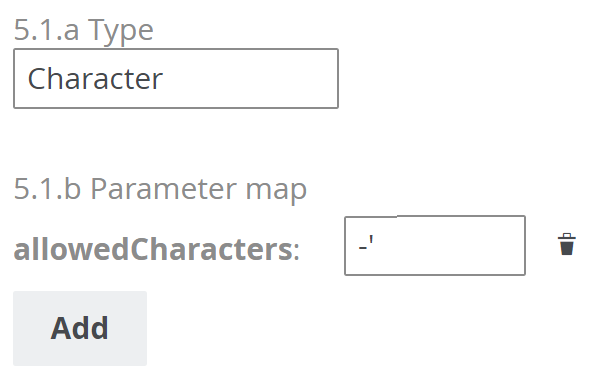
Suppose that the allowedCharacters parameter contains an asterisk (*). If you search for salesforce task under*review, then the Character tokenizer will treat * as an allowed character and generate the following tokens:
- salesforce
- task
- under*review
The Character tokenizer doesn't split the search text when it encounters * because it is an allowed character.
Suppose that an asset named salesforce_task exists in Collibra.
- Behavior with the Standard tokenizer: If the Standard tokenizer is used, when you search for salesforce task (without the underscore), salesforce_task (with the underscore) won't be shown in the search results. The Standard tokenizer allows _ because it is one of the allowed characters in the Standard tokenizer pattern (a-zA-Z0-9_). As a result, salesforce_task is treated as salesforcetask.
- Behavior with the Character tokenizer: If you want salesforce_task to be shown in the search results, then use the Character tokenizer and ensure that _ isn't added to the allowedCharacters parameter. If _ isn't added to the allowedCharacters parameter, then the tokenizer will split the search text when it encounters _. As a result, salesforce_task is treated as salesforce and task.