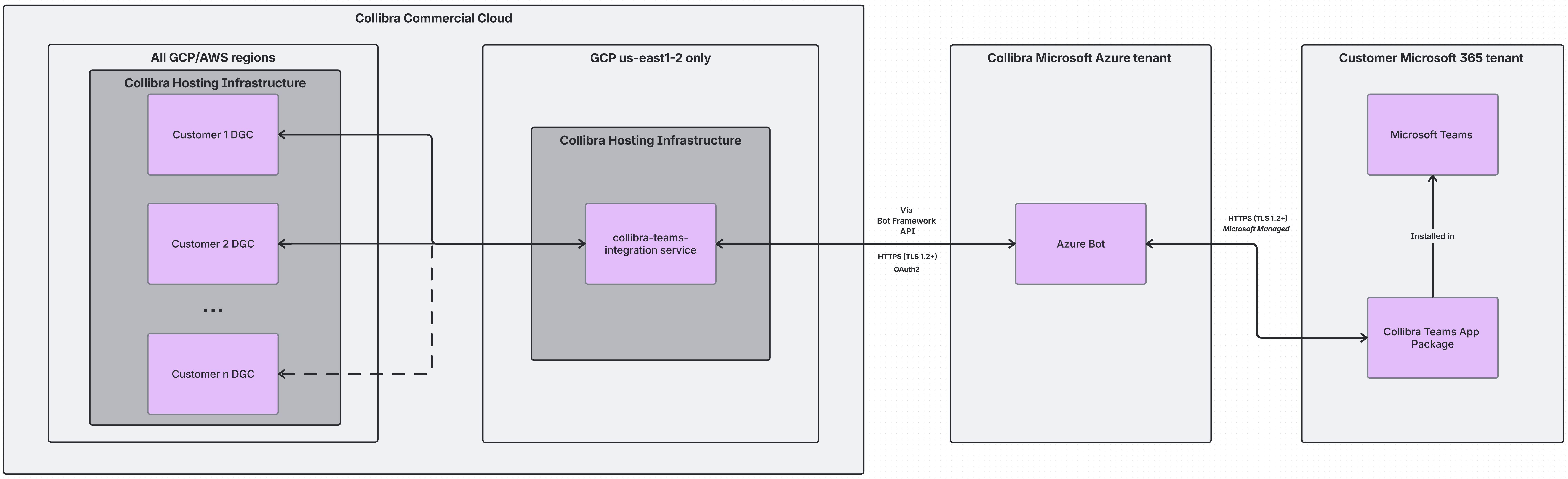
About Microsoft Teams integration
You can integrate the Microsoft Teams communication application with Collibra Platform to instantly collaborate with your colleagues on Collibra data. After setting up the integration, you can:
- Receive Collibra notifications.
- Reply to comments.
- Search Collibra data.
- Share assets.
Note
- You can map only one Collibra environment to one Teams tenant at a time.
- When the integration is complete, you will continue to receive existing Collibra email notifications in addition to Teams messages.
- If needed, review Collibra's privacy policy.
- Mobile is currently not supported.
Frequently asked questions
- What Microsoft permissions does the Collibra Teams integration require?
The Collibra Teams integration requires theUser.ReadMicrosoft Graph delegated permission. This permission is requested during the setup OAuth flow, when the administrator activates the integration or when an individual user connects their Collibra profile to Teams. This permission allows Collibra to identify the signed-in user and map their Teams user ID to Collibra for proper notification routing. - Which APIs does the Collibra Teams integration use?
The Collibra Teams integration primarily relies on the Bot Framework REST APIs for messaging, not Microsoft Graph APIs. The specific endpoints used are:[POST] /conversations: Creates or retrieves conversations with users.[POST] /conversations/{conversationId}/activities: Sends messages to users.[PUT] /conversations/{conversationId}/activities/{activityId}: Updates existing messages in a user conversation.
- How is the data is exchanged between the Teams app and the Collibra instance?