This section includes the connection details of remote files supported by Collibra DQ.
Supported remote file data sources
| Data Source | Packaged | Certified | Archive Break Records |
|---|---|---|---|
| Amazon S3 |
|
|
|
| Azure Blob Storage |
|
|
|
| Azure Data Lake Storage (Gen2) |
|
|
|
| Google Cloud Storage |
|
|
|
| Hadoop Distributed Files System (HDFS) |
|
|
|
| Network File Storage (NFS) |
|
|
|
 Yes
Yes
 No
No
Supported file types
Because file formats differ in structure, you may need to prepare your data before establishing a connection.
Note The file types listed below are supported by default using the ALLOWED_UPLOAD_FILE_TYPES variable. You can update the default list by updating the associated config file.
| Type | File structure | Notes |
|---|---|---|
| CSV (.csv) | Structured | The default delimiter is comma (for example, CSV). |
| PARQUET (.parquet) | Structured | N/A |
| AVRO (.avro) | Structured | N/A |
| JSON (.json) | Semi-structured | N/A |
| ORC (.orc) | Semi-structured | N/A |
| XML (.xml) | Semi-structured | N/A |
| DELTA (.delta) | Semi-structured | N/A |
| DAT (.dat) | Structured | N/A |
| TSV (.tsv) | Structured | N/A |
| TXT (.txt) | Unstructured | N/A |
| HUDI (.hudi) | Structured |
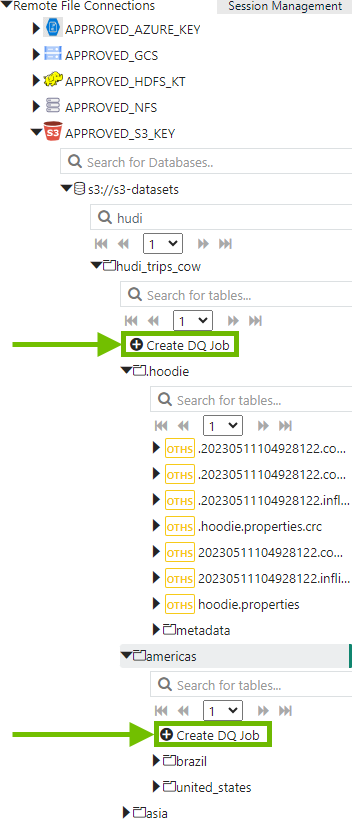
You can only create DQ jobs for Hudi files from the directory-level, not from the individual file-level. When you create a DQ job from the Remote File Connections section of Explorer, expand a directory, then click Create DQ Job. View example screenshot... Note After you select HUDI as your file type, you do not need to change any of the default file information, such as delimiter or charset. Tip The Hudi Spark connector requires a separate package to work properly due to a security vulnerability in the Hudi bundle jar. Please reach out to your CSM for more information about accessing this package. |
Supported delimiters
The following table is a list of supported delimiters available in the Delimiter dropdown menu.
| Type | Format | Description |
|---|---|---|
| Comma | CSV |
|
| Tab | TSV | tab is used to separate values in the file. |
| Semicolon | CSV | ; is used to separate values in the file. |
| Double Quote | CSV | " is used to separate values in the file. |
| Single Quote | CSV | ' is used to separate values in the file. |
| Pipe | TXT | \| is used to separate values in the text file. |
| SOH | TXT | A Unicode character 'START OF HEADING' (U+0001) is an invisible control character. |
| Custom | N/A | Add a custom delimiter. Support for custom delimiters may vary. |
Known limitations
- Spark supports only one account configuration for remote connections. When archive break records are enabled, you need read and write access to the connection where break records are sent. Additionally, you must use the same remote account for the
-archivecxnand-cxncommand line options. For example, if you run a job on data from an ADLS connection, it must use the same ADLS connection to archive break records. - DQ jobs that run on remote file connections with headers that contain white spaces fail with a requirement failed exception message. A possible workaround is to edit the DQ Job command line in the Run CMD tab and place single quotes
''around the column name in-qand double quotes""around the contents of the-headerflag. - Filtergram on the Data Preview tab is not available for any remote file connection. Currently, there is not a workaround for this limitation.
- Array and nested array datatypes in JSON files are not supported.
- While Collibra DQ supports most UTF-8 encoded characters in column headers of file-based connections, some Chinese characters are not currently supported. Jobs that run with this type of unsupported characters fail with a mismatched input exception message.
- When you use Validate Source, the Update Source Scope button is not available for remote files. Update Source Scope is only visible for JDBC connections.
- Collibra DQ does not support creating DQ Jobs at the folder level for remote file connections.