Inheritance in access controls
In Data Access, inheritance allows you to link access controls together, enabling you to reuse existing rules. This simplifies administration, improves scalability, and aligns your security model with how your business operates.
Your organization may want to manage access by separating technical roles (aligning with how data is modeled) from functional roles (aligning with how the business operates). You can use inheritance to bridge these layers:
- Technical (low-level) roles: Define access to specific data objects, for example, BigQuery datasets or Snowflake tables.
- Functional (business) roles: Define access based on data products or job functions, for example, Regional Analyst or Financial Auditor.
By nesting technical roles inside functional roles, you can update your data architecture or your team structure independently, without breaking your entire access model.
You can also use a role as a group by adding users to its Who component and granting them permissions by nesting other existing roles into its What component. This approach eliminates the need for IT-managed groups in external identity providers.
How inheritance works
An access control can inherit both beneficiaries (who gets access) and permissions (what data is being accessed). When defining the Who logic of an access control, you can add identities as well as other roles. Similarly, when defining the What logic of an access control, you can add data objects as well as other access controls.
Only roles can inherit other access controls, whether they are other roles, column masks, or row filters. Column masks and row filters merely mask or hide data, so they can't inherit other access controls themselves.
The following table shows the differences between inheriting beneficiaries and inheriting permissions in an access control.
| Feature | Inheriting beneficiaries (Who component) | Inheriting permissions (What component) |
|---|---|---|
| Action | You add an existing role to the Who component of your access control. | You add an existing role (or other type of access control) to the What component of your access control. |
| Meaning |
You are granting the access defined in your access control to the beneficiaries of the added role. Depending on the type of access control, granting access means one of the following:
|
You are granting the access defined in the added role to the beneficiaries of your access control. |
| Result |
The beneficiaries of the added role automatically inherit the access defined in your access control. |
The beneficiaries of your access control automatically inherit the access defined in the added role. |
| Reciprocal view | Your access control appears in the What component of the added role. |
Your access control appears in the Who component of the added role. |
| Use case |
To grant access to large groups of users, without manual reassignment. |
To create high-level functional roles that inherit permissions from multiple lower-level, technical roles. |
| Approval |
None. |
If you do not own the item you added to your What component, an access request is sent to the owner of the item for approval. The owner of the item must approve the request for the inheritance link to be established. |
Scenarios for using inheritance
You can apply inheritance logic to roles, masks, and filters to achieve specific outcomes.
- Roles: You want the beneficiaries of a specific role to have access to the data objects selected in your role. To achieve this, add that role to the Who component of your role. This ensures that the beneficiaries of that role receive access to your selected data objects.
- Column masks: You want the data in the columns selected in your column mask to be masked for everyone except the beneficiaries of a specific role. To achieve this, add that role to the Who component of your column mask. This creates a local exception. It ensures that only the beneficiaries of that role can see unmasked data, but only in those specific columns that reside in the tables on which the role grants access.
- Row filters: You want the rows selected in your row filter to be visible to the beneficiaries of a specific role. To achieve this, add that role to the Who component of your row filter. This ensures that the beneficiaries of that role can see the filtered rows.
Using a role as a group for inherited access
Suppose that you have a team of 10 analysts who all need the same access. Traditionally, you might rely on IT to manage a group for them in an external identity provider, such as Microsoft Entra ID or Okta. With Data Access, you can bypass this bottleneck. You can create a new role named Sales Dashboard and add the 10 analysts to its Who component. The Sales Dashboard role now effectively functions as a virtual group. Every time a new analyst joins the team, you can simply add them to the Who component of the role directly, instead of waiting for IT to update the external group.
Additionally, instead of adding raw tables to the Sales Dashboard role, you can add other existing technical roles (for example, Sales Analytics) into its What component. By doing this, the 10 analysts in the Who component automatically inherit the access defined in the roles added to the What component. From your perspective, you added existing roles into your What component to give your team access (inheriting permissions). From the perspective of those existing technical roles you added, your "Sales Dashboard" role has been added to their Who component (inheriting beneficiaries).
Using a functional role to inherit technical permissions
To understand how inheritance works in practice, consider the following model, where technical roles are mapped to functional roles to manage access for two identities, Elton and Emma.
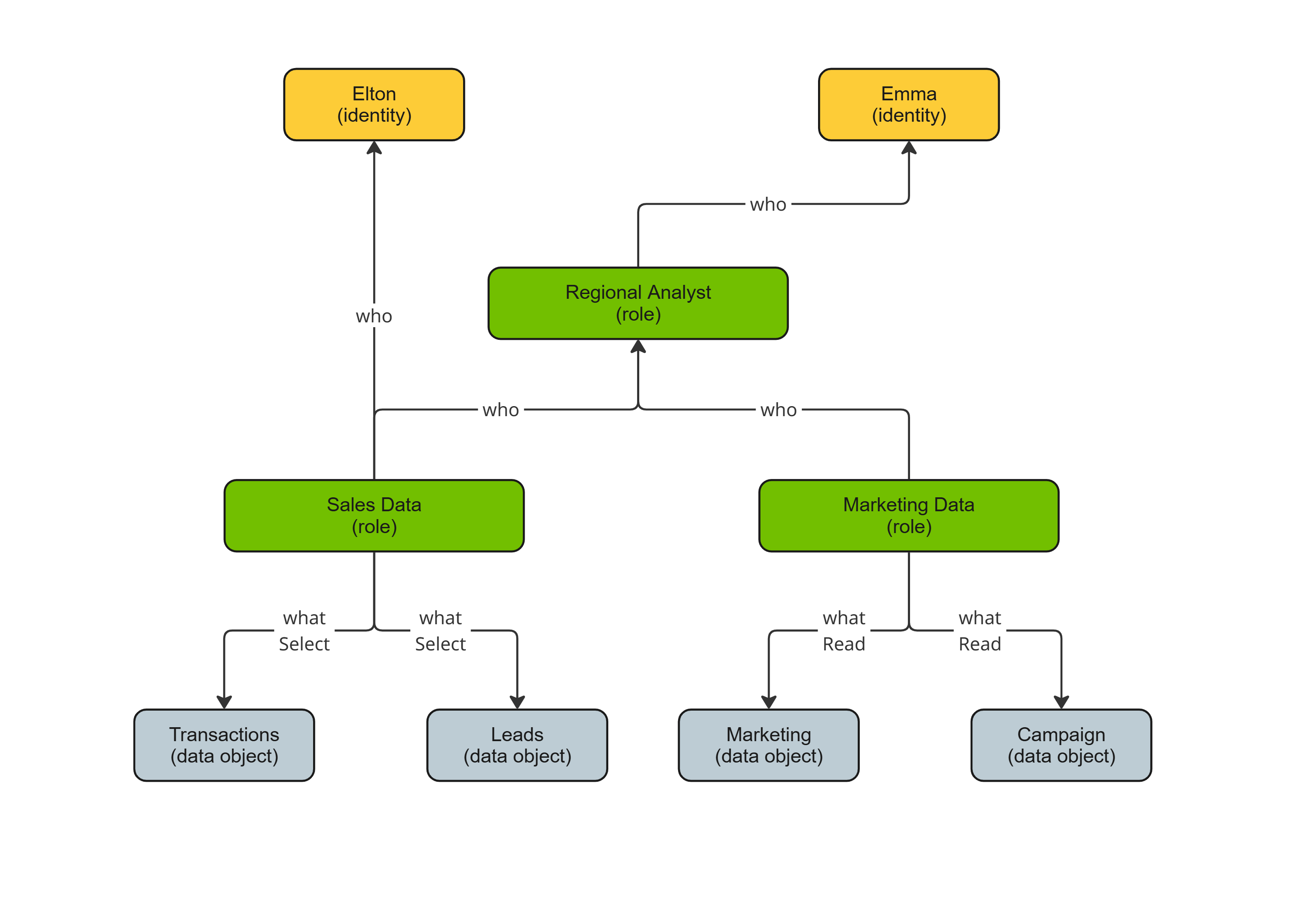
In the model, Sales Data and Marketing Data are technical (low-level) roles, which are modeled directly after your data structure.
- The Sales Data role grants Select permissions on the Transactions and Leads tables.
- The Marketing Data role grants Read permissions on the Marketing schema and Campaign folder.
In this technical layer, Elton is assigned directly to Sales Data. This allows him to select from the Transactions and Leads tables.
In the model, Regional Analyst is a functional (high-level) role, which aligns with how your business operates. Instead of manually adding individual data objects to this functional role, you add the existing technical roles to its scope.
- The Sales Data role is added to the What component of the Regional Analyst role.
- The Marketing Data role is added to the What component of the Regional Analyst role.
In this functional layer, Emma is assigned to the Regional Analyst role. She automatically inherits the permissions from both technical roles, Sales Data and Marketing Data. This allows her to select from the Transactions and Leads tables, as well as read from the Marketing schema and Campaign folder.
The inheritance structure gives Elton the specific access required for sales-focused tasks, without being exposed to broader marketing data. It gives Emma a broader set of permissions than Elton, providing her with a complete map of the data products she needs to oversee.
Visualizing inheritance
On the access control page, you can see the complete set of data objects and identities by clicking Show all.
- Clicking "Show all" within the What component: Shows every data object to which access is provided. The view includes all data objects explicitly assigned, as well as those inherited from any linked access controls.
- Clicking "Show all" within the Who component: Shows every identity that receives access to the data objects. The view includes all identities explicitly assigned, as well as those inherited from any linked roles.