Important
In Collibra 2024.02, we've launched a new user interface (UI) in beta for Collibra Data Intelligence Cloud! You can learn more about this latest UI in the UI overview.
Use the following options to see the documentation in the latest UI or in the previous, classic UI:
Validating an asset executes all validation rules assigned to the asset type. If an asset does not meet all validation rules, the asset is invalid.
You can see the validation result in the following locations:
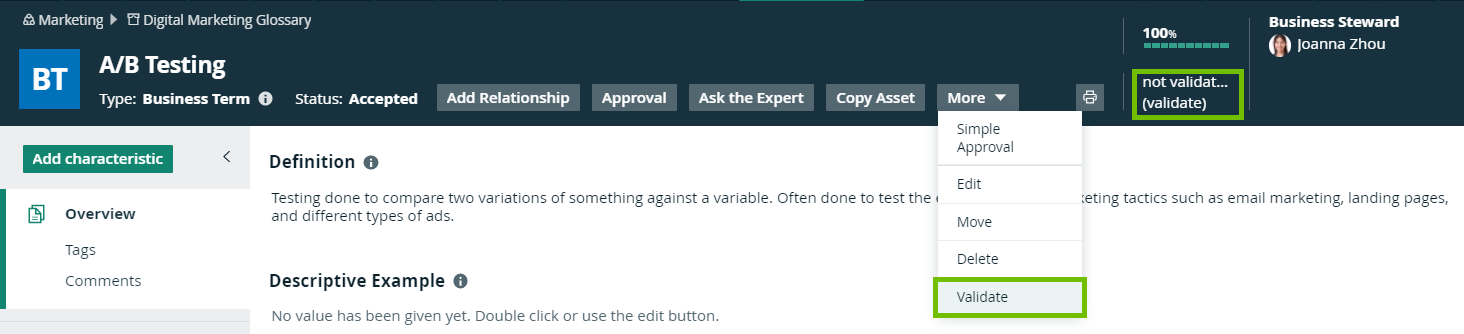
- In the asset page’s title bar.
- In the At a glance pane of an asset.
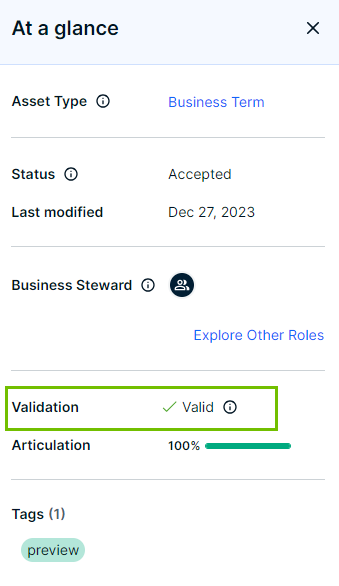
- As a column, Validation Result, when viewing assets in table display mode.

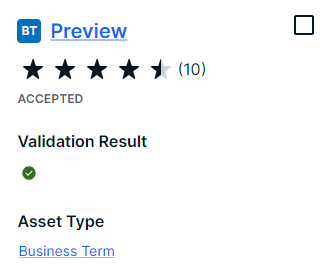
- As a field, Validation Result, when viewing assets in tiles display mode.
- As an overlay in a traceability diagram.
Note
- After validation, the dgc.log file will also contain more extensive messages. For more information on how to configure validation logging, see Logging.
- By default, validation is not automatically triggered when an asset is edited, so you have to revalidate it after editing an asset. However, you can create a workflow for this. To configure validation on certain events, see Getting started with workflows.
Prerequisites
- You have a global role with the Reference Data Manager global permission, for example ReferenceData.
- The global permission applicable for the asset type.
- You have either of the following:
- You have a resource role with the Validation Execution resource permission, for example Community Manager.
- You have a global role that has the Manage all resources global permission.
Validate an asset from the asset page
- Open an asset page.
- Click (validate).
- In the At a glance pane, click Validate.
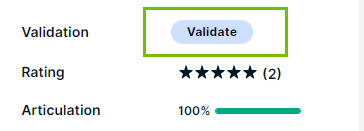
You can also use Actions → Validate.
Validate one or more assets from an asset table
- Open a set of assets in table display mode.
- Select the checkboxes in front of the assets you want to validate.
- Click Validate.
The validation activity starts. - Once the validation is completed, refresh the page.
Validate one or more assets from a set of tiles
- Open a set of assets in tile display mode.
- Select the assets you want to validate.
- Click Validate.
The validation activity starts. - Once the validation is completed, refresh the page.