Technical lineage is a detailed lineage graph that shows where data objects are used and how they are transformed. Business lineage shows the relations between Data Assets in Data Catalog after stitching. Both map the flow of data, but a technical lineage provides a detailed overview of the data flow, while a business lineage only provides a summary of it.
Business lineage and technical lineage are both visual representations of nodes. However, there are some key differences between them.
|
Business lineage |
Technical lineage |
|---|---|
|
A business lineage helps Business Analysts and other business stewards to understand their data by providing a summary of the technical lineage. |
A technical lineage helps Data Engineers, Data Architects and similar personas to easily navigate to data objects in the data flows and find relevant source code fragments by providing a detailed lineage graph. |
|
A business lineage is accessible via the Diagram tab on all asset pages. |
A technical lineage is accessible via the Technical Lineage tab pane of all Table assets, all Column assets,and some BI assets. |
|
A diagram shows assets and relations as defined in its diagram view. In the case of a business lineage, the diagram shows, amongst others, relations of the type "Data Element targets / sources Data Element" between assets that exist in Data Catalog. Relations of this type are automatically created as part of the technical lineage process. Warning During the ingestion process, relations of the type "Data Element targets / sources Data Element" are automatically created between certain assets. Any relations of this type that you manually create between assets will be deleted during the synchronization process. If you want to manually create such relations and ensure that they are maintained, you can create a custom technical lineage.
|
A technical lineage shows relations of the type "Data Element targets / sources Data Element" between all data objects in the data source. Relations of this type are automatically created as part of the technical lineage process. Note The data objects that you see in the technical lineage are:
|
|
A business lineage shows how registered data sources relate to each other. |
Technical lineage shows how all data sources for which you create a technical lineage relate to each other. If the data source, or a part of the data source, is not registered in Data Catalog, the dependencies between the data elements in the data sources are still shown. |
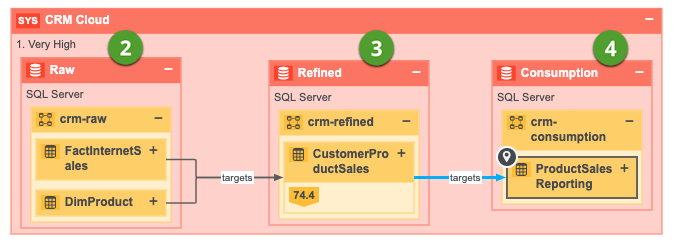
You have created a technical lineage for four different databases:
- The first database, Oracle, is not ingested in Data Catalog and therefore has no assets in Data Catalog.
- The second database, Raw, contains tables that are ingested in Data Catalog, but also tables that are not ingested and therefore are not assets.
- The third and fourth database, Refined and Consumption, only contains data objects that are also assets in Data Catalog.
The Technical lineage shows the data flow from all data objects in the first database, to the second, the third, and the fourth. Databases or data objects that are not ingested in Data Catalog and therefore are not assets, have a gray background.

The business lineage only shows the relations between data objects that are also assets in Data Catalog, which means the data flow from assets in the second database to assets in the third, to assets in the fourth. The first database, which wasn't ingested, will not be shown on the diagram.
Dependencies
A dependency is a data object that is targeted by another data object. This is represented by a relation of the type "Data Element targets / sources Data Element", where the dependency is the tail.
There are two type of dependencies:
- a direct dependency: a data object that is the tail of a relation of the type "Data Element targets / sources Data Element". Example If column A targets column B, then column B is the direct dependency of column A.
- an indirect dependency: a data object that is the target of a direct or another indirect dependency. Example Column A targets column B, which on its turn targets column C. This means that column A indirectly targets column C, so column C is the indirect dependency of column A.