This topic describes the typical technical lineage workflow.
Tip Check out our free Why you should use Lineage on Edge today training course in Collibra University.
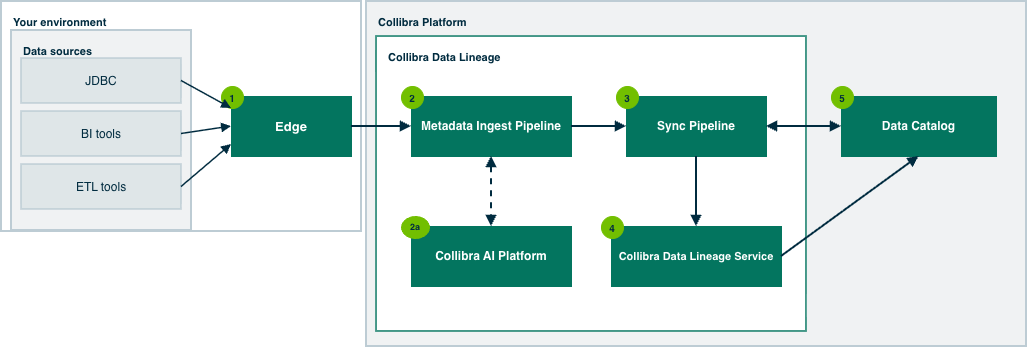
- Edge:
- Harvests metadata from the data sources configured in Edge capabilities.
- Uploads the metadata to the Metadata Ingest Pipeline.
- Triggers the Sync Pipeline after all metadata is processed.
- The Metadata Ingest Pipeline parses the metadata for lineage assets and relations.
- Collibra AI Platform:
- For supported data sources, the platform receives code from the Metadata Ingest Pipeline, analyzes it, and returns lineage relationships to the Metadata Ingest Pipeline, which incorporates them into the lineage.
AI-powered analysis is supported for Power BI DAX sources.
- For supported data sources, the platform receives code from the Metadata Ingest Pipeline, analyzes it, and returns lineage relationships to the Metadata Ingest Pipeline, which incorporates them into the lineage.
- Collibra AI Platform:
- The Sync Pipeline:
- Merges all partial lineages into a single data store.
- Publishes discovered BI assets to Data Catalog.
- Reads asset IDs from Data Catalog to match them against assets discovered from the metadata (stitching).
- Publishes newly discovered relations to Data Catalog.
- Sends the complete lineage to Collibra Data Lineage Service.
-
The Collibra Data Lineage Service:
- Stores the complete lineage and serves lineage diagrams to Data Catalog on request.
- Data Catalog:
- Shows the assets and relations published by the Sync Pipeline.
- Displays the technical lineage in the Technical Lineage viewer, using lineage diagrams served by Collibra Data Lineage Service.
A word about synchronization
The process for synchronizing metadata and corresponding assets in Data Catalog varies depending on whether you use the CLI lineage harvester or Edge:
- When using the CLI lineage harvester (deprecated), synchronization is triggered via a single CLI command, and all data sources are synchronized as a single job.
- On Edge, if you synchronize multiple data sources and don't select the Analyze option in the Edge capability, each data source is synchronized as a separate job. This is highly inefficient and leads to failed sync jobs.
For more information, including critical details on how to use the Analyze option in the Processing Level setting in Edge capabilities, go to Tips for successful lineage synchronization.
Limitations
| Subject | Details |
|---|---|
| Character limits in fields in Edge capabilities. |
When creating a technical lineage via Edge, you need to add a capability for each data source, to provide specific configurations. Due to a limitation inherent to a third-party workflow engine on which Collibra Data Lineage relies, there is a limit to the amount of characters that can be entered in the various fields of a capability. If you approach or exceed the limit, it's likely due to the number of databases you mention in the capability. Our testing has shown that 250 databases is about the maximum amount, although the length of the names of the databases is the driving factor. If the character limit is exceeded, an error is produced and integration fails. |
| Connection reuse across capabilities created from the same template. |
You cannot reuse the same connection or Technical Lineage Admin Connection across multiple Edge capabilities created from the same capability template. Each capability requires its own connection and Technical Lineage Admin Connection.. How this applies:
If you reuse a connection that is already assigned to another capability created from the same template, the save operation fails with a validation error indicating that the connection is already in use. |
| Manually created relations. |
During the ingestion process, relations of the type "Data Element targets / sources Data Element" are automatically created between certain assets. Any relations of this type that you manually create between assets will be deleted during the synchronization process. If you want to manually create such relations and ensure that they are maintained, you can create a custom technical lineage. |
| REST API | You can't work with Edge via the REST API. |
| Jobserver (end of life) | You can't migrate from Jobserver to Edge to preserve the metadata that you manually added to the assets that you ingested via Jobserver. |
If you want to maintain on Edge a technical lineage that you created by using the CLI lineage harvester (deprecated), you can add technical lineage capabilities for the data sources with the same source IDs. For details, go to Migrate from CLI lineage harvester to Edge.