Before you can use the lineage harvester, you need to download and install it. You can download the lineage harvester from the Collibra Community downloads page.
Requirements and permissions
- Collibra Platform.
- You have purchased Collibra Data Lineage.
- A global role with the following global permissions:
- Catalog, for example Catalog Author
- Data Stewardship Manager
- Manage all resources
- System administration
- Technical lineage
- A resource role with the following resource permissions on the community level in which you created the domain:
- Asset > Add
- Attribute > Add
- Domain > Add
- Attachment > Add
- You meet the minimum system requirements.
- You have added Firewall rules so that the lineage harvester can connect to:
- The host names of all databases in the lineage harvester configuration file.
- All Collibra Data Lineage service instances within your geographical location:
Region DNS name aws-ca techlin-ca-central-1.collibra.com aws-eu techlin-eu-central-1.collibra.com aws-me techlin-me-central-1.collibra.com aws-sg techlin-ap-southeast-1.collibra.com aws-us techlin-us-east-1.collibra.com gcp-au techlin-australia-southeast1.collibra.com gcp-ca techlin-northamerica-northeast1.collibra.com gcp-eu techlin-europe-west1.collibra.com gcp-sg techlin-asia-southeast1.collibra.com gcp-uk techlin-europe-west2.collibra.com gcp-us techlin-us-east1.collibra.com We recommend that you only use DNS names in your network configurations, as the IP addresses are subject to change periodically. If you need to use IP addresses in your network configuration, we recommend using a command line utility like nslookup to query the DNS and obtain the mapping between domain name and IP address.
Note The lineage harvester connects to different instances based on your geographic location and cloud provider. If your location or cloud provider changes, the lineage harvester rescans all your data sources. You have to allow all Collibra Data Lineage service instances in your geographic location. In addition, we highly recommend that you always allow the techlin-aws-us instance as a backup, in case the lineage harvester cannot connect to other Collibra Data Lineage service instances.
Steps
- Download the newest lineage harvester.
- Unzip the archive. You can now access the lineage harvester folder. The lineage harvester folder name is unique per version.
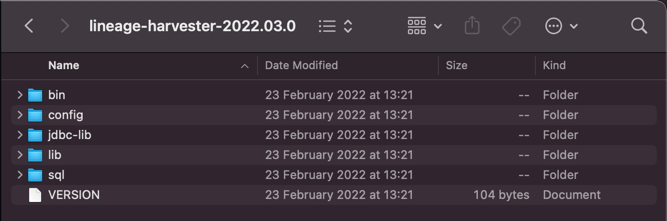
- Start the lineage harvester to create an empty lineage harvester configuration file by entering the following command:
- Windows:
.\bin\lineage-harvester.bat
- For other operating systems:
chmod +x bin/lineage-harvesterand thenbin/lineage-harvester
An empty configuration file is created in the config folder.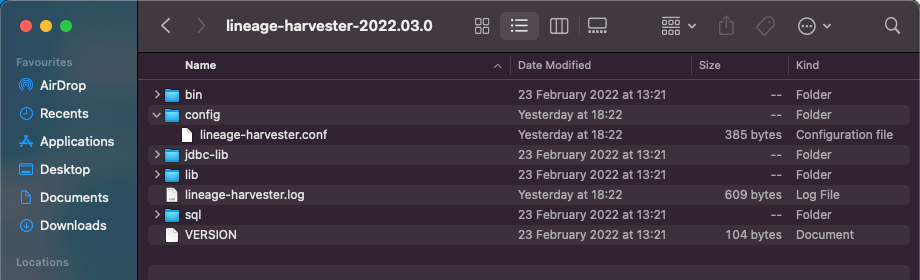
- Windows:
./bin/lineage-harvester --help.Prepare the lineage harvester configuration file.