As a BI Admin, use this reference to find which data sources work with Power BI technical lineage. Collibra Data Lineage automatically stitches metadata to registered data sources and creates technical lineage to show data transformations.
The following table lists the tested data source types. A "Certified" status means that Collibra ingests the data as a Power BI Data Model asset and supports both technical lineage and stitching.
- The Files tab refers to Parquet files. Connect via the URL to the files.
- All data source types under Database require a JDBC connection.
- For Power Platform, you need a live connection.
- The three data source types under the Azure tab require either a JDBC or ODBC connection.
- All data source types under Other require an ODBC connection.
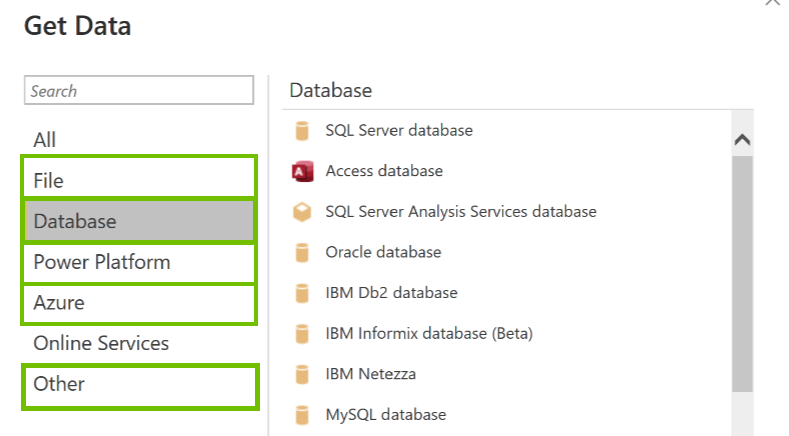
The connections types are mentioned in the following table, for each supported data source type.
- Although the following data sources have been tested extensively, there still may be some issues caused by unsupported elements within the data source or limitations in the Power BI integration process.
- Collibra Data Lineage can connect only to semantic models that are hosted by Power BI. It cannot connect to externally hosted semantic models. For complete information, consult Microsoft's Power BI documentation.
- Real-time semantic models, DirectQuery connections, semantic models with object-level security, semantic models with a live connection to AS-Azure and AS on-premises, and Excel full fidelity datasets are not supported for subartifact metadata. For complete information, consult Microsoft's Real-time streaming in Power BI documentation.
- SharePoint files are not a supported data source type. However, there is an Ideation ticket for this. If you'd like to vote for support for SharePoint files as a supported data source in Power BI, you can do so in the Collibra Ideation Portal.
|
Power BI data source |
Connection type |
Certified ? |
|---|---|---|
| Amazon Athena | ODBC |
Yes |
|
Amazon Redshift |
JDBC |
Yes |
| Apache Hive |
ODBC |
Yes |
| Azure Analysis Services |
ODBC |
Yes |
|
JDBC |
No
|
|
|
Azure Databricks |
JDBC, ODBC |
Yes Collibra Data Lineage supports the following functions:
|
| Azure Synapse Analytics |
JDBC |
Yes |
| Dremio |
JDBC |
No Dremio data sources are ingested as Power BI Data Model assets and shown in the technical lineage, but stitching is not possible. |
|
Google BigQuery |
JDBC |
Yes |
| Impala |
ODBC |
Yes |
| MySQL |
JDBC |
Yes |
|
Netezza |
ODBC |
Yes |
|
ODBC |
ODBC |
Yes Important You need to use a Power BI <source ID> configuration file to provide the true system names of the ODBC databases in Power BI. For more information, see Providing ODBC database names in Power BI. |
|
Oracle |
JDBC, ODBC |
Yes Note If you connect via ODBC:
|
|
Parquet file |
URL to the files |
No |
|
SAP HANA |
ODBC |
Yes |
|
Snowflake |
JDBC |
Yes |
|
SQL Server |
JDBC |
Yes |
|
Sybase |
JDBC |
Yes |
|
Power BI with measures only, no columns |
JDBC |
Yes |
|
Power Platform > Power BI semantic model |
Live connection |
Yes Important Supported only if the semantic model is from one of these supported data sources. |
Note We cannot guarantee that other data sources in Power BI can be stitched successfully.