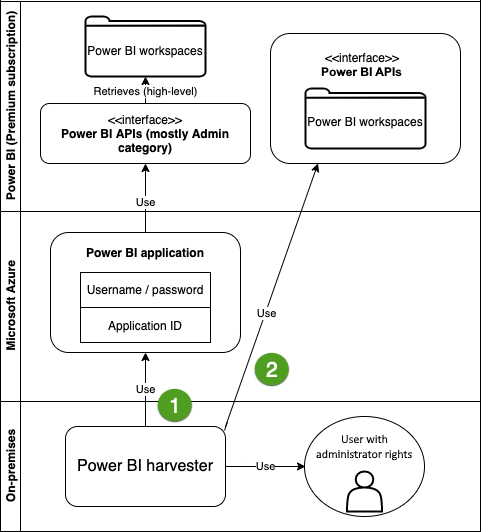
Collibra uses Power BI REST APIs to harvest Power BI metadata. The APIs retrieve basic Power BI metadata, for example metadata in the Power BI tenant or server and reports. The Power BI API calls are then used to retrieve more specific metadata, for example Power BI columns and lineage.
Note The Edge or CLI lineage harvester (deprecated) access the metadata of all Power BI workspaces. If you don't use filtering, all workspaces are ingested in Collibra. We recommend that you use filtering and domain mapping to structure your Power BI assets in Collibra. For more information, go to Power BI workspace filtering and Power BI source configuration for Edge..
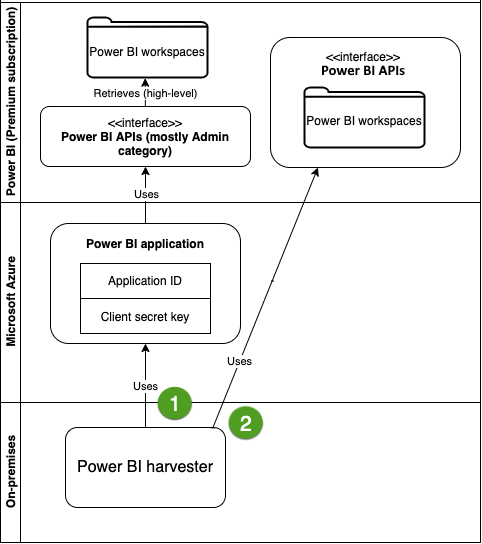
The authentication method you choose determines how Edge or the CLI lineage harvester accesses the Power BI APIs.
The lineage harvester uses the application ID and the client secret key of the Azure Active Directory application to access the Power BI APIs.
Edge or the CLI lineage harvester (deprecated) uses the username, password and application ID to access the Power BI APIs.
Important The Power BI application in Microsoft Azure must be granted administrator rights, such as Office 365 Global Administrator or Power BI Service Administrator. Delegated permissions are supported.