Collibra Data Lineage supports the most commonly used transformations and data sources in Azure Data Factory.
Pipelines
Technical lineage for Azure Data Factory retrieves and processes pipeline metadata and includes it in the technical lineage graph as follows:
- If a pipeline definition does not contain parameters, Collibra Data Lineage processes the definition and includes the associated assets under the pipeline definition folder in the technical lineage tree in the technical lineage viewer:
- Pipeline Definition
- Assets
- Pipeline Definition
- If a pipeline definition contains parameters, Collibra Data Lineage processes pipeline runs and pipeline triggers to resolve parameter values. The assets are then included in the following structure in the technical lineage tree:
- Pipeline Definition
- Pipeline Runs
- Date
- Pipeline run ID
- Assets
- Pipeline run ID
- Date
- Pipelines Triggers
- Pipeline name and run count
- Assets
- Pipeline name and run count
- Pipeline Runs
- Pipeline Definition
- Collibra Data Lineage processes only parameter values that are explicitly provided during pipeline execution.
-
To exclude pipeline run and pipeline trigger metadata from technical lineage, set the Pipeline Runs Days To Look Back field to
0in the technical lineage for ADF capability. In this case, only pipeline definitions are processed and included in the technical lineage graph. You can also use this field to specify how many days of pipeline run metadata to be collected and processed. For more information, go to Create a technical lineage via Edge for Azure Data Factory
Note that only the definitions of pipeline triggers are processed and included in the technical lineage graph.
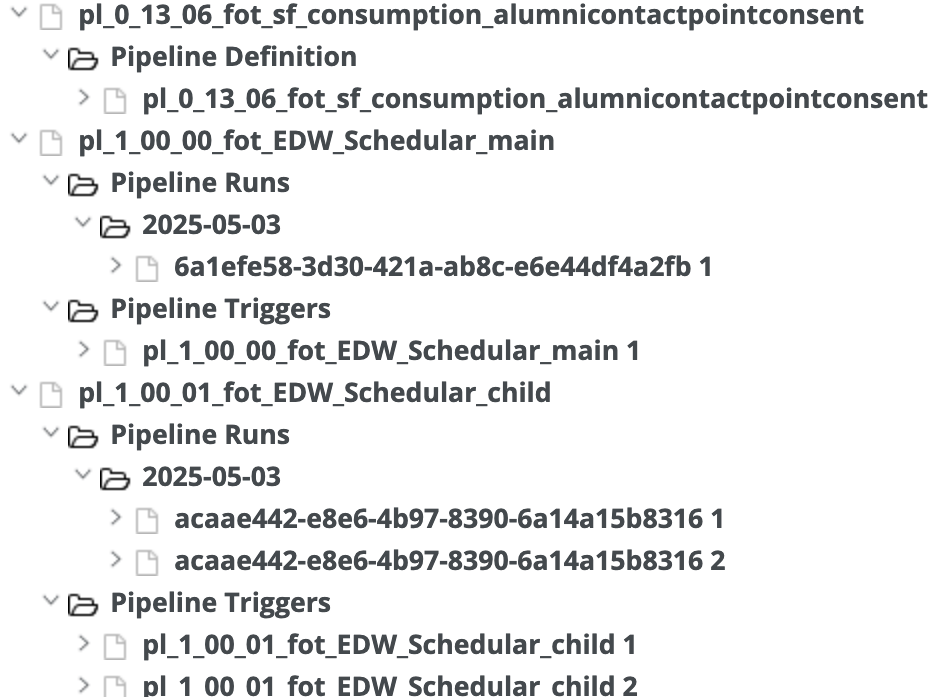
The following example shows how pipeline metadata is structured and presented in the technical lineage graph:
- When the
pl_0_13_06_fot_sf_consumption_alumnicontactpointconsentpipeline does not contain parameters, the assets are listed in thePipeline Definitionfolder in the technical lineage tree. - When the
pl_1_00_00_fot_EDW_Schedular_mainpipeline contains parameters, Collibra Data Lineage resolves the values by processing the associated pipeline runs and triggers, which are included in the technical lineage tree. - The
pl_1_00_01_fot_EDW_Schedular_childchild pipeline is included because it was executed by thepl_1_00_00_fot_EDW_Schedular_mainparent pipeline.
Supported transformations
The following tables shows a non-exhaustive list of supported and unsupported transformations.
Supported data sources
The following table shows a non-exhaustive list of supported sources with the corresponding dataset and linked service types.
CollibraData Lineage supports all data format types that are supported in Azure Data Factory, including binary, Excel file, Delimited text, JSON, Parquet, and so on.
| Data sources |
Dataset type |
Linked service type |
|---|---|---|
| Amazon Redshift | AmazonRedshiftTable | AmazonRedshift |
| Azure Blob storage | AzureBlob | AzureBlobStorage |
| Azure Data Lake Storage Gen2 | AzureBlobFSFile | AzureBlobFS |
| Azure Data Lake Store | AzureDataLakeStoreFile | AzureDataLakeStore |
| Azure Databricks Delta Lake | AzureDatabricksDeltaLake | AzureDatabricksDeltaLake |
| Azure SQL Managed Instance | AzureSqlMITable | AzureSqlMI |
| Azure SQL Server database | AzureSqlTable | AzureSqlDatabase |
| Azure Synapse Analytics | AzureSqlDWTable | AzureSqlDW |
| DB2 data source | Db2Table | Db2 |
| Google Cloud Storage | GoogleCloudStorageLocation | GoogleCloudStorage |
| Microsoft Access | MicrosoftAccessTable | MicrosoftAccess |
| Microsoft Azure Cosmos Database | CosmosDbSqlApiCollection | CosmosDb |
| Open Database Connectivity (ODBC) | OdbcTable | Odbc |
| On-premises Oracle database | OracleTable | Oracle |
| REST | RestResource | RestService |
| Salesforce | SalesforceObject | Salesforce |
| Salesforce Marketing Cloud | SalesforceMarketingCloudObject | SalesforceMarketingCloud |
| Salesforce Service Cloud | SalesforceServiceCloudObject | SalesforceServiceCloud |
| SAP Business Warehouse (open hub) | SapOpenHubTable | SapBW |
| SFTP server | SftpLocation | Sftp |
| Snowflake | SnowflakeTable | Snowflake |
| SQL Server | SqlServerTable | SqlServer |
Supported activity types
A Data Factory can have one or more pipelines. A pipeline is a logical grouping of activities that together perform a task. There are three groupings of activities: data movement activities, data transformation activities, and control activities. For a complete list of Azure Data Factory activity types and descriptions, see Microsoft's documentation on pipelines and activities.
Collibra Data Lineage currently supports the following activity types:
| Activity type | Activity group |
|---|---|
| Append Variable | Control flow |
| Copy | Data movement |
| Data Flow | Data transformation |
| Execute Pipeline | Control flow |
| For Each | Control flow |
| Get Metadata | Control flow |
| If Condition | Control flow |
| Lookup | Control flow |
| Set Variable | Control flow |
| Switch | Control flow |
| Until | Control flow |
| Web | Control flow |