Collibra Data Lineage creates technical lineage for AWS Glue via the OpenLineage Spark integration.
To create this technical lineage, we recommend using Fluentd. Fluentd is a third-party, open-source tool maintained by the community. While we provide documentation to help configure the integration, Collibra support is limited to Collibra-side configuration and does not cover troubleshooting the Fluentd environment.
Alternative: OpenLineage AWS Glue integration
Although Collibra supports and has tested the Apache Spark integration, OpenLineage also provides a native AWS Glue integration. If you choose to use the native Glue integration, follow the steps in the OpenLineage Quickstart for Glue to emit lineage messages to Fluentd and save the resulting files to a location accessible by Collibra, as described in step 5 of the Set up OpenLineage Apache Spark integration and prepare the data source files section.
Technical architecture
The following diagram shows the architecture of technical lineage for AWS Glue.
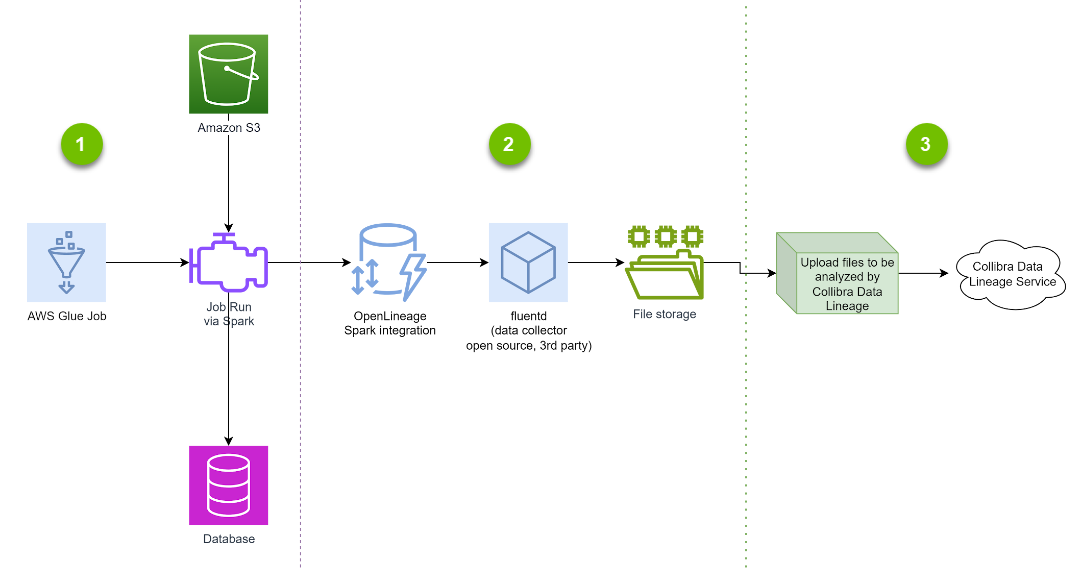
- A Spark engine runs an AWS Glue job to move and transform data from an AWS bucket to a database. You already have this part.
To extract lineage, add the OpenLineage Spark integration to your code; that is, the AWS Glue job. When the Spark engine runs, the job emits lineage information in OpenLineage format. This architecture is event driven, which means that lineage information is emitted when a job runs.
- The second part collects the emitted lineage information. You can use any method to collect the OpenLineage messages and save them to files. For example, you can use Fluentd for receiving REST API calls and saving them to files; this is the recommended method. Fluentd is an open source data collector for building a unified logging layer. Once installed on a server, it runs in the background to collect, parse, transform, analyze, and store various types of data.
- For Collibra Data Lineage to process the saved files, ensure that Collibra Data Lineage has access to the files.
- If you use technical lineage via Edge, copy the files to the Edge server, and then use the Edge CLI to copy the files to the proper location.
- If you use the lineage harvester, the files must be local to the lineage harvester. You can choose to run the lineage harvester from the same server as Fluentd, or copy the files from the Fluentd server to the server where the lineage harvester runs.
When the source files are ready, Collibra Data Lineage parses the lineage, merges it with any other lineage information in Collibra Data Lineage service, stitches the technical lineage objects to Data Catalog assets, and generates the technical lineage graph.