You can remove a synchronized schema and the associated synchronized assets. To do so, you need to delete the Schema, Table and Column assets of the synchronized schema.
Required permissions
- You have a global role with the Catalog global permission, for example, Catalog Author.
- You have a global role with the View Edge connections and capabilities global permission, for example, Edge integration engineer.
- You have a resource role with the Configure external system resource permission, for example, Owner.
Steps
- Look up the target domain of the synchronized schema:
- Open a Database asset page.
- In the tab bar, click Configuration.
- Select the synchronized schema and check the Target Domain.
- Navigate to the target domain.
The domain can contain content from more than one schema. - Do one of the following:
- If the domain contains only one schema and its related tables and columns that can be removed, then delete the domain.
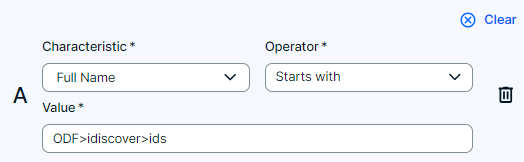
- If the domain contains multiple schemas and their related tables and columns, then we advise to create a filter to make sure you filter out the assets that you need to delete, select the checkboxes of the assets one by one, and delete them.Tip You can create a filter, for example by using the asset name: "Full Name <starts with> {edgeConnectionName}>{databaseName}>{schemaName}".
- Go back to the Database asset and click Configuration.
- Click the
 Refresh List icon.
Once the refresh is completed, the schema will no longer have the check symbol ( ) and will show the status "Not Synchronized".