To integrate Microsoft Fabric, set up a service principal in Microsoft Entra ID and grant the required permissions to it in Fabric.
Steps
- Register an application in Microsoft Entra ID and create a client secret.
- Complete the steps in the Register an application topic in Microsoft Entra documentation.
- Complete the steps in the create a new client secret topic.
- Grant the
Organization.Read.Allapplication permission from Microsoft Graph to the service principal created in step 1. The Fabric integration uses this permission to read your Fabric tenant information through the Microsoft Graph API. If you are unable to provide theOrganization.Read.Allpermission to the service principal, you can instead specify the Fabric tenant name in the integration using the Custom tenant name field. When you do this, the integration uses the value you enter and does not call the Microsoft Graph API to read tenant information.For detailed steps, go to Application permission to Microsoft Graph in Microsoft Entra documentation.
The following graphic shows how to grant the
Organization.Read.Allapplication permission.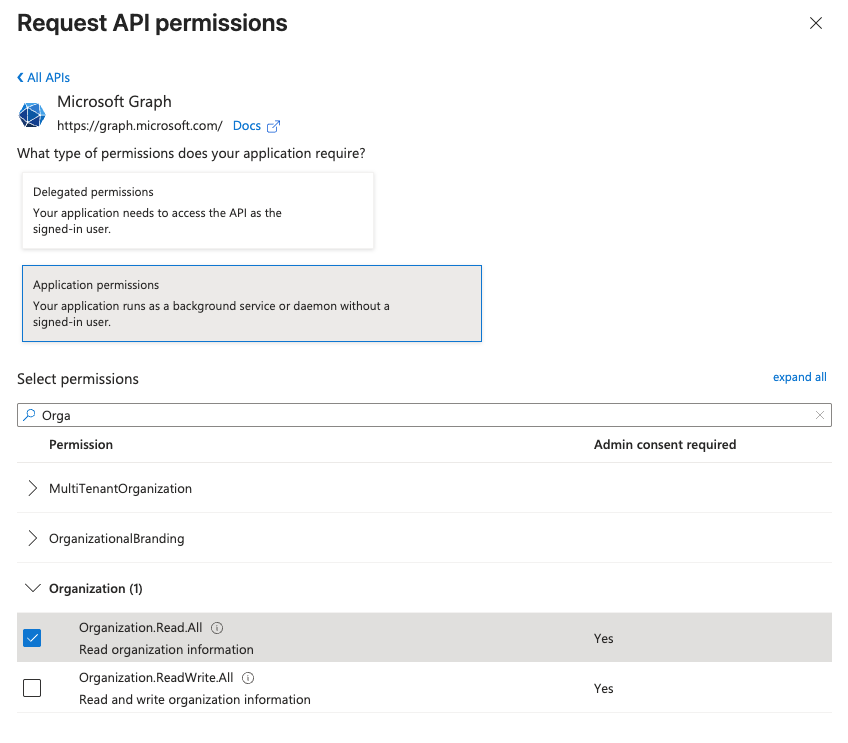
- Create a security group in Microsoft Entra ID application, and add the service principal created in step 1 as a member.
Ensure the Group type is
Security.For detailed steps, go to Manage Microsoft Entra groups and group membership in Microsoft Entra documentation.
The Microsoft Entra application ID and client secret are displayed in the Summary box.
- Associate the service principal with your Fabric tenant.
Log in to the Fabric Admin Portal as a Tenant Administrator and enable the following settings:- Service principals can call Fabric public APIs, and select the security group created in step 3.
- Service principal authentication for admin APIs and select the security group created in step 3.
- Enhance admin APIs responses with detailed metadata.
The service principal authentication for admin APIs setting is required only when the integration reads capacity details through the Fabric Admin API. To skip this setting, provide a custom capacity name and ID for each capacity you want to integrate, together with a custom tenant name in the integration settings. The integration then uses the values you enter and does not call the Admin API.
- Assign the Viewer role in the Fabric workspace and Read access in the Fabric capacity to the service principal or security group.
For detailed steps, go to Give users access to workspaces in Microsoft Fabric documentation.
- The Viewer role assigned in the previous step allows the integration to list lakehouses but not read their tables and files. This is because OneLake security controls access to lakehouse data. Create a OneLake security data access role that grants the service principal:
- Read access to Tables, required for schema, table, and column metadata ingestion.
- Read access to Files, required for file path listing. Grant this only if you want to ingest files.
For detailed steps, go to Create and manage OneLake security roles in Microsoft Fabric documentation. After you have updated the OneLake permissions, allow up to an hour for the changes to take effect. For more information on latencies, go to the OneLake documentation.
- If you want to integrate mirrored Azure Databricks Unity Catalog items, grant the service principal access to the catalog's schemas and tables in Databricks Unity Catalog. The Viewer role assigned in the Fabric workspace in the previous step allows the integration to list mirrored catalogs and their schemas. Ingesting table and column metadata requires two additional controls, configured by a metastore administrator in Databricks Unity Catalog:
- Grant the
EXTERNAL USE SCHEMAprivilege on each schema you want to integrate to the service principal. - On the metastore details page in Unity Catalog, enable External data access for the metastore.
Both controls are required. If either is missing, the integration creates the Database and Schema assets but no tables. For more information, go to the Databricks documentation.
- Grant the
- Optionally, if you want to profile, classify data, and request sample data, grant the
db_datareaderrole to the service principal for each SQL database.The following graphic shows how to grant the
db_datareaderrole.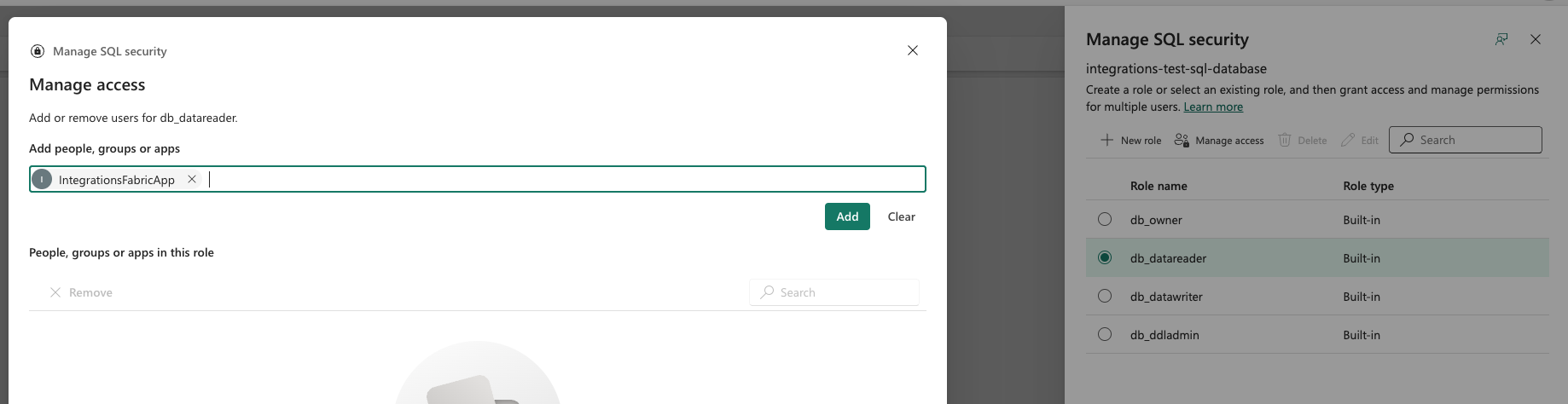
You can now Create an Azure connection to an Edge or Collibra Cloud site.