After the synchronization, assets become available in Collibra. Fabric synchronization relies on UUIDs.
Warning Do not move the assets to another domain. Doing so may lead to errors during future synchronizations.
If a temporary communication issue results in a partial synchronization, the status of the assets that were not synchronized becomes Missing from source. If the assets are identified in the source system during the next fully successful synchronization, the status behavior depends on the nature of the failure:
- If synchronization of the asset was interrupted during processing, the previous status is restored.
- If synchronization of the asset did not start, the status is reset to the first default status configured in the asset's lifecycle.
By default, the assets are shown in a plain list, but you can enable a multi-path hierarchy to show it in a tree structure.
Edge naming conventions for assets created during the Fabric integration
The full name reflects the asset hierarchy, which differs depending on the source. Fabric integrates metadata from SQL Server databases, Fabric lakehouses, Fabric warehouses, and mirrored Azure Databricks Unity Catalog items. Lakehouse tables do not include a schema because schemas are not ingested for lakehouses. Additionally, a mirrored Azure Databricks Unity Catalog item is ingested as a Database asset, with its schemas, tables, and columns as child assets.
The assets created when integrating Fabric receive a unique full name (fully qualifying name) based on the following naming convention:
| Asset type | Naming convention | Example |
|---|---|---|
| Microsoft Tenant | tenantName | Collibra, Inc |
| Fabric Capacity | tenantName>capacityName | Collibra, Inc>colfabriccapacity1 |
| Fabric Workspace | tenantName>capacityName>workspaceName | Collibra, Inc>colfabriccapacity1>ColEngWorkspace |
| Fabric Warehouse | tenantName>capacityName>workspaceName>warehouseName | Collibra, Inc>colfabriccapacity1>ColEngWorkspace>ColEngWarehouse |
| Fabric Lakehouse | tenantName>capacityName>workspaceName>lakehouseName | Collibra, Inc>colfabriccapacity1>ColEngWorkspace>ColEngLakehouse |
| File | tenantName>capacityName>workspaceName>lakehouseName>filename | Collibra, Inc>colfabriccapacity1>ColEngWorkspace>integrations_lakehouse_no_schemas>Files/cities.csv |
| Database | tenantName>capacityName>workspaceName>databaseName | Collibra, Inc>colfabriccapacity1>ColEngWorkspace>SalesDatabase |
| Schema | tenantName>capacityName>workspaceName>databaseName>schemaName | Collibra, Inc>colfabriccapacity1>ColEngWorkspace>SalesDatabase>OrdersSchema |
| Table |
|
|
| Column |
|
|
Integrated assets
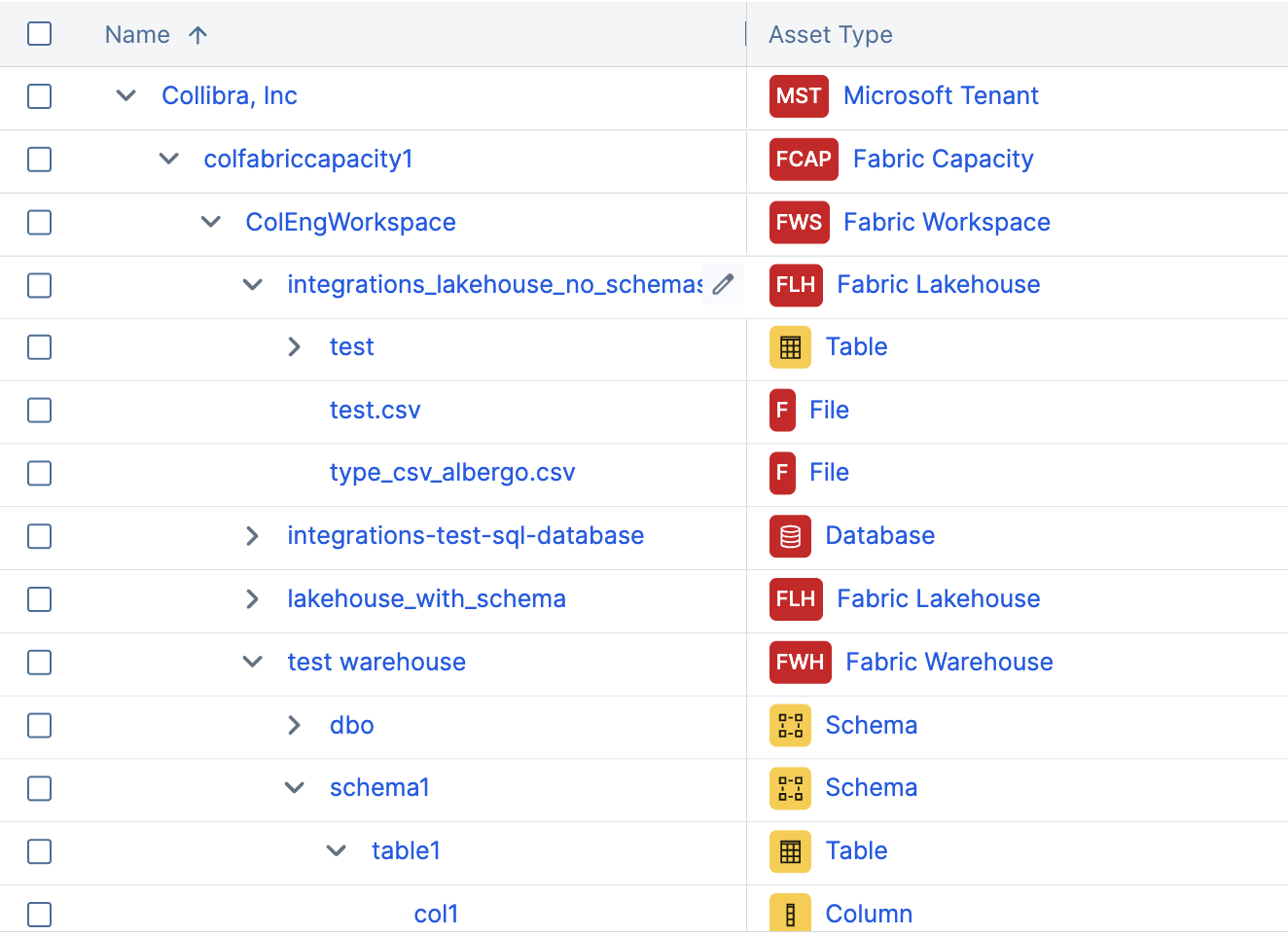
You can enable a multi-path hierarchy to show the assets in a tree structure. For the best results, use the following relations in the multi-path hierarchy:
- Technology Asset groups Technology Asset
- Storage Container contains Storage Container
- Storage Container contains Storage Element
- Technology Asset has Schema
- Schema contains Table
- Table contains Column
The following image shows the resulting hierarchical table.
Synchronized metadata
This table shows the metadata for each Fabric asset type if you selected the Fabric integration. If you do not see any of the listed synchronized metadata, you can add characteristics to the layout on the asset type page.
- Some column metadata is available only for SQL Server database columns, which are ingested through the JDBC connection, and depends on the driver used.
- For supported asset types, the URL attribute contains a link to the item in the Fabric portal. For Mirrored Azure Databricks Unity Catalog database assets specifically, this replaces the previous URL value, which was the OneLake Tables storage path.
| Asset type | Synchronized metadata | Public ID |
|---|---|---|
| Microsoft Tenant | ||
| Fabric Capacity | Technology Asset groups / is grouped by Technology Asset | TechnologyAssetGroupsTechnologyAsset |
| Fabric Workspace | Description from source system | DescriptionFromSourceSystem |
| Source Tags | SourceTags | |
| Technology Asset groups / is grouped by Technology Asset | TechnologyAssetGroupsTechnologyAsset | |
| Fabric Warehouse | Description from source system | DescriptionFromSourceSystem |
| URL | Url | |
| Source Tags | SourceTags | |
| Technology Asset groups / is grouped by Technology Asset | TechnologyAssetGroupsTechnologyAsset | |
| Technology Asset has / is part of Schema | TechnologyAssetHasSchema | |
| Fabric Lakehouse | Description from source system | DescriptionFromSourceSystem |
| URL | Url | |
| Source Tags | SourceTags | |
| Technology Asset has / is part of Schema | TechnologyAssetHasSchema | |
| Storage Container contains / is part of Storage Container | FileContainerContainsFileContainer | |
| File | URL | Url |
| Document creation date | DocumentCreationDate | |
| Document modification date | DocumentModificationDate | |
| Storage Container contains/ contained in File | FileContainerContainsFile | |
| Database |
Description from source system |
DescriptionFromSourceSystem |
|
Last Sync Date (Mirrored Azure Databricks Unity Catalog only) |
LastSyncDate | |
|
URL Supported for both SQL Server and Mirrored Azure Databricks Unity Catalog database assets. |
Url | |
|
Source Tags Supported for both SQL Server and Mirrored Azure Databricks Unity Catalog database assets. |
SourceTags | |
|
Technology Asset has / is part of Schema |
TechnologyAssetHasSchema | |
| Schema |
Schema contains / is part of Table |
SchemaContainsTable |
|
Description from source system (Mirrored Azure Databricks Unity Catalog only) |
DescriptionFromSourceSystem |
|
|
Owner in Source (Mirrored Azure Databricks Unity Catalog only) |
OwnerInSource | |
| Table |
Schema contains / is part of Table |
SchemaContainsTable |
|
Description from source system (Mirrored Azure Databricks Unity Catalog only) |
DescriptionFromSourceSystem |
|
|
URL (Mirrored Azure Databricks Unity Catalog only) |
Url | |
| Column |
Technical Data Type Tip
If you selected or Ingest parent and nested columns in the Columns ingestion mode field in the configuration, you can view the structure of the data for columns with a structured technical data type, such as Array or Struct. To do this, click the hyperlink in the Technical Data Type field in the At a glance sidebar of the Column asset. If the At a glance sidebar is hidden, click |
TechnicalDataType |
|
Column Position |
ColumnPosition | |
|
Is Nullable |
IsNullable | |
|
Column is part of / contains Table |
ColumnIsPartOfTable | |
| Char Octet Length | CharOctetLength | |
| Is Auto Incremented | IsAutoIncremented | |
| Size | Size | |
| Number Of Fractional Digits | NumberOfFractionalDigits | |
| Is Primary Key | IsPrimaryKey | |
| Primary Key Name | PrimaryKeyName |
 . In other locations, such as in Table assets, click the