Note The content in this topic is nearly identical to the AI Command Center operating model content. The only difference is the product name; this topic refers to AI Governance.
The AI Governance operating model includes the following AI Governance-specific asset types:
| Asset type | Description | Public ID |
|---|---|---|
| AI Agent | An autonomous system that perceives its environment, makes decisions based on predefined rules or learned patterns, and takes actions to achieve specific goals. | AIAgent |
| AI Agent Tool |
A service accessible to an AI agent that automates tasks, generates content, or delivers intelligent insights. |
AIAgentTool |
| AI Agent Version |
A specific implementation of an AI agent at a point in time, capturing details like the tools, models, and configurations used. |
AIAgentVersion |
| AI Base Model |
The foundational business concept that defines the model's purpose and governing principles, remaining constant across all technical iterations. Important This asset type is currently only available for the Azure AI Foundry and Databricks AI integrations. It will become available for other AI model integrations in future versions of Collibra. |
FoundationalAIModel |
| AI Endpoint |
The access point for external systems that provides a consistent interface while allowing for the seamless exchange of underlying deployments. |
AIEndpoint |
| AI Model Deployment |
The operational instance where a model version is assigned computational resources to execute and generate real-time outputs. |
AIModelDeployment |
| AI Model Version | A specific, immutable implementation of the model logic and parameters that serves as the audited "raw" model version before it is activated. | DeployedAIModel |
| AI Monitor | The configuration of automated tracking parameters and alerting thresholds used to observe a deployment’s real-world performance and detect deviations from expected behavior. | AIMonitor |
| AI Project |
A structured initiative that involves the development, deployment, and management of AI Models and Agents. Note Despite the name, AI Project is a technical grouping construct, not a project-management artifact. It represents a resource inherited from the source AI platform's own terminology (for example, an Azure AI Foundry project), and carries no timeline, budget, or status-tracking semantics. Its purpose is to group AI Models and Agents and link them to an AI Use Case for traceability.
|
AIProject |
| AI Use Case |
A specific application of artificial intelligence (AI) and AI Models trained on specific data in order to solve a business problem and deliver business value. Implementing an AI Use Case may result in automating a task, improve decision-making or develop new products and services. |
AIUseCase |
| Inference Data (asset type group) |
Groups all types of assets that can be used as inference data in the context of AI Model Deployments. By default, includes the following asset types:
|
InferenceData |
| Output Data (asset type group) | Groups all types of assets that can hold the output generated by AI Model Deployments. By default, includes the following asset types:
|
OutputData |
Other important asset types that are not specific to AI Command Center include the following:
- File: Assets that represent dataset files used to fine-tune AI model versions.
- Storage Container: Assets that represent the folders containing dataset files
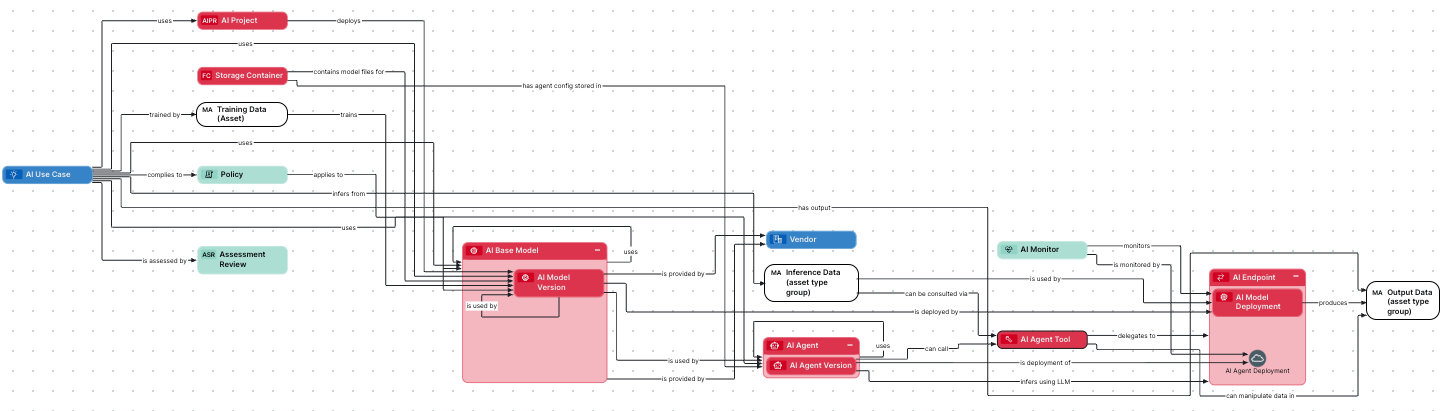
The following image shows the relations between the AI Command Center asset types and other relevant asset types. For instructions on how to create this diagram view in your Collibra environment, see the section "Create an operating model diagram view", at the bottom of this topic.
Descriptions, attributes, and relation types
Click the relevant tab below to see descriptions and the out-of-the-box attributes, relation types and more, for each asset type.
The details relevant to each asset type apply also to their respective child asset types.
Description
An autonomous system that perceives its environment, makes decisions based on predefined rules or learned patterns, and takes actions to achieve specific goals.
Relation types
| Relation type | Head role / corole tail | Public ID | Kind |
|---|---|---|---|
| is used by AI Use Case | AI Use Case uses / is used by AI Agent | AIUseCaseUsesAIAgent | Explicit |
| uses AI Model Version | AI Agent uses / is used by AI Model Version | AIAgentUsesAIModel | Explicit |
| uses AI Agent | AI Agent uses / is used by AI Agent | AIAgentUsesAIAgent | Explicit |
| is used by AI Agent | AI Agent uses / is used by AI Agent | AIAgentUsesAIAgent | Explicit |
| has version AI Agent Version | AI Agent has version / is version of AI Agent Version | AgentHasVersion | Explicit |
| has agent config stored in Storage Container | AI Agent has agent config stored in / contains config files for Storage Container | AIAgentContainsFileContainer | Explicit |
Attributes
| Attribute | Description | Public ID |
|---|---|---|
| AI Trust Score | Average governance maturity, safety, and operational health of your AI assets. | AITrustScore |
| Creation Date in Source | The date on which the resource was created in the source system. | CreationDateInSource |
| Description | The description of the asset. This is typically a more verbose way to describe what the asset means. | Description |
| Description from source system | The description from the source system of the asset. | DescriptionFromSourceSystem |
| Instructions | A set of guidelines, rules, or commands that define how an AI model, agent, or assistant should behave or respond. | Instructions |
| Initiating User in Source | The user who initiated the corresponding process in the source system. | InitiatingUserInSource |
| Tool Usage | Indicates which tools or skills the agent is allowed to use. | ToolUsage |
Domain type
AI Agent assets can be created in domains of type Technology Asset Domain.
Asset statuses
By default, the Lifecycle management feature is switched on for this asset type. This allows you, in part, to configure the asset status progression for core and retirement phases of the asset lifecycle.
| Phase | Asset status | Description |
|---|---|---|
| Core phase | Candidate | The asset is in an initial drafting state. |
| Under Review |
|
|
| Accepted |
|
|
| Retirement phase | Rejected | You can use this status for projects that have been canceled or aren’t being considered for future production. They're in storage for future reference. |
| Archived | You can use this status for projects that have been closed and are no longer in production. They are in storage for future reference. | |
| Missing from source | The asset is no longer available in the source. |
Tip For information on editing the status of an asset, go to Edit an asset.
Important This asset type is currently only available for the Azure AI Foundry and Databricks AI integrations. It will become available for other AI model integrations in future versions of Collibra.
Description
The foundational business concept that defines the model's purpose and governing principles, remaining constant across all technical iterations.
Relation types
| Relation type | Head role / corole tail | Public ID | Kind |
|---|---|---|---|
| uses AI Base Model | AI Base Model uses / is used by AI Base Model | FoundationalAIModelUsesFoundationalAIModel | Explicit |
| is used by AI Base Model | AI Base Model uses / is used by AI Base Model | FoundationalAIModelUsesFoundationalAIModel | Explicit |
| complies to Governance Asset | Asset (AI Base Model) complies to / applies to Governance Asset (Policy) | AssetCompliesToGovernanceAsset | Explicit |
| has version AI Model Version | AI Base Model has version / is version of AI Model Version | ModelHasVersion | Explicit |
| used in AI Use Case | AI Use Case uses / used in AI Base Model | AIUseCaseUsesBaseModel | Explicit |
| is provided by Vendor | AI Base Model is provided by / provides Vendor | BaseModelProvidedByVendor | Explicit |
Attribute types
| Attribute type | Description | Public ID |
|---|---|---|
| AI Trust Score | Average governance maturity, safety, and operational health of your AI assets. | AITrustScore |
| Creation Date in Source | The date on which the resource was created in the source system. |
CreationDateInSource |
| Description | The description of the asset. This is typically a more verbose way to describe what the asset means. |
Description |
| Description from source system | The description from the source system of the asset. | DescriptionFromSourceSystem |
| Owner in Source | The owner(s) of the corresponding object in the data source. | OwnerInSource |
| Initiating User in Source | The user who initiated the corresponding process in the source system. | InitiatingUserInSource |
| Required Content Filtering | Defines the criteria or rules that need to be applied to restrict, refine, or control the type of content generated by an AI Model. | RequiredContentFilter |
| Retirement Date in Source | The date on which the resource was retired in the source system. | RetirementDateInSource |
| Retrain Cycle | The frequency at which the asset is retrained. | RetrainCycle |
Domain type
AI Base Model assets can be created in domains of type Technology Asset Domain.
Asset statuses
By default, the Lifecycle management feature is switched on for this asset type. This allows you, in part, to configure the asset status progression for core and retirement phases of the asset lifecycle.
| Phase | Asset status | Description |
|---|---|---|
| Core phase | Candidate | The asset is in an initial drafting state. |
| Under Review |
|
|
| Accepted |
|
|
| Retirement phase | Rejected | You can use this status for projects that have been canceled or aren't being considered for future production. They're in storage for future reference. |
| Archived | You can use this status for projects that have been closed and are no longer in production. They are in storage for future reference. | |
| Missing from source | The asset is no longer available in the source. |
Tip For information on editing the status of an asset, go to Edit an asset.
Description
The access point for external systems that provides a consistent interface while allowing for the seamless exchange of underlying deployments.
Relation types
| Relation type | Head role / corole tail | Public ID | Kind |
|---|---|---|---|
| exposes AI Model Deployment | AI Model Deployment is exposed through / exposes AI Endpoint | DeploymentsExposedThroughEndpoint | Explicit |
| is used for inference of AI Agent Version | AI Agent Version infers using LLM / is used for inference of AI Endpoint | AgentVersionInvokesModelEndpoint | Explicit |
| can receive requests from AI Agent Tool | AI Agent Tool delegates to / can receive requests from AI Endpoint | AIAgentToolCallsAIAgentEndpoint | Explicit |
Complex relation types
| Name | Description | Relation types | Attribute types | Public ID | System-managed |
|---|---|---|---|---|---|
| AI Agent Deployment | Represents the deployment of a specific AI agent version to an AI endpoint, capturing operational details such as traffic allocation. A single agent version may have multiple deployments across different endpoints, and an endpoint may expose multiple agent deployments simultaneously |
|
Traffic Split Percentage (1:1) | AIAgentDeployment |

|
Attribute types
| Attribute type | Description | Public ID |
|---|---|---|
| Access Instructions | Instructions on how to access the data. | AccessInstructions |
| Access Method | Indicates what method can be used to access the data. | AccessMethod |
| Endpoint Availability |
Controls how the model endpoint is deployed and billed:
|
EndpointAvailability |
| Supported Interaction Protocols |
Lists the interaction protocols supported by this endpoint:
|
SupportedInteractionProtocols |
| Traffic Split | Reflects how the traffic that is sent to an endpoint is split between different deployments. | TrafficSplit |
Domain type
AI Endpoint assets can be created in domains of type Technology Asset Domain.
Asset statuses
| Asset status | Description |
|---|---|
| In Use | The asset is actively being used. |
| Obsolete | The asset is no longer in use. |
| Missing from source | The asset is no longer available in the source. |
This asset type is not eligible for the Lifecycle management feature.
Tip For information on editing the status of an asset, go to Edit an asset.
Description
The operational instance where a model version is assigned computational resources to execute and generate real-time outputs.
Relation types
| Relation type | Head role / corole tail | Public ID | Kind |
|---|---|---|---|
| is deployment of AI Model Version | AI Model Version is deployed by / is deployment of AI Model Deployment | ModelVersionIsDeployedByModelDeployment | Explicit |
| uses Inference Data | AI Model Deployment uses / is used by Inference Data | ModelDeploymentInfersFromInferenceData | Explicit |
| produces Output Data | AI Model Deployment produces / is produced by Output Data | ModelDeploymentToOutputData | Explicit |
| is exposed through AI Endpoint | AI Model Deployment is exposed through / exposes AI Endpoint | DeploymentsExposedThroughEndpoint | Explicit |
| is monitored by AI Monitor | AI Model Deployment is monitored by / monitors AI Monitor | DeploymentMonitoredByAIMonitor | Explicit |
Attribute types
| Attribute type | Description | Public ID |
|---|---|---|
| Compute Configuration | Shows the capacity and amount of resources allocated to this asset. | ComputeConfiguration |
| Creation Date In Source | The date on which the resource was created in the source system. | CreationDateInSource |
| Description From Source System | The description from the source system of the asset. | DescriptionFromSourceSystem |
| Implemented Content Filtering | List the content filters activated on an AI Model deployment, to avoid unwanted output being generated. | ImplementedContentFiltering |
| Initiating User In Source | Shows the name of the user who initiated the creation of this resouce in the source system. We capture this as an attribute and not via responsibilities because the user who has an account in the source system may not have a Collibra user. | InitiatingUserInSource |
| Modification Date In Source | The date on which the resource was modified in the source system. | ModificationDateInSource |
| Retirement Date In Source | The date on which the resource was retired in the source system. | RetirementDateInSource |
Domain type
AI Model Deployment assets can be created in domains of type Technology Asset Domain.
Asset statuses
| Asset status | Description |
|---|---|
| In Use | The asset is actively being used. |
| Obsolete | The asset is no longer in use. |
| Missing from source | The asset is no longer available in the source. |
This asset type is not eligible for the Lifecycle management feature.
Tip For information on editing the status of an asset, go to Edit an asset.
Description
A specific, immutable implementation of the model logic and parameters that serves as the audited "raw" model version before it is activated.
Relation types
| Relation type | Head role / corole tail | Public ID | Kind |
|---|---|---|---|
| used in AI Use Case | AI Use Case uses / used in AI Model Version | AIUseCaseUsesAIModel | Explicit |
| trained by Asset | AI Model Version trained by / trains Asset | AIModelTrainedByAsset | Explicit |
| infers from Asset | AI Model Version infers from / used to infer Asset | AIModelInfersFromAsset | Explicit |
| has output Asset | AI Model Version has output / provides Asset | AIModelHasOutputAsset | Explicit |
| is provided by Vendor | AI Model Version is provided by / provides Vendor | AIModelProvidedByVendor | Explicit |
| uses AI Model Version | AI Model Version uses / is used by AI Model Version | AIModelUsesAIModel | Explicit |
| is used by AI Model Version | AI Model Version uses / is used by AI Model Version | AIModelUsesAIModel | Explicit |
| complies to Governance Asset | AI Model Version complies to / applies to Governance Asset (Policy) | AssetCompliesToGovernanceAsset | Explicit |
| is used by AI Agent | AI Agent uses / is used by AI Model Version | AIAgentUsesAIModel | Explicit |
| is deployed in AI Project | AI Model Version is deployed in / deploys AI Project | AIProjectDeploysAIModel | Explicit |
| has model files stored in Storage Container | AI Model Version has model files stored in / contains model files for Storage Container | AIModelContainsFileContainer | Explicit |
| is deployed by AI Model Deployment | AI Model Version is deployed by / is deployment of AI Model Deployment | ModelVersionIsDeployedByModelDeployment | Explicit |
| is version of AI Base Model | AI Base Model has version / is version of AI Model Version | ModelHasVersion | Explicit |
Attribute types
| Attribute type | Description | Public ID |
|---|---|---|
| AI Trust Score | Average governance maturity, safety, and operational health of your AI assets. | AITrustScore |
| Description | The description of the asset. This is typically a more verbose way to describe what the asset means. |
Description |
| Model Accuracy |
Model Accuracy refers to how well the model performs on a given task. Typically, this is defined by the proportion of correct predications made by the model. For example, if a model is used to classify emails as spam or not spam, and it classifies 90% of emails correctly, then the model accuracy is 90%. |
ModelAccuracy |
| Model Precision |
Model Precision refers to how accurate positive model predictions are. Typically, this is defined as the proportion of predictions that are correct. For example, if a model is used to classify emails as spam, and it correctly classifies 95% of emails as spam, then the model has a precision of 0.95. |
ModelPrecision |
| Mean Squared Error |
Mean Squared Error (MSE) refers to a model quality metric that measures the quality of the model’s predications. |
MeanSquaredError |
| Mean Absolute Error |
Mean Absolute Error (MAE) refers to a model quality metric that evaluates the performance of regression models. |
MeanAbsoluteError |
| Model Type |
Type of AI model. Values include: Generative AI, Classification, Regression, Computer Vision, Reinforcement Learning, and Image Classification. |
ModelType |
| Feature Importance |
Feature Importance refers to how important a feature is to a machine learning model. It helps you to understand which features contribute the most to the model’s predictions. |
FeatureImportance |
| Version | If this asset is versioned (manually or in an external system), this string represents the asset version. | Version |
| Description from source system | The description from the source system of the asset. | DescriptionFromSourceSystem |
| Repository | Reference to the repository where the code behind the model is stored. | Repository |
| Required Content Filtering | Defines the criteria or rules that need to be applied to restrict, refine, or control the type of content generated by an AI Model. | ContentFilter |
| Supported Input Modalities | Specifies the fundamental types of input data the model can accept. This includes discrete categories such as text, image, audio, video, or tabular data. For multi-modal models, this attribute defines the valid combinations of these inputs (for example, text and image for a visual question answering model). | SupportedInputModalities |
| Supported Output Modalities | Specifies the fundamental types of output data the model can generate. This includes discrete categories such as text, image, audio, video, or tabular data. For multi-modal models, this attribute defines the valid combinations of these inputs (for example, text and image for a visual question answering model). | SupportedOutputModalities |
| Supported Model Customizations | Defines the available pathways for adapting the model's base capabilities to specific use cases. This attribute details the supported adaptation techniques (such as Full Fine-Tuning, Parameter-Efficient Fine-Tuning (PEFT), or Distillation) and the degree of structural flexibility allowed (for example, modular adapters or freezing specific layers). It serves as a guide for developers to understand the trade-offs between computational cost and model specialization. | SupportedModelCustomizations |
| Initiating User in Source | The user who initiated the corresponding process in the source system. | InitiatingUserInSource |
| Framework | The machine learning framework used to build the model. | Framework |
Domain type
AI Model Version assets can be created in domains of type Technology Asset Domain.
Asset statuses
By default, the Lifecycle management feature is switched on for this asset type. This allows you, in part, to configure the asset status progression for core and retirement phases of the asset lifecycle.
| Phase | Asset status | Description |
|---|---|---|
| Core phase | Candidate | The asset is in an initial drafting state. |
| Under Review |
|
|
| Accepted |
|
|
| Retirement phase | Archived |
You can use this status for projects that have been closed and are no longer in production. They are in storage for future reference. |
|
Rejected |
You can use this status for projects that have been canceled or aren’t being considered for future production. They are in storage for future reference. |
|
| Missing from source | The asset is no longer available in the source. |
Tip For information on editing the status of an asset, go to Edit an asset.
Description
The configuration of automated tracking parameters and alerting thresholds used to observe a deployment’s real-world performance and detect deviations from expected behavior.
Relation types
| Relation type | Head role / corole tail | Public ID | Kind |
|---|---|---|---|
| monitors AI Model Deployment | AI Model Deployment is monitored by / monitors AI Monitor | DeploymentMonitoredByAIMonitor | Explicit |
Complex relation types
| Name | Description | Relation types | Attribute types | Public ID | System-managed |
|---|---|---|---|---|---|
| AI Agent Deployment | Represents the deployment of a specific AI agent version to an AI endpoint, capturing operational details such as traffic allocation. A single agent version may have multiple deployments across different endpoints, and an endpoint may expose multiple agent deployments simultaneously |
|
Traffic Split Percentage (1:1) | AIAgentDeployment |
|
Attribute types
| Attribute type | Description | Public ID |
|---|---|---|
| Data Drift Detection Enabled | Data drift detection monitors shifts in input data distributions over time to identify when a model’s environment no longer matches its training data. This attribute type captures whether data drift detection is enabled on the AI Monitor. | DataDriftDetection |
| Prediction Drift Detection Enabled | Tracks changes in the model’s output distribution to identify shifts in prediction patterns, serving as an early warning for model decay when actual outcomes are delayed. This attribute type captures if whether prediction drift detection is enabled on the AI Monitor. | PredictionDriftDetection |
| Schedule | Defines the frequency (e.g., hourly, daily) at which a monitor analyzes data or a job is executed. | Schedule |
| Alert Configuration | Defines the threshold conditions that trigger an alert and the communication channels (for example email and Slack) used to notify stakeholders. | AlertConfiguration |
| URL | Uniform Resource Locator, also colloquially known as web address. | Url |
Domain type
AI Monitor assets can be created in domains of type Governance Asset Domain.
Asset statuses
| Asset status | Description |
|---|---|
| In Use | The asset is actively being used. |
| Obsolete | The asset is no longer in use. |
| Missing from source | The asset is no longer available in the source. |
This asset type is not eligible for the Lifecycle management feature.
Tip For information on editing the status of an asset, go to Edit an asset.
Description
A structured initiative that involves the development, deployment, and management of AI Models and Agents.
Relation types
| Relation type | Head role / corole tail | Public ID |
|---|---|---|
| is used by AI Use Case | AI Use Case uses / is used by AI Project | AIUseCaseUsesAIProject |
| deploys AI Model Version | AI Project deploys / is deployed by AI Model Version | AIProjectDeploysAIModel |
Attribute types
| Attribute type | Description | Public ID |
|---|---|---|
| Description | The description of the asset. This is typically a more verbose way to describe what the asset means. | Description |
| Location | The location where the actual asset is stored or can be found. | Location |
| Project Id | A globally unique identifier for your project. | ProjectId |
| URL | Uniform Resource Locator, also colloquially known as web address. | Url |
Domain type
AI Project assets can be created in domains of type Technology Asset Domain.
Asset statuses
| Asset status | Description |
|---|---|
| Candidate | The asset is in an initial drafting state. |
| Under Review | The stakeholders are reviewing an asset. |
| Accepted | The stewards approved an asset definition. |
| Archived | You can use this status for projects that have been closed and are no longer in production. They are in storage for future reference. |
| Rejected | You can use this status for projects that have been canceled or aren’t being considered for future production. They're in storage for future reference. |
This asset type is not eligible for the Lifecycle management feature.
Tip For information on editing the status of an asset, go to Edit an asset.
Description
A specific application of artificial intelligence (AI) and AI Models trained on specific data in order to solve a business problem and deliver business value. Implementing an AI Use Case may result in automating a task, improve decision-making or develop new products and services.
Relation types
| Relation type | Head role / corole tail | Public ID | Kind |
|---|---|---|---|
| is assessed by Assessment Review | Asset is assessed by / assesses Assessment Review |
AssetIsAssessedByAssessmentReview |
Explicit |
| uses AI Model Version | AI Use Case uses / used in AI Model Version |
AIUseCaseUsesAIModel |
Explicit |
| infers from Asset | AI Use Case infers from / used to infer Asset |
AIUseCaseTransformsAsset |
Explicit |
| trained by Asset | AI Use Case trained by / trains in Asset |
AIUseCaseTrainedByAsset |
Explicit |
| has output Asset | AI Use Case has output / is output Asset |
AIUseCaseHasOutputAsset |
Explicit |
| complies to Governance Asset | Asset complies to / applies to Governance Asset (Policy) | AssetCompliesToGovernanceAsset | Explicit |
| uses AI Agent | AI Use Case uses / is used by AI Agent | AIUseCaseUsesAIAgent | Explicit |
| uses AI Project | AI Use Case uses / is used by AI Project | AIUseCaseUsesAIProject | Explicit |
| uses AI Base Model | AI Use Case uses / used in AI Base Model | AIUseCaseUsesBaseModel | Explicit |
Attribute types
| Attribute type | Description | Public ID |
|---|---|---|
| AI Trust Score | Average governance maturity, safety, and operational health of your AI assets. | AITrustScore |
| Description |
General description of the Use Case and its potential for the use of AI. |
Description |
| Use Case Application |
Indicates that the AI use case will be used by an external audience or internally by your organization. |
UseCaseApplication |
| Business Case |
Refers to the business problem you want to solve with the AI use case. It focuses on describing a concrete business problem. For example, I'm a customer support manager and my team receives too many support tickets. |
BusinessCase |
| Business Value |
Refers to how this AI use case can improve your organization. For example, reduce support tickets, bring in additional revenue, or mitigate risks. |
BusinessValue |
| Business Sponsor |
Refers to the Business Owner or Executive Sponsor of the AI Use Case in your organization. |
BusinessSponsor |
| Maintenance Cost |
Indicates the overall expected cost of running the Use Case over selected period of time. |
MaintenanceCost |
| General Purpose AI |
Refers to whether the model used in your AI use case is using a General Purpose AI (GPAI). Some regulatory frameworks may impose additional transparency and risk mitigation requirements for GPAI based systems, sometimes referred to as foundation models. For example, large language models (LLMs). |
GeneralPurposeAI |
| Third Party Model |
Refers to the vendor of your AI model(s) and what kind of model you are using. For example, Google Vertex. |
ThirdPartyModel |
| Internal Model |
Refers to the existing or upcoming internally built model(s) your AI use case may use. |
InternalModel |
| Training Data Description |
The training or re-retraining data used to teach the AI model(s). |
TrainingDataDescription |
| Inference Data Description |
An explanation of the input or inference data the AI model(s) uses to create output data. For example, an image classification model uses images as input data and a language model uses text as input data. |
InferenceDataDescription |
| Model Output |
An explanation of the output data that the AI model(s) is expected to create. For example, classification labels, descriptions, or complex probability predictions. |
ModelOutput |
| Data Storage |
Refers to whether any data is stored, and if so, where and how the data is stored. For example, the prompts data is stored on the cloud. |
DataStorage |
| Automation Level |
The nature and degree of automation of the AI use case. For example, are decisions going to be based solely on the automated output, or is human oversight possible or planned? |
AutomationLevel |
| Model Monitoring |
Refers to how your organization will ensure the AI model is meeting accuracy and performance expectations. |
ModelMonitoring |
| Legal Approval Date |
Date your legal team approved or rejected the AI use case. |
LegalApprovalDate |
| Legal Approval Renewal Date |
Date of the expected periodical review of the Use Case’s approval. |
LegalApprovalRenewalDate |
| Legal Description of Model |
Description of the AI model provided by your legal team. This may include any legal repercussions of processing the AI model within the context of the AI use case. |
LegalModelDescription |
| Security Protocols |
Any general security protocols that may result from the implementation of the AI use case. |
SecurityProtocols |
| Data Retention Protocols |
Any data retention standards already in place or projected to be implemented for the AI use case. |
DataRetentionProtocols |
| Data Privacy Risks |
Any data privacy risks that may result from processing the AI model within the context of this AI use case and either putting it on the market for external customer use or internal use. For example, is there the risk of a data breach or misuse of data? |
DataPrivacyRisks |
| Data Privacy Risk Score | Number calculated from Risk Assessment. | DataPrivacyRiskScore |
| Intellectual Property Risks |
Inherent Intellectual Property Risks resulting from processing AI Models within this use case and placing them on the market or putting into service for own use. Examples include copyright or patent infringement. |
IntellectualPropertyRisks |
| Ethical Risks |
Any ethical risks that may result from processing the AI model within the context of this AI use case and either putting it on the market for external customer use or internal use. For example, is there the risk of a data breach or misuse of data? |
EthicalRisks |
| Other Risks |
Other Risks resulting from processing AI Models within this use case and placing them on the market or putting into service for own use. Examples can include safety and reliability, security, social risks. |
OtherRisks |
| Business Risks | A summary of the business risks associated with implementing the AI use case. For example, the expected financial loss resulting from significant disruptions to the business due to the complexity of operating the AI model. | BusinessRisks |
| Overall Risk Analysis |
Details and the result of any risk analysis performed on the AI use case. |
OverallRiskAnalysis |
| Overall Risk Rating |
Risk level calculated based on pre-defined thresholds in the default Risk Assessment. |
OverallRiskRating |
| Transparency Disclosure Requirements |
Transparency Disclosure Requirements refers to identified requirements, if any, for AI use case transparency. For example, a Transparency Declaration that requires an organization to disclose the purpose of the AI model and any data used for training purposes. |
TransparencyDisclosureRequirements |
| Protective Measures |
Any additional required or recommended actions that have been identified based on regulations, industry standards or dedicated frameworks. |
ProtectiveMeasures |
| Safeguard Effectiveness | Indicates the effectiveness of the safeguards in place. | SafeguardEffectiveness |
Domain type
AI Use Case assets can be created in domains of type Business Asset Domain.
Asset statuses
By default, the Lifecycle management feature is switched on for this asset type. This allows you, in part, to configure the asset status progression for core and retirement phases of the asset lifecycle.
| Phase | Asset status | Description |
|---|---|---|
| Core phase | Ideation | You can use this status for suggestions, opportunities, or proofs of concept. |
| Development |
You can use this status to show that a review has taken place and development work has started. |
|
| Monitoring | You can use this status to show that a release has been made and monitoring is taking place for potential performance, reliability, and accuracy risks. | |
| Retirement phase | Rejected |
You can use this status for projects that have been canceled or aren’t being considered for future production. They're in storage for future reference. |
| Archived | You can use this status for projects that have been closed and are no longer in production. They are in storage for future reference. |
Tip For information on editing the status of an asset, go to Edit an asset.
Create an AI Governance operating model diagram view
You can create an AI Governance diagram view, to visualize the operating model. The following procedure describes how to quickly create a new diagram view by copying and pasting the JSON code in the diagram view text editor.
Steps
- Open the asset page.
- Click the
Diagram tab.
The diagram is shown in the default diagram view. - Click
 to add a new view.
 - Select the Text option below the diagram view name.
The diagram view text editor is shown. - Copy the code from the Show JSON code section below and paste it in the diagram view text editor.
- Click Save.
- Edit the name and description of the diagram view as needed.
{
  "nodes": [
    {
      "id": "AI Use Case",
      "type": {
        "id": "00000000-0000-0000-0000-000000031401"
      },
      "fields": [],
      "editorSettings": {
        "edgePropsExpanded": true,
        "nodePropsExpanded": false
      }
    },
    {
      "id": "AI Model Version",
      "type": {
        "id": "00000000-0000-0000-0000-000000031402"
      },
      "editorSettings": {
        "nodePropsExpanded": false,
        "filterPropsExpanded": true
      }
    },
    {
      "id": "Vendor",
      "type": {
        "id": "00000000-0000-0000-0000-000000031403"
      },
      "layoutRegion": "flow"
    },
    {
      "id": "Assessment Review",
      "type": {
        "id": "00000000-0000-0000-0000-000000031305"
      }
    },
    {
      "id": "Policy",
      "type": {
        "id": "00000000-0000-0000-0000-000000031202"
      }
    },
    {
      "id": "Training Data (Asset)",
      "type": {
        "id": "00000000-0000-0000-0000-000000031000"
      }
    },
    {
      "id": "Inference Data (asset type group)",
      "type": {
        "id": "00000000-0000-0000-0000-000000031000"
      }
    },
    {
      "id": "Output Data (asset type group)",
      "type": {
        "id": "00000000-0000-0000-0000-000000031000"
      }
    },
    {
      "id": "AI Agent",
      "type": {
        "id": "00000000-0000-0000-0000-000000031450"
      }
    },
    {
      "id": "AI Agent Version",
      "type": {
        "id": "00000000-0000-0000-0000-000000031452"
      }
    },
    {
      "id": "AI Agent Tool",
      "type": {
        "id": "00000000-0000-0000-0000-000000031453"
      }
    },
    {
      "id": "AI Project",
      "type": {
        "id": "00000000-0000-0000-0000-000000031420"
      }
    },
    {
      "id": "AI Base Model",
      "type": {
        "id": "00000000-0000-0000-0000-000000031422"
      }
    },
    {
      "id": "AI Model Deployment",
      "type": {
        "id": "00000000-0000-0000-0000-000000031500"
      }
    },
    {
      "id": "AI Endpoint",
      "type": {
        "id": "00000000-0000-0000-0000-000000031501"
      }
    },
    {
      "id": "AI Monitor",
      "type": {
        "id": "00000000-0000-0000-0000-000000031502"
      }
    },
    {
      "id": "Storage Container",
      "type": {
        "id": "00000000-0000-0000-0001-002900000002"
      }
    },
    {
      "id": "AI Agent Deployment",
      "type": {
        "id": "00000000-0000-0000-0000-000000007505"
      }
    }
  ],
  "edges": [
    {
      "from": "AI Model Version",
      "to": "Vendor",
      "label": "",
      "style": "arrow",
      "type": {
        "id": "00000000-0000-0000-0000-000000007105"
      },
      "roleDirection": true
    },
    {
      "from": "AI Use Case",
      "to": "AI Model Version",
      "label": "",
      "style": "arrow",
      "type": {
        "id": "00000000-0000-0000-0000-000000007098"
      },
      "roleDirection": true
    },
    {
      "from": "AI Use Case",
      "to": "Assessment Review",
      "label": "",
      "type": {
        "id": "00000000-0000-0000-0000-000000007097"
      },
      "roleDirection": true
    },
    {
      "from": "AI Use Case",
      "to": "Policy",
      "label": "",
      "type": {
        "id": "00000000-0000-0000-0000-000000007018"
      },
      "roleDirection": true
    },
    {
      "from": "AI Use Case",
      "to": "Output Data (asset type group)",
      "label": "",
      "style": "arrow",
      "type": {
        "id": "00000000-0000-0000-0000-000000007101"
      },
      "roleDirection": true
    },
    {
      "from": "Policy",
      "to": "AI Model Version",
      "label": "",
      "style": "arrow",
      "type": {
        "id": "00000000-0000-0000-0000-000000007018"
      },
      "roleDirection": false
    },
    {
      "from": "Training Data (Asset)",
      "to": "AI Model Version",
      "label": "",
      "style": "arrow",
      "type": {
        "id": "00000000-0000-0000-0000-000000007102"
      },
      "roleDirection": false
    },
    {
      "from": "AI Model Version",
      "to": "AI Model Version",
      "label": "",
      "style": "arrow",
      "type": {
        "id": "00000000-0000-0000-0000-000000007106"
      },
      "roleDirection": false
    },
    {
      "from": "AI Use Case",
      "to": "AI Agent",
      "label": "",
      "style": "arrow",
      "type": {
        "id": "00000000-0000-0000-0000-000000007109"
      },
      "roleDirection": true
    },
    {
      "from": "AI Agent",
      "to": "AI Agent",
      "label": "",
      "style": "arrow",
      "type": {
        "id": "00000000-0000-0000-0000-000000007110"
      },
      "roleDirection": true
    },
    {
      "from": "AI Agent",
      "to": "AI Agent Version",
      "label": "",
      "style": "boxing",
      "type": {
        "id": "00000000-0000-0000-0000-000000007206"
      },
      "roleDirection": true
    },
    {
      "from": "AI Agent Version",
      "to": "AI Agent Tool",
      "label": "",
      "style": "arrow",
      "type": {
        "id": "00000000-0000-0000-0000-000000007207"
      },
      "roleDirection": true
    },
    {
      "from": "AI Agent Version",
      "to": "AI Endpoint",
      "label": "",
      "style": "arrow",
      "type": {
        "id": "00000000-0000-0000-0000-000000007210"
      },
      "roleDirection": true
    },
    {
      "from": "AI Agent Tool",
      "to": "AI Endpoint",
      "label": "",
      "style": "arrow",
      "type": {
        "id": "00000000-0000-0000-0000-000000007209"
      },
      "roleDirection": true
    },
    {
      "from": "AI Use Case",
      "to": "AI Project",
      "label": "",
      "style": "arrow",
      "type": {
        "id": "00000000-0000-0000-0000-000000007112"
      },
      "roleDirection": true
    },
    {
      "from": "AI Project",
      "to": "AI Model Version",
      "label": "",
      "style": "arrow",
      "type": {
        "id": "00000000-0000-0000-0000-000000007111"
      },
      "roleDirection": true
    },
    {
      "from": "Policy",
      "to": "AI Base Model",
      "label": "",
      "style": "arrow",
      "type": {
        "id": "00000000-0000-0000-0000-000000007018"
      },
      "roleDirection": false
    },
    {
      "from": "AI Use Case",
      "to": "Training Data (Asset)",
      "label": "",
      "style": "arrow",
      "type": {
        "id": "00000000-0000-0000-0000-000000007100"
      },
      "roleDirection": true
    },
    {
      "from": "AI Use Case",
      "to": "Inference Data (asset type group)",
      "label": "",
      "style": "arrow",
      "type": {
        "id": "00000000-0000-0000-0000-000000007099"
      },
      "roleDirection": true
    },
    {
      "from": "AI Base Model",
      "to": "AI Base Model",
      "label": "",
      "style": "arrow",
      "type": {
        "id": "00000000-0000-0000-0000-000000007116"
      },
      "roleDirection": true
    },
    {
      "from": "AI Model Version",
      "to": "AI Model Deployment",
      "label": "",
      "style": "arrow",
      "type": {
        "id": "00000000-0000-0000-0000-000000077001"
      },
      "roleDirection": true
    },
    {
      "from": "AI Model Deployment",
      "to": "AI Endpoint",
      "label": "",
      "style": "boxed",
      "type": {
        "id": "00000000-0000-0000-0000-000000077006"
      },
      "roleDirection": true
    },
    {
      "from": "Inference Data (asset type group)",
      "to": "AI Model Deployment",
      "label": "",
      "style": "arrow",
      "type": {
        "id": "00000000-0000-0000-0000-000000077003"
      },
      "roleDirection": false
    },
    {
      "from": "AI Model Deployment",
      "to": "Output Data (asset type group)",
      "label": "",
      "style": "arrow",
      "type": {
        "id": "00000000-0000-0000-0000-000000077004"
      },
      "roleDirection": true
    },
    {
      "from": "AI Monitor",
      "to": "AI Model Deployment",
      "label": "",
      "style": "arrow",
      "type": {
        "id": "00000000-0000-0000-0000-000000077007"
      },
      "roleDirection": false
    },
    {
      "from": "AI Model Version",
      "to": "AI Agent",
      "label": "",
      "style": "arrow",
      "type": {
        "id": "00000000-0000-0000-0000-000000007108"
      },
      "roleDirection": false
    },
    {
      "from": "Storage Container",
      "to": "AI Agent",
      "label": "",
      "style": "arrow",
      "type": {
        "id": "00000000-0000-0000-0000-000000007115"
      },
      "roleDirection": true
    },
    {
      "from": "AI Base Model",
      "to": "AI Model Version",
      "label": "",
      "style": "boxing",
      "type": {
        "id": "00000000-0000-0000-0000-000000077000"
      },
      "roleDirection": true
    },
    {
      "from": "AI Use Case",
      "to": "AI Base Model",
      "label": "",
      "style": "arrow",
      "type": {
        "id": "00000000-0000-0000-0000-000000077002"
      },
      "roleDirection": true
    },
    {
      "from": "AI Base Model",
      "to": "Vendor",
      "label": "",
      "style": "arrow",
      "type": {
        "id": "00000000-0000-0000-0000-000000077005"
      },
      "roleDirection": true
    },
    {
      "from": "Storage Container",
      "to": "AI Model Version",
      "label": "",
      "style": "arrow",
      "type": {
        "id": "00000000-0000-0000-0000-000000007114"
      },
      "roleDirection": false
    },
    {
      "from": "AI Agent Version",
      "to": "AI Agent Deployment",
      "label": "",
      "style": "arrow",
      "type": {
        "id": "00000000-0000-0000-0000-000000007213"
      },
      "roleDirection": true
    },
    {
      "from": "AI Agent Deployment",
      "to": "AI Endpoint",
      "label": "",
      "style": "boxed",
      "type": {
        "id": "00000000-0000-0000-0000-000000007214"
      },
      "roleDirection": true
    },
    {
      "from": "AI Monitor",
      "to": "AI Agent Deployment",
      "label": "",
      "style": "arrow",
      "type": {
        "id": "00000000-0000-0000-0000-000000007215"
      },
      "roleDirection": true
    },
    {
      "from": "AI Agent Tool",
      "to": "Output Data (asset type group)",
      "label": "",
      "style": "arrow",
      "type": {
        "id": "00000000-0000-0000-0000-000000007212"
      },
      "roleDirection": true
    },
    {
      "from": "Inference Data (asset type group)",
      "to": "AI Agent Tool",
      "label": "",
      "style": "arrow",
      "type": {
        "id": "00000000-0000-0000-0000-000000007211"
      },
      "roleDirection": false
    }
  ],
  "showOverview": false,
  "enableFilters": false,
  "showLabels": true,
  "showFields": true,
  "showLegend": false,
  "showPreview": false,
  "visitStrategy": "directed",
  "layout": "HierarchyLeftRight",
  "maxNodeLabelLength": 50,
  "maxEdgeLabelLength": 30,
  "layoutOptions": {
    "compactGroups": false,
    "componentArrangementPolicy": "topmost",
    "edgeBends": true,
    "edgeBundling": true,
    "edgeToEdgeDistance": 5,
    "minimumLayerDistance": "auto",
    "nodeToEdgeDistance": 5,
    "orthogonalRouting": true,
    "preciseNodeHeightCalculation": true,
    "recursiveGroupLayering": true,
    "separateLayers": true,
    "webWorkers": true,
    "nodePlacer": {
      "barycenterMode": true,
      "breakLongSegments": true,
      "groupCompactionStrategy": "none",
      "nodeCompaction": false,
      "straightenEdges": true
    }
  }
}