Appendix B - The SafyrSettings.xlsx file
Describes the structure and usage of the SafyrSettings.xlsx file
The SafyrSettings.xlsx file stores most of the options used by ERP/CRM Integrator. It is not normally necessary to modify the file manually, but there are a few circumstances where this may be necessary. These are described below.
File usage
The SafyrSettings.xlsx file is used by ERP/CRM Integrator to record a range of settings used by ERP/CRM Integrator. The sections below describe the contents of this Excel spreadsheet, which is presented as a set of worksheets.
Note ERP/CRM Integrator users may want to modify the spreadsheet (in particular see Appendix B of the ERP/CRM Integrator User Guide). Before doing this, copy the SafyrSetting.xlsx and use this to create a copy named SafyrSettings_Cust.xlsx in the ERP/CRM Integrator installation folder. Then add the required rules to this SafyrSettings_Cust.xlsx spreadsheet.
When the ERP/CRM Integrator application is started, if the file SafyrSettings_Cust.xlsx exists, then this will be used instead of the delivered SafyrSetting.xlsx file.
File structure
The file is structured as a number of worksheets. The worksheets are:
DataTypeMapping
This worksheet area shows a table of logical ERP/CRM Integrator data types and how they map to the various RDBMS’ supported by ERP/CRM Integrator. The format is shown in the following example:
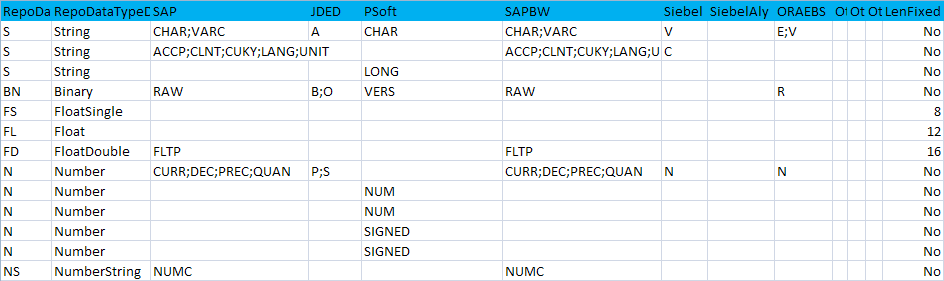
The extraction of metadata by ERP/CRM Integrator from the ERP includes ‘logical’ ERP datatypes. These are specific to each ERP type. ERP/CRM Integrator has no direct knowledge of how these logical datatypes are implemented in the physical RDBMS. This sheet presents a mapping, showing how each logical ERP datatype maps to a physical RDBMS-specific datatype.
It would not normally be necessary to amend this sheet, but if required to do so, we recommend that you consult your ERP/CRM Integrator representative before making any changes.
ERPTypeNaming
This worksheet records the names for the various Enterprise Application packages addressed by ERP/CRM Integrator.
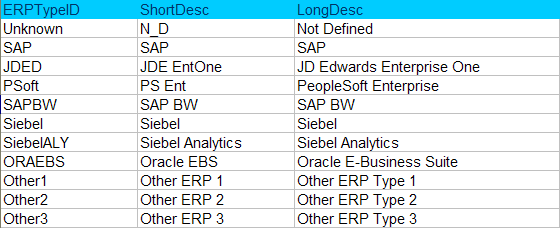
The columns are as follows:
- ERPTypeID:This is the internal identifier for the ERP type
- ShortDescThe short description that will appear in the ERP/CRM Integrator interface
- LongDescThe long description that will appear in the ERP/CRM Integrator interface
ERPTypeLanguages
This worksheet lists the available languages for extraction of descriptive fields from each Enterprise Application. A typical set of language codes for each Enterprise Application are coded in this worksheet, but you may need to add your own if you wish to extract metadata in a language not included in the list. The worksheet format is shown in the following example:
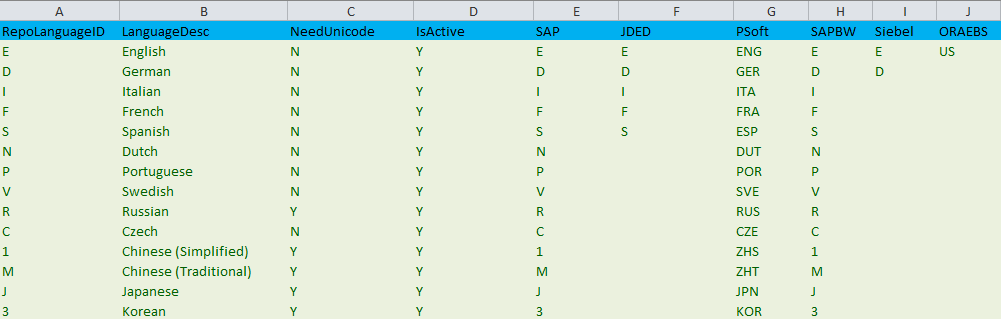
The columns are as follows:
- RepoLanguageID:This is the internal identifier for the ERP type
- LanguageDescA descriptive name for the language
- NeedUniCodeIndicates if a Unicode supported schema is required to accommodate the language
- IsActiveIf ‘Y’ then the language is active. If ‘X’ then the language is not currently supported by ERP/CRM Integrator
- SAP, JDED, etc….The ‘native’ language code for that ERP that corresponds to the Repository Language code. For example, the PeopleSoft language code for English is ‘ENG’ – this maps to the ERP/CRM Integrator internal language code of ‘E’. So when ERP/CRM Integrator performs the metadata extraction from a PeopleSoft system where the user has requested ‘English’, ERP/CRM Integrator uses the worksheet to select the PeopleSoft-specific language code to use.
PSoftRuleBasedRelationships
This worksheet is used by the Rules Based Relationship Generation feature of ERP/CRM Integrator to create additional relationships for a PeopleSoft Repository. Please see the ERP/CRM Integrator User Guide for more details on how to use this feature. The worksheet format is shown in the following example:
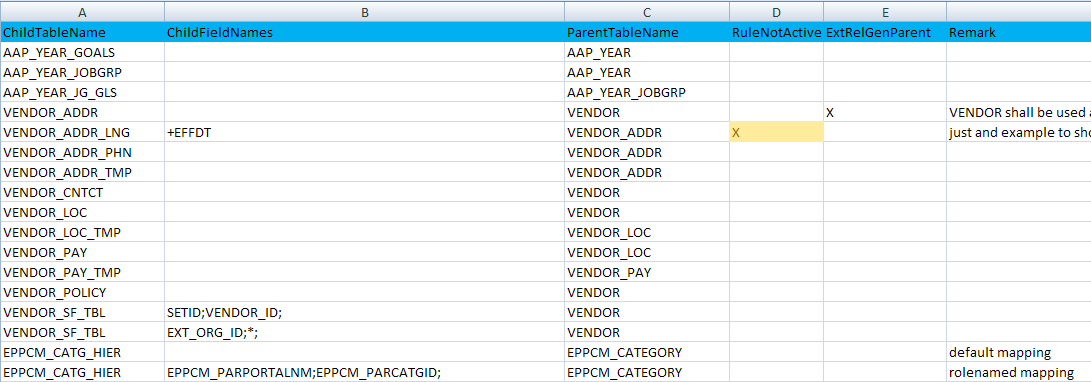
The columns are as follows:
- ChildTableName:The name of the Child table for the relationship.
- ChildFieldNames:See ‘Defining a Rule’ in Appendix B of the User Guide.
- ParentTableName:The name of the Parent table for the relationship.
- RuleNotActive:If blank, then the rule is active. If ‘X’ then the rule will be ignored.
- ExtGenRelParentUsed by the Extended Relationship generation process (See Appendix B of the ERP/CRM Integrator user Guide for details).
- Remark:A free-format comment area for entry of optional notes describing the rule
JDERuleBasedRelationships
This worksheet has the same format as the PSoftRuleBaseRelationships worksheet. It is used by the RulesBased Relationship Generation feature of ERP/CRM Integrator to create additional relationships for a JDEdwards Repository. See Appendix B of the ERP/CRM Integrator user Guide for more details.
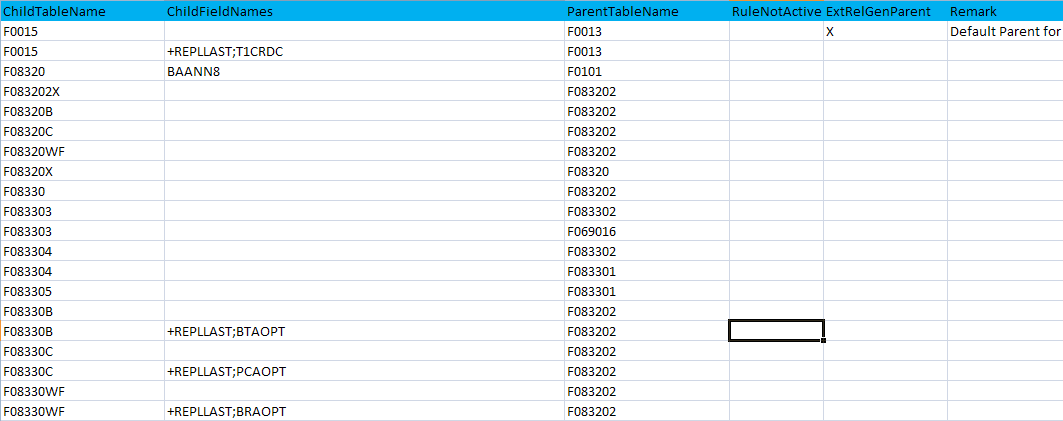
SAPRuleBasedRelationships
This worksheet has the same format as the PSoftRuleBaseRelationships worksheet. It is used by the Rules Based Relationship Generation feature of ERP/CRM Integrator to create additional relationships for a SAP Repository. See Appendix B of the ERP/CRM Integrator user Guide for more details.

CollibraMappings
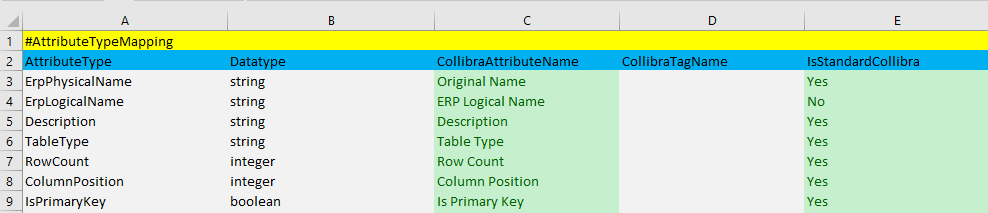
This worksheet has a set of Collibra Asset mappings to allow a level of configuration for the ERP/CRM Integrator to Collibra interface. The worksheet is only relevant to the Collibra export and users should refer to the appropriate ERP/CRM Integrator Collibra interface documentation for details of this worksheet.
DataCatalogJSON
This worksheet has a set of Asset mappings to allow a level of configuration for the Safyr JSON export format. The worksheet is only relevant to the JSON export and users should refer to the appropriate JSON interface documentation for details of this worksheet.

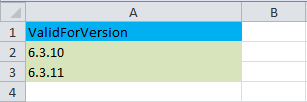
Version Support
This worksheet records the versions of ERP/CRM Integrator that will be compatible with this version of the spreadsheet. If the ERP/CRM Integrator version is not compatible, the user will see an error message on starting ERP/CRM Integrator. Typically this can occur when the user has copied SafyrSettings.xlsx to SafyrSettings_Cust.xlsx in order to record relationship rules (see sections above).