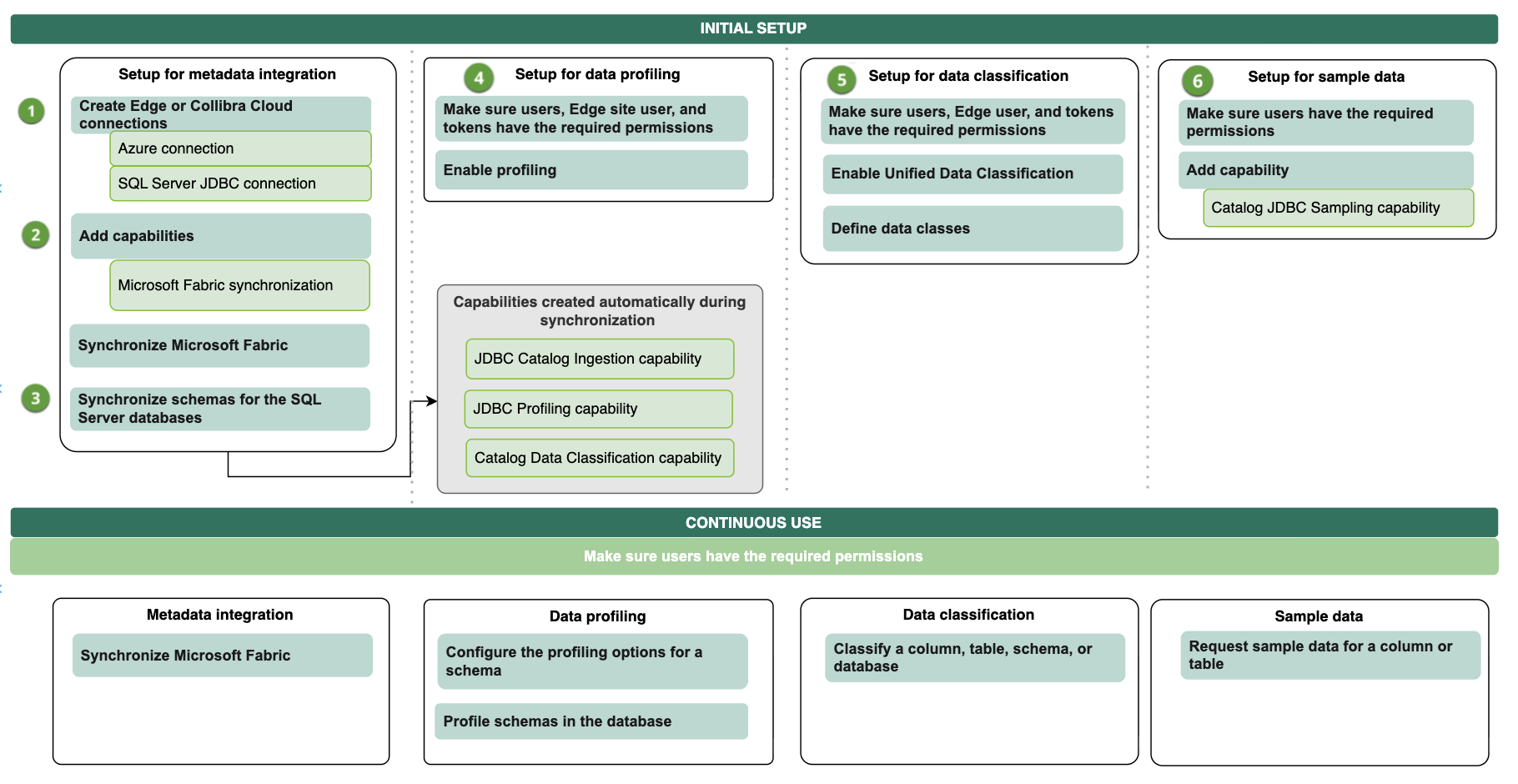
The Microsoft Fabric integration has two parts. You typically complete both: Part 1 is always required, and Part 2 adds column-level metadata for SQL Server databases.
- Part 1: The Microsoft Fabric synchronization capability uses Microsoft APIs to ingest the Fabric workspace hierarchy. This includes workspaces, lakehouses (including their tables, columns, and files), warehouses (including their schemas, tables, views, and columns), and a Database asset for each SQL Server database.
- Part 2: The JDBC connection adds schema, table, and column metadata beneath the Database assets that Part 1 creates for SQL Server databases. It also enables profiling, classification, and sample data for those columns.
The parts are complementary, not alternatives. Part 1 integrates lakehouse and warehouse metadata down to the column level on its own. The JDBC connection is required only for SQL Server databases because the Microsoft APIs do not return their column-level metadata. The schemas, tables, and columns from the JDBC connection are created beneath the Database asset that the synchronization capability already created, so they do not duplicate existing assets.
To keep metadata current, you can schedule both flows independently. You can integrate metadata only, or integrate metadata along with profiling, classification, and requesting sample data.
Complete the steps listed below to integrate Microsoft Fabric.
Part 1: Integrate Fabric metadata
| No. | Step | Description |
|---|---|---|
| 1 | Set up service principal access for Microsoft Fabric. | Sets up a service principal and grants the service principal the required permissions for integration with Fabric. |
|
2 |
Create an Azure connection to Edge. | Creates a connection to Azure in your Edge site. |
| 3 | Add the Microsoft Fabric synchronization capability to Edge. | Adds the Microsoft Fabric synchronization capability to the Azure Edge connection. The capability allows you to retrieve metadata from Fabric. |
| 4 | Synchronize Microsoft Fabric. |
You can manually synchronize Fabric or add a synchronization schedule to automatically synchronize it. As a result, the Fabric metadata is integrated. |
Part 2: Integrate SQL Server metadata
Profiling, classification, and sample data are available only for columns ingested through JDBC, that is, SQL Server database columns.
| No. | Step | Description |
|---|---|---|
|
1 |
Create a JDBC connection for SQL Server. |
Creates a JDBC connection to SQL Server in an Edge site site. If you created a SQL Server JDBC connection previously, you can use that JDBC connection. The only identity provider supported for authenticating to SQL databases in Fabric is Microsoft Entra ID.
When setting up the JDBC connection in CPSH, for AuthScheme, you must use Note Create a JDBC connection for each database you want to integrate. |
| 2 | Synchronize schemas for the registered SQL Server databases. |
Synchronizes schemas to update the metadata of the registered SQL Server databases in Collibra Platform. You can synchronize a schema manually or automatically at fixed intervals. This step is required to integrate column-level metadata for SQL Server databases. It is not needed for lakehouses or warehouses, whose column-level metadata is integrated by the Microsoft Fabric synchronization capability. |
| 3 | Optionally, set up and configure data profiling | Goes through the required permission and steps to prepare Edge and CPSH to profile columns in Fabric. |
| 4 | Optionally, enable and set up Unified Data Classification | Goes through the required permission and steps to prepare Edge and CPSH to classify columns in Fabric via the Unified Data Classification method. |
| 5 | Optionally, set up and configure the use of sample data | Goes through the required permissions and steps to prepare Edge and CPSH to show sample data for columns in Fabric. |
| Result |
Users with the correct permissions can now configure the profiling options and profile the data, automatically classify the data, or request sample data. |
|
Integration workflow
The following graphic shows the process of integrating Fabric, profiling and classifying the data, and requesting sample data.