After you install an Edge site or are granted a Collibra Cloud site, you can create a connection to the Google Cloud Platform (GCP).
Do you use a vault?
|
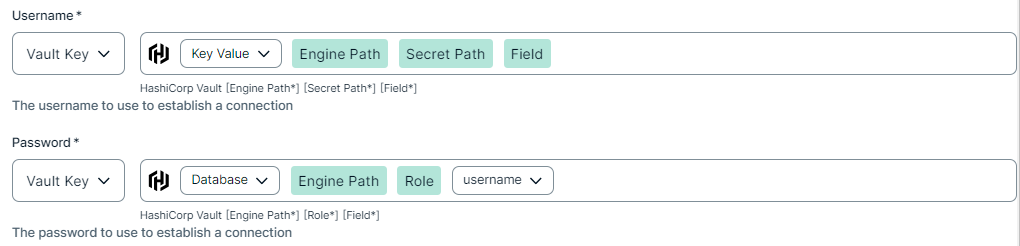
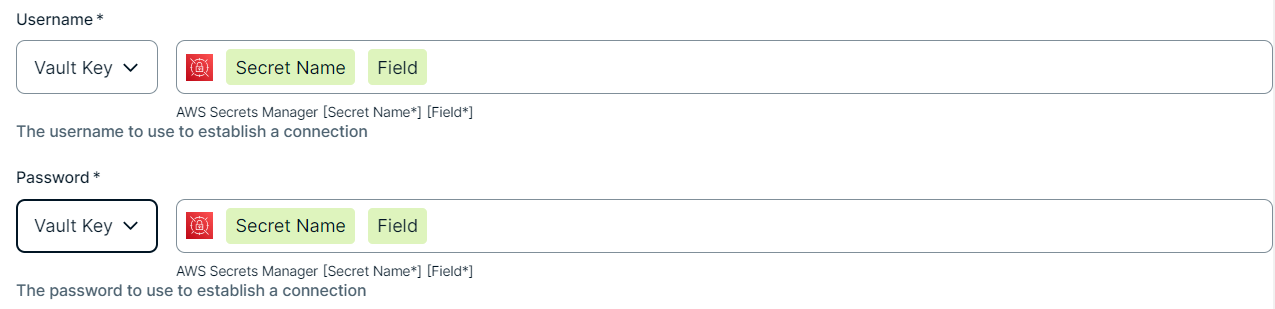
You can use a vault to add your data source information to your Edge site connection. Check the connection property table below to see which information is available for your vault. Vaults are not available for Collibra Cloud sites. |

No vault

AWS Secrets Manager

Azure Key Vault

CyberArk Vault

Google Secret Manager

HashiCorp Vault
|
|
|
|
||
|
How to use your vault...
To use your vault, do the following:
To use your vault, do the following:
To use your vault, do the following:
To use your vault, do the following:
To use your vault, do the following:
|
||



Prerequisites
In your Collibra environment
-
You created and installed an Edge site.Note
If you have defined an outbound (forward) proxy on your Edge site, the integration will take that configuration into account when connecting to the AI platform. The following proxies are supported, using either a HTTP or HTTPS proxy URL:
- Pass through (No authentication)
- Pass through (Basic authentication)
- No proxy for noProxy hosts defined by Edge
This integration is not supported on Edge sites installed using a Man-in-the-middle (MITM) proxy.
- You have added a vault to your Edge site.
- You have a global role that has the Manage connections and capabilities global permission, for example, Edge integration engineer.
- You have the models you want to ingest evaluated and in your Google Vertex AI model registry.
- You have the Vertex AI Viewer role with the following Google Vertex AI permissions. For more information, go to the Google Vertex AI access control with IAM documentation.
roles/aiplatform.viewerfir reading A models, reasoning agents, pipelines, and monitors.roles/browserfor browsing projects.storage.objects.listandstorage.objects.getfor reading files from Google Cloud Storage buckets if ingestAiInputAndOutput is enabledbigquery.tables.getand bigquery.tables.getData for reading BigQuery table schema if ingestAiInputAndOutput is enabled and endpoints have BigQuery prediction logging configured.
Note If your Vertex AI resources are in a different project than the service account that is configured for synchronizations, you must also have the following permission:resourcemanager.projects.get
In your Google Vertex AI environment
Steps
- Open a site.
-
On the main toolbar, click
 →
→
 Settings.
The Settings page opens. -
In the tab pane, click Edge.
The Sites tab opens and shows a table with an overview of your sites. - In the table, click the name of the site whose status is Healthy.
The site page opens.
-
On the main toolbar, click
- In the Connections section, click Create connection.
The Create connection page appears. - Select the GCP connection to connect to Google Cloud Platform.
- Enter the required information.
Field Description Required Available for vaults? Name The name of the Edge site connection for Google Cloud Platform.
 Yes
Yes No
No
Description The description of the connection.
No
No
Vault The vault where you store your data source values. No
No
Connection type Important Currently, only the Service Account authentication method is supported for this integration.The authentication method for your GCP connection. Select Service Account to use a Google service account for authentication.
Yes
No
GCP Service Account / Workload Identity Federation (WIF) Important Currently, only the Service Account authentication method is supported for this integration.The account to connect to GCP.
Add the full content of the service account key JSON file.CopyExample{
"type": "service_account",
"project_id": "PROJECT_ID",
"private_key_id": "KEY_ID",
"private_key": "-----BEGIN PRIVATE KEY-----\nPRIVATE_KEY\n-----END PRIVATE KEY-----\n",
"client_email": "SERVICE_ACCOUNT_EMAIL",
"client_id": "CLIENT_ID",
"auth_uri": "https://accounts.google.com/o/oauth2/auth",
"token_uri": "https://accounts.google.com/o/oauth2/token",
"auth_provider_x509_cert_url": "https://www.googleapis.com/oauth2/v1/certs",
"client_x509_cert_url": "https://www.googleapis.com/robot/v1/metadata/x509/SERVICE_ACCOUNT_EMAIL"
}Ensure the service account has the required permissions, as defined in the prerequisites.
For more information about service account keys, go to the Google documentation. Yes
Yes
Property If your connection to GCP requires any additional parameters, click Add Property.
No
No
- Click Create.
The connection is added to the Edge site.
You can now add the Google Vertex AI capability to an Edge site.