After the synchronization, the assets are available in the specified domain.
Warning Do not move the assets to another domain. Doing so may lead to errors during future synchronizations.
By default, the assets are shown in a plain list, but you can enable a multi-path hierarchy to show it in a tree structure.
The status of assets depends on the selected value in the Default Asset Status field in the capability.
- If No Status is selected, newly created assets receive the first status listed in your Operating Model statuses, and existing assets keep their assigned status.
- If Implemented is selected, all assets receive the "Implemented" status.
Synchronized metadata per Google Vertex AI asset type
Important We only ingest the latest metrics from Vertex AI models that have been evaluated and added to the model registry in Google Vertex AI.
This table shows the metadata for the Vertex AI Model asset type. If you do not see any of the listed synchronized metadata, you can add characteristics to the layout on the asset type page.
Note If you remove a label in Vertex AI after a Vertex AI synchronization, the attribute for the removed label is removed when you integrate Vertex AI again.
| Asset type | Synchronized metadata | Public ID |
|---|---|---|
| AI Base Model | Description | Description |
| Creation Date in Source | CreationDateInSource | |
| Retirement Date in Source | RetirementDateInSource | |
| Required Content Filtering | ContentFilter | |
| Vertex AI Model Version | Description | Description |
| Model Accuracy | ModelAccuracy | |
| Model Precision | ModelPrecision | |
| Mean Squared Error | MeanSquaredError | |
| Mean Absolute Error | MeanAbsoluteError | |
| Model Type | ModelType | |
| Feature Importance | FeatureImportance | |
| Version | Version | |
| Description from source system | DescriptionFromSourceSystem | |
| Repository | Repository | |
| Required Content Filtering | ContentFilter | |
| Any custom labels defined via the configuration. If you use custom labels, ensure that you add them to the assignment and layout on the asset type page. | ||
| AI Model Deployment | Description from Source | DescriptionFromSourceSystem |
| Initiating User in Source | InitiatingUserInSource | |
| Creation Date in Source | CreationDateInSource | |
| Modification Date in Source | ModificationDateInSource | |
| Retirement Date in Source | RetirementDateInSource | |
| Implemented Content Filtering | ImplementedContentFiltering | |
| Compute Configuration | ComputeConfiguration | |
| AI Agent | Description | Description |
| Description from source system | DescriptionFromSourceSystem | |
| Instructions | Instructions | |
| Creation Date in Source | CreationDateInSource | |
| Tool Usage | ToolUsage | |
|
Any custom metrics defined via the configuration. If you use custom metrics, ensure that you add them to the assignment and layout on the asset type page. |
||
| AI Endpoint | Access Method | AccessMethod |
| Access Instructions | AccessInstructions | |
| Traffic Split | TrafficSplit | |
| AI Monitor | Data Drift Detection Enabled | DataDriftDetection |
| Prediction Drift Detection Enabled | PredictionDriftDetection | |
| Schedule | Schedule | |
| Alert Configuration | AlertConfiguration | |
| URL | Url | |
| File | Description | Description |
| URL | Url | |
| Document size | DocumentSize | |
| File Type | FileType | |
| Document creation date | DocumentCreationDate | |
| Document modification date | DocumentModificationDate | |
| Access Type | AccessType | |
| Storage Container | Description | Description |
| URL | Url | |
| Location | Location | |
| External System Label | ExternalSystemLabel | |
| Database | Description from source system | DescriptionFromSourceSystem |
| Owner in source | OwnerInSource | |
| Data Source Type | DataSourceType | |
| Schema |
Description from source system |
DescriptionFromSourceSystem |
| Owner in source | OwnerInSource | |
| Data Source Type | DataSourceType | |
| Table |
Description from source system |
DescriptionFromSourceSystem |
| Owner in source | OwnerInSource | |
| Column |
Description from source system |
DescriptionFromSourceSystem |
| Column Position | ColumnPosition | |
| Is Nullable | IsNullable | |
| Is Primary Key | IsPrimaryKey | |
| Primary Key Name (if the column is the primary key) | PrimaryKeyName | |
| Original Name | OriginalName | |
|
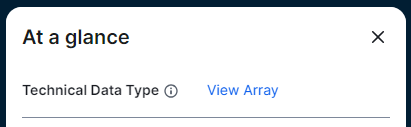
Technical Data Type Tip
You see the technical data type in the Technical Data Type field in the At a glance sidebar of the Column asset. If the At a glance sidebar is hidden, click |
TechnicalDataType |
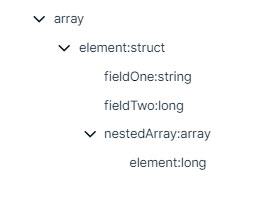
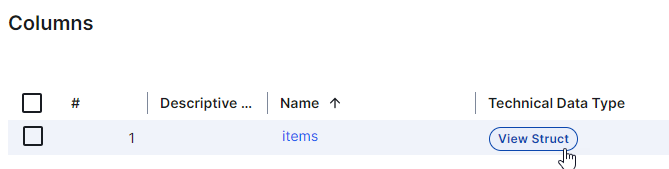
 . For columns that have a structured technical data type, Array or Struct, click the hyperlink to see the structure of the data in a dialog box. In other locations, for example, in Table assets, click the