About archive break records
Archive break records allows you to store data quality rule violations to a storage location in your connection. This feature enables you to track, analyze, and remediate data quality issues. It preserves detailed information about which rows fail your rules, allowing you to improve quality over time.
When you run data quality jobs, archived break records provide you with:
- Detailed failure tracking: Know exactly which rows fail your rules and why.
- Historical analysis: Track data quality trends and improvements over time.
- Remediation support: Access the specific information needed to fix source data issues.
- Enhanced reporting: Build comprehensive BI dashboards.
For a complete list of data sources that support archive break records, go to Supported data sources for Data Quality & Observability.
How break record archival works
You configure archive break records at the connection level. When enabled, Collibra automatically stores break records in a specified location within your source database whenever a data quality job identifies rule violations.
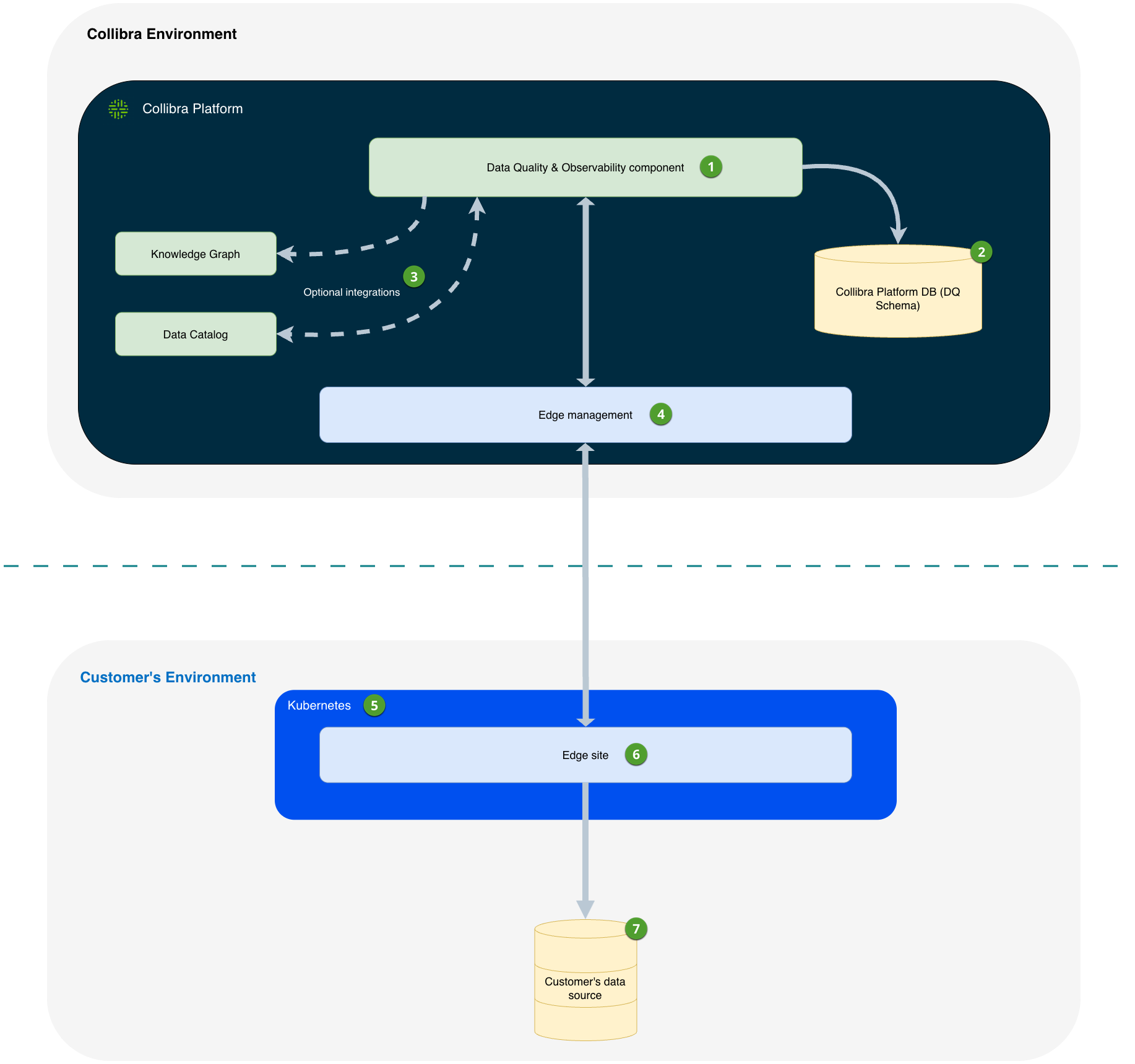
- Data Quality & Observability component
- Includes the Data Quality & Observability sections of the Collibra Platform UI and REST APIs, where you can run Data Quality Jobs, view results, and so on.
- You can enable previews of sensitive data, or break records, from the Collibra Platform UI. These previews require live queries to the data source. Sensitive data is never stored in Collibra Cloud.
- Data Quality Job results and aggregated metadata are securely stored in a schema within Collibra Platform.
- You can optionally integrate Data Quality & Observability with Data Catalog and the Knowledge Graph.
- When performing certain actions that require a connection to data within your data source, all requests and responses are securely routed through the Edge management component.
- The Edge site can be installed on either bundled k3s or a managed Kubernetes cluster.
- Edge sites
- You may have one or more Edge sites.
- Edge manages all connections and authentication to your data sources. This is the only component that must be installed and maintained within your environment.
- You can optionally host your Edge site within Collibra.
- Customer's data source
- Breaking records from your job are archived to your database. You can choose a database and schema within the data source being monitored for data quality to archive break records.
- You may choose to enable user previews of break records from the application UI. This requires sensitive data to be transmitted through the Collibra environment to the user's browser, but it is never stored in the Collibra environment.
Prerequisites
To archive break records, you need the following permissions and configurations:
| Requirement | Details |
|---|---|
| Collibra permissions |
|
| Existing Pushdown-compatible connection and Data Quality Pushdown Processing capability |
For more information on Pushdown-compatible connections, go to Supported data sources for Data Quality & Observability. |
| Data source privileges for break records |
Because exact permission models vary significantly across different data platforms, consult your organization's database administrator to provision the exact permissions. The service account connecting to your data source requires the following generalized privileges: On the source data (to monitor records):
On the destination schema (to archive break records):
Note You only need
create access once per break records table, or you can create it manually with explicit update access. All monitors write to the same break records table, so create access can be safely revoked after initial setup. If the break records storage location changes, create access is required again to generate a new table. |
Archive locations
The system provides two storage location options:
- Same location as job: Break records are stored in the same schema where your data quality job runs.
- Specify a location: You select a specific database and schema from existing options in your connection.
Break record previews adapt based on your configuration. When the archive break records setting is enabled, previews on the Job Details page display data from the archived records. When disabled, previews show the live results of the data quality rule.
After you select the storage location, Collibra creates the following tables in the database to store the break records:
| Database tables and views | Description |
|---|---|
| COLLIBRA_DQ_BREAK_RECORDS |
Provides a user-friendly view of break records based on the COLLIBRA_DQ_RULES table. Use this view to analyze and interpret rule violations. |
| COLLIBRA_DQ_BREAKS |
Stores internal tracking data and the database query used for troubleshooting. |
| COLLIBRA_DQ_RULES | Stores raw break record data for internal processing. |
A breakdown of the COLLIBRA_DQ_BREAK_RECORDS view
The COLLIBRA_DQ_BREAK_RECORDS view is the primary source for interacting with break records in your data source.
| Column name | Data type | Description |
|---|---|---|
| job_name | varchar | The name of the data quality job. |
| run_uuid | varchar | The unique ID of the job run. |
| run_date | timestamp | The date of the job run. |
| updt_ts | timestamp | The date and time the job ran. |
| monitor_name | varchar | The name of the rule monitor. |
| monitor_type | varchar | The type of monitor, for example, "Rule." |
| description | varchar | The description of the rule monitor. |
| details | varchar | Contains the JSON output of rule results, including column names and values for all columns in the rule query. |
Example: Data quality remediation workflow
A data steward at a financial services company runs weekly data quality checks on customer transaction data stored in Snowflake. When the job identifies 150 records with invalid account numbers, the archived break records feature stores these violations in a dedicated schema.
The data steward can then:
- Review the specific rows that failed validation.
- Export the break records to share with the source system team.
- Track remediation progress by comparing break records across job runs.
- Generate monthly reports showing data quality improvements.
Over time, the archived break records create a comprehensive audit trail that demonstrates the organization's data quality improvements to regulatory auditors.
- Configuring archive break records for Pullup jobs
- Configuring archive break records for Pushdown jobs